

Prerequisites
-
Providing
- Virtualbox
- Vagrant
- Vagrant plugins:
- vagrant-reload
- on some distributions also the vagrant plugins :
- winrm
- winrm-fs
- winrm-elevated
-
Provisioning with python
- Python3 (>=3.8)
- ansible-core==2.12.6
- pywinrm
-
Or provisioning With Docker
Install VirtualBox
- Download and install VirtualBox
- You can probably use the version of your package manager, but I would recommend using the latest one from Oracle.
Install Vagrant
- vagrant from their official site vagrant. The version you can install through your favorite package manager (apt, yum, …) is probably not the latest one.
- Install vagrant plugin vbguest if you want the guest addition:
vagrant plugin install vagrant-vbguest(not mandatory) - Vagrant installation is well described in the official vagrant page (tests are ok on 2.3.4)
- Some github issues indicate vagrant got some issues on some version and works well with 2.2.19 (
apt install vagrant=2.2.19)
wget -O- https://apt.releases.hashicorp.com/gpg | gpg --dearmor | sudo tee /usr/share/keyrings/hashicorp-archive-keyring.gpg
echo "deb [signed-by=/usr/share/keyrings/hashicorp-archive-keyring.gpg] https://apt.releases.hashicorp.com $(lsb_release -cs) main" | sudo tee /etc/apt/sources.list.d/hashicorp.list
sudo apt update && sudo apt install vagrant
- on some recent versions (ubuntu 23.04), you should consider running:
gem install winrm winrm-fs winrm-elevated
Install Ansible
Installing with pipx
pipx is a great way to avoid conflicting Python dependencies when installing applications. Installing ansible with pipx is documented here: https://docs.ansible.com/ansible/latest/installation_guide/intro_installation.html#installing-and-upgrading-ansible-with-pipx.
pipx install --include-deps ansible
pywinrm is a library, so it needs to be installed with pip.
python3 -m pip install pywinrm
If you encounter any issue, try the virtualenv installation below.
- Install all the ansible-galaxy requirements:
- ansible windows
- ansible community.windows
- ansible chocolatey (not needed anymore)
- ansible community.general
ansible-galaxy install -r ansible/requirements.yml
Installing with a virtualenv
-
If you want to play ansible from your host or a linux vm you should launch the following commands :
-
Create a python >= 3.8 virtualenv
sudo apt install git
git clone https://github.com/Pennyw0rth/NetExec-Lab
cd Barbhack-2025/ansible
sudo apt install python3.8-venv
python3.8 -m virtualenv .venv
source .venv/bin/activate
- Install ansible and pywinrm in the .venv
- ansible following the extensive guide on their website ansible.
- Tested with ansible-core (2.12)
- pywinrm be sure you got the pywinrm package installed
python3 -m pip install --upgrade pip
python3 -m pip install ansible-core==2.12.6
python3 -m pip install pywinrm
- Install all the ansible-galaxy requirements
- ansible windows
- ansible community.windows
- ansible chocolatey (not needed anymore)
- ansible community.general
ansible-galaxy install -r ansible/requirements.yml
Install
Create the vms
- To create the VMs just run
cd ad/BARBHACK/providers/virtualbox
vagrant up
note: For some distributions, you may need to run additional commands to install WinRM gems this can be done via the following commands:
vagrant plugin install winrm
vagrant plugin install winrm-fs
vagrant plugin install winrm-elevated
- At the end of the vagrantup you should have the vms created and running
Launch provisioning with Ansible
- launch the provision script (launch ansible with failover on errors)
cd ansible
export ANSIBLE_COMMAND="ansible-playbook -i ../ad/BARBHACK/data/inventory -i ../ad/BARBHACK/providers/virtualbox/inventory"
export LAB="BARBHACK"
../scripts/provisionning.sh
- or launch ansible directly
cd ansible/
ansible-playbook -i ../ad/BARBHACK/data/inventory -i ../ad/BARBHACK/providers/virtualbox/inventory main.yml
Once install has finished disable vagrant user to avoid using it
cd ansible/
ansible-playbook -i ../ad/BARBHACK/providers/virtualbox/inventory_disablevagrant disable_vagrant.yml
Now do a reboot of all the machines to avoid unintended secrets stored / am looking at you Lsassy
cd ansible/
ansible-playbook -i ../ad/BARBHACK/providers/virtualbox/inventory_disablevagrant reboot.yml
Lab Information
Servers
| Hostname | IP Address | Role |
|---|---|---|
| BLACKPEARL | 192.168.10.10 | Domain Controller |
| JOLLYROGER | 192.168.10.11 | Web Server (Caddy 8080) |
| QUEENREV | 192.168.10.12 | MSSQL Server |
| FLYINGDUTCHMAN | 192.168.10.13 | Windows Server |
Domain
- Domain: PIRATES.BRB
- Domain Admin Password: REDqC8aQtyhd78A
Attack Path
- Web application enumeration (port 8080)
- Credential stuffing with found credentials
- NTLMv1 relay to LDAP
- SPN-less RBCD
- DPAPI credential recovery
- GMSA offline password recovery
- MSSQL impersonation
- S4U2Self privilege escalation
- Kerberos Constrained Delegation
- NTDS backup forensics
- Domain Admin!
.
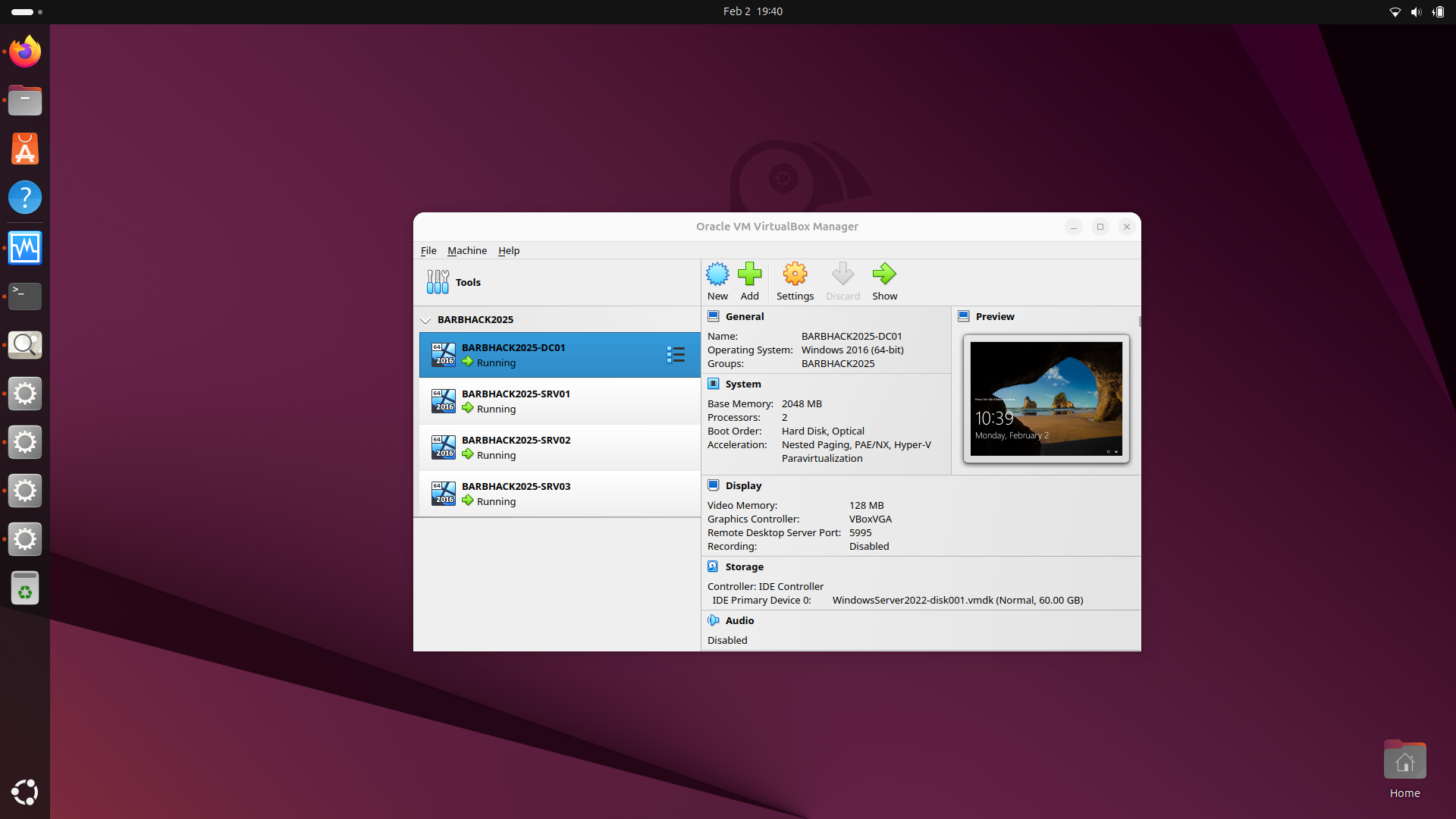
Some troubles setting it up. i used UBUNTU25 Desktop on a HP Probook 8th Gen Laptop with 16GB
bolke@hacky:~/NetExec-Lab/Barbhack-2025/ad/BARBHACK/providers/virtualbox$ ls -la
total 40
drwxrwxr-x 3 bolke bolke  4096 Feb  1 10:03 .
drwxrwxr-x 5 bolke bolke  4096 Jan 30 21:52 ..
-rw-rw-r-- 1 bolke bolke 15740 Feb  1 10:03 ConfigureRemotingForAnsible.ps1
-rw-rw-r-- 1 bolke bolke  5211 Feb  1 09:57 Install-WMF3Hotfix.ps1
drwxrwxr-x 4 bolke bolke  4096 Jan 30 21:53 .vagrant
-rw-rw-r-- 1 bolke bolke  3260 Jan 30 21:52 Vagrantfile
bolke@hacky:~/NetExec-Lab/Barbhack-2025/ad/BARBHACK/providers/virtualbox$ vagrant up
Bringing machine 'BARBHACK2025-DC01' up with 'virtualbox' provider...
Bringing machine 'BARBHACK2025-SRV01' up with 'virtualbox' provider...
Bringing machine 'BARBHACK2025-SRV02' up with 'virtualbox' provider...
Bringing machine 'BARBHACK2025-SRV03' up with 'virtualbox' provider...
==> BARBHACK2025-DC01: Checking if box 'StefanScherer/windows_2022' version '2021.08.23' is up to date...
==> BARBHACK2025-DC01: Machine already provisioned. Run `vagrant provision` or use the `--provision`
==> BARBHACK2025-DC01: flag to force provisioning. Provisioners marked to run always will still run.
==> BARBHACK2025-SRV01: Checking if box 'StefanScherer/windows_2022' version '2021.08.23' is up to date...
==> BARBHACK2025-SRV01: Machine already provisioned. Run `vagrant provision` or use the `--provision`
==> BARBHACK2025-SRV01: flag to force provisioning. Provisioners marked to run always will still run.
==> BARBHACK2025-SRV02: Checking if box 'StefanScherer/windows_2022' version '2021.08.23' is up to date...
==> BARBHACK2025-SRV02: Machine already provisioned. Run `vagrant provision` or use the `--provision`
==> BARBHACK2025-SRV02: flag to force provisioning. Provisioners marked to run always will still run.
==> BARBHACK2025-SRV03: Checking if box 'StefanScherer/windows_2022' version '2021.08.23' is up to date...
==> BARBHACK2025-SRV03: Machine already provisioned. Run `vagrant provision` or use the `--provision`
==> BARBHACK2025-SRV03: flag to force provisioning. Provisioners marked to run always will still run.
bolke@hacky:~/NetExec-Lab/Barbhack-2025/ad/BARBHACK/providers/virtualbox$ vagrant status
Current machine states:

BARBHACK2025-DC01         running (virtualbox)
BARBHACK2025-SRV01        running (virtualbox)
BARBHACK2025-SRV02        running (virtualbox)
BARBHACK2025-SRV03        running (virtualbox)

This environment represents multiple VMs. The VMs are all listed
above with their current state. For more information about a specific
VM, run `vagrant status NAME`.
bolke@hacky:~/NetExec-Lab/Barbhack-2025/ad/BARBHACK/providers/virtualbox$ vagrant provision
==> BARBHACK2025-DC01: Running provisioner: shell...
    BARBHACK2025-DC01: Running: ../../../../vagrant/Install-WMF3Hotfix.ps1 as C:\tmp\vagrant-shell.ps1
==> BARBHACK2025-DC01: Running provisioner: shell...
    BARBHACK2025-DC01: Running: ../../../../vagrant/ConfigureRemotingForAnsible.ps1 as C:\tmp\vagrant-shell.ps1
==> BARBHACK2025-DC01: Running provisioner: shell...
    BARBHACK2025-DC01: Running: inline PowerShell script
    BARBHACK2025-DC01: Ok.
    BARBHACK2025-DC01:
==> BARBHACK2025-SRV01: Running provisioner: shell...
    BARBHACK2025-SRV01: Running: ../../../../vagrant/Install-WMF3Hotfix.ps1 as C:\tmp\vagrant-shell.ps1
==> BARBHACK2025-SRV01: Running provisioner: shell...
    BARBHACK2025-SRV01: Running: ../../../../vagrant/ConfigureRemotingForAnsible.ps1 as C:\tmp\vagrant-shell.ps1
==> BARBHACK2025-SRV01: Running provisioner: shell...
    BARBHACK2025-SRV01: Running: inline PowerShell script
    BARBHACK2025-SRV01: Ok.
    BARBHACK2025-SRV01:
==> BARBHACK2025-SRV02: Running provisioner: shell...
    BARBHACK2025-SRV02: Running: ../../../../vagrant/Install-WMF3Hotfix.ps1 as C:\tmp\vagrant-shell.ps1
==> BARBHACK2025-SRV02: Running provisioner: shell...
    BARBHACK2025-SRV02: Running: ../../../../vagrant/ConfigureRemotingForAnsible.ps1 as C:\tmp\vagrant-shell.ps1
==> BARBHACK2025-SRV02: Running provisioner: shell...
    BARBHACK2025-SRV02: Running: inline PowerShell script
    BARBHACK2025-SRV02: Ok.
    BARBHACK2025-SRV02:
==> BARBHACK2025-SRV03: Running provisioner: shell...
    BARBHACK2025-SRV03: Running: ../../../../vagrant/Install-WMF3Hotfix.ps1 as C:\tmp\vagrant-shell.ps1
==> BARBHACK2025-SRV03: Running provisioner: shell...
    BARBHACK2025-SRV03: Running: ../../../../vagrant/ConfigureRemotingForAnsible.ps1 as C:\tmp\vagrant-shell.ps1
==> BARBHACK2025-SRV03: Running provisioner: shell...
    BARBHACK2025-SRV03: Running: inline PowerShell script
    BARBHACK2025-SRV03: Ok.
    BARBHACK2025-SRV03:
bolke@hacky:~/NetExec-Lab/Barbhack-2025/ad/BARBHACK/providers/virtualbox$
.
fixxing vagrant up –provision
bolke@hacky:~/NetExec-Lab/Barbhack-2025/ad/BARBHACK/providers/virtualbox$ vagrant up --provision
Bringing machine 'BARBHACK2025-DC01' up with 'virtualbox' provider...
Bringing machine 'BARBHACK2025-SRV01' up with 'virtualbox' provider...
Bringing machine 'BARBHACK2025-SRV02' up with 'virtualbox' provider...
Bringing machine 'BARBHACK2025-SRV03' up with 'virtualbox' provider...
==> BARBHACK2025-DC01: Checking if box 'StefanScherer/windows_2022' version '2021.08.23' is up to date...
==> BARBHACK2025-DC01: Running provisioner: shell...
    BARBHACK2025-DC01: Running: ../../../../vagrant/Install-WMF3Hotfix.ps1 as C:\tmp\vagrant-shell.ps1
==> BARBHACK2025-DC01: Running provisioner: shell...
    BARBHACK2025-DC01: Running: ../../../../vagrant/ConfigureRemotingForAnsible.ps1 as C:\tmp\vagrant-shell.ps1
==> BARBHACK2025-DC01: Running provisioner: shell...
    BARBHACK2025-DC01: Running: inline PowerShell script
    BARBHACK2025-DC01: Ok.
    BARBHACK2025-DC01:
==> BARBHACK2025-SRV01: Checking if box 'StefanScherer/windows_2022' version '2021.08.23' is up to date...
==> BARBHACK2025-SRV01: Running provisioner: shell...
    BARBHACK2025-SRV01: Running: ../../../../vagrant/Install-WMF3Hotfix.ps1 as C:\tmp\vagrant-shell.ps1
==> BARBHACK2025-SRV01: Running provisioner: shell...
    BARBHACK2025-SRV01: Running: ../../../../vagrant/ConfigureRemotingForAnsible.ps1 as C:\tmp\vagrant-shell.ps1
==> BARBHACK2025-SRV01: Running provisioner: shell...
    BARBHACK2025-SRV01: Running: inline PowerShell script
    BARBHACK2025-SRV01: Ok.
    BARBHACK2025-SRV01:
==> BARBHACK2025-SRV02: Checking if box 'StefanScherer/windows_2022' version '2021.08.23' is up to date...
==> BARBHACK2025-SRV02: Clearing any previously set forwarded ports...
==> BARBHACK2025-SRV02: Fixed port collision for 5985 => 55985. Now on port 2203.
==> BARBHACK2025-SRV02: Fixed port collision for 5986 => 55986. Now on port 2204.
==> BARBHACK2025-SRV02: Fixed port collision for 22 => 2222. Now on port 2205.
==> BARBHACK2025-SRV02: Clearing any previously set network interfaces...
==> BARBHACK2025-SRV02: Preparing network interfaces based on configuration...
    BARBHACK2025-SRV02: Adapter 1: nat
    BARBHACK2025-SRV02: Adapter 2: hostonly
==> BARBHACK2025-SRV02: Forwarding ports...
    BARBHACK2025-SRV02: 5985 (guest) => 2203 (host) (adapter 1)
    BARBHACK2025-SRV02: 5986 (guest) => 2204 (host) (adapter 1)
    BARBHACK2025-SRV02: 22 (guest) => 2205 (host) (adapter 1)
==> BARBHACK2025-SRV02: Running 'pre-boot' VM customizations...
==> BARBHACK2025-SRV02: Booting VM...
==> BARBHACK2025-SRV02: Waiting for machine to boot. This may take a few minutes...
    BARBHACK2025-SRV02: WinRM address: 127.0.0.1:2203
    BARBHACK2025-SRV02: WinRM username: vagrant
    BARBHACK2025-SRV02: WinRM execution_time_limit: PT2H
    BARBHACK2025-SRV02: WinRM transport: negotiate
==> BARBHACK2025-SRV02: Machine booted and ready!
==> BARBHACK2025-SRV02: Checking for guest additions in VM...
    BARBHACK2025-SRV02: The guest additions on this VM do not match the installed version of
    BARBHACK2025-SRV02: VirtualBox! In most cases this is fine, but in rare cases it can
    BARBHACK2025-SRV02: prevent things such as shared folders from working properly. If you see
    BARBHACK2025-SRV02: shared folder errors, please make sure the guest additions within the
    BARBHACK2025-SRV02: virtual machine match the version of VirtualBox you have installed on
    BARBHACK2025-SRV02: your host and reload your VM.
    BARBHACK2025-SRV02:
    BARBHACK2025-SRV02: Guest Additions Version: 6.1.26
    BARBHACK2025-SRV02: VirtualBox Version: 7.0
==> BARBHACK2025-SRV02: Configuring and enabling network interfaces...
==> BARBHACK2025-SRV02: Running provisioner: shell...
    BARBHACK2025-SRV02: Running: ../../../../vagrant/Install-WMF3Hotfix.ps1 as C:\tmp\vagrant-shell.ps1
==> BARBHACK2025-SRV02: Running provisioner: shell...
    BARBHACK2025-SRV02: Running: ../../../../vagrant/ConfigureRemotingForAnsible.ps1 as C:\tmp\vagrant-shell.ps1
==> BARBHACK2025-SRV02: Running provisioner: shell...
    BARBHACK2025-SRV02: Running: inline PowerShell script
    BARBHACK2025-SRV02: Ok.
    BARBHACK2025-SRV02:
==> BARBHACK2025-SRV03: Checking if box 'StefanScherer/windows_2022' version '2021.08.23' is up to date...
==> BARBHACK2025-SRV03: Clearing any previously set forwarded ports...
==> BARBHACK2025-SRV03: Fixed port collision for 5985 => 55985. Now on port 2206.
==> BARBHACK2025-SRV03: Fixed port collision for 5986 => 55986. Now on port 2207.
==> BARBHACK2025-SRV03: Fixed port collision for 22 => 2222. Now on port 2208.
==> BARBHACK2025-SRV03: Clearing any previously set network interfaces...
==> BARBHACK2025-SRV03: Preparing network interfaces based on configuration...
    BARBHACK2025-SRV03: Adapter 1: nat
    BARBHACK2025-SRV03: Adapter 2: hostonly
==> BARBHACK2025-SRV03: Forwarding ports...
    BARBHACK2025-SRV03: 5985 (guest) => 2206 (host) (adapter 1)
    BARBHACK2025-SRV03: 5986 (guest) => 2207 (host) (adapter 1)
    BARBHACK2025-SRV03: 22 (guest) => 2208 (host) (adapter 1)
==> BARBHACK2025-SRV03: Running 'pre-boot' VM customizations...
==> BARBHACK2025-SRV03: Booting VM...
==> BARBHACK2025-SRV03: Waiting for machine to boot. This may take a few minutes...
    BARBHACK2025-SRV03: WinRM address: 127.0.0.1:2206
    BARBHACK2025-SRV03: WinRM username: vagrant
    BARBHACK2025-SRV03: WinRM execution_time_limit: PT2H
    BARBHACK2025-SRV03: WinRM transport: negotiate
==> BARBHACK2025-SRV03: Machine booted and ready!
==> BARBHACK2025-SRV03: Checking for guest additions in VM...
    BARBHACK2025-SRV03: The guest additions on this VM do not match the installed version of
    BARBHACK2025-SRV03: VirtualBox! In most cases this is fine, but in rare cases it can
    BARBHACK2025-SRV03: prevent things such as shared folders from working properly. If you see
    BARBHACK2025-SRV03: shared folder errors, please make sure the guest additions within the
    BARBHACK2025-SRV03: virtual machine match the version of VirtualBox you have installed on
    BARBHACK2025-SRV03: your host and reload your VM.
    BARBHACK2025-SRV03:
    BARBHACK2025-SRV03: Guest Additions Version: 6.1.26
    BARBHACK2025-SRV03: VirtualBox Version: 7.0
==> BARBHACK2025-SRV03: Configuring and enabling network interfaces...
==> BARBHACK2025-SRV03: Running provisioner: shell...
    BARBHACK2025-SRV03: Running: ../../../../vagrant/Install-WMF3Hotfix.ps1 as C:\tmp\vagrant-shell.ps1
==> BARBHACK2025-SRV03: Running provisioner: shell...
    BARBHACK2025-SRV03: Running: ../../../../vagrant/ConfigureRemotingForAnsible.ps1 as C:\tmp\vagrant-shell.ps1
==> BARBHACK2025-SRV03: Running provisioner: shell...
    BARBHACK2025-SRV03: Running: inline PowerShell script
    BARBHACK2025-SRV03: Ok.
    BARBHACK2025-SRV03:
bolke@hacky:~/NetExec-Lab/Barbhack-2025/ad/BARBHACK/providers/virtualbox$
.
VM’s created but not with all content
.
bolke@hacky:~/htb/barbhack2025$ nxc smb 192.168.10.10-13
SMB         192.168.10.10   445    VAGRANT          [*] Windows Server 2022 Build 20348 x64 (name:VAGRANT) (domain:vagrant) (signing:False) (SMBv1:None)
SMB         192.168.10.11   445    VAGRANT          [*] Windows Server 2022 Build 20348 x64 (name:VAGRANT) (domain:vagrant) (signing:False) (SMBv1:None)
SMB         192.168.10.12   445    VAGRANT          [*] Windows Server 2022 Build 20348 x64 (name:VAGRANT) (domain:vagrant) (signing:False) (SMBv1:None)
SMB         192.168.10.13   445    VAGRANT          [*] Windows Server 2022 Build 20348 x64 (name:VAGRANT) (domain:vagrant) (signing:False) (SMBv1:None)
Running nxc against 4 targets ━━━━━━━━━━━━━━━━━━━━━━━━━━━━━━━━━━━━━━━━ 100% 0:00:00
bolke@hacky:~/htb/barbhack2025$
.
bolke@hacky:~/htb/barbhack2025$ nxc smb 192.168.10.10 -u user.list  -p pass.list --no-bruteforce --continue-on-success
SMB         192.168.10.10   445    VAGRANT          [*] Windows Server 2022 Build 20348 x64 (name:VAGRANT) (domain:vagrant) (signing:False) (SMBv1:None)
SMB         192.168.10.10   445    VAGRANT          [-] vagrant\user.list:pass.list STATUS_LOGON_FAILURE
bolke@hacky:~/htb/barbhack2025$ nxc smb 192.168.10.10 -id 2 --users
SMB         192.168.10.10   445    VAGRANT          [*] Windows Server 2022 Build 20348 x64 (name:VAGRANT) (domain:vagrant) (signing:False) (SMBv1:None)
[19:46:43] ERROR    Invalid database credential ID 2!                                                                                                                        connection.py:361
bolke@hacky:~/htb/barbhack2025$
..
note: For some distributions, you may need to run additional commands to install WinRM gems this can be done via the following commands:
bolke@hacky:~$ vagrant plugin install winrm
Installing the 'winrm' plugin. This can take a few minutes...
Installed the plugin 'winrm (2.3.9)'!
bolke@hacky:~$ vagrant plugin install winrm-fs
Installing the 'winrm-fs' plugin. This can take a few minutes...
Installed the plugin 'winrm-fs (1.3.5)'!
bolke@hacky:~$ vagrant plugin install winrm-elevated
Installing the 'winrm-elevated' plugin. This can take a few minutes...
Installed the plugin 'winrm-elevated (1.2.3)'!
bolke@hacky:~$ ip addr
1: lo: <LOOPBACK,UP,LOWER_UP> mtu 65536 qdisc noqueue state UNKNOWN group default qlen 1000
    link/loopback 00:00:00:00:00:00 brd 00:00:00:00:00:00
    inet 127.0.0.1/8 scope host lo
       valid_lft forever preferred_lft forever
    inet6 ::1/128 scope host noprefixroute
       valid_lft forever preferred_lft forever
2: enp1s0: <NO-CARRIER,BROADCAST,MULTICAST,UP> mtu 1500 qdisc fq_codel state DOWN group default qlen 1000
    link/ether 80:e8:2c:14:2f:04 brd ff:ff:ff:ff:ff:ff
    altname enx80e82c142f04
3: wlp0s20f3: <BROADCAST,MULTICAST,UP,LOWER_UP> mtu 1500 qdisc noqueue state UP group default qlen 1000
    link/ether 58:a0:23:5c:d8:5c brd ff:ff:ff:ff:ff:ff
    altname wlx58a0235cd85c
    inet 192.168.178.53/24 brd 192.168.178.255 scope global dynamic noprefixroute wlp0s20f3
       valid_lft 2366sec preferred_lft 2366sec
    inet6 2001:1c01:391a:6500:53a6:42df:5c4c:d597/64 scope global temporary dynamic
       valid_lft 599968sec preferred_lft 81296sec
    inet6 2001:1c01:391a:6500:f3d0:8d18:9e0:73d7/64 scope global dynamic mngtmpaddr noprefixroute
       valid_lft 1209597sec preferred_lft 604797sec
    inet6 fe80::c3af:e204:d3f:b60b/64 scope link noprefixroute
       valid_lft forever preferred_lft forever
4: vboxnet0: <BROADCAST,MULTICAST,UP,LOWER_UP> mtu 1500 qdisc fq_codel state UP group default qlen 1000
    link/ether 0a:00:27:00:00:00 brd ff:ff:ff:ff:ff:ff
    altname enx0a0027000000
    inet 192.168.10.1/24 brd 192.168.10.255 scope global vboxnet0
       valid_lft forever preferred_lft forever
    inet6 fe80::800:27ff:fe00:0/64 scope link proto kernel_ll
       valid_lft forever preferred_lft forever
bolke@hacky:~$
.
.
Launch provisioning with Ansible
- launch the provision script (launch ansible with failover on errors)
cd ansible
export ANSIBLE_COMMAND="ansible-playbook -i ../ad/BARBHACK/data/inventory -i ../ad/BARBHACK/providers/virtualbox/inventory"
export LAB="BARBHACK"
../scripts/provisionning.sh
.
bolke@hacky:~/NetExec-Lab/Barbhack-2025$ ls
ad  ansible  barbhack-2025.jpg  docs  graph.mmd  README.md  scripts  vagrant
bolke@hacky:~/NetExec-Lab/Barbhack-2025$ cd ansible/
bolke@hacky:~/NetExec-Lab/Barbhack-2025/ansible$ ls
ad-acl.yml   ad-gmsa.yml     ad-parent_domain.yml  ad-servers.yml  barbhack2025.yml  data.yml       main.yml       reboot.yml  security.yml  vulnerabilities.yml
ad-data.yml  ad-members.yml  ad-relations.yml      ansible.cfg     build.yml         inventory.yml  msqlsrv02.yml  roles       servers.yml
bolke@hacky:~/NetExec-Lab/Barbhack-2025/ansible$ export ANSIBLE_COMMAND="ansible-playbook -i ../ad/BARBHACK/data/inventory -i ../ad/BARBHACK/providers/virtualbox/inventory"
export LAB="BARBHACK"
../scripts/provisionning.sh

[+] Current coordinates: /home/bolke/NetExec-Lab/Barbhack-2025/ansible
[+] Preparing to deploy the Pirate Fleet for: BARBHACK
[+] The navigation charts are ready with the command: ansible-playbook -i ../ad/BARBHACK/data/inventory -i ../ad/BARBHACK/providers/virtualbox/inventory
[+] The Royal Navy is approaching. The fleet must be deployed before they catch us!
[+] Raising the Jolly Roger – initiating Pirate Fleet protocols!
[+] Voyage attempt: 0
[✓] The treasure is secured—the crew celebrates! Navigating the seas with a 30-minute voyage limit: ansible-playbook -i ../ad/BARBHACK/data/inventory -i ../ad/BARBHACK/providers/virtualbox/inventory build.yml
[WARNING]: Unable to parse /home/bolke/NetExec-Lab/Barbhack-2025/ad/BARBHACK/providers/virtualbox/inventory as an inventory source
[WARNING]: Deprecation warnings can be disabled by setting `deprecation_warnings=False` in ansible.cfg.
[DEPRECATION WARNING]: community.windows.win_http_proxy has been deprecated. win_http_proxy will be removed in a future release of this collection. Use ansible.windows.win_http_proxy instead. This feature will be removed from collection 'community.windows' version 4.0.0.
[DEPRECATION WARNING]: community.windows.win_inet_proxy has been deprecated. win_inet_proxy will be removed in a future release of this collection. Use ansible.windows.win_inet_proxy instead. This feature will be removed from collection 'community.windows' version 4.0.0.

PLAY [build all] *****************************************************************************************************************************************************************************
 [started TASK: Gathering Facts on dc01]
 [started TASK: Gathering Facts on srv01]
 [started TASK: Gathering Facts on srv02]
 [started TASK: Gathering Facts on srv03]

TASK [Gathering Facts] ***********************************************************************************************************************************************************************
[ERROR]: Task failed: Failed to connect to the host via ssh: ssh: Could not resolve hostname dc01: Temporary failure in name resolution
fatal: [dc01]: UNREACHABLE! => {"changed": false, "msg": "Task failed: Failed to connect to the host via ssh: ssh: Could not resolve hostname dc01: Temporary failure in name resolution", "unreachable": true}
[ERROR]: Task failed: Failed to connect to the host via ssh: ssh: Could not resolve hostname srv01: Temporary failure in name resolution
fatal: [srv01]: UNREACHABLE! => {"changed": false, "msg": "Task failed: Failed to connect to the host via ssh: ssh: Could not resolve hostname srv01: Temporary failure in name resolution", "unreachable": true}
[ERROR]: Task failed: Failed to connect to the host via ssh: ssh: Could not resolve hostname srv02: Temporary failure in name resolution
fatal: [srv02]: UNREACHABLE! => {"changed": false, "msg": "Task failed: Failed to connect to the host via ssh: ssh: Could not resolve hostname srv02: Temporary failure in name resolution", "unreachable": true}
[ERROR]: Task failed: Failed to connect to the host via ssh: ssh: Could not resolve hostname srv03: Temporary failure in name resolution
fatal: [srv03]: UNREACHABLE! => {"changed": false, "msg": "Task failed: Failed to connect to the host via ssh: ssh: Could not resolve hostname srv03: Temporary failure in name resolution", "unreachable": true}

PLAY RECAP ***********************************************************************************************************************************************************************************
dc01                       : ok=0    changed=0    unreachable=1    failed=0    skipped=0    rescued=0    ignored=0
srv01                      : ok=0    changed=0    unreachable=1    failed=0    skipped=0    rescued=0    ignored=0
srv02                      : ok=0    changed=0    unreachable=1    failed=0    skipped=0    rescued=0    ignored=0
srv03                      : ok=0    changed=0    unreachable=1    failed=0    skipped=0    rescued=0    ignored=0

[!] The Kraken has been released upon the Seven Seas! Navy ships jammed our signals! Retrying: ansible-playbook -i ../ad/BARBHACK/data/inventory -i ../ad/BARBHACK/providers/virtualbox/inventory build.yml
[+] Voyage attempt: 1
[✓] The treasure is secured—the crew celebrates! Navigating the seas with a 30-minute voyage limit: ansible-playbook -i ../ad/BARBHACK/data/inventory -i ../ad/BARBHACK/providers/virtualbox/inventory build.yml
[WARNING]: Unable to parse /home/bolke/NetExec-Lab/Barbhack-2025/ad/BARBHACK/providers/virtualbox/inventory as an inventory source
[WARNING]: Deprecation warnings can be disabled by setting `deprecation_warnings=False` in ansible.cfg.
[DEPRECATION WARNING]: community.windows.win_http_proxy has been deprecated. win_http_proxy will be removed in a future release of this collection. Use ansible.windows.win_http_proxy instead. This feature will be removed from collection 'community.windows' version 4.0.0.
[DEPRECATION WARNING]: community.windows.win_inet_proxy has been deprecated. win_inet_proxy will be removed in a future release of this collection. Use ansible.windows.win_inet_proxy instead. This feature will be removed from collection 'community.windows' version 4.0.0.

PLAY [build all] *****************************************************************************************************************************************************************************
 [started TASK: Gathering Facts on dc01]
 [started TASK: Gathering Facts on srv01]
 [started TASK: Gathering Facts on srv02]
 [started TASK: Gathering Facts on srv03]

TASK [Gathering Facts] ***********************************************************************************************************************************************************************
[ERROR]: Task failed: Failed to connect to the host via ssh: ssh: Could not resolve hostname dc01: Temporary failure in name resolution
fatal: [dc01]: UNREACHABLE! => {"changed": false, "msg": "Task failed: Failed to connect to the host via ssh: ssh: Could not resolve hostname dc01: Temporary failure in name resolution", "unreachable": true}
[ERROR]: Task failed: Failed to connect to the host via ssh: ssh: Could not resolve hostname srv01: Temporary failure in name resolution
fatal: [srv01]: UNREACHABLE! => {"changed": false, "msg": "Task failed: Failed to connect to the host via ssh: ssh: Could not resolve hostname srv01: Temporary failure in name resolution", "unreachable": true}
[ERROR]: Task failed: Failed to connect to the host via ssh: ssh: Could not resolve hostname srv02: Temporary failure in name resolution
fatal: [srv02]: UNREACHABLE! => {"changed": false, "msg": "Task failed: Failed to connect to the host via ssh: ssh: Could not resolve hostname srv02: Temporary failure in name resolution", "unreachable": true}
[ERROR]: Task failed: Failed to connect to the host via ssh: ssh: Could not resolve hostname srv03: Temporary failure in name resolution
fatal: [srv03]: UNREACHABLE! => {"changed": false, "msg": "Task failed: Failed to connect to the host via ssh: ssh: Could not resolve hostname srv03: Temporary failure in name resolution", "unreachable": true}

PLAY RECAP ***********************************************************************************************************************************************************************************
dc01                       : ok=0    changed=0    unreachable=1    failed=0    skipped=0    rescued=0    ignored=0
srv01                      : ok=0    changed=0    unreachable=1    failed=0    skipped=0    rescued=0    ignored=0
srv02                      : ok=0    changed=0    unreachable=1    failed=0    skipped=0    rescued=0    ignored=0
srv03                      : ok=0    changed=0    unreachable=1    failed=0    skipped=0    rescued=0    ignored=0

[!] The Kraken has been released upon the Seven Seas! Navy ships jammed our signals! Retrying: ansible-playbook -i ../ad/BARBHACK/data/inventory -i ../ad/BARBHACK/providers/virtualbox/inventory build.yml
[+] Voyage attempt: 2
[✓] The treasure is secured—the crew celebrates! Navigating the seas with a 30-minute voyage limit: ansible-playbook -i ../ad/BARBHACK/data/inventory -i ../ad/BARBHACK/providers/virtualbox/inventory build.yml
[WARNING]: Unable to parse /home/bolke/NetExec-Lab/Barbhack-2025/ad/BARBHACK/providers/virtualbox/inventory as an inventory source
[WARNING]: Deprecation warnings can be disabled by setting `deprecation_warnings=False` in ansible.cfg.
[DEPRECATION WARNING]: community.windows.win_http_proxy has been deprecated. win_http_proxy will be removed in a future release of this collection. Use ansible.windows.win_http_proxy instead. This feature will be removed from collection 'community.windows' version 4.0.0.
[DEPRECATION WARNING]: community.windows.win_inet_proxy has been deprecated. win_inet_proxy will be removed in a future release of this collection. Use ansible.windows.win_inet_proxy instead. This feature will be removed from collection 'community.windows' version 4.0.0.

PLAY [build all] *****************************************************************************************************************************************************************************
 [started TASK: Gathering Facts on dc01]
 [started TASK: Gathering Facts on srv01]
 [started TASK: Gathering Facts on srv02]
 [started TASK: Gathering Facts on srv03]

TASK [Gathering Facts] ***********************************************************************************************************************************************************************
[ERROR]: Task failed: Failed to connect to the host via ssh: ssh: Could not resolve hostname dc01: Temporary failure in name resolution
fatal: [dc01]: UNREACHABLE! => {"changed": false, "msg": "Task failed: Failed to connect to the host via ssh: ssh: Could not resolve hostname dc01: Temporary failure in name resolution", "unreachable": true}
[ERROR]: Task failed: Failed to connect to the host via ssh: ssh: Could not resolve hostname srv01: Temporary failure in name resolution
fatal: [srv01]: UNREACHABLE! => {"changed": false, "msg": "Task failed: Failed to connect to the host via ssh: ssh: Could not resolve hostname srv01: Temporary failure in name resolution", "unreachable": true}
[ERROR]: Task failed: Failed to connect to the host via ssh: ssh: Could not resolve hostname srv02: Temporary failure in name resolution
fatal: [srv02]: UNREACHABLE! => {"changed": false, "msg": "Task failed: Failed to connect to the host via ssh: ssh: Could not resolve hostname srv02: Temporary failure in name resolution", "unreachable": true}
[ERROR]: Task failed: Failed to connect to the host via ssh: ssh: Could not resolve hostname srv03: Temporary failure in name resolution
fatal: [srv03]: UNREACHABLE! => {"changed": false, "msg": "Task failed: Failed to connect to the host via ssh: ssh: Could not resolve hostname srv03: Temporary failure in name resolution", "unreachable": true}

PLAY RECAP ***********************************************************************************************************************************************************************************
dc01                       : ok=0    changed=0    unreachable=1    failed=0    skipped=0    rescued=0    ignored=0
srv01                      : ok=0    changed=0    unreachable=1    failed=0    skipped=0    rescued=0    ignored=0
srv02                      : ok=0    changed=0    unreachable=1    failed=0    skipped=0    rescued=0    ignored=0
srv03                      : ok=0    changed=0    unreachable=1    failed=0    skipped=0    rescued=0    ignored=0

[!] The Kraken has been released upon the Seven Seas! Navy ships jammed our signals! Retrying: ansible-playbook -i ../ad/BARBHACK/data/inventory -i ../ad/BARBHACK/providers/virtualbox/inventory build.yml
[!] The Kraken has been released upon the Seven Seas! The fleet has sunk after 3 failed attempts! Davy Jones claims his prize!
bolke@hacky:~/NetExec-Lab/Barbhack-2025/ansible$
.
tried
bolke@hacky:~/NetExec-Lab/Barbhack-2025/ansible$ ansible-playbook -i ../ad/BARBHACK/data/inventory -i ../ad/BARBHACK/providers/virtualbox/inventory main.yml
[WARNING]: Unable to parse /home/bolke/NetExec-Lab/Barbhack-2025/ad/BARBHACK/providers/virtualbox/inventory as an inventory source
[WARNING]: Deprecation warnings can be disabled by setting `deprecation_warnings=False` in ansible.cfg.
[DEPRECATION WARNING]: community.windows.win_http_proxy has been deprecated. win_http_proxy will be removed in a future release of this collection. Use ansible.windows.win_http_proxy instead. This feature will be removed from collection 'community.windows' version 4.0.0.
[DEPRECATION WARNING]: community.windows.win_inet_proxy has been deprecated. win_inet_proxy will be removed in a future release of this collection. Use ansible.windows.win_inet_proxy instead. This feature will be removed from collection 'community.windows' version 4.0.0.
[ERROR]: The 'ansible.windows.win_domain' module has been removed. Use microsoft.ad.domain instead. This feature was removed from collection 'ansible.windows' version 3.0.0.
Origin: /home/bolke/NetExec-Lab/Barbhack-2025/ansible/roles/domain_controller/tasks/main.yml:10:3

 8   when: two_adapters == "yes"
 9
10 - name: Ensure that domain exists
     ^ column 3

bolke@hacky:~/NetExec-Lab/Barbhack-2025/ansible$
.
.
bolke@hacky:~/NetExec-Lab/Barbhack-2025/ansible$ cat ansible.cfg
[defaults]
host_key_checking = false
inventory = ../ad/BARBHACK/data/inventory
display_skipped_hosts = false
show_per_host_start = True
;stdout_callback = yaml
enable_plugins = yaml, ini
bolke@hacky:~/NetExec-Lab/Barbhack-2025/ansible$ ansible all --list-hosts
  hosts (4):
    dc01
    srv01
    srv02
    srv03
bolke@hacky:~/NetExec-Lab/Barbhack-2025/ansible$ ansible-inventory -i ../ad/BARBHACK/data/inventory --list
.
now problem : The ‘ansible.windows.win_domain‘ module has been removed. Use microsoft.ad.domain instead. This feature was removed from collection ‘ansible.windows’ version 3.0.0.
bolke@hacky:~/NetExec-Lab/Barbhack-2025/ansible$ ansible-playbook -i ../ad/BARBHACK/data/inventory -i ../ad/BARBHACK/providers/virtualbox/inventory main.yml
[WARNING]: Deprecation warnings can be disabled by setting `deprecation_warnings=False` in ansible.cfg.
[DEPRECATION WARNING]: community.windows.win_http_proxy has been deprecated. win_http_proxy will be removed in a future release of this collection. Use ansible.windows.win_http_proxy instead. This feature will be removed from collection 'community.windows' version 4.0.0.
[DEPRECATION WARNING]: community.windows.win_inet_proxy has been deprecated. win_inet_proxy will be removed in a future release of this collection. Use ansible.windows.win_inet_proxy instead. This feature will be removed from collection 'community.windows' version 4.0.0.
[ERROR]: The 'ansible.windows.win_domain' module has been removed. Use microsoft.ad.domain instead. This feature was removed from collection 'ansible.windows' version 3.0.0.
Origin: /home/bolke/NetExec-Lab/Barbhack-2025/ansible/roles/domain_controller/tasks/main.yml:10:3

 8   when: two_adapters == "yes"
 9
10 - name: Ensure that domain exists
     ^ column 3

bolke@hacky:~/NetExec-Lab/Barbhack-2025/ansible$ ls
ad-acl.yml   ad-gmsa.yml     ad-parent_domain.yml  ad-servers.yml  barbhack2025.yml  data.yml       main.yml       reboot.yml  security.yml  vulnerabilities.yml
ad-data.yml  ad-members.yml  ad-relations.yml      ansible.cfg     build.yml         inventory.yml  msqlsrv02.yml  roles       servers.yml
bolke@hacky:~/NetExec-Lab/Barbhack-2025/ansible$ ls ../ad/BARBHACK/providers/virtualbox/
config.json  ConfigureRemotingForAnsible.ps1  Install-WMF3Hotfix.ps1  inventory  main.yml  Vagrantfile
bolke@hacky:~/NetExec-Lab/Barbhack-2025/ansible$
.
aangepast, dan error
bolke@hacky:~/NetExec-Lab/Barbhack-2025/ansible$ ansible-playbook -i ../ad/BARBHACK/data/inventory -i ../ad/BARBHACK/providers/virtualbox/inventory main.yml
[WARNING]: Deprecation warnings can be disabled by setting `deprecation_warnings=False` in ansible.cfg.
[DEPRECATION WARNING]: community.windows.win_http_proxy has been deprecated. win_http_proxy will be removed in a future release of this collection. Use ansible.windows.win_http_proxy instead. This feature will be removed from collection 'community.windows' version 4.0.0.
[DEPRECATION WARNING]: community.windows.win_inet_proxy has been deprecated. win_inet_proxy will be removed in a future release of this collection. Use ansible.windows.win_inet_proxy instead. This feature will be removed from collection 'community.windows' version 4.0.0.
[ERROR]: The 'ansible.windows.win_domain_controller' module has been removed. Use microsoft.ad.domain_controller instead. This feature was removed from collection 'ansible.windows' version 3.0.0.
Origin: /home/bolke/NetExec-Lab/Barbhack-2025/ansible/roles/domain_controller/tasks/main.yml:23:3

21   when: check_domain.changed
22
23 - name: Ensure the server is a domain controller
     ^ column 3

bolke@hacky:~/NetExec-Lab/Barbhack-2025/ansible$
.
dan error
bolke@hacky:~/NetExec-Lab/Barbhack-2025/ansible$ ansible-playbook -i ../ad/BARBHACK/data/inventory -i ../ad/BARBHACK/providers/virtualbox/inventory main.yml
[WARNING]: Deprecation warnings can be disabled by setting `deprecation_warnings=False` in ansible.cfg.
[DEPRECATION WARNING]: community.windows.win_http_proxy has been deprecated. win_http_proxy will be removed in a future release of this collection. Use ansible.windows.win_http_proxy instead. This feature will be removed from collection 'community.windows' version 4.0.0.
[DEPRECATION WARNING]: community.windows.win_inet_proxy has been deprecated. win_inet_proxy will be removed in a future release of this collection. Use ansible.windows.win_inet_proxy instead. This feature will be removed from collection 'community.windows' version 4.0.0.
[ERROR]: The 'community.windows.win_domain_group_membership' module has been removed. Use microsoft.ad.group instead. This feature was removed from collection 'community.windows' version 3.0.0.
Origin: /home/bolke/NetExec-Lab/Barbhack-2025/ansible/roles/domain_controller/tasks/main.yml:77:3

75 #  win_shell: install-packageprovider -name nuget -force
76
77 - name: Ensure Administrator is part of Enterprise Admins
     ^ column 3

bolke@hacky:~/NetExec-Lab/Barbhack-2025/ansible$
dan error
bolke@hacky:~/NetExec-Lab/Barbhack-2025/ansible$ ansible-playbook -i ../ad/BARBHACK/data/inventory -i ../ad/BARBHACK/providers/virtualbox/inventory main.yml
[WARNING]: Deprecation warnings can be disabled by setting `deprecation_warnings=False` in ansible.cfg.
[DEPRECATION WARNING]: community.windows.win_http_proxy has been deprecated. win_http_proxy will be removed in a future release of this collection. Use ansible.windows.win_http_proxy instead. This feature will be removed from collection 'community.windows' version 4.0.0.
[DEPRECATION WARNING]: community.windows.win_inet_proxy has been deprecated. win_inet_proxy will be removed in a future release of this collection. Use ansible.windows.win_inet_proxy instead. This feature will be removed from collection 'community.windows' version 4.0.0.
[ERROR]: The 'community.windows.win_domain_group_membership' module has been removed. Use microsoft.ad.group instead. This feature was removed from collection 'community.windows' version 3.0.0.
Origin: /home/bolke/NetExec-Lab/Barbhack-2025/ansible/roles/domain_controller/tasks/main.yml:84:3

82     state: present
83
84 - name: Ensure Administrator is part of Domain Admins
     ^ column 3

bolke@hacky:~/NetExec-Lab/Barbhack-2025/ansible$
.opgelost
bolke@hacky:~/NetExec-Lab/Barbhack-2025/ansible$ cat roles/domain_controller/tasks/main.yml
# DNSCHANGE
# - name: "disable interface {{nat_adapter}} before join domain"
#   win_shell: netsh interface set interface "{{nat_adapter}}" disable

- name: "disable the registration of the {{nat_adapter}} interface (NAT address) in DNS"
  ansible.windows.win_shell:
    Get-NetAdapter {{nat_adapter}} | Set-DNSClient -RegisterThisConnectionsAddress $False
  when: two_adapters == "yes"

- name: Ensure that domain exists
  microsoft.ad.domain:
    domain_netbios_name: "{{netbios_name}}"
    dns_domain_name: "{{domain}}"
    safe_mode_password: "{{domain_password}}"
  register: check_domain

- name: Reboot to complete domain creation
  win_reboot:
    reboot_timeout: 900
    post_reboot_delay: 100
  when: check_domain.changed

- name: Ensure the server is a domain controller
  microsoft.ad.domain_controller:
    dns_domain_name: "{{domain}}"
    domain_admin_user: "Administrator@{{domain}}"
    domain_admin_password: "{{domain_password}}"
    safe_mode_password: "{{domain_password}}"
    state: domain_controller
  register: check_domain_controller

- name: Reboot to complete domain controller setup
  win_reboot:
    reboot_timeout: 900
    post_reboot_delay: 100
  when: check_domain_controller.changed

# DNSCHANGE
# - name: "enable interface {{nat_adapter}} after domain joined"
#   win_shell: netsh interface set interface "{{nat_adapter}}" enable
#   register: enable_interface_dc
#   until: "enable_interface_dc is not failed"
#   retries: 3
#   delay: 120

- name: Be sure DNS feature is installed
  win_feature:
    name: DNS
    state: present

- name: Check for xDnsServer Powershell module
  win_psmodule:
    name: xDnsServer
    state: present

- name: "Install XactiveDirectory"
  win_psmodule:
    name: ActiveDirectoryDSC
    state: present

- name: enable only the {{domain_adapter}} interface (local) for DNS client requests
  ansible.windows.win_shell: dnscmd . /resetlistenaddresses {{ hostvars[dict_key].ansible_host }}
  when: two_adapters == "yes"

- name: Configure DNS Forwarders
  win_dsc:
    resource_name: xDnsServerForwarder
    IsSingleInstance: "yes"
    UseRootHint: false
    IPAddresses:
      - "1.1.1.1"
      - "9.9.9.9"

#- name: install nuget
#  win_shell: install-packageprovider -name nuget -force

- name: Ensure Administrator is part of Enterprise Admins
  microsoft.ad.group:
    name: "Enterprise Admins"
    members:
      - Administrator
    state: present

- name: Ensure Administrator is part of Domain Admins
  microsoft.ad.group:
    name: "Domain Admins"
    members:
      - Administrator
    state: present
bolke@hacky:~/NetExec-Lab/Barbhack-2025/ansible$
.
nu error
bolke@hacky:~/NetExec-Lab/Barbhack-2025/ansible$ ansible-playbook -i ../ad/BARBHACK/data/inventory -i ../ad/BARBHACK/providers/virtualbox/inventory main.yml
[WARNING]: Deprecation warnings can be disabled by setting `deprecation_warnings=False` in ansible.cfg.
[DEPRECATION WARNING]: community.windows.win_http_proxy has been deprecated. win_http_proxy will be removed in a future release of this collection. Use ansible.windows.win_http_proxy instead. This feature will be removed from collection 'community.windows' version 4.0.0.
[DEPRECATION WARNING]: community.windows.win_inet_proxy has been deprecated. win_inet_proxy will be removed in a future release of this collection. Use ansible.windows.win_inet_proxy instead. This feature will be removed from collection 'community.windows' version 4.0.0.
[ERROR]: The 'ansible.windows.win_domain_membership' module has been removed. Use microsoft.ad.membership instead. This feature was removed from collection 'ansible.windows' version 3.0.0.
Origin: /home/bolke/NetExec-Lab/Barbhack-2025/ansible/roles/member_server/tasks/main.yml:20:3

18     include_management_tools: True
19
20 - name: "Add member server"
     ^ column 3

bolke@hacky:~/NetExec-Lab/Barbhack-2025/ansible$
.
bolke@hacky:~/NetExec-Lab/Barbhack-2025/ansible$ ansible-playbook -i ../ad/BARBHACK/data/inventory -i ../ad/BARBHACK/providers/virtualbox/inventory main.yml
[WARNING]: Deprecation warnings can be disabled by setting `deprecation_warnings=False` in ansible.cfg.
[DEPRECATION WARNING]: community.windows.win_http_proxy has been deprecated. win_http_proxy will be removed in a future release of this collection. Use ansible.windows.win_http_proxy instead. This feature will be removed from collection 'community.windows' version 4.0.0.
[DEPRECATION WARNING]: community.windows.win_inet_proxy has been deprecated. win_inet_proxy will be removed in a future release of this collection. Use ansible.windows.win_inet_proxy instead. This feature will be removed from collection 'community.windows' version 4.0.0.
[ERROR]: The 'ansible.windows.win_domain_membership' module has been removed. Use microsoft.ad.membership instead. This feature was removed from collection 'ansible.windows' version 3.0.0.
Origin: /home/bolke/NetExec-Lab/Barbhack-2025/ansible/roles/commonwkstn/tasks/main.yml:14:3

12     log_path: C:\dns_log.txt
13
14 - name: "Add workstation to {{member_domain}}"
     ^ column 3
.
bolke@hacky:~/NetExec-Lab/Barbhack-2025/ansible$ ansible-playbook -i ../ad/BARBHACK/data/inventory -i ../ad/BARBHACK/providers/virtualbox/inventory main.yml
[WARNING]: Deprecation warnings can be disabled by setting `deprecation_warnings=False` in ansible.cfg.
[DEPRECATION WARNING]: community.windows.win_http_proxy has been deprecated. win_http_proxy will be removed in a future release of this collection. Use ansible.windows.win_http_proxy instead. This feature will be removed from collection 'community.windows' version 4.0.0.
[DEPRECATION WARNING]: community.windows.win_inet_proxy has been deprecated. win_inet_proxy will be removed in a future release of this collection. Use ansible.windows.win_inet_proxy instead. This feature will be removed from collection 'community.windows' version 4.0.0.
[ERROR]: The 'community.windows.win_domain_group_membership' module has been removed. Use microsoft.ad.group instead. This feature was removed from collection 'community.windows' version 3.0.0.
Origin: /home/bolke/NetExec-Lab/Barbhack-2025/ansible/roles/ad/tasks/main.yml:1:3

1 - name: Ensure Administrator is part of Domain Admins
    ^ column 3

bolke@hacky:~/NetExec-Lab/Barbhack-2025/ansible$
.
bolke@hacky:~/NetExec-Lab/Barbhack-2025/ansible$ ansible-playbook -i ../ad/BARBHACK/data/inventory -i ../ad/BARBHACK/providers/virtualbox/inventory main.yml
[WARNING]: Deprecation warnings can be disabled by setting `deprecation_warnings=False` in ansible.cfg.
[DEPRECATION WARNING]: community.windows.win_http_proxy has been deprecated. win_http_proxy will be removed in a future release of this collection. Use ansible.windows.win_http_proxy instead. This feature will be removed from collection 'community.windows' version 4.0.0.
[DEPRECATION WARNING]: community.windows.win_inet_proxy has been deprecated. win_inet_proxy will be removed in a future release of this collection. Use ansible.windows.win_inet_proxy instead. This feature will be removed from collection 'community.windows' version 4.0.0.
[ERROR]: The 'community.windows.win_domain_group' module has been removed. Use microsoft.ad.group instead. This feature was removed from collection 'community.windows' version 3.0.0.
Origin: /home/bolke/NetExec-Lab/Barbhack-2025/ansible/roles/ad/tasks/groups.yml:3:3

1 # https://clintboessen.blogspot.com/2010/04/group-scopes.html
2 # https://docs.microsoft.com/en-us/previous-versions/windows/it-pro/windows-server-2003/cc755692(v=ws.10)
3 - name: Create Groups Universal
    ^ column 3

bolke@hacky:~/NetExec-Lab/Barbhack-2025/ansible$
.
bolke@hacky:~/NetExec-Lab/Barbhack-2025/ansible$ ansible-playbook -i ../ad/BARBHACK/data/inventory -i ../ad/BARBHACK/providers/virtualbox/inventory main.yml
[WARNING]: Deprecation warnings can be disabled by setting `deprecation_warnings=False` in ansible.cfg.
[DEPRECATION WARNING]: community.windows.win_http_proxy has been deprecated. win_http_proxy will be removed in a future release of this collection. Use ansible.windows.win_http_proxy instead. This feature will be removed from collection 'community.windows' version 4.0.0.
[DEPRECATION WARNING]: community.windows.win_inet_proxy has been deprecated. win_inet_proxy will be removed in a future release of this collection. Use ansible.windows.win_inet_proxy instead. This feature will be removed from collection 'community.windows' version 4.0.0.
[ERROR]: The 'community.windows.win_domain_user' module has been removed. Use microsoft.ad.user instead. This feature was removed from collection 'community.windows' version 3.0.0.
Origin: /home/bolke/NetExec-Lab/Barbhack-2025/ansible/roles/ad/tasks/users.yml:6:3

4     dest: C:\windows\temp
5
6 - name: "Create users"
    ^ column 3

bolke@hacky:~/NetExec-Lab/Barbhack-2025/ansible$
.
bolke@hacky:~/NetExec-Lab/Barbhack-2025/ansible$ ansible-playbook -i ../ad/BARBHACK/data/inventory -i ../ad/BARBHACK/providers/virtualbox/inventory main.yml
[WARNING]: Deprecation warnings can be disabled by setting `deprecation_warnings=False` in ansible.cfg.
[DEPRECATION WARNING]: community.windows.win_http_proxy has been deprecated. win_http_proxy will be removed in a future release of this collection. Use ansible.windows.win_http_proxy instead. This feature will be removed from collection 'community.windows' version 4.0.0.
[DEPRECATION WARNING]: community.windows.win_inet_proxy has been deprecated. win_inet_proxy will be removed in a future release of this collection. Use ansible.windows.win_inet_proxy instead. This feature will be removed from collection 'community.windows' version 4.0.0.
[ERROR]: The 'community.windows.win_domain_group' module has been removed. Use microsoft.ad.group instead. This feature was removed from collection 'community.windows' version 3.0.0.
Origin: /home/bolke/NetExec-Lab/Barbhack-2025/ansible/roles/ad/tasks/main.yml:18:3

16
17 # Managed BY
18 - name: Assign managed_by domainlocal groups
     ^ column 3

bolke@hacky:~/NetExec-Lab/Barbhack-2025/ansible$
.
bolke@hacky:~/NetExec-Lab/Barbhack-2025/ansible$ ansible-playbook -i ../ad/BARBHACK/data/inventory -i ../ad/BARBHACK/providers/virtualbox/inventory main.yml
[WARNING]: Deprecation warnings can be disabled by setting `deprecation_warnings=False` in ansible.cfg.
[DEPRECATION WARNING]: community.windows.win_http_proxy has been deprecated. win_http_proxy will be removed in a future release of this collection. Use ansible.windows.win_http_proxy instead. This feature will be removed from collection 'community.windows' version 4.0.0.
[DEPRECATION WARNING]: community.windows.win_inet_proxy has been deprecated. win_inet_proxy will be removed in a future release of this collection. Use ansible.windows.win_inet_proxy instead. This feature will be removed from collection 'community.windows' version 4.0.0.
[ERROR]: The 'community.windows.win_domain_group_membership' module has been removed. Use microsoft.ad.group instead. This feature was removed from collection 'community.windows' version 3.0.0.
Origin: /home/bolke/NetExec-Lab/Barbhack-2025/ansible/roles/ad/tasks/main.yml:40:3

38
39 # Add members
40 - name: Add members to the Universal group, preserving existing membership
     ^ column 3
.
bolke@hacky:~/NetExec-Lab/Barbhack-2025/ansible$ ansible-playbook -i ../ad/BARBHACK/data/inventory -i ../ad/BARBHACK/providers/virtualbox/inventory main.yml
bolke@hacky:~/NetExec-Lab/Barbhack-2025/ansible$ ansible-playbook -i ../ad/BARBHACK/data/inventory -i ../ad/BARBHACK/providers/virtualbox/inventory main.yml
[WARNING]: Deprecation warnings can be disabled by setting `deprecation_warnings=False` in ansible.cfg.
[DEPRECATION WARNING]: community.windows.win_http_proxy has been deprecated. win_http_proxy will be removed in a future release of this collection. Use ansible.windows.win_http_proxy instead. This feature will be removed from collection 'community.windows' version 4.0.0.
[DEPRECATION WARNING]: community.windows.win_inet_proxy has been deprecated. win_inet_proxy will be removed in a future release of this collection. Use ansible.windows.win_inet_proxy instead. This feature will be removed from collection 'community.windows' version 4.0.0.
[WARNING]: Could not match supplied host pattern, ignoring: elk
[WARNING]: skipping vars_files item due to an undefined variable
Origin: /home/bolke/NetExec-Lab/Barbhack-2025/ansible/data.yml:6:7

4   connection: local
5   vars_files:
6     - "{{data_path}}/config.json"
        ^ column 7


PLAY [Read data files] ***********************************************************************************************************************************************************************
 [started TASK: Gathering Facts on dc01]
 [started TASK: Gathering Facts on srv01]
 [started TASK: Gathering Facts on srv02]
 [started TASK: Gathering Facts on srv03]

TASK [Gathering Facts] ***********************************************************************************************************************************************************************
[WARNING]: Host 'srv02' is using the discovered Python interpreter at '/usr/bin/python3.13', but future installation of another Python interpreter could cause a different interpreter to be discovered. See https://docs.ansible.com/ansible-core/2.20/reference_appendices/interpreter_discovery.html for more information.
ok: [srv02]
[WARNING]: Host 'srv03' is using the discovered Python interpreter at '/usr/bin/python3.13', but future installation of another Python interpreter could cause a different interpreter to be discovered. See https://docs.ansible.com/ansible-core/2.20/reference_appendices/interpreter_discovery.html for more information.
ok: [srv03]
[WARNING]: Host 'srv01' is using the discovered Python interpreter at '/usr/bin/python3.13', but future installation of another Python interpreter could cause a different interpreter to be discovered. See https://docs.ansible.com/ansible-core/2.20/reference_appendices/interpreter_discovery.html for more information.
ok: [srv01]
[WARNING]: Host 'dc01' is using the discovered Python interpreter at '/usr/bin/python3.13', but future installation of another Python interpreter could cause a different interpreter to be discovered. See https://docs.ansible.com/ansible-core/2.20/reference_appendices/interpreter_discovery.html for more information.
ok: [dc01]
[ERROR]: an undefined variable was found when attempting to template the vars_files item '{{data_path}}/config.json': 'domain_name' is undefined

an undefined variable was found when attempting to template the vars_files item '{{data_path}}/config.json'
Origin: /home/bolke/NetExec-Lab/Barbhack-2025/ansible/data.yml:6:7

4   connection: local
5   vars_files:
6     - "{{data_path}}/config.json"
        ^ column 7

<<< caused by >>>

'domain_name' is undefined
Origin: /home/bolke/NetExec-Lab/Barbhack-2025/ansible/main.yml:6:16

4 - import_playbook: data.yml
5   vars:
6     data_path: "../ad/{{domain_name}}/data/"
                 ^ column 16

bolke@hacky:~/NetExec-Lab/Barbhack-2025/ansible$
fixed that one
next
bolke@hacky:~/NetExec-Lab/Barbhack-2025/ansible$ nano /home/bolke/NetExec-Lab/Barbhack-2025/ansible/main.yml
bolke@hacky:~/NetExec-Lab/Barbhack-2025/ansible$ ansible-playbook -i ../ad/BARBHACK/data/inventory -i ../ad/BARBHACK/providers/virtualbox/inventory main.yml
[WARNING]: Deprecation warnings can be disabled by setting `deprecation_warnings=False` in ansible.cfg.
[DEPRECATION WARNING]: community.windows.win_http_proxy has been deprecated. win_http_proxy will be removed in a future release of this collection. Use ansible.windows.win_http_proxy instead. This feature will be removed from collection 'community.windows' version 4.0.0.
[DEPRECATION WARNING]: community.windows.win_inet_proxy has been deprecated. win_inet_proxy will be removed in a future release of this collection. Use ansible.windows.win_inet_proxy instead. This feature will be removed from collection 'community.windows' version 4.0.0.
[WARNING]: Could not match supplied host pattern, ignoring: elk

PLAY [Read data files] ***********************************************************************************************************************************************************************
 [started TASK: Gathering Facts on dc01]
 [started TASK: Gathering Facts on srv01]
 [started TASK: Gathering Facts on srv02]
 [started TASK: Gathering Facts on srv03]

TASK [Gathering Facts] ***********************************************************************************************************************************************************************
[WARNING]: Host 'dc01' is using the discovered Python interpreter at '/usr/bin/python3.13', but future installation of another Python interpreter could cause a different interpreter to be discovered. See https://docs.ansible.com/ansible-core/2.20/reference_appendices/interpreter_discovery.html for more information.
ok: [dc01]
[WARNING]: Host 'srv03' is using the discovered Python interpreter at '/usr/bin/python3.13', but future installation of another Python interpreter could cause a different interpreter to be discovered. See https://docs.ansible.com/ansible-core/2.20/reference_appendices/interpreter_discovery.html for more information.
ok: [srv03]
[WARNING]: Host 'srv01' is using the discovered Python interpreter at '/usr/bin/python3.13', but future installation of another Python interpreter could cause a different interpreter to be discovered. See https://docs.ansible.com/ansible-core/2.20/reference_appendices/interpreter_discovery.html for more information.
ok: [srv01]
[WARNING]: Host 'srv02' is using the discovered Python interpreter at '/usr/bin/python3.13', but future installation of another Python interpreter could cause a different interpreter to be discovered. See https://docs.ansible.com/ansible-core/2.20/reference_appendices/interpreter_discovery.html for more information.
ok: [srv02]
 [started TASK: save the Json data to a Variable as a Fact on dc01]
 [started TASK: save the Json data to a Variable as a Fact on srv01]
 [started TASK: save the Json data to a Variable as a Fact on srv02]

TASK [save the Json data to a Variable as a Fact] ********************************************************************************************************************************************
ok: [dc01]
 [started TASK: save the Json data to a Variable as a Fact on srv03]
ok: [srv01]
ok: [srv02]
ok: [srv03]

PLAY [build all] *****************************************************************************************************************************************************************************
 [started TASK: Gathering Facts on dc01]
 [started TASK: Gathering Facts on srv01]
 [started TASK: Gathering Facts on srv02]

TASK [Gathering Facts] ***********************************************************************************************************************************************************************
[ERROR]: Task failed: Failed to connect to the host via ssh: ssh: Could not resolve hostname dc01: Temporary failure in name resolution
fatal: [dc01]: UNREACHABLE! => {"changed": false, "msg": "Task failed: Failed to connect to the host via ssh: ssh: Could not resolve hostname dc01: Temporary failure in name resolution", "unreachable": true}
 [started TASK: Gathering Facts on srv03]
[ERROR]: Task failed: Failed to connect to the host via ssh: ssh: Could not resolve hostname srv01: Temporary failure in name resolution
fatal: [srv01]: UNREACHABLE! => {"changed": false, "msg": "Task failed: Failed to connect to the host via ssh: ssh: Could not resolve hostname srv01: Temporary failure in name resolution", "unreachable": true}
[ERROR]: Task failed: Failed to connect to the host via ssh: ssh: Could not resolve hostname srv02: Temporary failure in name resolution
fatal: [srv02]: UNREACHABLE! => {"changed": false, "msg": "Task failed: Failed to connect to the host via ssh: ssh: Could not resolve hostname srv02: Temporary failure in name resolution", "unreachable": true}
[ERROR]: Task failed: Failed to connect to the host via ssh: ssh: Could not resolve hostname srv03: Temporary failure in name resolution
fatal: [srv03]: UNREACHABLE! => {"changed": false, "msg": "Task failed: Failed to connect to the host via ssh: ssh: Could not resolve hostname srv03: Temporary failure in name resolution", "unreachable": true}

PLAY RECAP ***********************************************************************************************************************************************************************************
dc01                       : ok=2    changed=0    unreachable=1    failed=0    skipped=0    rescued=0    ignored=0
srv01                      : ok=2    changed=0    unreachable=1    failed=0    skipped=0    rescued=0    ignored=0
srv02                      : ok=2    changed=0    unreachable=1    failed=0    skipped=0    rescued=0    ignored=0
srv03                      : ok=2    changed=0    unreachable=1    failed=0    skipped=0    rescued=0    ignored=0

bolke@hacky:~/NetExec-Lab/Barbhack-2025/ansible$
.
bolke@hacky:~/NetExec-Lab/Barbhack-2025/ansible$ ansible-config dump --only-changed -t all
CONFIG_FILE() = /home/bolke/NetExec-Lab/Barbhack-2025/ansible/ansible.cfg
DEFAULT_HOST_LIST(/home/bolke/NetExec-Lab/Barbhack-2025/ansible/ansible.cfg) = ['/home/bolke/NetExec-Lab/Barbhack-2025/ad/BARBHACK/data/inventory']
DISPLAY_SKIPPED_HOSTS(/home/bolke/NetExec-Lab/Barbhack-2025/ansible/ansible.cfg) = False
HOST_KEY_CHECKING(/home/bolke/NetExec-Lab/Barbhack-2025/ansible/ansible.cfg) = False

GALAXY_SERVERS:


CALLBACK:
========

default:
_______
display_skipped_hosts(/home/bolke/NetExec-Lab/Barbhack-2025/ansible/ansible.cfg) = False
show_per_host_start(/home/bolke/NetExec-Lab/Barbhack-2025/ansible/ansible.cfg) = True

CONNECTION:
==========

paramiko_ssh:
____________
host_key_checking(/home/bolke/NetExec-Lab/Barbhack-2025/ansible/ansible.cfg) = False

ssh:
___
host_key_checking(/home/bolke/NetExec-Lab/Barbhack-2025/ansible/ansible.cfg) = False
bolke@hacky:~/NetExec-Lab/Barbhack-2025/ansible$ ansible --version
ansible [core 2.20.2]
  config file = /home/bolke/NetExec-Lab/Barbhack-2025/ansible/ansible.cfg
  configured module search path = ['/home/bolke/.ansible/plugins/modules', '/usr/share/ansible/plugins/modules']
  ansible python module location = /home/bolke/.local/share/pipx/venvs/ansible/lib/python3.13/site-packages/ansible
  ansible collection location = /home/bolke/.ansible/collections:/usr/share/ansible/collections
  executable location = /home/bolke/.local/bin/ansible
  python version = 3.13.3 (main, Jan  8 2026, 12:03:54) [GCC 14.2.0] (/home/bolke/.local/share/pipx/venvs/ansible/bin/python)
  jinja version = 3.1.6
  pyyaml version = 6.0.3 (with libyaml v0.2.5)
bolke@hacky:~/NetExec-Lab/Barbhack-2025/ansible$
etc etc.
so stuck now at
TASK [Gathering Facts] *********************************************************************************************************************************************************************** [ERROR]: Task failed: Failed to connect to the host via ssh: ssh: Could not resolve hostname dc01: Temporary failure in name resolution fatal: [dc01]: UNREACHABLE! => {“changed”: false, “msg”: “Task failed: Failed to connect to the host via ssh: ssh: Could not resolve hostname dc01: Temporary failure in name resolution”, “unreachable”: true}
.
used reference : https://github.com/Orange-Cyberdefense/GOAD/issues/447
.